Only two days until the terrific Day of .NET event in Ann Arbor, MI. I haven’t seen any announcements that registration is closed, so get signed up if you’re in the area and interested in attending a great conference!
Thursday, May 11, 2006


Tuesday, May 09, 2006
More Excellent Book News!
I just found out from O’Reilly that James’s and my book will be up on O’Reilly’s Rough Cuts! Rough Cuts is a really cool program where you can get access to the first draft manuscript of the book. Sure, there will be some rough edges, but readers will actually have the opportunity to send in comments/feedback/gripes about the book. I love the concept of getting early feedback to help us shape the book into a better product!
I realize I keep blabbing vaguarities about the book without giving you any specifics, but I can’t really just pop things out on my own. James will be back from Hawaii (tough life) mid-month. You can bet we’ll make more details public immediately after his return.
Sunday, May 07, 2006
Cool Vacation Things
Highlights from five days on Hilton Head Island, SC, in no particular order:
- Finding a gelateria that actually knows how to make real gelato instead of some hideous crap masquerading as the good stuff.
- “Thank you for teaching me how to swim, Poppa!” (Even though the not-quite-six-year old more or less taught herself.)
- Seeing a real bluebird.
- Hanging out at the very relaxing, not over-the-top Disney Hilton Head Island Resort.
- Seeing my not-quite-two-year old playing in the sand.
- Having a more or less quiet game of shuffleboard with my wife while remembering my grandfather teaching me the game decades ago.
- Getting back to our own bed six hours later than planned after a return trip travel day from hell.
PocketMod Template
Way back in January at the Dayton-Cincinnati Code Camp we handed out PocketMod sheets as schedules for the Camp. Most folks loved ‘em, although we should have given each person a quick rundown on how the dang things work: “No, don’t unfold them. Just put them in your pocket and look at them like a book.” Oh well, lesson learned.
In any case, John Hopkins, one of the smart folks behind the Day of .NET in Ann Arbor next weekend, pinged me to ask how I did the PocketMod thing. It’s really simple. First, grab the template I created and change that to meet your needs. Next, print that file as a PDF. (Use PDFCreator if you need a PDF printer.) Finally go grab the PDF to PocketMod converter and feed your PDF through it.
Note to event organizers: Get a gaggle of folks together for a folding party if you’re printing off scads of these. I printed out 200 for the Code Camp and folded something like 100 myself. I got to the point where I was doing one every 40 seconds, but that’s still a helluva lot of folding for one person!
Second note to event organizers running a PocketMod folding party: hold off the adult beverages until after the folding is done.
Sunday, April 30, 2006
Off for a Week
Blogging will be light, if not non-existant, for the next week. We’re off on a long-overdue vacation.
I’ll be spending my time chasing and splashing kids, trying to get a bit of writing done, and with any luck, catching up on some reading in a hammock — which really means I’ll be napping.
Saturday, April 29, 2006
One of the Several Reasons I'm No McCain Fan
(Political Rant. Hide your children’s eyes.)
John McCain, father of the so-called Campaign Finance Reform Bill on the Imus Show speaking on how he feels about your first amendment rights: “I would rather have a clean government than one where quote First Amendment rights are being respected, that has become corrupt.”
Forget prosecuting corrupt politicians and those who buy them, let’s just knock off everyone’s ability to exercise a fundamental principle of our Republic.
More Book News
Holy smokes! I’m sitting here looking at an O’Reilly sell sheet being drafted on our book. Sell sheets go out to Barnes and Noble, Borders, Amazon, and other booksellers in order to market our book.
Borders and Amazon, fer cryin’ out loud! I’m just amazed that this is all coming together.
James is off on vacation in Hawaii until mid-May. I think we’ll be letting out details of the book shortly after his return, plus we’ll be unveiling the first iteration of the book’s companion website in early June. (“This Site Under Construction.” NOT!)
Thursday, April 27, 2006
Intro To Security Presentation
I gave my Intro to Security presentation tonight at the Central Ohio .NET Developers Group in Columbus. It went nicely and folks politely stayed awake through what can be a pretty dry topic… I got good feedback on the format and content, which was a nice validation for me. I’d given this same gig at the Dayton .NET Developers Group, but that’s my home turf; they humor me a lot there. I also got a couple great feedback items which will help me tune the presentation for the next time.
I had a couple folks ask about the font I used in my slide deck. It’s the P22 Typewriter font available from the International House of Fonts. No clue if they spawned or were spawned from IHOP.
Regardless, the font is a great one for presentations. I got the font idea and general style of my presentation from Larry Lessig’s talk at OSCON. Dick Hardt also has a great talk on Identity 2.0 from his OSCON presentation.
Code and slides from my presentation can be found at my website.
Getting Explorer to Launch in Admin Context
I run and develop as a basic user, not as an Admin. (You ought to seriously consider this if you’re still developing as an Admin user, but I digress.) I use Aaron Margosis’s MakeMeAdmin command file to fire up an Admin command session, and from there I can launch Explorer windows if I need to do something GUI-related. I use Margosis’s PrivBar to highlight Explorer windows running in the Admin context to help me avoid doing something Really Stupid.
So today I’m working on configuring the nice Tablet PC I bought from James the other day, and I was having difficulty getting Explorer to launch correctly from an admin command line session. Every Explorer window I launched was showing up in the regular user context. What’s up with that?
A quick Google on Margosis’s PrivBar and Explorer came up with the answer: I’d forgotten to tell Explorer to launch each instance in new process. Oops. Quick fix.
Aaron Margosis' WebLog : RunAs with Explorer.
Take a good look at Margosis’s tools if you’re working as an Admin. His widgets make life as a LUA developer smooth and productive.
Great Stuff from Bill Wagner
Bill Wagner, author of the incredible work Effective C#,was kind enough to drive all the way down from Ann Arbor (or close by) to talk at the Dayton .NET Developers Group last night.
He gave a great presentation on, well, effective C#. It was a terrific talk covering everything from architectural choices to good idioms to why developers really, really need to push their management to move on from the 1.1 Framework and start using goodness out of the 2.0 Framework — his practical examples of how generics can go beyond just collections was terrific.
I hope to have Bill’s slide deck and example code up on the group’s homepage soon.
Many thanks to Bill for spending seven hours on the road yesterday to talk here for a bit under two hours!
Wednesday, April 26, 2006
Good Stuff on Automated Testing With Watir
More good stuff from the very smart folks at telerik, this time an article on how to use Watir for testing complex controls: Automating Complex JavaScript-rich Controls with Watir.
Telerik makes great software, and their folks are really sharp. The article’s worth reading and filing away if you’re in need of automating some web tests.
Official ReSharper 2.0 Keymap
The folks at JetBrains have released an official keymap for ReSharper 2.0. I’ve been doing ReSharper 2.0 thing during the EAP run and it’s great stuff!
Thursday, April 20, 2006
Subversion Online Book
I’ve been using Subversion in a very simplistic fashion, but am gradually learning more about it. Folks who have used Subversion a long time are likely aware of the great Version Control with Subversion book available online. It’s pretty neat that O’Reilly allowed the content of this book to get put freely out on the web, so consider plunking down money for a copy of the book if you find it useful.
More Notepad2 Goodness
Notepad2 is wonderful stuff, but I didn’t realize it did automatic highlighting of Patch files:
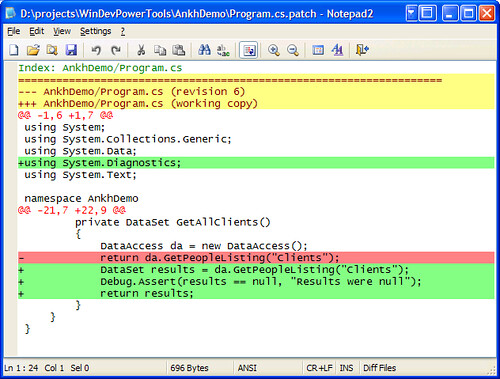
That’s pretty cool!
Oi! Writer's Block Stinks
For the most part, I’m having a great working on my book, but I’ve already run into writer’s block a couple times. The latest round has been while working on a piece about AnkhSVN, a great plugin for Visual Studio which brings the whole Subversion flow right into your VS IDE. AnhkSVN is nice and it’s got a lot of nice features, but I’m just completely blocked on knocking out the piece.
I’ve fallen back to the most basic of writing steps: building a skeleton via outlining, then moving on from there. Over the years I’ve been writing I’ve gotten to the point where I do this in my head and don’t have to scratch it out on paper. This AnhkSVN piece has forced me to revert back to fundamentals. I’m also going to get the initial draft finished off and leave it alone for a few days to give myself a break from it.
I am SO looking forward to putting the nail in this coffin later today and getting the piece off out of my writing queue!
Wednesday, April 19, 2006
Happiness is...
the doctor at the Emergency Room telling you at 2am the intense difficulty your son is having breathing is just the croup instead of some life-threatening mess. More happiness is your son breathing more easily and laughing with the nurses after having woken up 30 minutes earlier sounding bad enough that a 911 call was seriously considered.
(Croup can be very dangerous for small ones with other health issues. Thankfully Zeke’s a robust tyke.)
Tuesday, April 18, 2006
(Politics) Divided Government May Be The Only Way
Via Instapundit, a blog post which pretty much sums up how I feel about the Republicans these days: Voting for Democrats in the hopes of wresting control of Congress from the GOP may be the only way to get spending back under control.
Saturday, April 15, 2006
A Little Documentation Would Have Been Nice...
Every once in awhile I run across a snippet of code which makes absolutely no sense to me. This snippet from SharpZipLib’s BZipOutputStream.cs file is one of those:
if (!(nHeap < (BZip2Constants.MAX_ALPHA_SIZE+2))) {
Panic();
}
Keep in mind that this source code is part of the examples to help newcomers understand how to use the library, so the odds are high that a reader will not understand the intricacies of the library.
OK, so a test is being done and things panic if the heap size is smaller than the MAX_ALPHA_SIZE plus two. Sure, that’s shiny and clear. But what the h3|| is MAX_ALPHA_SIZE, and why is two added to it? Maybe the help file will tell us something. Here’s what the documentation for that constant’s field says: “Backend constant.” Ah, OK, that’s perfectly clear.
I’m also happy that the developer took a moment to tell everyone why two was added to the test condition. Oh, wait. They didn’t. Maybe that value is added because the developer had two left feet? Maybe it’s the number of cheeseburgers they had for lunch.
I wonder if the developer who wrote that would themselves remember why the value is added six months down the road. Most likely not without some serious head scratching effort.
Do yourself and those who come after you a favor: help out a bit by describing why you’re altering a basic test condition. Better yet, note what constants and other field members are really supposed to do for a living.
Or maybe you just like to live by the principles of Unmaintainable Code.
I don’t mean to pick on the very nice SharpZipLib, this is just a pet peeve rant of mine and they happend to be in front of my nose today.
CORRECTION: This is from SharpZipLib’s source code, not the example files. Regardless, an explanation would have been really nice.
NOW PLAYING: The Stone Roses — Love Spreads. Man, what a great bunch of guitar and bass going on in this track. Replayed it twice already and it’s most likely gonna get hit again.
Friday, April 14, 2006
Ah, the Joys of Being Edited
James and I have some great help at O’Reilly for our upcoming book. We’ve just gotten our first two submitted chapters back with comments and edits, and I’m finding just how much grammar I’ve forgotten or never really knew in the first place. I am, after all, a product of Jerry Brown’s California educational system — which is to say at the start of sixth grade my parents pulled me out of public school and sent me to a Catholic school where I repeated fifth grade because I could barely read or write.
Things have improved over the years, and I’m a pretty good writer now — but I’m completely clueless about most grammar beyond nouns, verbs, adverbs, adjectives, and conjunctions. (“Conjunction junction, what’s your function? Hooking up verbs and phrases and clauses.” Go back and rewatch your Schoolhouse Rock if you don’t know that one.)
My success in the large amounts of writing I’ve done in my career has been due to a voracious reading habit I developed after getting the crap knocked out of me a few times in the Catholic school. I write well because I’ve read a lot and remembered a lot of things I liked.
So now I’m at the place in life where I’m having to pull out and REALLY read the Chicago Manual of Style so that I’m able to moderately understand what my editors are telling me when they’re recommending a gerund style of heading versus an imperative one.
Oi vey. My head hurts.
At least I haven’t been told my participles are dangling. Yet. Anyways, that usually only happens when I’m wearing my kilt in traditional fashion.
Thursday, April 13, 2006
Good Looking Bread Baking Site
My wife pointed this bread baking community out to me. I haven’t dug through it much, but it sure looks like a great place to check out. I didn’t bake anywhere near as much bread this winter as I usually do, and my bread baking season is pretty much over. Having a 550 degree oven on in the house just isn’t very attractive now that temps are moving up to the 80s and above…
Great Security Article from Josh Holmes
Josh Holmes, a good buddy but not a relation, is now a published author — and on Visual Studio Magazine’s website, none the less. He’s co-authored a terrific article on how to reduce your software’s code vulnerability. He and co-author Gabriel Torok do a great job on laying out some good fundamentals.
Give it a read!
Visual Studio Magazine – Getting Started – Reduce Your Code Vulnerability.
Best Buy Doesn't Buy Software
From Gunderloy's Daily Grind, another reason to dislike Best Buy. It seems their Geek Squad plays loose with copyright laws.
Wednesday, April 12, 2006
ReSharper 2.0 Key Shortcuts
ReSharper 2.0’s EAP is just killer. Wonderful, wonderful stuff and I’m barely scratching the surface with it. One of the few downers is the lack of a keyboard shortcut file. Somebody on the EAP newsgroup asked about one, which prodded me to stop whining about the lack of one and just make the dang thing.
Voila! In shiny PDF if you’re interested:
http://www.iterativerose.com/Misc/ReSharper2.0Shortcuts.pdf
Or an Excel version if you don't like the format and want to change it yourself:
http://www.iterativerose.com/Misc/ReSharper2.0Shortcuts.xls
Errors are my fault, not JetBrains’. Feedback welcome.
Gardening Notes
Notes to myself so I can Google them next year instead of having to beat my head against the wall trying to find my @#^%!! gardening journal my kids have absconded with.
Ground corn gluten meal as a pre-emergent at forsythia bloom time. ~20lbs per 1000 ft2, setting 12 on Scott’s AccuGreen drop spreader. Checked dispersal rate by marking out two 50 x 10 areas and putting down 10lbs in each, tweaking spreader setting until the rate was right.
Ringers lawn restore organic fertilizer. 10lbs per 1000ft2, setting 12.5 on spreader. (Pellets vs. CGM meal, so this setting really works.)
Dormant/horticultural oil on pear and apple tree right after bud break. 7Tbs / gal of water. Soak the trees to hopefully prevent the #%^T#@!! scales that made last year’s crop miserable. Bummer.
Started spraying roses with Cornell organic spray to control black spot:
- 2 tbsp. of ultrafine horticultural oil (such as Sunspray™ oil)
- 1 heaping tbsp. of baking soda
- 1 tbsp. of fish oil/seaweed emulsion
- 3-5 drops of Superthrive®
(Spray recipe from GardenWeb’s FAQs) (I don’t bother with the Superthrive and my roses have done really, really well.)
Tuesday, April 11, 2006
More on Microsoft Not Not Listening
I’ve been sitting through Channel 9 episode where Josh Ledgard’s Developer Solutions Team shows off three toys they’ve built: Team Foundation Server Admin tool, MSBee, and Managed Stack Explorer. (It’s the latter I’m most interested in today.) The three gigs on the tools were all great, but some of the most interesting stuff (to me, at least) comes at about 19 minutes in when the team is asked where inspiration for the tools came from.
It seems all three tools were genesisized (heh, my own word I invented) straight from customer feedback and requests. Josh continues to impress the heck out of me with his blogging on transparency and openness to customers. All these folks impress me with their willingness to build little tools of great use to customers.
Excellent.
10 Stupid Mistakes Made by the Newly Self-Employed
Via Jason Haley's Interesting Finds, some good points for folks running their own business. The bit about frugality really hit home. I’ve been self-employed for a year now and have made do without a lot of stuff which could have been 1) useful and 2) really cool. Gotta pinch those pennies.
Monday, April 10, 2006
Blogger Running Against Congresswoman
Via Instapundit, this interesting post of a Blogger sick of his local representative. He’s mad enough that he’s going to file for candidacy against her: Dignan's 75 Year Plan: Georgia Blogger to Challenge Cynthia McKinney.
Pretty great stuff when blogging can help grass-roots efforts such as Will Hinton running for Congress, or the entire PorkBusters crusade against overspending idiots like Tom Delay, Ted Stephens, or Jerry Lewis (no kidding) from California.
(No, I’m not blindly optimistic about these sorts of efforts, but it’s great to see all the same.)
Good Take on Interview Questions
I've had to do plenty of interviewing in my career — part of the deal when I’ve had to move around following my wife. I consider myself a pretty good interviewee, but I learned a whole lot from reading through this useful post:
GoodRecruits: 25 Most Difficult Job Interview Questions (and their answers).
As with everything in life, think hard about how these may apply to you. For example, I spend more than a minute or two on the inevitable “Tell me about yourself” question. I’ve done a wide range of things in my career and I try to pull out tidbits from my past which are pertinent to the job I’m interviewing for. I’d guess I usually spend between three to five minutes on this one.
Regardless of that example, take a gander at the post. It’s a very worthwhile read.
Day of .NET Conference in Ann Arbor, MI
The folks up in southern MI and northern OH are putting on a terrific event: the Day of .NET on 13 May. Take a looksee at the release info below. It’s certainly worth a drive to hit this day-long FREE conference on things .NET. (Not to mention having a chance to see me present at the show… )
 Registration for the Day of .NET in Ann Arbor is now open!
Day of .NET is a one-day conference on all things .NET organized by developers for developers. This event is being offered at no cost to anyone interested in .NET development, and features speakers from across the Heartland Region, as well a special guest speaker: Mark Miller from Developer Express and Mondays.
The Day of .NET in Ann Arbor is a collaborative effort between the following INETA member groups:
- Great Lakes Area .NET User Group (http://www.migang.org/)
- Ann Arbor .NET Developer Group (http://www.aadnd.org/)
- Northwest Ohio .NET User Group (http://www.nwnug.com/)
Further details and event registration at: http://dayofdotnet.org
Saturday, April 08, 2006
Current Reading List
It’s been awhile since I posted up my reading list, so here goes.
Ronald Spector’s Eagle Against The Sun. Terrific work about the war against Japan. Lots of very good insight, but it’s a broad treatment so you won’t find detailed coverage of any particular battle or unit. Part of the reason I like it so much is Spector’s fact-based ripping apart of MacArthur.
Heinlein’s Stranger In A Strange Land. How in the world have I missed this in my decades of lust over good science fiction??
Melvile’s Moby Dick. It’s that time of the decade again where I try and fail miserably to get through this work. I’ve no idea why I’ve never managed to complete it. The style’s not hard and I loved Seven Years Before The Mast which certainly wasn’t any easier in style or tone.
Stephen Perry’s Core C# and .NET. I’ve not worked through this completely, but it seems to be a pretty good work. (Yes, this was also on my last reading list…)
Löwy’s Programming .NET Components, 2nd ed. Löwy seems to generate some passionate debate among my acquaintances on whether or not his approach is too complex and dogmatic. I think the book’s a very good read, and I think he does a fair job of laying out aspects of design and development you need to carefully consider when implementing for your own system.
Faroult’s The Art of SQL. Interestingly styled after Sun Tzu’s masterpiece The Art of War, Faroult travels down the same paths as Sun. Just started, but I’m diggin’ it so far.
Now Playing: The Stone Roses — Rhapsody Sampler. Great music. I likes it.
A Couple Writing Tricks I've Discovered
I’ve written loads of material from design documentation to white papers to proposals. Now I’m working on a book. I’ve come up with several writing tricks which work well for me when dealing with code-related issues.
One trick is to use GVim to quickly get rid of indents on code snippets I’m going to be pasting in to O’Reilly’s template. Sure, CopyAsHTML will get rid of indents if you so configure it, but using that results in fugly text. For example, the following text in VS:
plotSurface.Clear();
// obtain stock information from xml file
DataSet ds = new DataSet();
System.IO.Stream file =
Assembly.GetExecutingAssembly().GetManifestResourceStream( "NPlotDemo.resources.asx_jbh.xml" );
ds.ReadXml( file, System.Data.XmlReadMode.ReadSchema );
DataTable dt = ds.Tables[0];
becomes this nasty stuff:
<div style="font-family: Lucida Sans Typewriter; font-size: 10pt; color: black; background: white; font-weight: bold;">
<p style="margin: 0px;">plotSurface.Clear();</p>
<p style="margin: 0px;"> </p>
<p style="margin: 0px;"><span style="color: green; font-weight: normal;">// obtain stock information from xml file</span></p>
<p style="margin: 0px;"><span style="color: teal; font-weight: normal;">DataSet</span> ds = <span style="color: blue; font-weight: normal;">new</span> <span style="color: teal; font-weight: normal;">DataSet</span>();</p>
<p style="margin: 0px;">System.IO.<span style="color: teal; font-weight: normal;">Stream</span> file =</p>
<p style="margin: 0px;"> <span style="color: teal; font-weight: normal;">Assembly</span><span style="font-weight: normal;">.GetExecutingAssembly().GetManifestResourceStream( </span><span style="color: maroon; font-weight: normal;">"NPlotDemo.resources.asx_jbh.xml"</span> );</p>
<p style="margin: 0px;">ds.ReadXml( file, System.Data.<span style="color: teal; font-weight: normal;">XmlReadMode</span><span style="font-weight: normal;">.ReadSchema );</span></p>
<p style="margin: 0px;"><span style="color: teal; font-weight: normal;">DataTable</span> dt = ds.Tables[0];</p>
</div>
That’s unusable.
Instead I copy the snippet from VS, pop open GVim via SlickRun, paste the contents in, and with Shift-V (visual line mode), Shift-G (select to bottom), < (shift left), and after two periods (repeat last command) I’ve got all the indents out. gg takes me back to the top of the file, then Shift-V, Shift-G and Ctrl-Insert to copy the entire buffer content.
OK, that may look like a bunch of keystrokes, but it actually goes pretty easy. Plus it uses GVim/Vim which is the ultimate in lightweight text editors. As a matter of fact, I could make a Vim macro to do all that in one swell foop… I’ll knock that out soon. (Yes, yes, Notepad2 rocks. GVim rulz.)
Second trick relates to making screenshots of multiple windows. Alt-PrtScn nicely grabs the active window, eliminating background cruft. But what to do when you’ve got several windows at once you need to grab and you don’t want a bunch of confusing junk in the spaces between the windows? Easy: maximize an Explorer window opened to an empty (or lightly filled) and use that as your background.
I’d love to hear of any tricks you folks have come up with for authoring any sort of material, or pointers to good references for these sorts of tips.
Friday, April 07, 2006
How to Track A Trojan
A great step-by-step post on how to track down a Trojan on a system using three tools from the way smart folks at Sysinternals.
This is the kind of stuff I love to see from Hanselman.
Thursday, April 06, 2006
Book Review: Writing Portable Code
Overview
Brian Hook’s Write Portable Code: An Introduction to Developing Software for Multiple Platforms is an in-depth discussion of issues involved in getting C/C++ code from one platform to another. Hook dives deep into arcane topics such as processor memory access alignment, floating point operation platform differences, and exception handling. The book’s not for the faint-of-heart, and it’s rather specific to C/C++; however, readers brave enough to push through the book should get interesting insights regardless of what platform and development environment they’re working with.
Disclaimer: I got this book free from No Starch Press as a review copy.
I should note that while I’ve had experience on a fairly wide range of platforms in several different languages, I’ve not dealt specifically with portability issues. I also would not by any means consider myself a C/C++ guru.
Who It's For
Hook’s preface gives a great list of folks who might find the book useful. Paraphrasing, his list includes developers who experiment with different platforms at home, developers moving a product to a different platform in hopes of capturing more market share, game developers who have client and server portions on different platforms, folks dealing with mobile/desktop environments, and vertical integration vendors who’ve lost a platform.
To this list I’d add anyone interested in general sound software engineering practices, particularly knowing when to try and abstract or wrap something out, and when to just press on with implementation. A theme constant throughout the book is Hook’s mantra “define
Who It's Not For
Don’t look to this book for specifics on portability for anything other than C/C++. While there’s some very thought-provoking text on general topics like filesystems, user interaction, and general scalability, all the code’s in C/C++.
What It Covers
Hook uses C/C++ for his examples because “they are ubiquitous and tend to contribute to portability problems.” I found his assertion that “ANSI C and C++ are probably the most unportable languages that were still intended to be portable” pretty funny and of course spot on.
As I mentioned in the overview, the book’s got tremendous detail on a great number of topics. Hook covers a great deal of specifics like differing compiler flags, safely serializing and deserializing data, byte ordering for storage, memory management idiosyncrasies, and even function calling convention differences.
Hook carries two software products through the entire book, using them as examples for various issues. POSH, the Portable Open Source Harness, is a set of C99-like type definitions Hook developed for assisting in cross-platform compilation. He also uses his Simple Audio Library (SAL) to clearly and excellently demonstrate specific issues such as thread handling or exporting/importing DLLs when working on a Windows platform.
There’s also great detail on higher-level, but still important topics like data formats, user interaction, and scalability. Hook’s example of time differences for a simple database querry vs. a binary tree implementation is very pertinent because he shows the small gains made on a fast system vice the enormous gains made on a Palm Zire PDA.
He briefly covers internationalization and localization, one of the several topics applicable to all developers. His points about dealing with Unicode, currency, and even keyboard differences are good items for all developers to consider, regardless of their environment.
What It Doesn't Cover
As already mentioned, there’s no real discussion of languages other than C/C++, aside from Chapter 17’s very short blurbs on scripting languages where Python, Lua, and Ruby are quickly covered.
It’s also surprising that he doesn’t cover Visual Source Safe in his discussion of source control systems in Chapter 4. I know that VSS is wildly unpopular in many arenas, but it’s also widely used – even in some non-Windows development shops. Still, he gives only brief detail to the other covered systems (rcs, cvs, Perforce, BitKeeper, Subversion, and GNU arch), so it’s not like readers will miss a great deal.
Summary
This appears to be a great resource for folks who are actively porting software. It’s a very good guidebook of issues to address if you’re even thinking about porting. I’d also say it’s a good skimming read for most developers if only to get an understanding of some engineering principles to consider when building your systems. You never know when your platform might fold or get deprecated.
Book Review: Just Say No To Microsoft
I wanted to love Tony Bove’s book Just Say No To Microsoft, I really did. Despite focusing on Microsoft products in my career right now, despite running a .NET developers group, there’s plenty about Microsoft I don’t much like. The list is lengthy and I won’t go into details here; suffice it to say I've used plenty of solid alternatives to Microsoft’s products in the past and am always open to others.
Unfortunately, Bove’s hyperbole and polemics get in the way of his attempts to showcase many of Microsoft’s nasty business practices and troublesome software. Likewise, his discussion of moving away from Microsoft’s operating systems and applications is often blatantly one-sided and ignores issues with alternatives.
For example, in the first part of the book Bove has a number of clear examples of Microsoft’s bullying business behavior such as PC manufacturers being forced to pay Microsoft royalties for every system they shipped, regardless of whether or not Microsoft operating systems were installed on it. However, for each example like this there are handfuls of unsubstantiated claims of price fixing, coercion, and any number of other unsavory practices.
These unsubstantiated claims left me wondering if Bove was hyping things or just didn’t have time or resources to follow up. I avoid anything written by Ann Coulter or Al Franken for this same reason: don’t toss out such flamebait without backing it up. Give me the facts and history behind such allegations so that I can make up my own mind rather than assimilate into some Borg-like conspiracy theory collective.
I also found his overviews of Microsoft alternatives a bit simplistic and in some cases, flat out wrong. In Chapter 2: All You Need Is a Mac, he asserts “The iPod steers clear of the digital rights management technology in subscription services.” Either he’s taking a sophist’s approach to this argument, or I’m very wrong in my understanding of what’s happening with the cuts I buy via my iTunes. DRM is very much in use on those files, preventing me from listening to my music elsewhere in an unaltered form without resorting to the terrific JHymn software to scrub out that DRM.
I think he also plays up bugs in Microsoft’s software while downplaying or ignoring issues in alternatives. For example, Bove plays up browser alternatives such as Firefox for their security – but Firefox has had a number of security vulnerabilities discovered since its 1.0 release. Again, give me an honest comparison of things and let me make up my own mind.
Don’t get me wrong. There’s plenty of great stuff in this book. His quick overviews of the various OpenOffice components are dandy, and he does point out problems with these alternatives. One example he shows is problems in OOo Writer when trying to deal with some of Microsoft Word’s more “esoteric” features such as STYLEREF and cross-references.
Additionally, Bove’s got a great section on the asinine, dangerous ActiveX crapware that causes so many security issues. He’s also got an interesting 12-step plan to rid oneself of Microsoft products.
Overall it’s a very interesting read. I just wish he would have throttled down the tone, and been a bit more fair in his discussion of alternatives. That would have done a lot more to win me over to his viewpoint -- and I was not far away from it to start with.
Book Review: 19 Deadly Sins of Software Security
Another review rejected by Slashdot, so I'm posting it here.
Overview
According to Amit Yoran, former director of the National Cyber Security Division, “95% of software bugs are caused by the same 19 programming flaws.” 19 Deadly Sins of Software Programming by Michael Howard, David LeBlanc, and John Viega lays out these sins in a well-written book, complete with patterns of detecting the sins during code reviews, examples of real-world problems caused by these sins, and redemption steps for fixing and avoiding these same sins.
What it covers
Yoran’s numbers may or may not be right, but this book’ excellent format and great content make it a terrific addition to a developer’s bookshelf. Each chapter is dedicated to a concise coverage of one sin. A partial list of sins covered by this book includes buffer overflows, weak password protection, improper file access, race conditions, and poor usability. Yes, poor usability is indeed a sin. As the authors quote from the Microsoft Security Response Center, “Security only works if the secure way also happens to be the easy way.”
Each sin has an overview and explanation of the sin, a list of languages and/or platforms vulnerable to the sin, sample code defects, and measures one can take for additional defense. Real-world examples of sins are given (My morning would have been just fine without having to read about Paris Hilton’s cell phone hijacking in the password chapter), plus comprehensive lists of other resources to look at when dealing with the sin.
What I find particularly useful are the sections on typical patterns to look for when searching out sinful code, methods of testing to identify the sin, and suggestions for items to look at during code reviews.
Many languages and platforms are covered in this book. There are snippets and discussion of C/C++, C#, Java, Perl, Python, Visual Basic, and PHP. Windows, Mac, and Unix operating systems are discussed at various points, as are Apache and IIS.
What it doesn't cover
The book’s concise, cookbook-like format is a great strength, but it’s also a weakness if you’re expecting details on exactly how to solve a particular issue. The book expects you to be deeply familiar with the technology and methodology being discussed for any sin, so don’t expect this book to be one-stop-shopping for immediately improving your security skills.
I also found that some examples weren’t explained quite well enough. The Sinful ASP.NET Forms section in Sin 7’s Cross-Site Scripting is one example of where additional information would have been a great help.
That said, each sin has a great list of additional resources, plus there’s generally enough detail to point readers to additional, specific information for actual implementation. Developers with a bit of initiative will move on to these references to flesh out the details for their specific implementation.
Who it's for
Tech leads and mid-level developers should all find this book exceedingly useful and educational. If your company/group/entity has technical staff dedicated to security issues, then they’ll be happy to get a copy of this book as well.
Who it's not for
Folks expecting this book to be an end-all solution for implementation-specific answers will be disappointed – but only if they don’t follow up on the resources lists. Folks looking for a detailed tutorial on security matters may also be disappointed.
I’d say this book, by itself, isn’t really helpful for entry-level developers, simply because the material’s fairly deep. However, along that line the book could be an excellent guide for in-house training and mentoring sessions to bring those basic developers up to speed on these critical issues.
Summary
Structurally, the book’s very well put together. A very good Table of Contents coupled with an excellent, comprehensive index makes it easy to quickly find specifics on an issue you’re researching. Two appendices add great value as well. Appendix A maps all the sins to the Open Web Application Security Project’s Top 10 vulnerabilities. Appendix B is a great summary of the do’s and don’ts for each sin.
Additionally, the Introduction’s “What You Should Read” section breaks out the
19 Deadly Sins really is an important book to add to your shelf. It’s clear, it’s concise, and its format makes it a great reference for quickly finding pertinent information about the most troubling security bugs in software.
Book Review: Time Management for System Administrators
Many workers are crushed for time in their jobs, and the book market has responded with lots of works like David Allen’s Getting Things Done: The Art of Stress-Free Productivity. While very useful, these books are general in nature and aren’t tailored to specific work domains. System Administrators can reap great benefits by grabbing Thomas Limoncelli’s Time Management for System Administrators, a work that is tailored specifically to SysAdmin’s hectic life.
Limoncelli’s book is much in the same bent as GTD or Sally McGhee’s Take Back Your Life!: Using Microsoft Outlook to Get Organized and Stay Organized: manage your inbox with a smart system, use a calendar, and kill off cruft tasks which block progress.
This book’s counter to those systems is his Cycle, a three-point system for handling to-lists and today’s schedule, keeping a general calendar, and setting and tracking life goals. There’s nothing earth-shattering in his Cycle system, and you may not want to change from any system you’re currently using. However, it’s a great place to start if you’re not currently using any time management tricks. What’s unique about Time Management is the focus on things a SysAdmin runs into every day.
Limoncelli shows how to manage a SysAdmin’s customers (those *#$%@! users) effectively while maintaining progress on the endless list of varied projects a SysAdmin has to juggle. Limoncelli is particularly good with tips on how to keep customers happy while avoiding misunderstandings. One example he puts out is using a running dialog with a customer, explaining how he’s using remote access at a different workstation to check a server the customer had stopped by to complain about. The customer understands the SysAdmin is using a nearby tool to help, instead of thinking the SysAdmin is merely ignoring the customer and turning away from him to work on something else.
Along this same lines, Limoncelli dedicates an entire chapter to managing interruptions. He’s got several good tricks such as coordinating interruption handling with co-workers, or even, gasp!, closing one’s door.
Limoncelli helps differentiate his work from other time management books by showing how various tools help SysAdmins get through their daily loads. He mentions Best Practical’s Request Tracker as an example ticket system several times throughout the book, showing how me manages his workload via RT’s various interfaces. He also covers a few shell tricks and even shows how he uses make to help with server management.
Particularly useful to SysAdmins is Limoncelli’s common-sense approach to prioritization. It’s OK to have some things fail, or not optimize some resources, so long as the tasks or resources in question are bottom feeders. He illustrates this with his backup tape changing schedule. He used to spend a lot of time each morning running around checking tape status on numerous machines throughout his facility in order to save expenses on tapes. He changed his routine, prioritizing servers and only changing tapes on low-priority systems once they’d run out of space. The cost of tapes is far outweighed by the amount of time he’s saved.
Another common sense example is his approach to documentation, particularly the black hole of network diagrams. Rather than spend hours making nifty, perfect Visio diagrams, he simply draws diagrams on a whiteboard and snaps a digital photo of them. A printout of that photo goes in a book, and a softcopy goes on a central documentation site such as a web server.
The author co-hosts a website Everything SysAdmin where he also writes a blog along with his collaborator Christine Hogan.
Limoncelli’s writing style is funny and thankfully concise – the book is only 223 pages long, and those 223 are tightly written. There’s little, if any cruft anywhere in the book. That’s a great pleasure after having had far too many bloated tomes in my reading queue lately.
Time Management for System Administrators isn’t any earth-shattering, ground breaking book, but its focus makes it unique and a great use for SysAdmins. Workers in other domains will find it quite useful as well.
Book Review: Programming .NET Components
I used to get a few Slashdot book reviews posted, but my acceptance rate has dropped off. No clue why, because Slashdot is a complete black box with regards to their acceptance stuff. Maybe they need to read Scoble’s book and read up on Instapundit’s transparency-of-operations line. Whatever.
In any case, in the next few posts I’ll be sending up a few reviews which didn’t make it to Slashdot. I don’t write Slashdot reviews for crappy books — it takes too much effort — so the reviews I’ll be posting are for books I think are especially worthwhile for a developer’s shelf.
Programming .NET Components, 2nd. ed.
Looking for a concise, well-written book covering everything from interface-based design and development to the nitty-gritty on remoting in .NET? If so, you ought to give Juval Löwy’s Programming .NET Components, 2nd ed. some consideration. His book, focused on the benefits of getting software into well-defined components, does a great job of hitting the details on tough implementation issues while clearly laying out fundamentals needed to understand the problems.
Löwy, recognized as a Software Legend by Microsoft (which may instantly disqualify him as a Smart Guy on Slashdot), nicely covers general .NET topics such as the Just-In-Time compiler and garbage collection. Thankfully he doesn’t spend hundreds of pages on this, instead moving on to the main gist of the book: how to go about creating component-based systems.
The beginning parts of book aren’t a theoretical mess on design; rather Löwy’s kept it to how one goes about laying out functionality in different assemblies and how you can best accomplish that using by interfaces to structure that functionality. He nicely introduces interface-based programming for developers who might not be familiar with that approach. There’s also good coverage of using generics in interfaces, particularly some of the trickier bits such as derivation and constraints.
The remainder of the book gets into more complex concepts for getting your components to function together. Löwy has some very good coverage on asynchronous calls and event-handling. His sections on multithreading/concurrency and remoting are very detailed and provide solutions to difficult problems.
One thing I liked a lot about the book is Löwy’s strong emphasis on dealing with potential errors which may occur. Every section is rich with practical advice on identifying and handling error conditions that might pop up. Löwy’s also very good in pointing out where you’ll need to make tough decisions, for example when deciding on whether to use Enterprise Services (DCOM), remoting, or web services for communication between components.
Generics, new to the .NET 2.0 Framework, get a lot of coverage in this book. Löwy’s done a lot of other writing on the usefulness of generics. Each major section includes a discussion on how generics might benefit a particular scenario, plus there’s a separate appendix serving as an introduction to generics.
A good friend of mine feels that Löwy tends to favor complexity in his approach to design and implementation, but I didn’t get that from this book at all. Löwy lays out a clear case for what he’s talking about, plus he gives you the pros and cons to make an informed decision about how you’ll design and implement your code.
More Big News (MVP!!)
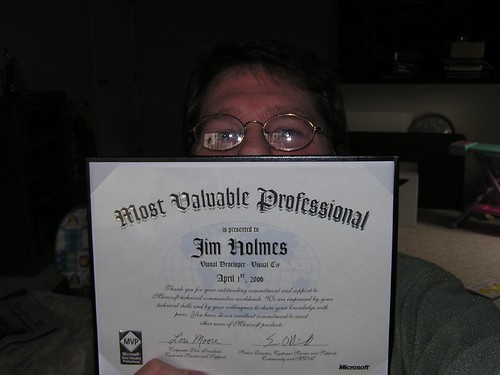
I hate self-promotion, but for this one I’ll make an exception.
I got home from a short vacation to find this bit of great news sitting on the doorstep. I’ve worked my butt off this last year organizing the Dayton .NET Developers Group and the Dayton-Cincinnati Code Camp. It’s very nice to get recognized by Microsoft for all that effort!
But, at the end of the day, this award would not have been possible were it not for a whole lot of great help from folks in the region such as Drew, James, Dave, and others who I’m forgetting to mention.
This award also would not have been possible without the ongoing excitement and passion of all the regular members of the Dayton DevGroup. Y’all were the reason I started the group, and it’s your enthusiasm that keeps me working on the group. (That and the drive to the Columbus meetings from Dayton in the middle of rush hour sucks.)
Monday, April 03, 2006
Offline For Several Days
We’re off to the Hocking Hills region of Ohio for a few days of hiking and sleeping. Feel free to break in, just leave my espresso machine and don’t even think about trying to abscond with my new cans.
Top 10 Developer Blogs
This older post from Jon Galloway has a great list of developer blogs you should consider adding to your blogroll.
[via Scobleizer]
Sunday, April 02, 2006
ExcelXmlWriter Code Correction
I was not proof-reading well when I sent out that post on ExcelXmlWriter.
Here is the correct code for generating the summary history section. Sorry about the mixup!
private void CreateHistoryReportSection(WorksheetCollection sheets)
{
//reps is a private member ArrayList holding sales reps' last names
reps.Sort();
WorksheetRow row;
WorksheetCell cell;
string repName;
Worksheet history = sheets["History"];
WorksheetColumn repCol = history.Table.Columns.Add();
repCol.Width = 80;
repCol.Index = 8;
WorksheetColumn figures = history.Table.Columns.Add();
figures.Width = 80;
figures.Index = 9;
row = history.Table.Rows[0];
row.Cells.Add(); //blank cell to get alignment right
row.Cells.Add("Sales Rep", DataType.String, "headerStyle");
row.Cells.Add("Total Sales", DataType.String, "headerStyle");
for (int i = 0; i < reps.Count; i++)
{
row = history.Table.Rows[i + 1]; //offset by one row down
repName = reps[i].ToString();
//add and style the rep's name
row.Cells.Add();
cell = row.Cells.Add(repName);
cell.StyleID = "reportStyle";
//add a cell and include the summing formula
cell = row.Cells.Add();
cell.Formula = "=SUMIF(C[-8],\"" + repName + "\",C[-3])";
cell.StyleID = "reportStyle";
}
}
#1 On Google for Something!
OK, so it’s only for Amarath flour, but a previous bread making post of mine got me up to the #1 spot on Google if you query for “amarath flour”.
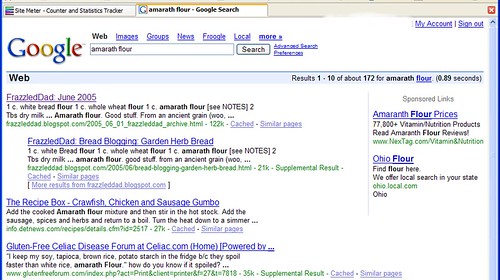
Now I’m really famous. (But I still can’t get my daughter to clean up her toys.)
Wiring Data Into ExcelXmlWriter
I’ve been checking out Carlos Mares’ killer tool ExcelXmlWriter. His library lets you create classes to write out flexible, complex Excel files in Office’s XML format. (Office XP and above, only.) It’s a great tool, but it took me a little while to understand how to go about throwing data into the classes you build.
I thought there might be some way to pass XML from a DataSet into Mares’ API, but it doesn’t work that way. You need to iterate through rows in a DataTable (or a table of a DataSet. Duh.) and create individual cells from that. Below is an implementation pulling data from three tables in the ubiquitous Northwind database.
First, load up a DataTable:
public System.Data.DataTable GetAllEmployeesSalesHistory()
{
string sel = @"select employees.lastname, orders.orderdate, " +
"[order details].unitprice, [order details].quantity, " +
"[order details].discount from employees, orders, [order details]" +
"where [order details].orderid = orders.orderid AND " +
"employees.employeeid = orders.employeeid "+
"order by employees.lastname";
DataTable history = new DataTable();
try
{
SqlCommand cmd = new SqlCommand();
SqlDataAdapter adapter = new SqlDataAdapter(sel, conn);
adapter.Fill(history);
}
catch (SqlException e)
{
System.Console.WriteLine("Error: " + e.Message);
}
return history;
}
Now use that to load data into an existing sheet of a workbook. This example assumes you've created a sheet named "History." Note I’m adding in a column containing a formula for figuring out the gains of the sale — ExcelXmlWriter supports all kinds of Excel shininess like formulas, pivot tables, sorting, filters, etc.
private void LoadData(Workbook book, DataTable data)
{
//reps is a private member ArrayList holding sales reps' last names
reps = new ArrayList();
WorksheetRow sheetRow;
WorksheetCell cell;
foreach (DataRow tableRow in data.Rows)
{
// create a new row
sheetRow = book.Worksheets["History"].Table.Rows.Add();
//last name
cell = sheetRow.Cells.Add();
cell.Data.Type = DataType.String;
cell.Data.Text = tableRow[0].ToString();
//add rep names in if they're not already
if (! reps.Contains(tableRow[0]))
{
reps.Add(tableRow[0]);
}
//date of sale
cell = sheetRow.Cells.Add();
//Note this is type *string*. DateTime type causes load errors in
// Excel. The column's DateTime type so everything out ducky.
cell.Data.Type = DataType.String;
DateTime date = Convert.ToDateTime(tableRow[1].ToString());
cell.Data.Text = date.ToShortDateString();
//unit price
cell = sheetRow.Cells.Add();
cell.Data.Type = DataType.Number;
cell.Data.Text = tableRow[2].ToString();
//quantity
cell = sheetRow.Cells.Add();
cell.Data.Type = DataType.Number;
cell.Data.Text = tableRow[3].ToString();
//discount
cell = sheetRow.Cells.Add();
cell.Data.Type = DataType.Number;
cell.Data.Text = tableRow[4].ToString();
//Net sales -- calculated
// Unit cost less any discount times quantity sold
cell = sheetRow.Cells.Add();
//Note R1C1 cell reference type!
cell.Formula =
"=IF(RC[-1] > 0,RC[-3] * ((1 - RC[-1])) * RC[-2], RC[-3]*RC[-2])";
}
}
I also did a bit of fancy but not too complex trickery to create a summary of sales reports:
private void GenerateWorksheetSheet1(WorksheetCollection sheets)
{
Worksheet sheet = sheets.Add("History");
WorksheetRow headerRow = sheet.Table.Rows.Add();
headerRow.Cells.Add("Sales Rep", DataType.String, "headerStyle");
headerRow.Cells.Add("Order Date", DataType.String, "headerStyle");
headerRow.Cells.Add("Unit Price", DataType.String, "headerStyle");
headerRow.Cells.Add("Quantity", DataType.String, "headerStyle");
headerRow.Cells.Add("Discount", DataType.String, "headerStyle");
headerRow.Cells.Add("Net", DataType.String, "headerStyle");
WorksheetColumn salesRep = sheet.Table.Columns.Add();
salesRep.Width = 70;
salesRep.StyleID = "defaultStyle";
WorksheetColumn date = sheet.Table.Columns.Add();
date.Width = 66;
date.StyleID = "dateStyle";
WorksheetColumn unitPrice = sheet.Table.Columns.Add();
unitPrice.Width = 57;
unitPrice.StyleID = "currencyStyle";
WorksheetColumn quantity = sheet.Table.Columns.Add();
quantity.StyleID = "quantityStyle";
WorksheetColumn discount = sheet.Table.Columns.Add();
discount.StyleID = "discountStyle";
WorksheetColumn net = sheet.Table.Columns.Add();
net.StyleID = "currencyStyle";
}
The result looks something like this
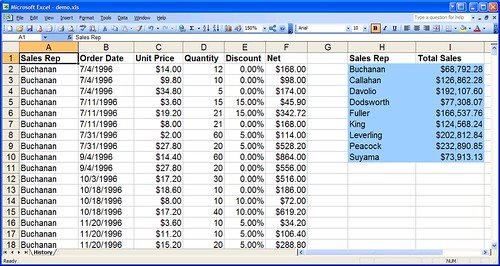
Pretty cool, no? Mares has a great tool to help dealing with the non-trivial API: ExcelXmlGenerator, which reverse-engineers an existing Excel file. So that makes the easy route to first create a spreadsheet like you want it to look, including formulae, styling, and some mock data. Then run the Generator against it and Poof! you’ve got complete code as a starting point.
You’ll need to do some code clean up for simple readability, plus delete all the hardwired mock data you tossed in.
It took me some time to figure out how to deal with the different DataType values as they interract with formats of data coming out of the DataTable I used as a source. Things went quickly once I finally got my head wrapped around that.
Now Playing: Morrissey — Your Arsenal. Love this guy’s voice, love the guitars.
Amazing Juggling. No, Really.
I don’t read Powerline’s blog anymore, but for some odd reason browsed by there the other night. In the midst of them plugging their new video service they had a pointer to this amazing video of a competetor at the finals of the World Juggling competition.
Great juggling amazes me simply because I’ve got thouroughly mediocre hand-eye coordination — as anyone who played with me during my years of volleyball, basketball, and softball could attest. This guy on the video is just amazing, in no small part because it seems like he’s genuinely enjoying himself.
Thursday, March 30, 2006
Lousy Performance, High Hardware Interrupt Usage
My system has been dog doo slow since I did a reinstall a couple weeks back. Process Explorer was showing some outrageous hardware interrupt rates, on occasion as high as 50% and regularly at 20%.
I’d let it roll for a couple weeks simply because it was low on my frustration list and I was trying to roll through other things. It finally pissed me off enough tonight that I spent some time nailing it down. Turns out ATA/IDE controllers will often revert back to PIO mode instead of Ultra-DMA. (MS KB article on the problem here.)
Check the problem by examining the controller’s Primary and Secondary IDE settings: Device Manager -> IDE ATA/ATAPI controllers -> Primary or Secondary IDE Channel -> Properties -> Advanced Settings. Look at the Current Transfer Mode field. If it’s “PIO” then it’s a FUBAR PITA and you’ll need to uninstall the driver, reboot and let XP do its magic reinstall.
Sucky, but fixable. Now I’ve got my shiny system back shiny again.
Now Playing: Olu Dara — In The World: From Natchez to New York. Wow, jazzy/bluesy/folksy goodness. Amazing clarity, terrific vocals, killer guitar and harmonies.
I’d let it roll for a couple weeks simply because it was low on my frustration list and I was trying to roll through other things. It finally pissed me off enough tonight that I spent some time nailing it down. Turns out ATA/IDE controllers will often revert back to PIO mode instead of Ultra-DMA. (MS KB article on the problem here.)
Check the problem by examining the controller’s Primary and Secondary IDE settings: Device Manager -> IDE ATA/ATAPI controllers -> Primary or Secondary IDE Channel -> Properties -> Advanced Settings. Look at the Current Transfer Mode field. If it’s “PIO” then it’s a FUBAR PITA and you’ll need to uninstall the driver, reboot and let XP do its magic reinstall.
Sucky, but fixable. Now I’ve got my shiny system back shiny again.
Now Playing: Olu Dara — In The World: From Natchez to New York. Wow, jazzy/bluesy/folksy goodness. Amazing clarity, terrific vocals, killer guitar and harmonies.
Wednesday, March 29, 2006
I Have Great Cans
I mean a new set of headphones, you filthy-minded philistine. These terrific Sennheisers, to be precise. They’re just amazing plugged into the headphone jack on my semi-cheesey Logitech speakers. They’ll be a complete knockout when I get one of these Bithead amps in a few months.
Now Playing: Pink Floyd — Dark Side of the Moon. There is absolutely no better music for checking out a good set of cans.
Upcoming Speaking Engagements
Holy smokes, I’m actually going to be doing a few talks at places other than our DevGroup!
I’ll be giving my Intro to Security talk twice in the next few months, once at the Day of .NET in Ann Arbor on May 15th, and I’ll be heading over to Columbus for the Central Ohio .NET Developers Group to talk on April 27th.
Speaking at the C-Bus meeting will be a neat deal for me personally. I came back from the Software Development Expo West in 2004 all fired up about getting back into software development. I’d been doing lousy system analysis/customer relations work and was burned out and sick of it. Unfortunately things didn’t work out for moving back to fun development at the time. I was getting very discouraged until I found out about the C-Bus group. I got over there and saw Ben Carey and Drew Robbins give a gig on Continous Integration and Test Driven Development. Instant re-energizer, and a serious motivator for me to get out of that lousy spot I was in.
That kind of motivation is the biggest benefit of user groups for me. Such communities are a great source of energy to revitalize oneself. Plus you get to learn cool stuff and occasionally you get free food.
Tuesday, March 28, 2006
Neat Word Trick for Finding Bogus Styles
I didn’t know you could do this in Word…
O’Reilly provides authors a Word template with specific styles in it. Pasting in formatted text from another source can be a complete PITA in Word because odd styles get carried over if you’re not careful — and now you have to go and find those nasty styles and fix them up.
Word’s “Find” will actually search out style occurances for you. Pull up the Find dialog with Ctrl-F and make sure you’re displaying “More” options via the, uh, “More” button. Click the “Format” button at the bottom of the dialog, then select “Style.” Select the troublesome style in the list you’re presented (“CellCode Char” in our case) and click OK.
Make sure you clear out any contents from the “Find What” field, then click “Next.” Off to the races you go. Notice you can leave up the Find dialog while you’re fixing up the bad, bad, bad styles in your document.
Shiny.
Monday, March 27, 2006
Dear Friends, Please Stop Those E-Mails
Amanda, Barbara, and [%from_name%] [[%from_email%]]: I’ve got all the OEM software I can use. Please save yourselves the obvious effort you’re putting into the mails you send me. Especially you, Ms./Mr. [[%from_email%%]]. Really, it breaks my heart to know how much your fingers must be aching from all that typing.
Mrs. Williams, I’m very happy you’ve received Christ, but I’m sorry that your husband Peter died in Kenya. I’m doubly sorry since you wrote me last month about your husband Phillip who had died in Nigeria. As much as I’d like to help you out with those two $20 million dollar bonanzas sitting in European banks, but I’m unable to help you. Good luck with that esophageal cancer you’re fighting, though.
Dear William, Alexander, Walter, and Rogert: Please stop sending me all those mails for Cialis and Viagra. I appreciate your thoughts, but really, I’m not in need of those particular pharmecuticals. (Robert, that Prozac e-mail you sent. We may need to talk.)
Now Playing: Essex Green — Cannibal Sea
Great Zoom Tool
Mark Russinovich at Sysinternals has done it again, this time with a killer Zoom application. It freezes your display while zooming, but it adds, get this, drawing capability both in the zoomed and unzoomed modes. Killer, killer, killer!
The only nit is that small pen widths mean the drawing point is almost invisible. Otherwise, this is a terrific addition to a presenter’s toolkit. This won’t replace Magnifixer; it’s more complimentary.
Two other presentation tools for me: Slickrun and TaskSwitchXP. The former gives me quick hotkey access to anything I’ve set up, the latter makes it easier for me to see what apps I’m changing between.
Shiny tools. Love ‘em.
(Via Hanselman)
Reflections on the Last Year
I just realized it’s been a year since I got my last paycheck from the company I had to leave due to their inflexible telecommuting policies. They forced me to make a choice between putting my kids in daycare or leaving the company, so it was time to bid them adieu.
(BTW, I’m not criticizing those of you with kids in full-time daycare. It’s a choice each family has to make based on their own priorities and how they want to raise their kids. This was the road my wife and I chose when we first started talking about having ankle biters in the house.)
It was the company’s loss, and frankly, I was ready to leave after nearly a year of busting my ass scrambling for three and four weeks’ coverage at a time doing proposals and white papers. Ick. Talk about stressful, crushing work — it was all stifling, endless process without any rewarding or creative accomplishments. (OK, one of my solely-authored papers was used as an implementation plan for rolling out an extensive, complex electronic documentation system to about 7,000 users. That was cool.)
Plus, I’d been far too long in boring system analysis and customer relations management, and far too long away from the technical, interesting work I much prefer. (My former boss, a good friend, and my wife, a very accomplished program manager, both say I’ve got great talent in the program management domain, but I want to do more fun stuff before moving back to the Dark Side.)
Without getting too Dr. Phil or Oprah on my few readers, everything in life is an opportunity, and that’s how I approached this last year. The following list of accomplishments and things I didn’t get done isn’t so much for readers here as a reminder of positive things to myself when I’m in my occasional whiny funks.
Stuff I Really Meant To Get Done but didn’t quite finish…
- Certification as an MCSD. Got one test done, got wrapped up with life on the others. (Side note: I don’t view certifications as some Holy Grail. I’ve used them in the past when changing into new careers — it shows I’ve got base knowledge of a domain even if I’m lacking practical experience in the field.)
- Any number of projects around the house. I got several rooms painted, some major repairs acomplished, and a fair amount done around the yard, but there are always items on the To Do list which just seem to hang there and hang there and hang there…
Stuff I’m pretty happy to have accomplished
- Started my company
- Took and passed one MCP test for Windows Forms in C# (let’s not talk about the other five tests…)
- Started the Dayton .NET Developers Group
- Started writing articles for James’s Visual Studio Hacks website
- Got on contract with O’Reilly for writing a book
- Worked with James to put on the Dayton-Cincinnati Code Camp (For some astounding reason, James keeps referring to the Camp as the Cincinnati-Dayton Code Camp instead of by its proper name. Inconcievable.)
- Gave several short Grok talks at the Dayton DevGroup
- Gave two full-lenth presentations at the DevGroup
- Moved a couple bushes around in the yard
- Had a fair crop of peas and beans
- Had a good crop of raspberries
- Had a great crop of tomatoes
- Fixed up the rotten back siding on our shed
- Installed a new water softener
- Bought a propane torch for soldering pipes for the softener. (The real purpose of buying the torch was so I would have something to do a serious job for caramelizing sugar on creme bruleé.)
- Spent a week working with some great folks in St. Martin
- Watched my son grow from a lauging blob to a laughing, crawling maniac to a laughing, running maniac
- Watched my daughter continue to grow into a wonderful little girl
- Started this blog and watched its readership grow to a massive audience. (OK, that’s exaggeration, but it’s nice to know that there are a few folks subscribed to my RSS feed.)
Being a camp follower (my wife’s active duty military), I’ve had to take a pretty long-term view and very flexible approach to my career. There are a few things I want to knock off for my career as well as other areas.
Stuff I want to knock off Real Soon Now
- Deliver a killer book to O’Reilly (Proceeds from the book will help pay for the therapy my kids will need after having gone through their formative years with me as their stay-at-home parent.)
- Knock off a few more things from the To-Do list on the house. Fixing the front door jamb is high on the list, as is repairing the #&*@!! street light.
- Give a presentation at some venue other than our DevGroup
- Squirrel-proof the #&*@!! shed
Number two on the priority list, after writing material for the book, is to continue building my network of contacts in the region. I’ll be heading back to full-time employment in a few months, and I want to find a great environment to work in.
I’m also looking forward to seeing how this blog continues to develop. Looking back through some of the archives has been a funny experience. Content here is rather schizo, but it’s been a fun journey.
More Great Openeness at Microsoft
Josh Ledgard writes about another major move to transparency at Microsoft: the Internet Explorer team is opening up their database to public view!
Two points here: 1) it’s a terrific move, and 2) look hard at Josh’s mindset. His passion about having an open view into Microsoft’s product workings is refreshing and killer.
Sunday, March 26, 2006
Bad Speakers? Stone Them!
Presentation Zen (which I had somehow dropped from my blog list. Ick!) has yet another great post, this one on avoiding tedious technical presentations. One of the links there points to a terrific paper written in 1985 by Dr. Jay Lehr back in 1985. Lehr’s title is Let There Be Stoning and it’s a great bit on how not to give presentations. The tidbits for moderators, near the end, are very good, too.
Friday, March 24, 2006
Open Source Test Tools Materials
I’ve gotten my materials (slides and code) from my Open Source Test Tools together and posted up on my biz’s website. There are two different solutions for the demos — I didn’t have enough time to gather everything into one shiny package, so I just snarfed stuff from a couple existing widgets I had together.
The UGSignup solution is a seriously kludged-together set of apps for working a couple events. It’s not pretty, but it was me working a couple nights tossing together an extension of something Greg Huber worked a couple nights tossing together. (And I just realized I’d been missing his blog on my feed. Oops.) Pile that on top of the EventRegistration project (my work) being my first effort in dealing with WinForms in 2.0, which meant it was really a spike effort for me.
OK, enough excuses — use it as a demo for test code, not as an example of how you should bite off things…
Good VB.NET / VB 2005 Books?
Anyone out there know of good material on VB.NET or VB 2005? I’m looking for something much more than just a this-is-how-you-write-VB-code book. I want something along the lines of Bill Wagner’s Effective C#, in that the book’s on solid idioms for VB, not just how to use ADO.NET or write ASP.NET code-behind.
I’ve started Paul Vick’s The Visual Basic .NET Programming Language, and it seems like a decent enough work, but (so far) it doesn’t really light my fire in the same way Wagner’s book did.
(Maybe that’s just because it’s VB and I’m not particularly enthusiastic about it in the first place…)
Subscribe to:
Posts (Atom)
Subscribe (RSS)

The Leadership Journey
