Sunday, June 15, 2008

VS2005 -> VS2008 Conversion Wizard Runs Every Time

I'm working through a few minor nits with a moderately sized solution (23 projects) that I've just converted from VS2005 to VS2008.  One nit is the conversion wizard runs every time I open the solution.  Irritating.

Answer found after trolling through some MSDN posts: Test projects appear to have a few hitches during the conversion process, one of which is the FileUpgradeFlags element in the .csproj file failing to properly update.  This causes the wizard to re-run every time you open the solution containing the project.

To fix, find the element <FileUpgradeFlags>.  It will probably look like

<FileUpgradeFlags>0</FileUpgradeFlags>

Remove the zero in the element content, leaving an empty element:

<FileUpgradeFlags></FileUpgradeFlags>

Do this for every test project in your solution.  Save 'em all, re-open the solution and you should see no conversion wizard.  Yay!

(Original MSDN post here.)

Now if I could just get MS Test to play nicely with my hibernate.cfg.xml files in the MS Test deployed location.  I continue to search for a rational explanation of why MS Test insists on copying all binaries to a location separate from the build location in order to run its tests, forcing you to deal with "DeploymentItem" attributes and test configuration shenanigans.  I've run in to a number of PITA issues with this separate-but-equal concept, and I'm having a hard time understanding the reasoning for creating a second environment that's not treated the same as the solutions' build environment.  Brittle, complex, and more moving parts than necessary.

Yet another reason for preferring MBUnit for a test framework that helps, not hinders, all the testing I like to do.

Shout Out: More Effective C# Rough Cuts Available

Bill Wagner's Effective C# is one of the books you absolutely need to have living on your bookshelf if you're working in .NET. Bill's book is crucial to understanding how certain things in .NET and C# work, and it's full of great examples on why you need to do things in a particular fashion.  He goes in to exactly the right level of detail to make you understand things like the as/is keywords, and why you really need to think hard about how to implement equality checking.

Effective C# covered C# 1 with just a nod to 2.0, so it's good to hear Bill's nearing completion of his work More Effective C#, updated for all the goodness of C# 2.0 and 3.0.  You can pre-order through Amazon, and it's also available on Rough Cuts where you can get read the chapters as they're going through the editing process.

I'm really looking forward to getting a copy of this when the dead tree version comes out in November.  (Hey, maybe a birthday present for myself!)

Tuesday, June 10, 2008

Meme: How I Got Started Programming

Tim whacked me with his post, so here goes.

How old were you when you started programming?

High school, 1979.  Age of 16 or so.  Radio Shack TRS-80 with a cassette tape drive for its storage.  Not quite punch cards, but damned close.  A buddy whose parents had gobs of money bought him one. (A tape drive, for cryin' out loud!  They must have been rich!)  He and I were in a D&D group together, so naturally a geeky computer attracted us.

How did you get started in programming?

I went enlisted in the Air Force in the general electronics field.  I could have ended up stringing telephone cables, but got lucky and landed a position in school for repairing massive aircraft radar systems.  I got even luckier by landing a slot for doing inflight repair, fulfilling a dream of flying I'd had since I was a kid and my dad used to take me out flying over rice fields in central California.  I digress.  At tech school in Biloxi, Mississippi, I got the chance to start programming 6502 processors using octal assembly code.  A complete PITA, but it rekindled the interest I'd found from the TRS-80 years earlier.

I got my first real computer a year or so later when I hocked the new aluminum wheels on my '67 convertible Camaro in order to buy an Apple //e computer complete with 32K of memory and a 64K video card.  Man, that was the cat's ass!  (I see Wingfield had a 128K expansion card.  He must have been living the high life, I tell you.)

I progressed to dropping in a Non-Maskable Interrupt card so I could hack into various wargames that were kicking my then bony ass.  I eventually did such crazy stuff like soldering together EPROMs onto a single socket with a DIP switch so I could toggle between the //e and ][+ BIOS sets.  I hung around a guy who wrote a voice driver for his modem to have his computer call up folks at random times, say "Asshole", and hang up.  Somewhere along the line I wrote some code that manually moved my 5.25" floppy drive's head around.

That interest slowly progressed as I was posted to Anchorage, Alaska, where I bought a 286 system from Radio Shack and started fooling around with Borland Turbo Pascal, then Turbo C++.  I eventually bought a generic 386 system from some company that went out of business the week after I bought the box.  So much for tech support.

The Air Force was kind enough to pay for 75% of my schooling while I was active duty, so I started taking night school courses at a branch of  Chapman University (then just "College").  I hit Pascal, more assembler, threw up through one Cobol course, and did some C++.

All that was just some background until I left the Air Force, wandered 'bout for a number of years, and eventually worked my way into cutting code for a living.  More or less.

What was your first language?

Whatever the variant of BASIC on that TRS-80.

What was the first real program you wrote?

Tough to nail that one down.  I remember starting one on the TRS-80 which was supposed to compute catapult damage to a castle wall (D&D, remember?), but I can't remember if we finished it.  Most likely it was some octal exercise on the 6502 in tech school.

What languages have you used since you started programming?

Surprisingly, not as many as some others: BASIC, AppleSoft BASIC, Pascal, Cobol, Assembly on a number of different procs, C++, Perl, Java, C#.  Suffered through Lisp just enough to be able to configure JDEE when I was doing Java work.

What was your first professional programming gig?

I did some writing of Perl modules for managing servers and accounts when I was a network admin, but that's utils, not cutting code.  My first "real" programming gig was as part of a team working on tools to convert SGML to HTML and XML.  (Yes, kiddies, let old fart Jim tell you about when you needed a PhD to understand stupid markup made when single characters counted so everything was implicit, not explicit.  Try figuring out an implied element closing when you're five layers deep.  Obviously I'm still scarred.) 

I only wrote code around the edges of that, so maybe maybe my first gig was actually writing tools to strip out metadata from DTED terrain data files and stuff all that in a database for use by a really cool system designed to figure out where bad guys hide so you can more easily find them and blow them up.  I wrote some code around the edges of that one, too, as well as built tools to create database schemas in Sybase 11 and Oracle 7 for the system's underlying datastores.

If you knew then what you know now, would you have started programming?

Hell yes!  I love what I do!  I wish I could have done more of this over the years, but I've had a somewhat eclectic career due to following my wife around for her military assignments.  (Germany, Alaska, Washington DC.  It's not been bad...)

If there is one thing you learned along the way that you would tell new developers, what would it be?

Learn to learn, don't just learn technology.  What you knew five years ago is laughable now, and what you knew last year likely isn't a higher on the scale.

One more thing: Learn to have the confidence to say 1) "I don't know" and 2) "Man, that code I wrote last year/last week/this morning really sucks.  But I've learned how to write better code, so I'll do better." 

#1's never been a factor for me because I follow with "But I can find out.". 

#2 has only just started to get somewhat easier after reading blogs or hearing podcasts from folks like Atwood, Ching, Miller, Haack, and a bunch of other industry leaders.  If those guys can be up front about their weaknesses then why should the rest of us not be?

What's the most fun you've ever had ... programming?

I'm torn between two things.  First off, watching the head of a hard drive move back and forth as you're stepping through some driver code you've written really is cool.  SOOO much of what we do is nebulous, which I think is part of the reason we like writing unit tests: a green indicator comes on.  Seeing your code make something physically move  is just plain wicked cool.  That bit of fun was, uh, many years ago but I still remember it vividly.  (I also remember having to repair the armature after some bad code...)

The second bit of fun would be a space of a couple months after I'd joined Quick Solutions last year.  I came on board with the expectation from my boss that I'd quickly jump into a leadership role and help drive business, lead teams, write offerings, etc.  But... for my first couple months I just got to sit my kiester in a chair and code.  It had been YEARS since I'd been able to have no responsibilities but write tests, write code, geek out with other smart folks.  One of the most refreshing times of my life, and exactly what I needed after coming out of a less than optimal situation.

Passing on the love (or, tag, you're it)

Jason Haley

Ben Carey

Drew Robbins

Leon Gersing

Dave Donaldson

Saturday, June 07, 2008

Shout Out: XNA and Robotics Studio Event, 19 June in Cincy

Mike Wood and the gang at the Cincinnati .NET User Group are putting on an XNA and Robotics Studio event on 19 June at 6pm.  The event will be presented by Microsoft's Bill Steele

Bill, if you don't know him, is a certifiable nut who does all sorts of crazy things like run MSDN events in the Heartland region, play around with Robotics Studio, write games in XNA, and has invented a system for displaying small aircraft's flight information on the virtual surface created by the spinning propeller blades.

Seriously, Bill's a wicked smart, passionate guy who will definitely entertain and educate you.  Make it a point to stop by on the 19th if you're at all interested!

Monday, June 02, 2008

Playing with SlickEdit

The folks at SlickEdit provided copies of their cool Visual Studio tools to folks like myself who are members of The Lounge.

Being a tool geek I couldn't resist installing it and fooling around a bit.  I've not spent a whole lot of time with the tools, but have already found some cool bits.  The window below shows a cool documentation preview in MSDN style, a nice compliment to what I get from ReSharper's Ctrl-Q.  There's also a nice regex evaluator which can generate code for you to paste in as needed.

The "Quick Profiling" bits require you to get some trace handling in your code, so I'm not sure how far I'll go with that, but it may be an interesting thing to experiment around with.

There's also a very nice comparison tool as part of the Versioning Toolbox.  There's some interesting visual sugar for version graphs, history, and visualizations.  The graphs are pretty cool, and the list of providers is very competent: SVN, CVS, TFS 2005/2008, and VSS (barf).

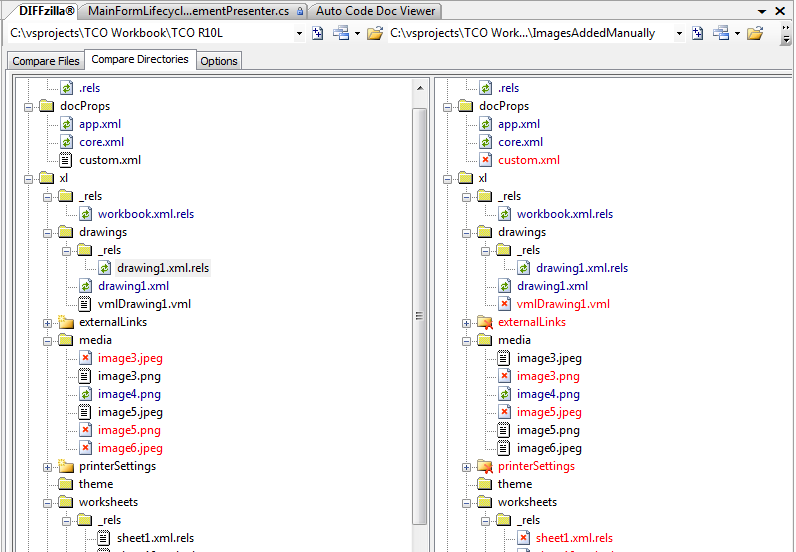
Perhaps one of the best widgets in the versioning toolbox is the DIFFzilla window:

This is nearly as good as my favorite comparison tool Beyond Compare 2.  Love that directory compare feature, and you can quickly get file comparisons by double-clicking a set of the files in this window.

Overall I like what I see so far.  While I've got access to other tools which fit a lot of these needs, it's really nice to have all this wrapped inside Visual Studio.

Friday, May 30, 2008

Save The Date: Open Spaces Mini-Conf 9 July

Mike Wood and I are organizing an open spaces event on 9 July at Max Training's Mason facility.  The event's still being fleshed out, but we're looking at running from 6pm to 9pm.  Max has a crapload of space in their Mason facility, so we ought to be able to run five or six concurrent discussion groups.

Stay tuned for more details!

Tuesday, May 27, 2008

ANTS Profiler 4 EAP

I spent an hour or so working with a couple folks from Red Gate this morning to run through the latest build of their ANTS Profiler v4.0. 

ANTS 4 is still in EAP (download latest bits here), but I was awfully impressed with the state it's in.  I downloaded the bits, installed it, ran a quick session on a monster WinForms app I've worked on in the past, and quickly got down to the guts of some possible performance issues.  The UI's nicely done, and I was very, very impressed with the app's responsiveness.  I'd all but given up on ANTS 3 and dotTrace because of nearly unusable performance while trying to profile a couple apps.

ANTS 4 still has a way to go.  There are some bugs running around, and some UI tweaks need to take place, but overall I liked what I saw with this version.  You ought to go have a look at it if you're interested in an easy to use profiler.

<disclaimer>I get some software from Red Gate for free because of my MVP status.  That doesn't stop me from criticizing if needed.</disclaimer>

Wednesday, May 21, 2008

Recap of Cincy .NET User Group Panel Discussion

The great gang at the Cincinnati .NET User Group invited me to participate in a panel discussion at their meeting tonight.  I was honored to be up front of the group with Tim Apke and Ed Sumerfield, both two sharp guys with much more technical experience than me.  All three of us have, as Mike Wood put it "a long history in IT" which I think was Mike's nice way of saying all of us are old farts.

The discussion was very free form and hit a lot of great topics ranging from specialization or generalization to estimation accuracy to workplace culture.  Dealing with new technology was  big one, as was questions about breadth of experience (outside of the strictly technical domain).  The value of certifications was bandied about with a mild consensus seeming to form around them being good in the proper context: use 'em if you need to prove your chops early in your career, but don't overly fixate on them.

Hearing Tim's and Ed's perspectives along with those of the audience was a great experience.  Tim and Ed are wicked smart and have some great insight into how to steer one's career along.  Tim was emphatic about taking ownership of your own career.  In a sidebar after the meeting he compared taking care of your career to taking care of your car.  You keep your car's tires in good shape, change the oil, and give the vehicle a tune up on occasion.  Same concept applies to your career.  Ed also impressed the hell out of me with a number of things, not the least of which were his closing comments which was a short haiku along the lines of "own your path" but he said it way more better.

One of the regulars there (forgot your last name, Jamie -- sorry!) hit me with the last question of the evening and asked how I manage to balance work, community involvement, book writing, and time with the family.  That one hit very, very close to home and got me choked up in a major way -- not what I would have preferred for my last question of the evening, but there you have it.  I don't always do a great job of work/life balance, but I've made some tough choices in my career to favor family over work.  I've passed up great opportunities, I've struggled with sub-optimal part-time positions, and I've left a high paying job to be unemployed at home in order to take care of the kids.  My career would be in a much, much different spot had I chosen career over family. 

The cons of those decisions are that I'm not some internationally recognized expert traveling around the world talking at TechEd Barcelona or running some wicked cool project in Dubai, nor am I billing out at $500 per hour while working at iDesign or some similar firm.  The pros of those decisions are that I got stay at home with my daughter and son while they grew up, and I'm not traveling three or four weeks of each month while my wife and kids live their lives without seeing me.  (Another con: costs of therapy for two kids when they hit teen years and figure out how screwed up they are after having had me as their primary caregiver...) 

So to those of you who thought I got emotional about that question, you're right.  It's really at the core of who I am, even if I don't get it right as often as I should.  (That's me, too, BTW.)

Actually, forget all that.  It was really allergies.  Sorry.

In any case, the panel discussion at the group was an excellent evening.  I hope attendees got something useful out of it!

Monday, May 19, 2008

Dealing With Technical Debt

All projects acquire technical debt in one fashion or another, and in varying quantities.  I've been looking at a couple past projects to identify areas in need of some debt repayment should the projects move into their next phases.

Apropos, then, that I ran across a great post from Steve McConnell on technical debt.  I particularly like his sections on communicating about technical debt and debt safety.  Be sure to follow Steve's links to Ward Cunningham's and Martin Fowler's articles.

Good reading!

Saturday, May 17, 2008

Book Review: The ThoughtWorks Anthology

The ThoughtWorks Anthology, published by Pragmatic Press, ISBN 193435614X

This is a terrific book loaded up with 13 short, concise, golden essays from ThoughtWorks leaders like Martin Fowler, Neal Ford, etc.  Each topic covers something pretty vital for those of us who care about being somewhere near the top of our chosen craft.  Topics include solving the "last mile" problem between development and release, Ruby DSLs, polyglot programming, single-click deployment, and a bunch of other great reads.  Each article is extremely well-written and useful, but I found a subset of the book particularly compelling. 

Unfortunately, I only heard parts of Neal Ford's "Polyglot Programming" at his keynote at CodeMash 2008.  I was thrilled to get to read his article in this book on how to leverage different languages on the same platform to solve different problems. 

Jeff Bay's piece "Object Calisthenics" strongly reminded me of the glorious work The Practice of Programming from Kernigan and Pike in its emphasis on clean, simple, clear code.  I'm all fired up to refresh my coding practices with Bay's exercise using nine points for pushing yourself into writing better object oriented code.

"Refactoring Ant Build Files" from Julian Simpson, along with Hatcher's Java Development with Ant, should be mandatory reading for anyone dealing with build files -- regardless of what build environment you're using.

Other big winners for me were the testing articles by Kristan Vingrys and James Bull, Dave Farley's work on one-click release, and Stelios Pantazopoulos's article on project vital signs.  Of course, the remaining articles are also winners, it's just that these six or so really struck home with me.

Overall it's a fantastic work and I'm really glad I've got it on my bookshelf!

Thursday, May 15, 2008

New Podcast: Alt.NET Podcast

Ran across references to the new Alt.NET Podcast and checked its inaugural episode on the drive to work this morning.   The first episode was great, and I'm looking forward to hearing more from the 'cast!

Subscriptions available through iTunes or POR (Plain Ol' RSS).

Tuesday, May 13, 2008

Accurately Reflecting Agile's Value in Budgets and Schedules

I've been struggling for some time to ensure that our agile projects get a true representation of value delivered to the client when schedules and budgets are being discussed.  I think our flexibility to deliver on client-driven scope change too often fails to show how we're really doing, particularly in e-mails or on the Great Game of Business boards we use at Quick.

For example, a project I just wrapped up the first phase on used SharePoint Excel services to host a complex workbook the client uses to show total cost of ownership for heavy equipment.  The original scope was for one set of features at a specific estimated cost.  We ran over estimates on a couple tasks (Excel Services is a difficult technology, especially when you're trying to work around its limitations) and beat a couple others.  The big delta, however, was that the client had us drop a couple items and add in a significant amount of new features.  Overall the client was extremely happy with what we produced.

Unfortunately, every mail regarding schedule and budget always went out the door saying we were slightly behind schedule and slightly over budget.  I'd have to immediately follow up and say "Yes, but look at the added scope and value we're bringing to the client at their direction."  Furthermore, the GGOB board shows a variance on our project, nicely written in red because we were over the initial figures on a time and materials project. 

This mindset comes straight out of the PMP world and I'm struggling with how to get this changed in our environment.  Metrics are good, as are BVC information radiators, but only if they're a fair and and accurate reflection of where a project's at.  That accurate reflection should include some measure of succeeding on client-driven scope change -- after all, shouldn't we be all over recognizing the value we've brought to the client?

I'm not sure where this will end up going, but I'm noodling over some ideas.  I'd love to hear suggestions if you've got 'em.

Monday, May 12, 2008

The Value of Specializing Generalists

I've never claimed to know all the answers.  Actually, I'd be happy if I could answer more questions than not...  That said, if I can't answer a question, I generally know right who to reach out to for answers.

This comes in to play time and time again in our line of work, particularly since we're expected to be able to solve so many different problems in so many different technologies/platforms/whatever.  I ran in to this recently with a performance issue and was able to solve part of the issue by reaching out to Bruce Lindman, the senior DBA we have on staff.

I'd isolated some connection timeout issues to a query that was taking almost four minutes to return.  The query was built to handle sorting out some permissions across a large set of data and was working with a lot of records from a master table and association table.  The developer who had originally written the SQL had broken out the sproc into several different functions in order to modularize it for testing and for clarity.  Everything looked pretty good, and all of our moderately complex use cases passed just fine in the test environment.  Unfortunately when we rolled in to the test environment at the client site we found the really bad timing issue.  Ick.

Bruce immediately identified the problem: the user defined functions were returning tables of result sets -- and those tables aren't indexed.  Large amounts of data for intermediate results. No indexes.  Small problem there.    Bruce spent 30 minutes or so rewriting the query to bring the functions back in to the main sproc, tweaked a few things, and ended up cutting the query from nearly four minutes down to 22 seconds.

That's a great improvement in a technology area that I'm, well, frankly, sucky at best.  Being able to call in a specialist let me focus on a couple other issues which were also contributing to the performance problem.  Those other areas (overly heavy biz objects, pooling issues) were in my area.  SQL complexities aren't.

Our industry's grown too broad for us to be experts at everything, even if clients expect us to be.  I think all we can ask for is that we form groups or teams of specializing generalists: folks who are very solid at a wide range of skills, but experts in one area.  That lets us have a cadre of resources to reach out to when we're in over our heads, which happens more often than we'd like to admit...

UPDATE:  One blog reader, blocked from commenting by an evil corporate proxy, pointed out a great article by Scott Ambler on this same topic.

Sunday, May 11, 2008

Book Review: Subject To Change

Subject To Change, Peter Merholz, et. al, published by Adaptive Path.  ISBN 0596516835.

This book at first glance seems awfully similar to Scott Berkun's The Myths of Innovation, but there's enough distinction to make it worth a separate read.

Subject to Change is short, concise, and very well-written.  It offers up insights on how companies can be more flexible to meet market changes by working in new ways for solid customer research, product design, and agile approaches, among other things.

The book's nicely done and is filled with good examples of how some companies have come up with concepts which completely changed the industry.  Kodak's first box camera is an example of a product which fundamentally changed how companies treated their customers.  ("You press the button and we do the rest.")  Kodak also gets slammed for their ignorant approach to the digital camera age -- failing to adapt to a changing environment isn't a great way to run a business...

This same theme runs through the book: approaches that have worked wonders for companies contrasted with flops that haven't.  Successful approaches almost always come from businesses which have spent time understanding their customer base; flops come from companies which do silly things like create hardware which is feature-scarce, expense, and hard to use without having ever talked to a customer.

I liked most all the chapters and found the ones on design competency and agile particularly interesting.  No surprise about me liking the agile chapter since I'm a nut about agile software development!  There are also a number of great discussions on brainstorming UIs, layouts, and product prototypes, something which I think gets little or no coverage in other works.

Overall it's a good read.  It didn't grab me as much as Berkun's Innovation book, but it's a solid addition to my bookshelf all the same.

Wednesday, April 30, 2008

Troubleshooting: Simple Stuff First

I spent a lot of years running and fixing radar systems on big airplanes while flying around cool places like Iceland, Saudi Arabia, and Alaska.

One of the hardest lessons I learned (or had beaten in to me by crusty old sergeants) was that you always, ALWAYS look for the simplest solutions first when troubleshooting.  In my early years I was always diving in to the books to pull out the four-page fold out schematic instead of first using some elementary deduction to get some quick checks out of the way. This same principle carries directly over to ANY form of troubleshooting, not just trying to figure out why dots aren't appearing on a radar screen.

Today I had a good reminder of that when trying to figure out a problem in a system we built.  Custom security roles weren't being recognized by one component which maps records in a database table to business objects based on an enumeration.  I jumped into the debugger and started stepping through the component where the disconnect was (sorry, no test around it, and it had been months since I'd been in that part of the code).

I quickly found this wasn't the best use of my time, and instead went to a very rudimentary step: double-check the values in the database.  Some close examination immediately led me to the source of the problem: someone had added spaces to the role name in an attempt to make them more readable.  "UserType" became "User Type" and "BusinessFunction" became "Business Function".  This may look nice for humans but causes some issues in code...

That quick check saved me from losing more time in the debugger trying to wind my way back to where that initial comparison was happening.  The simple thing won out over the more complex thing.

We geeky types like solving tough problems and too often we get carried away with looking for the harder answer when the simple answer is sitting right in front of us.

(On a related note, if you haven't already, grab a copy of Debugging by David Agans and read through it several times.  Highly worthwhile to help polish your troubleshooting skills.)

Tuesday, April 22, 2008

Any Wrap up of CODODN I Wrote Would Suck Compared to...

Andy Erickson's video summary.

'Nuff said.

MVP Summit Wrap Up

Like Nino, this was my first summit even though I've been an MVP for three years.  I spent most of my time in SharePoint sessions; however, I sat through part of the C# Language Future discussion (my head still hurts) and a wicked cool glimpse into Rosario (VNext of TFS).

I hooked up with a lot of old friends and made a lot of new ones while I was there -- and spent a LOT of time talking with Jef about a lot of important things for building a great development team such as culture, doing agile right, etc., etc., etc.  Seeing Keith Elder get on stage and sing karaoke (and break the process) nearly paid the price of admission for me.  I also got to meet Roy Osherove and Oren Eini (Ayende) which was great because both them helped me out with the book.

I also had a couple nice chats with Ben Curry who I met at SharePoint Connections in Las Vegas last November.  He's a wicked smart SharePoint MVP with a lot of experience in huge-scale SharePoint jobs.  I can't wait for his book on SharePoint Best Practices to come out.  Additionally, I met Eric Shupps who is one of several folks I'm working with on a cool SharePoint project -- more on that when things gel.

Perhaps the funniest thing about the Summit was sitting in a session on Excel Services while I was IMing back and forth with Phil about a problem we were overcoming.  I'm heads down with Phil confirming our approach, then look up and see a demo using Excel Services -- and see a solution to the exact problem we're working on.  The ES team dev who built the demo was in the back of the room, so I grabbed him after the session and got some validation that we'd identified all the issues and were solving it in the right way.  That was worth the entire trip out to Redmond!

One thing that struck me about Microsoft's attitude in nearly every session: they are actively seeking feedback from the community on current features, planned features, and general pain points I mean "opportunities."  I will (and do) bust Microsoft's chops on any number of issues, but the effort they're putting in to changing their culture is amazing.  I was part of some tremendously productive conversations with the Visual Studio team, and listened in as the Really Smart SharePoint folks conversed with any number of different MOSS team folks.

Overall it was a great trip and I'm looking forward to the next summit!

(Oh, and my Tweets went from four to 70 in one week...)

Tuesday, April 15, 2008

CodePlex Session at MVP Summit

Sara Ford and some of the CodePlex gang will be putting on a session around where CodePlex is going.  They're putting the session on at the Sheraton Hotel Seattle - Queen Anne Room on Thursday, from 2-5.

Stop by if you're interested in seeing the future of CodePlex (or getting loads of swag)!

Dropping Testing is Not a (Viable) Option

Yesterday at the opening of the MVP summit I spent a bit of time in an open spaces session on testing practices and pitfalls.  I left after the conversation took a turn where a number of folks were seriously talking about dropping testing in order to meet deadlines.

This from supposed industry thought leaders.  Frightening.

The conversation started out with someone putting forth their historical data that testing adds 10% - 15% to schedule time.  The person with these metrics then said it's an acceptable business decision to cut out that testing if your deadlines are in jeopardy and you need to hit milestones for time to market, compliance, business drivers.  I became more and more dumbfounded when others piped in and agreed.

This is sheer insanity.  I was so appalled that I couldn't bring up a coherent counter-argument to this lunacy.  Dropping testing to meet a deadline is like cutting off your leg to make a weigh in for your weight loss contest: sure, it's an option, but it's one which ought to be rejected by any rational person.

We've all worked with deadlines, and anyone who's worked more than .0432 projects has undoubtedly hit scheduling problems.  Doing poor quality work to meet that deadline never, EVER gets you in a place where you want to be the day after that deadline.  Sure, you may have gotten a release out and beat your competitors to market, but you're screwed after the first 100 people download your software and find it's rife with bugs.

(I'm purposely leaving off discussion about the design goodness that comes from Test Driven Development or Behavior Driven Development/Design.  I can't have this post going over 500 pages...)

The right answer when you're having milestone or deadline issues is to cut scope, not cut quality.  Furthermore, scheduling problems should be identified very, very early in the project -- you're using some form of feature velocity tracking, hopefully, which will let you discover issues early on.

Those scheduling problems/issues/challenges need to get communicated to the client (internal or external) immediately, along with your mitigation plan.  That mitigation plan can never, ever be "we're going to cut quality to meet this deadline."  Instead, that plan should be "we're working to close the schedule gap, but we need to have a hard look at what scope you want delivered for that release."

One of the best discussions I've ever read about this is in Tom and Mary Poppendeick's Lean Software Development.  They talk about a state government project that had a release date mandated by law with a set of functionality also mandated by law.  The project was also biting off a bunch of other functionality. 
The project was failing and had no chance of hitting the milestone when Mary came on board.  Her first triage was to cut out work on all features that weren't directly tied to those mandated features.  The project team worked only on functionality that was required by law since that had to be part of the release.  Everything else was shoved off and worked on after they hit that deadline.  They met their deadline, not by cutting quality, but by doing a brutal cut of features which weren't absolutely necessary for the release.

Cutting scope for a release isn't ever an easy conversation to have with a client, but it's a necessary one.  Furthermore, that conversation is easier if you have it very early in the process, not a week before you're due to ship.

Cutting scope is a reasonable way to hit your deadlines.  Cutting testing is not.

Monday, April 14, 2008

Breaking Apart Excel Files with Beyond Compare

I'm working on a SharePoint project using Excel Services to host an Excel file our client's sales reps use to create a total cost of ownership sales report for large equipment.  Excel Services is perfect for this except for one detail: You can't have images in the workbook you're serving up with ES. 

Think sales reps and sales reports.  They need images.  Bummer.

No worries, because the new XML format of Office documents lets us crack open those files and programatically inject new content or edit existing content.  The changes aren't overly simple, but they're workable using a combination of the System.IO.Packaging class and some manual edits of XML files.

Before you start cutting code, you need to figure out what you'll need to edit.  Two tools come in handy for this: Beyond Compare 2 and HTML Tidy.  Beyond Compare does an amazing job of directory comparison, and Tidy lets you quickly format XML files into an indented, readable view.

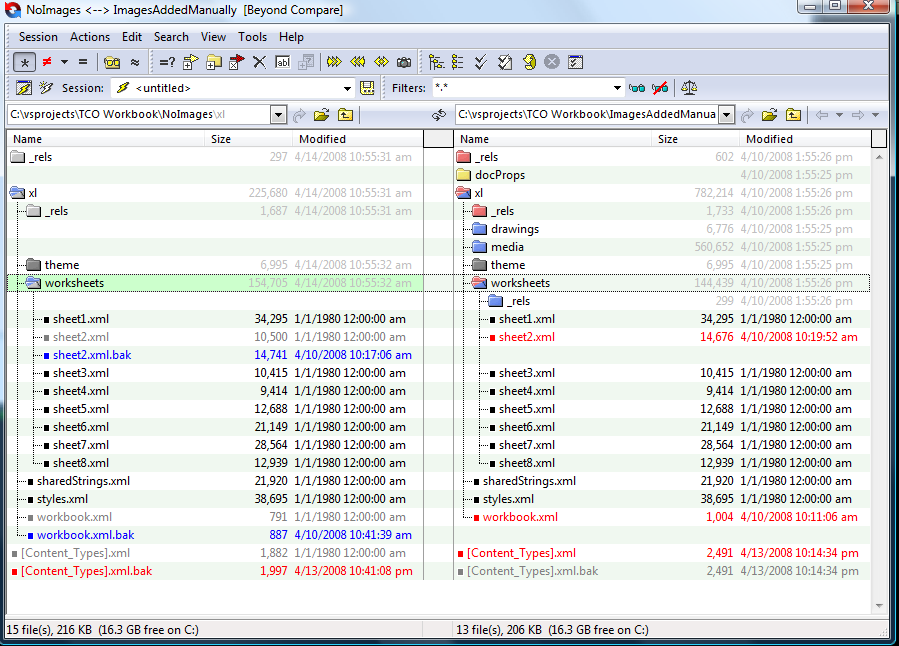
You'll also need before and after versions of the Excel file.  We cleaned out images from the workbook we were hosting in ES, uploaded it, then ran it through our system we've built, and finally saved a snapshot of it.  Then we opened that imageless snapshot, added in our images, and saved that file as a separate file.  Rename both with a .zip extension, extract them to separate folders, open those folders with Beyond Compare, and Poof! you've got an exact view of what you need to update in your files.  (Note the blue and red ".bak" files on the left are my additions as I'm working on coding up the changes.)

You can use Tidy to help clean up files on both sides of the viewer for easy readability.  Just run "tidy -im -xml <sourcefile>" to get a nicely formatted file.  "-xml" treats the input file as XML, and "-im" indents the XML and updates the source file rather than outputting to a separate file (which you can do).

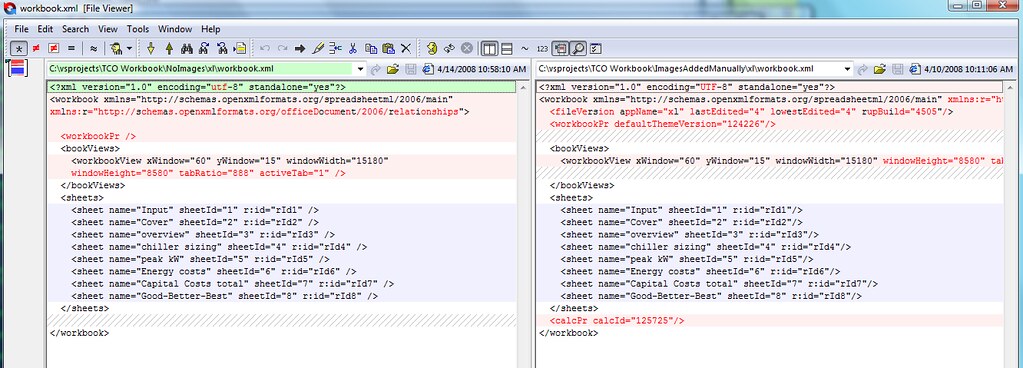
Now when you do a comparison on files you'll get something like this showing the exact changes:

Now it's just a simple <koff, koff> matter of coding up the edits and additions to those XML files.  More on that later.

Now Playing: Mike Farris -- Goodnight Sun.  I've been all over Farris's "Salvation In Lights" for its great vocals and music.  This earlier album by him is full of amazing tracks, to the point where I'm starting to get concerned I'm wearing out the tracks and sectors where its located on my iPod...

Sunday, April 13, 2008

Wednesday, April 09, 2008

Looking for .NET Work in Chicago?

Quick Solutions, the company I work for, has just gotten a number of opportunities for .NET developers in permanent positions in Chicago.

Contact me via the sidebar link if you're interested!

Thursday, April 03, 2008

Post Visual Studio Uninstall of SQL Express

On occasion I've someone I know has inadvertently installed SQL Express as part of the Visual Studio install, after having already set up a development machine where the real SQL Server (whichever flavor) is already installed.

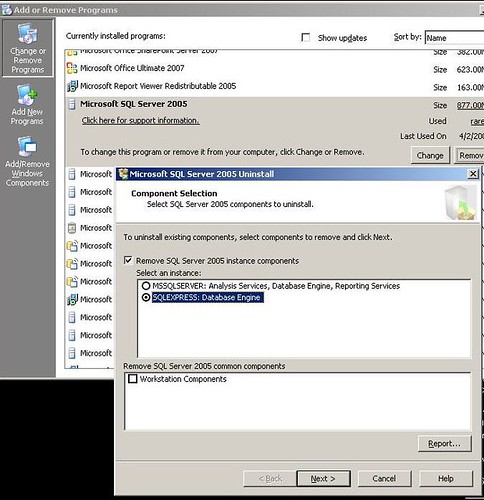
Running the VS install again and looking under the Change/Remove Options won't help you remove SQL Express in this case.  Instead, head over to Control Panel's Add or Remove Programs section and you'll find the listing for Microsoft SQL Server 2005.  It's not clear from the screen, but clicking Remove here will give you an option for which instance of SQL you want to remove: SQL Express or the "real" SQL.

A couple more clicks of "Next" and "Finish" and poof! SQL Express is gone.

Tuesday, April 01, 2008

Fixing Oddities in Omea Reader

I use Omea Reader for reading my blog and newsgroup lists.  It's free, it's handy, it's powerful, it's offline so I can read my blogroll while I'm driving back and forth to Columbus for work.  Just kidding, folks.  Really.

A couple weeks ago all the lists in Omea's views and feeds lists showed up as duplicates.  Ugh.  Furthermore, the "Unread" view flat out wasn't working, meaning I needed to troll through a whole lot of junk when I just wanted to see new posts.  Ugh.

Easy fix: run "dbrepair.exe" from Omea's folder under Program Files.  First back up your Omea files (local data folder in your user folder), then run "dbrepair.exe /fix" to repair any busted links, clean up the indices, and do a lot of other general repair.

Poof!  Everything's back nice and shiny.

Monday, March 31, 2008

ArcReady: Architecting for Scalable and Usable Web Applications

Get ready for the next round of ArcReady sessions!  Brian Prince and the other evangelists will be putting on another great ArcReady event this quarter.  Events are all over the central region -- check out the calendar at ArcReady.com.

Two different sessions are offered during this half-day, FREE event: Architecting for scalability, and architecting for usability.

I'll be attending the one in Columbus on 4/29.  Hope to see you there!

Friday, March 28, 2008

See You At the MVP Summit?

I am very excited that I'll be attending the MVP summit in Redmond in a few weeks!  I was not able to attend the last one so it's a thrill that I'll be out there drinking the Kool-Aid for this one.

There are a passle of things I'm looking forward to getting involved with during the summit, and I'm stoked that I'll be able to connect with a bunch of folks who I've read about, but haven't had the opportunity to meet before.  (And catch up with friends like Sara, Phil, and a few others.)

Drop me a line via the contact link if you're going to be in Redmond that week and would like to hook up!

Sunday, March 16, 2008

Day of .NET Session List Posted!

The Central Ohio Day of .NET is being held 19 April at the Roberts Center in Wilmington, on I-71 just south of I-35.

Check out the killer list of sessions for this free event!

What?  You’re STILL not registered?  Go register right now!  (Share the love with your friends, colleagues, and neighbors via this easy-to-remember Shrinkster link: http://www.shrinkster.com/udg.)

I’ll be giving my Story Driven Testing gig, once again spouting my love for Fitnesse.

Thursday, March 13, 2008

Tech Night: ASP.Net MVC Framework

Quick Solutions puts on monthly Tech Nights which are open to all interested folks.  Tech Nights are not sales events -- they're put on by geeks, for geeks.

This month's event will cover the ASP.Net MVC Framework.  Tim Wingfield will be discussing what the MVC framework's about, why you should care, and how to go about running with it.

If you're not familiar with the goodness of the MVC/MVP approach to cutting code, you really should attend.  MVC/MVP is a fantastic way of improving your software's flexibility, maintainability, and testability.

If you are familiar with MVC/MVP then you ought to attend and see what's new, as well as lending your $0.02 from your experiences.

Details on the event:

Where: QSI Training Center
    440 Polaris Parkway, Suite 500
When:      Wednesday, March 26, 2008
    5:30 – 7:00 p.m.
RSVP: Natalie Marsch --  nmarsch AT quicksolutions DOT com

You can also ping me via the contact link on the right sidebar of my blog.

Friday, March 07, 2008

DevCare Slide Deck

I mentioned earlier that I presented at a DevCare last week.  The topics were How Hackers Hack (and How to Stop Them) and Building Office Applications with Visual Studio 2008.  A number of attendees asked for everything from the slide deck to the entire VPC used for the demos.

I've asked what I can release, but I haven't gotten official word yet.  Therefore, I'm taking the "Forgiveness is easier to get than permission" tack, ergo I've posted the slide deck up at my website.

I'll pass on the word when I find out about the demo code and other example materials.

MOSS Search Setup Errors

I was running in to a problem configuring the Search Service on a MOSS install today.  Trolling through the logs showed an error "The call to SearchServiceInstance.Provision <xxxxxxx> failed."

Stupidly, I'd forgotten to qualify the account names for the Search Service and Search Content Access with the local system's name, i.e. "MossSystemName\MossSearchSA".  Yet another case of idiotic error handling in SharePoint helping me to shoot myself in the foot.

What's ironic is that just a couple months ago I had to keep reminding a client to add that system name to this field -- and here I am doing the same thing today.  Duh.

(And of course Sahil posted on this too some time back.)

Shout Out: New PowerShell Book

Hristo Deshev, one of the contributors to my book, has just gotten his own great-looking PowerShell book published: Pro Windows PowerShell.

I’ve not read the book yet, but I can heartily recommend it despite that because the articles Hristo wrote for Windows Developer Power Tools were sheer gold: great technical content and an amazingly clear style. (How can a Bulgarian writing in a non-native language understand the subtleties of semicolons, for crying out loud?!?)  Also, the table of contents for Hristo’s book looks to cover a broad range of terrific topics.

Congrats, Hristo!  I look forward to digging through the book!

Thursday, March 06, 2008

DevCare Security & Office Development Follow Up Info

Last Friday I gave a DevCare presentation in Columbus on How Hackers Hack (and How to Stop Them) and Building Office Applications with Visual Studio 2008.

Several folks asked me for the deck and demo code -- I'm still waiting on word for release of that.

In the meantime, here are the Shrinksterized links I mentioned in the talk:

Blogs

Thanks to everyone who attended!

Tuesday, February 26, 2008

Want a Copy of VS 2008? Attend the DevGroup Meeting on 2/27!

We're giving out 52 copies of Visual Studio 2008 at tomorrow's meeting (2/27) of the Dayton .NET Developers' Group.  These are eval copies; HOWEVER, you'll get a key which you can use to unlock the software, turning it into a full blown copy of VS 2008 Pro.

Meetings are held at Max Training's Miamisburg facility and start at 6pm.  I look forward to seeing you there!

Friday, February 22, 2008

Speak Up at the Central Ohio Day of .NET!

The Central Ohio Day of .NET is 19 April, which isn't all that far away!  If you've got a topic you're smart on, passionate about, or interested in, I encourage you to grab a submission form and toss your hat in the ring for one of the presentations. 

If you're interested, but are holding back because you've not spoken before, then consider this: Code Camps / Days of .NET are a great venue for folks to get their feet wet.  The crowd's friendly, the audience is interested in helping you succeed with your presentation, and you've got a bunch of other speakers who've been there and done that and are happy to share their experience with you.

What are you waiting for?  Go and submit an idea!

(Feel free to contact me via the sidebar link if you need to bounce some ideas off someone or are looking for help/advice in writing up your abstract.)

How Does A Tools Nerd Pack?

In response to Brian's challenge, here's how a tools nerd would pack for a move:

Packing is so 2000.  You have stuff.  There are tools to help you move that stuff, and you're likely to find that the right set of tools will enable to you to completely forego packing, bringing higher productivity and lower maintenance costs to your move.

First, your tiny little trinkets you've collected over the years.  I'm talking stuff like those Dot Net Rocks! mugs you picked up at various spots, or the nearly useless USB-crappy-writing-pen combo kits, or the stupid pokey things you use to hang stuff on the wall of your Dilbert cubicle.    Think consolidation.  Think compression.  There must be eight or ten tools which let you smash all those little trinkets together.  Find the first three from Google or download.com and install them.  All three, and maybe a fourth written by some guy in Uzbekistan just because his name sounds cool and the widget integrates into Explorer shell's context menu and it's the cat's ass when your Explorer context menu is 57 lines long.

Next, let's move on to memorabilia.  I'm talking those AttaBoy! certificates, test certification certificates, "Praise Him Because He Saved Us From Certain Death at the Hands of Pygmy Frogmen Headhunting Managers" certificates, etc.  Think filing utilities.  SourceForge and Tigris must have at least three each.  Pick the first hit from SourceForge, the second from Tigris, and generate a random prime number higher than 1,252,183 to select where you get your third.  Deinstall that last one because you find it doesn't play nicely with 64-bit Vista.  Now that you're thinking about it, go back and remove that Uzbekistani archiving utility because you're noticing Explorer seems to be crashing with alarming regularity.

After that, look to your geek gear.  Your computer, your monitors, your mouse (because you work for a cool company that actually buys you a mouse instead of making you buy your own), and possibly your external hard drive.  While any sap can grab bubblewrap, I'd say there's got to be at least 3.2 suppliers of Sorbothane geek device cushioning packs.  Look 'em up and get quotes from the 3.0.  Drop the second quote, because it's your friend from Uzbekistan who has given up on writing Explorer shell add-ins and is looking to expand into a new line of tools.  Manufacturing tools.

Finally, the righteously important stuff: your furniture.  My once skinny butt sits in an Aeron chair which I paid my own $$ for.  You may envy me.  Maybe not, because you've likely got more cash in your pocket after not springing for an Aeron.  Regardless, you need to transport that baby to the new office, but you first must ensure your transport layer's working properly.  Go download a packet sniffer.  Find some stub drivers that you'll need to ensure your NIC is properly smacked into promiscuous mode for working with that sniffer. 

Now you realize that maybe that wasn't such a good idea because your system is completely locked up, the activity light on your system's solid red instead of the occasionally orange blinking state, and the usually incredibly pleasant network lady is running up and down the hall yelling "Hey, which of you jackasses is fooling around with a packet sniffer and a promiscuous mode driver?"  You're also realizing that that Uzbekistani guy left the Sorbothane gig (Something about missing supply locker supplies.  That and the missing donut fund money, plus there was the whole thing about the Russian Mafia hanging out in the parking lot, too, but that was overblown) and has had his nefarious fingers on the keyboard that was involved in that promiscuous mode driver.

At this point your system, overloaded with cool tools, has become about as productive and unstable as a blogger writing a post at 12:30am when he's due to get his kids out of bed for the school bus in 5.5 hours.  The only recourse is to repave and install fresh from new media.

You can start that right after you finish packing for the move.

(Did I mention that Uzbekistan guy used to work in the plant where your Vista DVDs were burned?)

Sunday, February 17, 2008

The Problem With Dynamic Labels

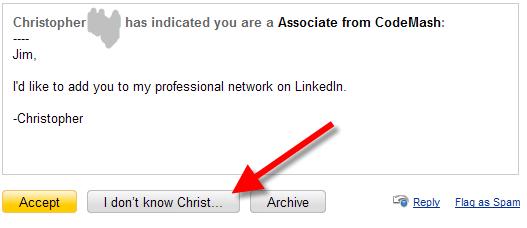
LinkedIn has no business telling me whether or not I know Christ.  My Christianity (despite the occasional profane rant here on this blog) certainly isn’t the business of some social networking group. 

Oh, wait.  That’s not what they meant.

Maybe having that label’s text dynamically generated wasn’t all that great an idea…

Book Review: SharePoint 2007, The Definitive Guide

SharePoint 2007: The Definitive Guide, by James Pyles, Christopher Buechler, et al.  O'Reilly, ISBN 0596529589.

This book's very broad in its coverage of SharePoint 2007 and sacrifices depth for that breadth.  While there are several chapters on development-related topics, development isn't the book's forte.  Rather, the book's really targeted to giving a lot of background and foundational information for folks wanting to implement Windows SharePoint Services (WSS) or Microsoft Office SharePoint Server (MOSS).

11 different contributors make some parts of the book difficult with their wide range of voices, and there are a number of clunky parts and some flat-out errors.  (One minor example: A diagram of server topology switched the labels between the web front ends and application servers.)

Those nits aside, the book's well done and a solid resource for folks moving in to the WSS/MOSS arena.  The sections on architecture, installation, and topology are all fine bits for discovering the broad strokes.  The remaining chapters hit functional jobs like site design, managing workspaces/discussions/groups/libraries, etc. as well as mid-level views of business intelligence, Excel Services, Forms Services, and security.

Each chapter does a nice job of covering its topic with good introductory passages and a nice summary.  Most chapters have a plethora of well-done, targeted screen shots backing up the content for that chapter.  From time to time the particular author will call out pitfalls (nicely denoted with a trap graphic) and discuss issues surrounding that problem.  I also like that the authors didn't try to push "Best Practice!" fluff throughout the book.  (My biases come up here since 1) I hate the phrase "Best Practice" since it may be "Best" for you but completely "Suck" for me and 2) MOSS/WSS is too new to have solid, industry-wide guidance anyway.)

Overall, I've gotten some very good value out of the book and wouldn't hesitate to recommend it to others, aside from making sure it's understood that the book's not one for understanding the mid-level or more complex areas of WSS/MOSS.

Saturday, February 16, 2008

Shout Out: Looking for IoC/DI References

I had a reader contact me asking if I knew any good books on Inversion of Control/Dependency Injection.  I don’t, so I thought I’d see if any of you readers knew good reading materials on IoC/DI.

Don’t limit yourselves to books — I’d love to see what blogs or other reading material you’ve found useful for IoC/DI.  Also, don’t limit it to .NET stuff.  I’d be happy to get good content references regardless of language!

O'Reilly Webinar on LINQ with LINQPad

O’Reilly’s putting on a good-sounding webinar on LINQ.  More details here.  The webinar’s on 20 Feb at 5pm Pacific (2200 GMT).

Tuesday, February 12, 2008

Lost Your Virtual PC Console?

It seems like two or three times a year I run into this problem where the Virtual PC Console won't display when you start VPC.  It may or may not display on the task bar, but regardless you can't get the little rat where you can use it.

Thankfully Jason Follas figured this out some time ago and has the answer.  His fix has always worked when VPC decides to go apes#it on me.

Free eBook on Virtualization

Realtime Publishers is offering up a free copy of The Definitive Guide To Virtual Platform Management.  Hit the link above, then enter your e-mail address to register.  You'll be able to download a copy of the eBook.

I've not read through much of the book, just skimmed the intro chapters and table of contents.  I like what I see in the TOC so far, and hey, the price is right.  Tough to argue with $Free.95...

(Pointed out to me by my boss.)

Friday, February 08, 2008

Displaying Items in the MOSS Table of Contents Web Part

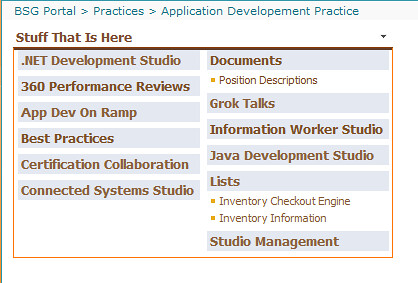
I ran across a silly configuration issue today when creating a Wiki page library for our group's collaboration site.  We don't use the Quick Launch left nav sidebar, instead favoring the Table of Contents web part.  I created the Wiki library, but it didn't appear in the web part -- it should have shown up under the "Documents" section below.

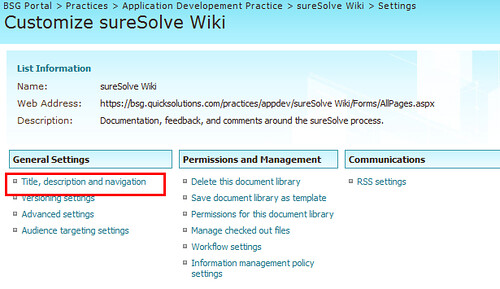
What's up here?  A quick check of the navigation settings (under library settings -> Title, description, and navigation)

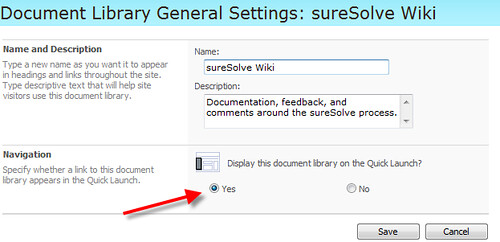
...revealed the silly error I'd made.  I mistakenly set the display on Quick Launch to "No" instead of "Yes."  I flipped that switch:

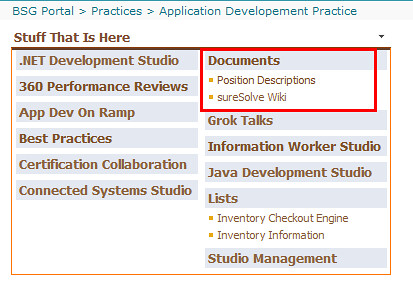
... and things are now displaying as they should.

Just because you don't use the Quick Launch doesn't mean you shouldn't make items available via it...

Why I Wear My Car for 2.5 Hours A Day

In case you didn't know, I am an aspiring crusty old fart.  I've been in the workforce for a fairly long time, and I've been through the wringer (several times) we all go through as we're figuring out what we want to do when we finally grow up.  I've had a number of very cool opportunities open up to me over the last several years, and I've had a bunch of great choices to make for career direction. 

So with those opportunities in mind, why do I drive back and forth between Dayton and Columbus each day?  As my 3.5 year old son would say, "Lemme tell you."

I joined Quick Solutions back in April, 2007 because I'd long wanted to work for Brian Prince and all the smart folks he's rounded up in his posse.  Smart folks like Alexei, James, Jon, Arnulfo, Monish, and all the others who I'm not listing because I'm too lazy.  I was of the opinion that the environment at Quick must be a great one because those folks are all smart and accomplished enough that they could work anywhere in Columbus, yet have been at Quick for some time now.

The last several months have only confirmed that opinion, and have cemented in my feeling that commuting 2.5 hours back and forth each day to work is a Good Thing when you're driving to a company with a supportive, enthusiastic environment.  While things like Quick's amazing support of CodeMash and the developer community in general carry great weight with me, the absolute nail in the coffin has been the backing and help I've had while trying to rescue a project gone badly wrong.

If you've worked on more than one project in your career you've likely had some variant of the same situation: difficulties communicating with the client, changing expectations, technical issues on the delivery side, etc., etc., etc.  All those add up to a bad spiral.  You get in a spot where you and your team are working as hard as possible but still can't get things on the track needed to satisfy the customer.  (Be clear: as with all death spiral projects, problems were on both sides of the aisle here.)

Things on this project were at a point where the client relationship was, at best, uh, difficult.  I was working exceptionally long hours trying to meet a moving target and get the technical side of things back on schedule and it was wearing me down.    Neither the PM nor I were having any success trying to get the relationship with the client calmed down, and it finally got to the point where we needed to escalate and get higher-level involvement.

That involvement came in a form I never expected: management immediately assembled a team to jump in and give us exactly the help we needed to get the project back on track.  A high-level director took over all client communication, giving the PM and I a much-needed respite from a nearly poisonous environment.  He also insisted on concrete direction from the customer, enabling us to focus on a clear goal instead of shifting expectations.  When things were calming down he handed off all communication and PM responsibilities to our delivery manager who kept things clear and on track.

Additionally, a group of QA folks were handed off to us, filling a bad gap since the client hadn't been fulfilling their responsibilities in that area.  The QA folks nailed down user and acceptance testing, helping us devs to shore up weak technical areas.  (Never, ever let anyone tell you that good unit testing eliminates the need for a solid QA team.  Ain't so.)

It took a couple months of hard work, and there were a number of difficult sacrifices made, but we got things nailed down and back on track.  The client got back in Happy Face mode.   The dev team finally got a commitment to a firm, unchanging set of features and was able to complete them well ahead of our estimates.   The system, a complex technical manual viewer, got finished and rolled out to the pilot phase.  That last point is especially important to me since years ago I was on a multi-year technical manual viewer effort which ended up getting shelved because of politics at the client's organization.  (There's a long story around that one, and why I was so emotionally invested in it, but I'll save that for a different venue.  Like over a beer if you're interested some day.)

Yesterday one of the devs and I had a successful handoff of the last bits for this phase.  My sales manager forwarded on a mail from the client indicating they've accepted the system and are closing out this phase.  That's just huge.

So here's one of the biggest things about all this:  Not once, not once, was any blame ever directed at anyone on my team.  Management, all the way to the top, simply said "Mistakes have been made on both sides.  Move past that, get the job done."  

I have no doubt that at several prior employers I would have been thrown under the bus.  Instead, what I got was calm and rational support, with never even a hint of finger pointing.

So there you have it.  Companies like this are few and far between.  That's why I drive 167 miles round trip each day.  I wish it was less, but I'm happy to make the drive when I go to work with and for such great folks.

(While this post wasn't meant as a recruiting pitch, contact me via the sidebar link if you're interested in working at Quick.  Especially if you work in Dayton and want to carpool...)

NUnit Snippets for Visual Studio

In James's and my book Windows Developer Power Tools we included a great snippet collection for NUnit tests written by Scott Bellware.  Scott compiled a bunch of very useful snippets for everything from adding NUnit attributes to existing classes to creating individual tests.  He also paid attention to small details like cursor placement after the snippet expansion.  Very cool.   Scott had wrapped all those snippets in a Visual Studio Installer package and posted this to his blog on CodeBetter.com some time ago.  I think this was one of the more useful contributions he'd made to the community.

For whatever reason Scott decided to delete his entire blog from CodeBetter.  Not just stop blogging or deactivate it, but completely delete it.  Ergo, no more snippets.

Until now, that is, because I uploaded the package complete with a snap of his great documentation to my website.  Go grab the zip if you're interested in some great snippets to speed your NUnit development.

Scott didn't include any copyright or licensing with his original package, so I'm uploading this on the assumption that it's public domain because he'd originally shared it on his blog.  If you use or reference these files, please make sure to give full attribution to Scott.

Thursday, February 07, 2008

Book Review: C# 3.0 Design Patterns

C# 3.0 Design Patterns by Judith Bishop.

This is a good rehash of the Gang of Four patterns, reworked in C# 3.0.  The book's fairly concise and most patterns are clearly laid out with a simplistic example to demonstrate the basics of the patterns followed by a more detailed example in a semi-real world implementation.

The articles are nicely done, there are a good set of exercises about each pattern, and there are some good comparisons between similar patterns.  As an example, there's a bit comparing the Builder and Abstract Factory which details that a Builder is concerned with how things are built while an Abstract Factory is concerned with what is built.

A couple things bothered me in the book, namely the lack of a clear overall summary of patterns, and an annoying batch of sidebars on fairly basic concepts.  While each pattern has a summary of when you would use it, you're forced to dig through the entire book looking at each pattern trying to figure out if it will solve a problem for you.  A consolidated list of the uses of each pattern at the start or end of the book would have been a great help.  Regarding the sidebars: do I need a patterns book to lay out fundamental concepts like accessibility modifiers or indexers?  These detract from the book's main purpose, which isn't to teach C# 3.0, but show how patterns are done in C# 3.0.

Those annoyances aside, I found the book to be a good read and a useful addition to my bookshelf.

Handy Home Office Gadgets

Two gadgets that have been very, VERY handy for me lately: a label printer and a sheet scanner.

The Visioneer Strobe Xp 220 lets me scan entire pages on one swell foop.  It's fast, and its one-click scan software is a thing of beauty.  The Visioneer, coupled with PDFCreator, lets me quickly make PDF images of contracts, documentation (feh!), and various other multi-page documents. For rapidly scanning in multiple pages it's head and shoulders over the ScanJet 6200c flatbed scanner I use for other tasks. 

Next cool toy: the Dymo LabelWriter 400.  Slick, easy to use, and fast.  It spit out 100+ mailing labels for Christmas cards in just over a minute.  Tie this printer together with mail merge and you're sitting very, very pretty.  The included software makes merges with Access or Excel very easy, and it's also simple to do one-off labels.  (There's a Turbo model with which I have no experience, but if it's got a turbo then it must be better.)

Both these gadgets are pretty inexpensive and have gotten a LOT of use around here.  I thought I'd pass on a shout out about 'em in case they may help you out.

Wednesday, February 06, 2008

Code Camp I Mean Day of .NET on 19 April!

The third annual Dayton-Cincinnati Code Camp will not be held this year.  Instead, we've renamed the event to the Central Ohio Day of .NET.  The name change brings us under the umbrella of great Day of .NET events throughout the region.

The CODODN will be held on 19 April at the Roberts Centre in Wilmington, Ohio.  That's off exit 50 on I-71 just south of I-35 between Columbus and Cincinnati.  The new venue has a lot better facilities for us, and it's equidistant between Dayton, Columbus, and Cincinnati.  We hope to draw in more folks from C-Bus than in prior years.

Interested in speaking?  Grab a copy of the speaker submission form and toss your hat in the ring!

Make sure to join us at the event.  The prior two camps were terrific and I'm sure this one will be even better!

Playing with NDepend

One of the first articles I wrote for my and James's book Windows Developer Power Tools was on NDepend.  I can't remember the exact version I covered, but it was right as Patrick was moving from his 1.x series to the 2.x version.

NDepend is a great metrics/code analysis tool.  It generates a wealth of metrics on your software, and it's fairly easy to use.  Scott Hanselman has a podcast on it which is well worth listening to, but in the meantime, here are a few of the high points about the tool.  (And I wrote about it before Hanselman, so neener neener.)

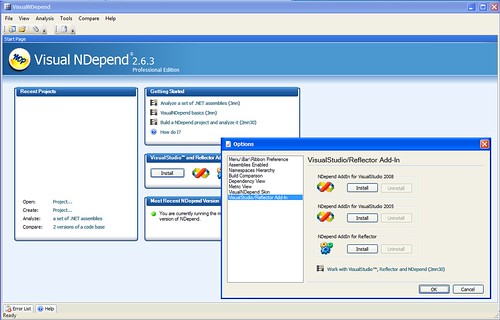
First off, love the startup screen: you can install plugins for Visual Studio and Reflector.  Wooo!


Secondly, after you run an analysis pass (select the assemblies you want, fire it off), you get a neat grid giving you a breakdown on dependencies in your code.

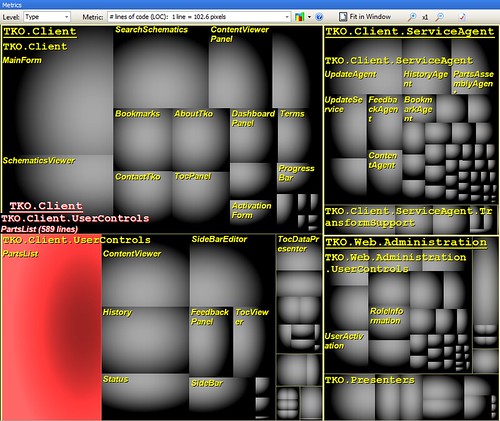
There's also an interesting graphical display for quickly visualizing potential problems in your code.  This view shows Lines of Code per type.

Clicking on one of the areas shows you specifics for that item.

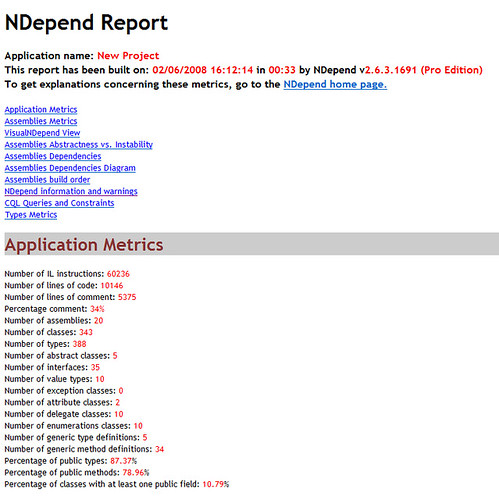
All the above happen within the NDepend UI.  There's also a separate HTML report generated which gives you a metric crapload of detailed specifics on afferent and efferent coupling, complexity, stability, and other items. 

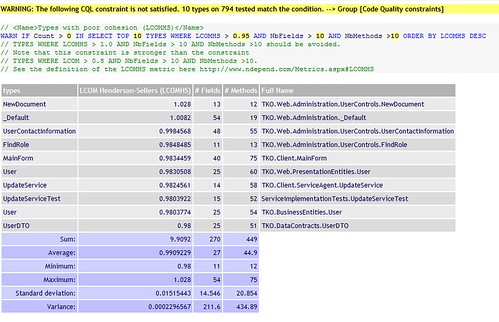
Patrick's also come up with a great query language to let you pull up potentially troublesome areas which a stock metric might not identify.  This one shows types with high cohesion and a large number of methods and fields.  Each section has a link to the NDepend site where you'll find more descriptive text.

NDepend was great in earlier versions; this newest version has a bunch of great features to offer.  It's a commercial tool, with licenses starting at around $400 and dropping as you buy more copies.  (A free license for Academic/Open Source projects is available.) This isn't a tool everyone on your team needs, but will be of great benefit to your tech leads or software architects.  It's a great tool and it's come a long, LONG way since the 1.x version I played with!

Disclaimer:  First off, I got a copy of this free as an MVP.  Secondly, Patrick's given out a copy for my .NET group to raffle off.  Neither of those mean I've been bought off for this glowing review.  Besides, the MVP license is only for "personal" use, so while I pointed NDepend at a project from work to play with, I won't be able to use it on a daily basis.

Saturday, February 02, 2008

Book Review: The Art of Agile Development

The Art of Agile Development by James Shore & Shane Warden.

I've been working through this book for the last five or six weeks and have been loving it.  Usually I do a deep skim read of most books -- the kind of reading you do in college where you need to get the gist of a book and some of the pearls -- but this one's grabbed me into an intense period of reading, reflecting, and re-reading parts.

Warden and Shore have written a fantastic work here.  The book covers all aspects of Agile from planning to delivery, and each aspect is broken down into sensible sections.  It reads like a series of great articles on very granular components of Agile such as Refactoring, 10-Minute Build, or Stand Up Meetings, but it's so well-written that all the articles mesh together perfectly leaving a smooth path through the book.

Each article (and that's my description, not theirs) lays out a specific practice or component of Agile, walks you through the benefits of it, details how that practice fits in the larger picture, shows you how to implement that practice, and discusses how to identify when you might need to implement or rework the practice.  Each article is extremely well done and approaches its topic from a very pragmatic view.  There are also cross-references to other practices elsewhere in the book that can help you solve related issues.  Additionally, there are great references to other books, articles, and web posts.

Overall the book's just terrific.  It's easy to read, it's pragmatic and practical, and it's thought-provoking.  Art of Agile Development can be used by newcomers interested in moving into Agile practices, but it's also absolutely applicable to Agile pros looking to improve their own system.  It certainly got me fired up with a number of ideas on how to improve our process even more.  Perhaps that's the best endorsement of this book.

Monday, January 28, 2008

C# 3.0 Jam in Ann Arbor -- April, 2008

The right fine folks at SRT Solutions are putting on a terrific educational event: C# 3.0 Jam.

This is a great chance to learn in a unique environment — and learn from Bill Wagner and other great minds.  The price is insanely cheap for four days of intense, cutting edge training.  You will NOT get a chance for similar training at any normal training provider.

Check it out if you’ve any training dollars available!

Saturday, January 26, 2008

Upcoming ArcReady Events in Ohio

ArcReady is a great series of FREE seminars from Microsoft, hosted at various MS offices around the area.  This quarter's topic is on service lifecycle management and looks to be an interesting set of sessions.

As with all these events, part of the benefit is from hearing contrarian views from attendees who have been out in the real world.  Networking with "Been there, done that" folks is always helpful for me.

Did I mention they're FREE???

Tuesday, January 22, 2008

Debugging Fitnesse Tests

Fitnesse is a great tool for end-to-end acceptance tests used to confirm a feature or story you're working on.  It's not a perfect tool, but then what is?

Fitnesse Fixtures, the goo between test tables and your system under test, can be a bit convoluted and often require some debugging.  (Maybe test driven test development would solve this.  Then I could write tests to test the tests I'm writing.  But then who would test those test tests?  I digress.)

Debugging fixtures takes just a couple steps to set up.

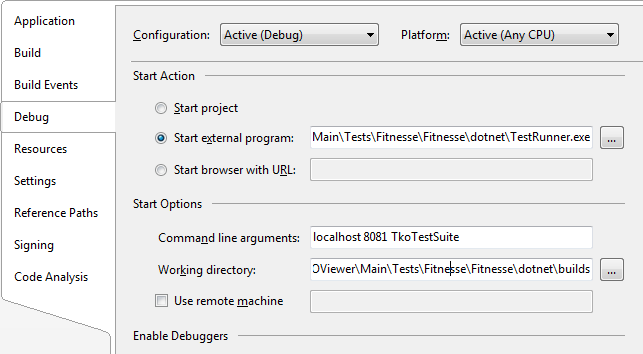
On your Fitnesse fixture project's property sheet, set up debugging as shown below.

The external program needs to point to TestRunner.exe in your .NET Fit distro.  The command line args point to the host (localhost), port (8081), and the page your tests are located on (TkoTestSuite).  Note that parameter is not the assembly or fixture name!  You just need the page name relative from the Fitnesse root.

Make sure that your FitServer process is running.  Set your fixture project as the startup project, set a breakpoint in your code, hit F5, and you're off.  Normally Studio would whine and complain that you can't start a class library project, but you're firing off the TestRunner.exe program in debug mode so everything's shiny.

Voila!

Wednesday, January 16, 2008

CodeMash Podcasts Are Posting!

Chris Woodruff has done a great job of starting to roll out the CodeMash podcasts.  Three interviews are already posted to the Podcast page on the CodeMash site, and session recordings will be posted soon.

Brian Sherwin teamed up with Chris to get all the sessions at CodeMash recorded.  They did a great job of getting a lot of work done!

Check out the interviews and keep tuned for more content to head up there!

Tuesday, January 15, 2008

Speaking in Southfield (Detroit) Wednesday, 1/16/2008

I'll be speaking at the Great Lakes .NET Users Group tomorrow (Wednesday, 1/16/2008) at 6:30pm.  I'll be doing my Open Source Test Tools talk, one of my favorites because it covers so many goodies like MbUnit, Watir, Fitnesse, Rhino.Mocks, and a passle of other widgets.

I'm looking forward to speaking to the group up there!

Saturday, January 12, 2008

CodeMash Summary (Coherent One)

CodeMash 2008 has come and gone and it was a terrific event.  Way more better than last year, and last year kicked butt!

We had a terrific lineup of speakers this year, and all three keynoters knocked it out of the park.  Neal Ford's talk on the evolution of software as an engineering discipline was the perfect kickoff to the conference.  Scott Hanselman's talk was a winner for several reasons: his opening schtick ("My life from DNA to this afternoon") was hysterically funny and absolutely perfect as a re-energizer for a group of folks who had spent the morning in sessions and then followed up with lunch.  No snoozing allowed. Brian Goetz's talk was very well-delivered and thought provoking.  Concurrency is an awfully difficult thing, and Brian did great job of planting a number of critical seeds in attendee's brains.

As always, the Kalahari Resort was a blast.  I didn't get to the water park (again); maybe next year if my family manages to come.

Many highlights were had, and only a tiny number of insignificant lowlights.  The hard work that the organizers did to put this on is stunning.  One of the greatest things for me personally was when Sara Ford said she didn't realize the conference was run by volunteers.  Another highlight was seeing Scott Hanselman spend a huge amount of time playing Guitar Hero and Rock Band and just hanging out with folks.

Brian Prince, Jason Gilmore, Jason Follas, Jeff Blankenburg, Josh Holmes, Dianne Marsh, John Hopkins, Brian Sherwin, and Chris Woodruff -- y'all did amazing work putting this together.  Many, MANY thanks!   Special thanks, too, to all my Quick Solutions homies who did extra lifting for the event: Matt Casto, AlexiG, Arnulfo, and all you other guys who I'm too tired to write out and link to.  Thanks for making my workplace and CodeMash something very special.

Perhaps one of the best highlights of the conference: finding my vest with my keys in the pocket in a corner of the conference venue this morning.  Now I can go home to my family!

Again, many thanks to all the folks who made CodeMash 2008 such a great success.  Organizers, sponsors, and most of all the passionate, tuned-in attendees who showed up and made it a great event.

Update:  Fixed spelling errors in keynoter names.  Maybe this wasn't such a coherent post after all...  (Thanks to Jason Gilmore who fell back to his old role as an editor and slapped me around about the errors!)

CodeMash Gets Media Coverage!

The Toledo Blade sent a reporter over to CodeMash to do a story on CodeMash!  The story's bent is on the job market, developers seeking jobs, and recruiters chasing them.  The reporter really didn't cover the conference's main purpose, which is too bad, but hey, every story needs a focus so that's OK.

Yours truly got mentioned in the interview.  Most of the mention was around my age and clothing, but that's OK.  At least he didn't say my ass looked big in my shorts.

Friday, January 11, 2008

CodeMash 2008 Wrap Up

Great CodeMash 2008 was.  Ford keynote.  Hansleman Rock Band addict.  Cool tech geeks and geekettes.  New friends many made I did.  Good gabbing I did.

Jim exhausted is.

Now Jim sleep.

First, thanks all helped, sponsored, and attended.  No CodeMash without you.

Jim more later write when brain recharged is.

ZZZZZZZZZZZZZzzzzzzzzzzzzzzzzzzzzzzzzzzzzzzzzzzzzzzzz..........................

Saturday, January 05, 2008

How Much Do I Love Lotus Notes?

This much.


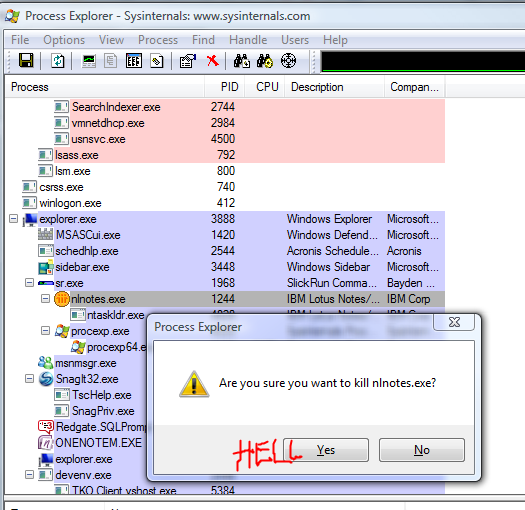
A screen shot from one of the many, many times I've had to use Process Explorer to kill the POS crapware.

I am SOOOOOO looking forward to the day when we're able to put a stake in the heart of Lotus Notes and move to Outlook.  Outlook's got its own set of warts, but nothing like Lotus Notes which has completely failed to make any improvements since I used it in the mid-90s.

Crapware.  Total crapware.

[Editor's Note: We've gotten Jim back into his usual comfy white jacket with nice sleeves that tie behind him.  He's also happily blurbling in the corner again now that he's had his meds.  We now return you to your regularly scheduled enjoyment of  FrazzledDad.]

Book Review: Simply JavaScript

Simply JavaScript by Kevin Yank and and Cameron Adams, ISBN 0980285801, published by SitePoint.

I've been exposed to very little JavaScript, so I was very happy to get a review copy of this sent to me.  First off, I'm a big fan of SitePoint's books, and secondly I was looking forward to a book which would hopefully give me some good ground-up fundamentals.  I'm not completely through the book yet, but I'm very impressed with it so far.

The book starts out with some good software design tenets by emphasizing the need to keep content, style, and behavior separated out, then moves into some very basic steps for programming in JavaScript.  The programming intro chapter starts out completely for beginners by laying out what variables are, what conditions and loops are, etc.  Later chapters hit the DOM, JavaScript libraries, events, debugging, Ajax, and a few other topics.

The authors do a very good job of laying out their topics, and I enjoyed their clear, enjoyable writing style.  I think they do a pretty good job of discussing good development, and they're all over things like browser compatibility issues and other "Gotcha!" type issues.  They've got a nice set of sidebars for tricks and tips as well as things to look out for.

I also like that it's another SitePoint book with loads of color throughout.  I'm not sure how SitePoint does it, but their continuing journey with all the color books is absolutely great to behold.

On the downside, I'm not a fan of some of the example code I saw, which in several cases was more convoluted than good design would dictate (multiple nested for loops, return statements from other method calls being used as return values themselves, etc.).  I also would have liked to see some discussion of testing via tools like Selenium or JsUnit.

That said, overall I like the book a lot.  They talk standards, they talk cool tools like FireBug, they make some headway with good decisions about separation of code, content, and style.

I'm almost done with the book and have been very happy with its content.

Wednesday, January 02, 2008

CodeMash is Nearly Here -- And Why You Should Care

CodeMash is just a few days away!  If you're not considering coming then let me throw out a few points to perhaps help sway your mind:

  1. Cost.  CodeMash is ridiculously cheap, even with the Early Bird window expired: $175.  Other conferences charge thousands.   Hotel rooms are $88 per night, but you'll need to move exceedingly fast since the room block is filling up!
  2. Content.  The schedule of sessions is on par with any national-level conference, and the mix of disciplines is unlike anything else you can find.  No other conference, regional or national, brings together folks from Java, Ruby, .NET, PHP, etc. under one roof to share experiences.
  3. Networking.  Making new contacts is one of the greatest benefits at any conference.  CodeMash will give you the opportunity to reach out to a wide range of folks you wouldn't normally be able to hook up with.
  4. Cool Factor.  It's at a freakin' indoor water park!

Training budgets are always a huge PITA, and it's sometimes tough to convince management of the value of conferences.  If you're in the latter category then offer up to management some of these points:

  1. Time to Market.  New ideas on how to solve problems will help you deliver solutions more quickly.
  2. Quality to Market.  Exposure to different testing approaches and tools will help you increase the quality of code you're developing.
  3. Innovative Products and Solutions.  See the blurbage for the first point.  You'll be exposed to any number of new things at CodeMash.
  4. Skills Development.  Management needs to recognize good developers for the extremely scarce resource they are.  Care and feeding of good developers should be a priority.   CodeMash will help motivate you and get you fired up in all kinds of new ways.  (If you're in a place that doesn't treat you well, then contact me via the link on the sidebar and I'll help you get in touch with folks at a place that does value its devs -- Quick is sending nearly 30 of its technical staff.)

"But my work is for internal projects, not things we release to market!" you say.  Fine.  Those internal projects still have customers -- the company staff who are using them.  Just flip the blurbage to point to your internal folks.  You should be thinking of them as real customers anyway, because that's what they really are.

CodeMash is an extremely unique opportunity for you to attend a world-class conference at an extremely cheap price.

Tuesday, January 01, 2008

CodeMash Contest!

Jeff Blankenburg is running a great contest for blogging about CodeMash.  Post something on your blog about CodeMash, then make a comment on Jeff’s blog about it.

The swag bag he’s offering up as a prize is full of great stuff!

Subscribe (RSS)

The Leadership Journey