Sunday, February 07, 2016

Demonstrating Risk, Stability, and Testing

Learning Through Games

UPDATED: Kim Engle pointed out I'd forgotten to include a timeframe to run this. Depending on amount of laughter and discussion this can take between 30 - 45 minutes.

Many coaches use the Jenga game to help illustrate the importance of testing early and often. It’s a fun activity that demonstrates the concepts in a light-hearted but eminently clear way.
I’ve wanted a similar approach to help drive home the idea of stability, risk, and how testing helps mitigate those issues. I also wanted a clear expression of the always-present constraint of time. Moreover, I want to explicitly demonstrate that stable components don’t need anywhere near the amount of testing as less stable components.
I came up with the following approach several months ago, and it’s been very effective the three or four times I’ve run it so far.

Overview

The general idea is to build a structure of a specific minimum height in a constrained amount of time. Attendees are given different materials each iteration with the same height and time constraints. The different materials inject stability issues, making it harder to meet the minimum height requirement within the time constraint. This tends to be a lot of fun, because as with the Jenga game there can be a lot of crashing as structures fall apart.
I’ll start the exercise talking about value and risk—two things I continually hammer home during my coaching sessions—and talk about how this exercise is a tradeoff of value and risk. I don’t specifically call out stability during my explanations. I like that come to the forefront as the game unfolds. Your mileage may vary.

Rock, Dice, Marbles Game

(Apologies to Rock, Scissors, Paper.)

The Goal

Illustrate the interaction of risk, stability, value, and how testing comes in to play helping stabilize things and mitigate risk.
Materials required:
  • One set of dice per team – nine to 12 dice
  • One small rock per team. Rock should be somewhat die-sized and roughly square. You don’t want them too flat—part of the point is the rocks being unstable…
  • Two marbles per team
  • One small blob of putty, PlayDo, or otherwise squishy stuff. This blob should be fairly small. It’s meant to illustrate testing, a constrained resource.
    Dice, clay, rocks, and marbles.
    Setup:
  • Break up your group in to teams. Keep teams under six if possible. Three to five per team seems to work best.
  • Give each team one set of dice. Keep the other materials hidden.

Timeframe: Allow 30 - 45 minutes for this.

Iteration One

Rules for I1:
  • Must build a tower at least eight dice high. I’ll also often use the sides of my Moleskein as a measure instead of just saying “Eight dice” or whatever.
  • Time limit of 90 seconds
Running I1
Explain the rules, then start the timer and have teams build their towers.
When the timer finishes you’ll have some successful teams and some who had trouble with falling towers.
Discussions
This is the first place to start discussing the main point: stability. The structure’s a bit wobbly, even when using dice. Sometimes teams will use interesting approaches to building. Use opportunities as they arise to discuss how different approaches help mitigate instability, risk, etc.

Iteration 2

Distribute a rock to each team. This is generally met with some groans and pained laughter. Play that up! The game’s meant to be fun in addition to educational!
Rules for I2
* Must start tower from scratch. No building on top of existing ones!
* Must build a tower the same height as I1
* The rock must be used as part of the tower. It must contribute to the tower’s height, meaning you can’t just set it off to the side of the tower. It has to have something on it, or be on top of something else.
(I’ve had some creative attempts to get around the intent of this. Testers. Go figure. Again, use this as an opportunity to inject some humor as you describe the rule and ask the teams to honor the intent of it!)
Running I2
Same as before: Start from scratch, 90 seconds, fire the teams off and see what happens!
Discussions
More instability, this time in a big way. I’ve had some teams build smaller towers that included the rock. This is actually a great discussion point: those teams shipped some value! That’s not a bad thing—it offers a great opportunity to discuss value versus risk trade offs!
Look at people who succeeded in any fashion and talk about how they managed their risk/stability.
Now carry the discussions over to software delivery. Make a connection that the stability in this game is a metaphor for different components/systems we work with.

Iteration 3

Pass out two marbles to each team. Yet another opportunity for injecting some serious humor. “Oh no! You’re giving us another rock???” “No! I’d never do anything so mean! Here, have marbles.”
Rules for I3
Same height and time constraints. Start from scratch. Rock and one marble must add to the height of the tower.
One critical modification here: The stakeholder must have a tower at the minimum height. A shorter tower will not deliver him the business value he needs.
Running I3
Same as before. There should be a nice amount of crashes, laughter, and muttering.
Discussion
Huge stability issues. Connect back to software: stable components and systems. Less stable or newer components which haven’t been used for as long. Brand new systems, or ones written very, very badly.

Iteration 4

Now distribute out the small ball of clay/putty. Talk about stabilizing as you’re doing it. Don’t tell teams how to use the clay.
Rules for I4
Start from scratch, same height, 90 seconds. Rocks and marbles must contribute to height.
Running I4
Same as before. Start it off, let it roll.
Discussions
Talk over how teams used clay for stability. I’ve seen a wide range of uses: dots between dice, nothing on dice, big blobs on the marbles, etc. One team made a large pancake of clay and wrapped their rock and die in it—what a great metaphor to tie directly to software wrappers around unstable components!
If the teams haven’t made the connection of clay == testing, help guide them along that. Now’s the time to really head off down the road of “You have 35 - 40 hours a week to apply all your testing expertise. Where are you and your team going to focus? What’s the scary unstable stuff? Where’s the high-risk stuff?”
This is also the spot in this exercise where I really hit home on careful thinking around test coverage, regression, and dear God PLEASE STOP TESTING ALL THE THIRD PARTY TOOLS YOU HAVEN’T CUSTOMIZED.

Finishing Up

You should definitely poll your attendees to see what they got out of this. I always get some neat feedback, and it’s important to validate the attendees got some glimpse of the goal of the exercise.

Note on Licensing of this Exercise

I invented it, I’m licensing it.
Here’s my terms: Use this as much as you want, whenever you want, wherever you want. Pass the concept on to others as often as you want. The sole term in this license is if we are ever in the same place at the same time you must buy me a [drink] and share your experience with the game I mean exercise. Let me know if it worked, and how you’ve changed it.
Awful terms. I get it.
[drink]: Coffee, soda, or beer. Scotch is best; however, I’m happy with anything as long as you share your experience!

Wednesday, December 16, 2015

Give Yourself a Great Christmas Present: A Job With Pillar

Want to start off 2016 with a job that’s challenging, interesting, and fun? Come join me at Pillar Technology!

We’ve got a significant number of job openings across a lot of disciplines. We’re looking for people to fill roles as Delivery Leads, DevOps, Experience Architects (and here at Pillar that is a real role, not some vaporware handwavy marketing thing!), and of course Software Craftsmen!

I joined Pillar last March and it’s been a tremendous time since then. I’ve know the folks at Pillar for years, and I love how they’ve grown in to a focused, passionate, awesome organization. If you looked at Pillar some time ago, I’d encourage you to give us another consideration. This is the best environment I’ve had in my career, and I love the clients I’m working with.

Interested? Drop me a note either at my work address or personal and I’d be happy to chat with you via mail, Skype, phone, or face-to-face. Sorry, no Morse code. I forgot everything after having earned the Signaling merit badge 40 years ago…

Tuesday, December 01, 2015

ISTA Conference Keynote

For those interested, my keynote from ISTA Conference 2015 in Sofia, Bulgaria, is live now on YouTube!

This keynote meant a lot to me. It was my first one, which was nerve-wracking, plus the organizers were kind enough to give me free rein to do a somewhat quirky format. I wanted badly to do a shorter keynote, and specifically stay away from the hour-long breakout-session-disguised-as-a-keynote format.

My topic for the talk was "Why?" which is a question we don't ask anywhere near enough. The talk's just under 30 minutes, so it's an easy to watch/listen to chunk.

I hope you'll find it interesting.

Thursday, October 01, 2015

Keynoting at ISTACon in November

I’m honored to announce I’m going to be keynoting at the ISTA Conference in Sofia, Bulgaria 18-19 November! This is exciting for me on a number of levels.

enter image description here

First, it’s my first-ever keynote, which is pretty exciting. I’ve never spoken to more than ~150 attendees, so being up front before 700-800 will be a new experience!

Second, I get to return to Sofia, Bulgaria, which is one of my favorite cities in the world. I had extraordinary experiences there when I worked for Telerik, and I’m looking forward to being back there.

ISTA’s organizers were kind enough to let me go a bit astray from “normal” keynotes. Instead of an hour talk I’ll be doing a much shorter session on the lines of a KalamazooX talk. My topic is “Why?” and I’m hoping to fire up attendees to ask “Why?” more often as we work to deliver value to our customers.

I’ll also be presenting my Leadership 101 workshop. This workshop’s from the heart, so it’s always a rewarding but exhausting experience.

ISTA’s registration is already open. I hope folks in the region will be interested enough to attend—it’s a great conference with a lot to offer! If you can’t attend please at least share the info to your friends, colleagues, and community members.

Please look me up onsite if you’re going to attend!

Thursday, September 03, 2015

Don't Ignore Big Deltas in Your Teams' Estimates

Estimates suck. They’re always wrong, and of course estimates somehow end up getting treated as exactimates, or worse yet, commitments.
enter image description here
I’m not here to tell you how to do estimates, or how to follow the #NoEstimates movement and not do estimates at all.
What I am here to do (well, in this article at least), is tell you to pay attention when you have wide estimate ranges within your team. It’s a situation that isn’t just an indicator of a skills gap. It’s a warning flag that maybe you’re missing something. (It’s also a great learning opportunity!) Regardless whether the range in estimates comes from junior to senior, or between similarly experienced folks, take some time to dive down into a conversation about the delta.
What’s causing the big disconnect? Is it indeed a skills/experience gap? Do the junior team members misunderstand the complexities involved? Take a few minutes and have someone more senior walk them through things—and make sure they get an understanding of what’s involved in this particular work item.
This quick learning moment doesn’t have to extend out to a huge training/knowledge sharing session. Keep it tight and focused; after all, the primary purpose is to get the estimating done. If needed, take the conversation offline so it doesn’t derail whatever meeting you’re in at the moment.
An even more interesting situation is when you have people with similar experience differing widely on work. Don’t simply take averages of the estimates and move on. Take time to explore what’s the rationale behind the extreme delta. In this case, you do want to spend as much time’s needed to clarify the delta.
Is the delta due to a lack of clarity around the work item? Spend more time getting the details around acceptance criteria, documentation, whatever’s necessary to ensure everyone’s on the same page.
Is the delta due to a disconnect in complexity of the work? If needed, whiteboard out workflows, data structures, dependencies, etc. until everyone’s got roughly the same idea of complexity involved.
Is the delta due to misunderstanding of the amount of testing involved? If so, move along, BECAUSE THAT NEVER HAPPENS. Hah. Of course it happens! This situation needs time to rectify, because the team has to make sure testing aligns with the information the business/product owner/customer needs to make effective risk/benefit decisions. Are the testers over-focusing on edge cases that don’t directly apply to highest priority risk/values? This can be a regular issue with less mature testers. Is the team missing critical integrations or dependencies that might impact how much testing is really needed? What about coverage matrices for things like browsers, devices, operating systems, etc.?
Work through the testing requirements, but ensure you’re focusing on what the business needs from you. Remember: The testers don’t assure quality, nor does the delivery team, frankly. The business/product owner/customer is the only one who can do that. The team is responsible to pass along the right information to help those people make informed decisions.
Got big estimate deltas? Make sure you’re using that as a trigger for further discussion!
How have you approached handling big deltas in your teams’ estimates? Let me know in the comments!

Wednesday, August 26, 2015

Sorry, I Can't Talk to You This Iteration

No, seriously, I actually heard that on a project once upon a time.
The client’s team had gotten far too focused on capacity and lost sight of delivery. Management wanted more stuff faster, so they focused on full utilization and commitment. As a result they were in a place where time for collaboration, knowledge transfer, and you know, teamwork had to be scheduled. Management had clearly lost sight that 100% utilization means no slack for conversations. They’d missed the problem that 100% utilization turns freeways—and software teams—into parking lots.
http://images.geo.tv/updates_pics/pakistan-karachi-trafficjam_8-5-2013_112485_l.jpg
Intended or not, teams and individuals on the project ran with that mindset to an extreme. Collaboration and cross-team assistance fell off drastically, as did the sense of a shared goal: working software delivered to the customers.
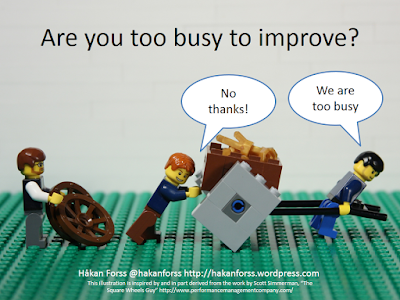
Such an emphasis on capacity and commitment isn’t healthy. I’ll go so far to say it’s a cancer. Regardless whether you’re “agile” (whatever that means), waterfall, or something else, you must leave slack time in your schedule. Without slack you’ll never get your teams working on the most important aspect of any software methodology: continual improvement and adaptation.
https://hakanforss.files.wordpress.com/2014/03/are-you-too-busy-to-improve2.png
Healing up this mindset and culture isn’t easy. It’s an issue with management’s pressure and unreasonable expectations. That can be a result of a lack of skills with the delivery teams’ ability to ship; however, honest change needs time for that change.
Generally management is open to discussions around impacts to delivery or business value. Remember, misguided as the decisions might be, they’re an attempt to meet deliverables and ship software. Frame your case in that context and you might have some luck.
Start gathering hard data around situations like:
  1. Work items blocked by inability to get time for discussions. Can’t get time with Team <X> to discuss the API work item you’re on right now? Note that and consolidate with other data.
  2. Work items slipping past the iteration. Are those blockages from #0 bad enough that you can’t finish your work? Make sure the reason behind it is clear to people up the chain.
  3. Lack of knowledge transfer. Shared codebases are critical, even on large projects. Can’t get time to understand critical aspects of what you’re working on? Document, escalate.
Make sure you’re approaching this from a positive, not negative, direction. Don’t even get out of bed if you’re planning on a “This is stupid and everyone sucks!” pitch. Instead, frame it as “Look, this is costing us <X> hours, <Y> blocked user stories, and <Z> <fill_in_blank/>.”
Additionally, come to the table with a suggested approach for fixing it. “Look, can we reserve some slack time each iteration for more ad-hoc discussions? Having some honest time for collaboration will help us prevent the <X> hours lost, <Y> blocked stories, and <Y><fill_in_blank/> we’ve seen the last couple iterations.”
Every team’s primary focus should be working software in production. Blocks to effective communication and collaboration are a direct impediment to that. Work to cure that cancer!

Tuesday, May 05, 2015

So Long Heartland

Back in the summer of 2001 my family (just three, back then) moved to Beavercreek, Ohio. For those of you who are, like me, math-challenged that’s 14 years. We’d moved here for my wife’s final assignment during her 20 years of service in the USAF.

At the time I was working as a customer relations manager for a small Department of Defense contactor engaged on a long-running program run out of Wright Patterson AFB. I was handling customer conversations and some project management, plus I was doing “testing” for the system we were developing.

enter image description here

Over those 14 years my family grew to four, we put 45 cubic yards of dirt in for flower beds, well over 100 cubic yards of mulch, we added on an 800 ft2 addition for my Mother-in-Law (hold the jokes. She’s awesome.), 1500 ft2 of laminate flooring, and 80 gallons of paint. Unlike other situations, those are accurate figures, not me exaggerating!

Also along the way I managed to hook up with the amazing Heartland’s amazing developer community. Yes, I know, I wrote amazing twice. It’s that amazing.

I was lucky enough to get engaged with the community here at a really interesting timeframe. In 2005 there weren’t any conferences being in the Heartland other than the occasional commercial thing like No Fluff Just Stuff. What was here was a nascent, primordial bubbling goo formed by some really smart, motivated folks who wanted to reach out to other like-minded folks.

I was fortunate to hook up with people like Drew Robbins, James Avery, Brian Prince, Josh Holmes, Mike Wood, and others who were starting to get various conferences off the ground. (I’m missing lots of people off that list. Sorry.) That group exploded out and created an incredible number of community events.

By 2008 you could, literally, hit a one-day conference at least once a month if you wanted to. Days of .NET, Code Camps, Give Camps, Days of Agile, and others had sprung up from Grand Rapids down through Nashville. Larger conferences like DevLink, StirTrek, KalamazooX, and of course CodeMash took off over the following years. User groups were springing up all over the place.

Fast forward to 2015: the pace of Code Camps, Days of .NET, etc. has died down a bit, but larger regional conferences like StirTrek, CodeMash, etc. have exploded. User groups have gone the way of tribbles and have spun off into an insane amount of local meetups, user groups, hangouts, whatever. I stopped trying to keep track years ago.

Heartland’s community is full of smart, passionate, welcoming folks who opened their arms, brains, and hearts to those interested in improving their various crafts, skillsets, and general outlook. These folks helped get me motivated to get out of the soul-crushing work I was involved with at the time. I trace a line from the awesome job I’m currently doing directly back to influences, motivations, and friendships I developed amongst Heartlanders over the years.

I can also point to at least three jobs I got directly because of my involvement with the Heartland community. I once got a job offer from a Heartland homie three or four days after I reached out. When I hung my shingle out earlier this year I had seven leads on independent contracts, five writing leads, and four job interviews—within four days.

Folks in this region are simply amazing. I’ve been blessed to have spent so many years here.

With all that said, it’s time for me and my family to bid adieu to the Heartland. My wife and I’ve always known Dayton wasn’t even close to our “forever home.” No mountains and too far from my family.

On 9 May my son, brother-in-law, and I load up a 27’ UHaul truck and minivan and head west for Ashland, Oregon. With two cats and two dogs in the minivan. Please send your prayers for what little is left of my sanity. The rest of my family will follow in stages, but we’ll be settled in our new home in early June.

I can’t list out all the people I really need to thank. There are hundreds of you, maybe even thousands. Literally. Those of you who’ve suffered through assorted tech crashes during my talks, those of you who’ve patiently listened to various rants, those of you who’ve made CodeMash so awesome, those of you who’ve lent me energy and strength at various dark phases of my life.

If you’re ever out in southern Oregon, please drop me a note either via mail (FrazzledDad@Gmail.com) or Twitter (@aJimHolmes). I’d love to meet up for a coffee, craft beer, or good glass of PNW vino.

To all I’ve met over the years: Thank you all. You’ve given me far more than I gave.

Monday, April 06, 2015

Visual Resume Template

Some time ago I posted about my visual resume. I think visual resumes are a great way to show off things you’re proud of in your career, so I started passing mine around together with my traditional resume.
Jim Holmes Visual Resume
More recently, someone asked if I’d put my resume out as a template, so I did! It’s a Visio file, and you can find it here on GitHub. I released it under Creative Commons CC0 which means, I think, you’re fine to do whatever you want with it.
Just don’t plagarize my stuff as your stuff. Other than that, I wish you well!

Wednesday, March 18, 2015

Changing Cucumber Fonts in Eclipse Editor

Problem: You’re writing Gherkin in Eclipse and you can’t figure out how to adjust font size in your Feature editor.

Solution: It’s actually in the Basic text editor. Window -> Preferences -> Appearance -> Colors and Fonts -> Select “Basic” folder in panel -> Text Font -> Edit.

Bonus: Make sure you’re using the Eclipse theme color plugin plus the Cucumber for Eclipse plugin.

Tuesday, March 17, 2015

Three Months with the Surface 3 Pro

I’ve had a Surface 3 Pro now for three months, and I thought I’d share my experiences with it for those interested.

TL;DR version: I hate it BUT I have some very specific use cases I bought it for—and it fails horribly at those. I know others who love their S3s, and there are a few things I do like about the system.

First off: My needs

I bought the Surface to handle loads of content production, authoring, and training when I figured I was heading out as an indie. I didn’t feel I needed a high-horsepower dev system, as that’s not my area.

Specifically, I needed a system that kicked butt at:

  • Running smaller-sized VMs
  • Video production
  • Writing
  • Portability
  • Light dev work

I purchased a top-of-the-line i7 Surface 3 Pro with 8GB RAM and the 256 GB SSD. I also sprang for a docking station and a few other odds and ends. Total cost was somewhere around $2,200 I think. (I’m on the road and away from my receipts…)

The Good

There are some things I really enjoy about the S3:

  • Form factor. Small, very lightweight.
  • Keyboard. Except for the trackpad (see below), I like the keyboard. I take my MS Ergonomic full-sized board along if I’m doing workshops or sessions where I have to code, but for general authoring and every day usage the keyboard/cover works really well. Great feel, good responsiveness.
  • Docking / undocking ease. Holy crap. I’ve suffered through decades of Microsoft’s crappy docking mess. The Surface 3 plus Win8.1 makes it a snap, literally. It’s a joy to not have to deal with the drama from way back.
  • Stylus. Freaking. Awesome. Great feel, extremely precise, great use of buttons on the pen. Kills anything I’ve used on the iPad. Did I mention it’s awesome?
  • FreshPaint. I badly missed Paper on my iPad. I fell in love with it for doing craay craay slides for demos and presentations. FreshPaint is nearly as good, although there are several icons/buttons that are a total mystery to me. The help for FreshPaint is non-existent, apparently.

The Bad

Here’s where the wheels fall off. Completely.

  • VM perf over USB3 is unusable. I lose horrific amounts of time trying to run VMs off an external USB3 drive—the same model I’ve had on other systems. It’s horrible. It’s unusable. Which means some of my demos requiring multiple VMs turn into a complete cluster fill-in-the-blank. I had better performance on Firewire 800 on an older MBP.
  • Power management. I hope the crew that designed power management on the Surface 3 gets infested with bedbugs and fire ants. The power management options are stupid, such that:

    • I can’t tell the system to stay awake while on battery, but turn on the screen saver. Utter fail when I need to leave the system on for long-running renders and uploads.
    • Hook up the S3 to my Bluetooth speaker, start music playing, system shuts down and goes to sleep at the hibernate timeout period. Apparently that timeout doesn’t monitor background system activity. Sigh.
    • Battery life is pathetic, even when I’m not running anything. Apparently there are a bunch of registry hacks and deep system tweaks I can do, but WTF? Seriously? Yes, I know, I’m holding it wrong.
  • The screen driver is tetchy and causes issues when I’m working in VMs. It also won’t let me properly use Telerik Test Studio on the native S3.

  • Sound output managment. Every time I plug in headphones I have to reconfigure the default playback device to play over my headphones. Same if I want to use an external Bluetooth speaker W.T.F?!? Crazy usability #EPICFAIL with much profanity.
  • My device died a horrible death a month after I bought it. Best Buy Geek Squad guy wrote “BIOS screwed up” on the RMA. BTW, this is the second Surface 3 we’ve had die. My wife’s bricked a couple months after we bought hers.
  • Wifi and bluetooth are tetchy. Dropped connections are far too frequent.
  • Touch screen experience inconsistent. Sometimes I click a finger into a field and it won’t recognize that I want to type.
  • Weird stuff when rotating (keyboard disabled, touchscreen weird)
  • Apps (other than FreshPaint) are meh

Do keep in mind my very specific use case. I know other folks who love their Surfaces. Good for them, and frankly I see some good use from this when watching Netflix or reading while on the road.

That said, for ME this is worst tech purchase ever. Over $2,200 with docking station and extras. Wish I’d gone with a completely different platform. :-/

Monday, March 02, 2015

My First Day with Pillar!

It’s another new chapter for me today: I’m joining Pillar Technology as an Executive Consultant!

I’ve known folks at Pillar for years in many different roles. They were instrumental in helping us sponsor CodeMash, and they’re deeply involved in the Heartland region’s active developer community. When we were struggling during the first CodeMash and knew we were tight on budget, Bob Myers, Pillar’s CEO, personally wrote me an extra check for $2,000 just in case we needed it. I was happy to be able to return it to him, but wow, what a great gesture!

I’ve talked with Pillar several times over the years about coming on board, and I always respected their team, but things weren’t ever quite right for one reason or another. Pillar’s Matt Van Vleet’s probably bought me as many breakfasts as he has key clients…

When I came back on the job market in December Pillar’s Don Abney immediately reached out to me and I had a great chat with him. I was extremely impressed with the extreme focus Pillar’s showing now, and I was very intrigued by the serious change they’re making in the organizations they’re working with.

Today I’m onboarding over at Pillar’s Forge in Columbus, and tonight I’m driving up to Detroit where I’ll start at a huge enterprise helping some of their teams build up their testing and delivery competencies. And automation. Go figure. I’m excited because I get to roll up my sleeves and do work, as well as help coach others along—which always ends up transforming me as much as those others.

It’s an exciting future, and I’m looking forward to the journey!

Thursday, February 26, 2015

Don't Start With Automation

I’ve lost track of the number of times new testers have asked me some variant of “I’m new to testing. What automation tool should I start learning?”

I really appreciate their excitement about automation—especially since I’ve made automation my wheelhouse—but it’s not the thing new testers should focus on!

Testing’s a craft with a whole lot of tools, most of which are between one’s ears. You need to focus on developing your skills as a craftsperson, not just jumping on the automation bandwagon. (Please, do join me on board, though. It’s a great wagon to use for parts of your testing ride!)

As a newcomer, there are a tremendous number of things you can use to build up your testing skills. In no particular order, here’s a few things I’ve pointed people to over the various years.

People:

  • Elisabeth Hendrickson, aka @TestObsessed on Twitter. Funny, wise, calm, extremely thoughtful tester. Her Test Heuristics Cheat Sheet is caramelized unicorn bacon drenched with awesomesauce.
  • Michael Bolton (@MichaelBolton) is a great thinker and writer in the testing space. He’s strong coffee and very opinionated, but I’ve gotten a lot out of reading his material. Much of Michael’s writing is at DevelopSense.
  • James Bach (@JamesMarcusBach) I’m really not a fan of James’s personality, but he’s done a lot of great thinking about what testing’s really about. Read with an open and skeptical, questioning mind. His deck on test cases is a great read.
  • Lisa Crispin (@LisaCrispin) and Janet Gregory (@JanetGregoryCA) are both smart folks who you should follow.

Other people who I’m not taking enough time to describe their awesomeness, but simply list. All are easily discoverable on Twitter, Google, etc.

General testing folks

  • Matt Heusser
  • Michael Larsen
  • Alan Page
  • Trish Khoo
  • Paul Carvalho
  • James Lyndsay

Automation geeks (who are also great testers, btw)

  • Adam Goucher
  • Richard Bradshaw
  • Dave Haeffner

Please keep in mind: these folks are a starting point! Many are folks I know personally and respect, and they’re pals. Expand beyond this list!

Books:
There are plenty of great books to read; these are a few titles that really stick out:

  • Beautiful Testing
  • ExploreIt!
  • Agile Testing and More Agile Testing
  • The Art of Agile Development
  • The Art of Unit Testing in .NET
  • Specification By Example
  • A Practitioner’s Guide to Software Test Design
  • ATDD by Example
  • Lessons Learned in Software Testing
  • Experiences Of Test Automation

Community:
Find testing groups near you, or start one! Look to some of the various online testing communities. Weekend Testers is a great start!

Conferences:
Some conferences are great, so are a waste of time and money. But I’m slightly opinionated…

  • CAST
  • EuroStar
  • STP Conference

Branch out to good developer conferences where there’s a welcoming, encouraging atmosphere. I’m biased, having been on the Board of Directors, but CodeMash is one of the best conferences you could hit for cross-polinating.

Other:

  • Elisabeth Hendrickson’s blog Test Obsessed. She’s stopped posting since moving out of the consulting space; however, her writing is gold. Just. Plain. Gold.

Don’t Stop Here

Testing is about curiosity. It’s about sharing information with your team, organization, and customers. It’s not about “assuring” quality—you as a tester simply can’t do that. You can be part of a team that delivers great quality.

Go out. Explore. Learn.

THEN go get started in automation.

Friday, February 13, 2015

Fixing Slow/Hanging VMWare Guests

Problem: Your VMWare guests may be incredibly slow or all together hang.

Solution: (One potential one) Check if your VMs disks have become corrupted. Repair them if so.

Steps:

Do the following with your VM powered off!

  1. Find the logs for your VM. They’re usually in the VM’s root directory, eg

    E:\VMs\2012R2\Win2K8R2.vmwarevm

  2. Open the latest logfile in that directory, eg vmware.log

  3. Search for “repair”
  4. If you find hits similar to the example below, you’ll need to run the disk repair utility.

    2015-02-13T14:00:06.102-05:00| vmx| I120: DISKLIB-DSCPTR: Opened [2]: “Virtual Disk-s003.vmdk” (0xa)
    2015-02-13T14:00:06.107-05:00| Worker#0| I120: DISKLIB-SPARSE: “E:\VMs\2012R2\Win2K8R2.vmwarevm\Win2K8R2-s001.vmdk” : failed to open (14): Disk needs repair.

  5. Open a command prompt and navigate to your VMWare install directory. On my system it’s:

    C:\Program Files (x86)\VMware\VMware Workstation

  6. Run the following command, where “” is the folder containing your VM’s disk—likely the same folder you found the logfile in above.

    vmware-vdiskmanager.exe -R

  7. Start your VM back up. Once it’s back up and stable, check the latest logfile and search for the same “repair” error. If “repair” isn’t found, search for the same file opening entry just before you ran the utility:

    2015-02-13T14:00:06.102-05:00| vmx| I120: DISKLIB-DSCPTR: Opened [2]: “Virtual Disk-s003.vmdk” (0xa)

  8. Verify there aren’t any errors.

Hopefully this will get you up and running!

Wednesday, February 11, 2015

Fixing Outlook Search Issues

Problem: Outlook’s “instant search” isn’t returning any results, or search isn’t returning results unless you change the scope from its default Current Mailbox to something else.

Solution: (Well, more accurately One Potential Solution) Run scanpst.exe, found in the same folder as Outlook.exe. On my system that’s C:\Program Files (x86)\Microsoft Office\Office15.

Point the utility at your PST or OST files. It will scan them. If it finds errors, you’re offered the option to back them up (Duh!) before repairing.

Fixed up my search problems that had been nagging me for a bit too long…

Thursday, February 05, 2015

Speaking on Leadership at KalamazooX Conference

I’m really pleased to be returning to the KalamazooX Conference as a speaker. KalX is my second favorite conference in the world, right behind CodeMash. KalX is something very, very special because it focuses on the human side of things: inspiration, motivation, self-improvement, self-fulfillment.

Mike Eaton invited me back to talk about leadership, so I’m polishing up a new talk “Growing Into Leadership based on previous talks, workshops, and of course my Leadership Journey book.

If you’ve been to KalX you know how special it is. If you’ve never been, I encourage you to consider attending—even if you need to travel. It’s that special. It’s that worth it.

Go register now on Eventbrite. You won’t be sorry. I promise.

Wednesday, February 04, 2015

I'm Listed in Top 21 Automation Blogs

I was surprised to find my blog as #3 on Testbuffet’s list of the Top 21 Test Automation Blogs for 2014. That’s quite flattering, and I’d like to give a big “Thanks!” to the folks at Testbuffet and the evaluators for that list.

That list is a great resource for you if you’re trying to broaden your reading horizons. There’s a lot of smart testers writing on topics other than just automation there!

I’d also encourage you to check out other lists from Testbuffet:

Tuesday, February 03, 2015

Book Update

Update: Wow, StackEdit did a horrible job of posting this! I had to fix several format issues including the book's price, which is is $12, not $122.

In case you missed it, I’m writing The Leadership Journey on LeanPub. The book’s meant to help individuals become great team leaders.

Pricing for the book is pretty attractive: Minimum price is FREE and recommended price is $9.49. When I release the price will change to minimum of $5 and recommended around $12.

The book’s currently at 67 pages and around 13,600 words. I hesitate to put a figure on it, but I’d estimate I’m around 50% - 70% done. Mind maps lay out the sections and their rough status, so you’ll have an idea where the book is going.

The latest major update is getting started on dealing with Impostor Syndrome. Self-confidence is a critical part of leadership, and I want readers to have some concrete actions to deal with self-doubt which can turn out to be quite destructive.

If you’ve signed up and are getting the updates, I’d love to hear from you.

If you’re not currently reading it, but are interested, go grab it! Please do let me know what you think of it, either on the LeanPub discussion group for the book, or via e-mail: Jim@GuidepostSystems.com.

I’d love to hear what you think of it!

Wednesday, January 28, 2015

Find me at CodePaLOUsa 2015

I’m very pleased to announce I’ve been selected to give two pre-conference workshops at CodePaLOUsa 2015!

If you’re not familiar with it, CodePaLOUsa is a terrific four day conference in Louisville, Kentucky. It’s organized by a number of terrific community folks including Chad Green, and it’s a wonderful conference full of great speakers and attendees. This is another conference where the hallway conversations are every bit as great, if not better, than the sessions themselves.

For my part of the schedule I’ll be doing my Leadership 101 workshop plus my Testing Web Applications with WebDriver session.

I hope to see you there if you’re in the neighborhood!

Tuesday, January 20, 2015

Hone Your Craft, Raise Your Hand

Last week I was talking with some folks at Pillar in Columbus, Ohio, and we were discussing career progression. The discussion evolved into how individuals could move up a career path, or be recognized as wanting more responsibilities.

John Huston, one of Pillar’s leaders, made the comment “Hone your craft, raise your hand.” That comment really struck home with me, so much so that I grabbed a 3x5 card on the table and scribbled the phrase down right in the middle of the ongoing discussion.

I love John’s phrasing because it concisely sums up one of the best ways you can advance along your career path: work hard, ask for more responsibility. I’ve always been a believer that hard work gets recognized in good organizations. [1] It’s not immediate recognition; sometimes it takes an extended effort to get to that point.

Honing your craft is critical both to you and the organization you work for. Honing your craft means you need to invest the time and energy in a focused, planned effort to improve your skills. That helps you get better at your job. Your improvement rolls up into your organization’s ability to better deliver value to whoever the customer or end users are.

Raising your hand isn’t always easy. First off, many of us (I’m looking hard in the mirror here) have problems letting our leaders know we’re ready for more responsibility. We may suffer from impostor syndrome, we may feel it’s arrogant, or we may just have a hard time speaking up. (I suffer from all three…)

Regardless, it’s something that everyone should strive to feel more confident about. Asking for more responsibility makes sure your leaders know you want to help the organization in one fashion or another&emdash;and that’s something they may have been too busy to notice.

My most favorite jobs have been opportunities that popped up after having worked hard at other roles: Director of QA at Telligent, Director of Engineering at Telerik, and a few other things further in my past. I didn’t plan for those advancements, I just worked hard at the role I was in and made it clear I was happy to take on other tasks as needed. That mindset worked out well for me and resulted in neat opportunities I’d never thought of.

Obviously my journey’s different than yours. Your mileage may vary. Insert other disclaimers here as necessary.

Point being, too often we forget that sometimes the best way to advance in one’s career is simply to focus on improving how we do our own work: Hone your craft. We also forget it’s good to let your leadership know you want more responsibility: Raise your hand.

Hone your craft, raise your hand. Solid words for moving your career along.

[1]Yes, yes, there are places and situations where it doesn’t. Remove yourself from those. You own your own path.

Tuesday, January 13, 2015

CodeMash Session Follow Up

For those readers who attended any of my three sessions at CodeMash: Thank you! I appreciate the great audiences I had, especially those who braved the 55 or 60F temps Thursday morning in Cypress for my Ten Tips for UI Automation talk!

Here are resources for my three sessions:

Leadership 101 Workshop
- Slide deck
- The Leadership Journey, my book on growing into being a great leader.

UI Automation Workshop
- Slide deck
- Basic examples on GitHub
- Demo site showing table access, updates to UI for dynamic IDs and flag elements

Ten Tips for Web UI Automation
- Slide deck

Common references for web testing
- Dave Haeffner @TourDeDave on Twitter.
- Dave’s Elemental Selenium site and newsletter
- Richard Bradshaw @FriendlyTester on Twitter

Subscribe (RSS)

The Leadership Journey