Saturday, October 06, 2007

Great-Looking ASP.NET Book

Jeff Atwood, Phil Haack, and a couple other fellows banded together to put out The ASP.NET 2.0 Anthology from SitePoint.  I haven’t read the book, but I can heartily endorse it despite that for two reasons:

0) It’s authored by Atwood, Haack, Galloway, and Allen.  All four of those guys are wicked smart, have tremendous experience (the invaluable hard knocks kind), and are fantastic writers.

B) It’s published by SitePoint.  I’ve been awfully impressed with their catalog over the last year.

Atwood’s got a rather ranting post where he actually discourages folks from buying the book.  I don’t know if he’s in the Post-Publication Traumatic Stress Disorder phase — I was so sick of my co-authored book when we finished that it took me weeks to do anything more than have a cursory glance through it — but I’m looking forward to getting a copy of it on my desk at some point.

Monday, October 01, 2007

CodeMash Registration Is Open!

Registration for CodeMash v2.0.0.8 is now open!  Head on over and register for the bestest software conference in the Midwest!

(But don’t register yet if you’re in the process of submitting a presentation for consideration.  We’ll have a separate registration channel for speakers.)

Friday, September 28, 2007

Join Microsoft, Get a Harley

Josh Holmes, a long-time friend who’s had a number of significant (positive) impacts on my career, joined Microsoft last year as the region’s Architect Evangelist.  Josh has a way with working deals.  Like managing to get a Harley for his job.

OK, so it’s not just Josh getting a Hog, it’s Josh coming up with a terrific concept for a great Channel 9 show: Code To Live.  He and Steve Loethen are travelling around on a Hog doing shows about passionate folks who develop code because it’s something central to their personas.  As Josh says, “Coding isn’t just a paycheck, it’s who we are.”

The show looks terrific, and with Josh behind it you can rest assured the shows will be full of great content.

Great stuff, Josh — keep it up!

Tuesday, September 25, 2007

Blogroll Shoutout

The folks at NuSoft Solutions where I worked for a short bit have made some of their blogs publicly available.  NuSoft has a bunch of smart folks and I’m glad to see they’re rolling out a public facing site.  I tried fighting for a public blog while I was there but got no traction, but I was the new kid on the block and was in Cincinnati far away from the rest of the collective.  I’m really glad to see that Chris Woodruff got the project pushed forward!

In any case, you might pay attention to that set of blogs!

Friday, September 21, 2007

CoolCommands for VS 2005

CoolCommands is perhaps one of my favorite add-ins for Visual Studio 2005 — perhaps even more so than TestDriven.NET.  Check out Gaston’s post for some of the details of its goodness.  Suffice it to say that I use features from it on a nearly hourly basis as I’m coding.

The URL for the tool is wrong on the post page, though.  You can find CoolCommands’ installer here now.

Thursday, September 20, 2007

Good (Older) Series on the /3GB Switch

Raymond Chen, author of the great book The Old New Thing, has a nice series of posts back in August, 2004, laying out what exactly the /3GB switch does for your addressing in 32–bit versions of server operating systems.

There’s an awful lot of misunderstanding around on what that switch does, and a lot of people don’t really consider the consequences of flipping that switch.

Chen’s blog isn’t a regular read of mine, but it’s a great source of information when I’m looking for anything deep level about operating systems, memory, and a host of other things.

(Go read his book, too.)

Nice HOW-TO for Creating Site Collections in a Specific Content DB

A very nice HOW-TO with pictures, even, on the steps needed for creating site collections in a specific content DB.  There’s also a bit at the bottom on how you carve off sites in an existing content DB and move them off to their own DB.

Wednesday, September 19, 2007

Finding the Length of an Image Field in SQL 2005

Problem: I need to know the size in bytes of an image stored in an Image column in SQL 2005.

Solution: SELECT DATALENGTH(image) FROM schematicsimage WHERE [schematicsid] = 527

(Courtesy of Bruce the DBA)

Wednesday, September 12, 2007

Working With LZ-Compressed Files in .NET

I’m needing to deal with some files compressed with the COMPRESS.EXE utility which packs targeted files in the Lev-Zimpel algorithm via the lz32.dll system library.  That means playing with PInvoke which is something I’d rather not do since it’s generally a huge PITA. 

To uncompress files you’ll need to open the zipped file, copy it to another file (expanding it enroute), then close your source and target files.  Three different calls from lz32.dll: LZOpenFile, LZCopy, and LZClose.  PInvoke means you need to reference those calls with DllImport statements:

[DllImport("lz32.dll", EntryPoint = "LZOpenFile", SetLastError = true,

    CharSet = CharSet.Ansi)]

public static extern int LZOpenFileA(

    string lpszFile,

    [Out, MarshalAs(UnmanagedType.LPStruct)] OFSTRUCT lpOf,

    int mode);


[DllImport("lz32.dll")]

public static extern int LZCopy(int hfSource, int hfDest);


[DllImport("lz32.dll")]

public static extern int LZClose(int hfFile);

A couple things about the first call, LZOpenFileA: The CharSet declaration makes sure that the unmanaged code gets things correctly marshalled from the CLR’s native Unicode over to the unmanaged world’s ANSI.  Secondly, the OFSTRUCT structure in the Win32 world needs defining as a .NET class in our world:

[StructLayout(LayoutKind.Sequential)]

public class OFSTRUCT

{

    public const int OFS_MAXPATHNAME = 128;

    public byte cBytes;

    public byte fFixedDisc;

    public UInt16 nErrCode;

    public UInt16 Reserved1;

    public UInt16 Reserved2;

    [MarshalAs(UnmanagedType.ByValTStr, SizeConst=OFS_MAXPATHNAME)]

    public string szPathName;

}

The string szPathName gets some MarshalAs love to deal with the transition from managed to unmanaged code.

Finally, we’ll set a couple constants for the mode we’re opening the files in:

private const int OF_READ = 0x0;

private const int OF_CREATE = 0x1000;

Now the code to actually deal with the calls:

public static string ExpandLZCompressedToTempFile(FileInfo file)

{

    OFSTRUCT sourceStruct = new OFSTRUCT();


    int handleSource = 0;

    int handleTarget = 0;

    string tmpFile = "";


    handleSource = LZOpenFileA(file.FullName, sourceStruct, OF_READ);

    OFSTRUCT targetStruct = new OFSTRUCT();

    tmpFile = FileSystem.GetTempFileName();

    handleTarget = LZOpenFileA(tmpFile, targetStruct, OF_CREATE);


    LZCopy(handleSource, handleTarget);


    LZClose(handleSource);

    LZClose(handleTarget);


    return tmpFile;

}

I’ll use another method to read the expanded file and stream that into a GZip-compressed format since that’s supported in .NET’s managed world.

Check out Natty Gur’s article on Code Project if you’re interested in some very, very deep PInvoke details.  His article solved a couple issues for me, but is written about sharing and caching data between processes using some interesting trickery. 

Tuesday, September 11, 2007

Visual Studio Tip of the Day

If you’re not reading it already, hop over to Sara Ford’s blog and subscribe PDQ.  She’s got an ongoing series of daily tips for VS 2005/2008.  There’s a lot of serious gold therein!

Saturday, September 08, 2007

Extreme Model-View-Presenter

ARCast has a very interesting three-part series on Presenter-First development.  There’s a lot of thought-prevoking discussion on breaking out responsibilities in a MVP pattern approached from the presenter first.  Mocks, interfaces, single responsibility principle, adapters, and an interesting take on what they see as the model. 

The folks at Atomic Object wrote a good white paper on the topic that I’ve been slowly working through. What I found interesting was their approach of having all communication to the presenter based on events spawned from the view or model.  I disagree with the algorithm (steps) they use for approaching the development (they stub out the presenter with interfaces and mocks before they even hit the user stories), but there’s an awful lot of useful info therein.

Listen to episode 1, #2, and the final installment and check out the paper.  Good stuff.

Shout Out: Web Standards Meetup Group

Who knew?  Dayton’s got its own web standards meetup group.  Interested in doing your web work in a non-craplike fashion?  Check ‘em out.

(Updated: The reason I ran across this is because Justin, one of the two guys foolish enough to sign up for helping me run the .NET User Group here, is speaking there later this month.)

Thursday, September 06, 2007

Toggling All Cells in a DataGridViewCheckBoxColumn

Problem: Need to toggle all cells in a DataGridViewCheckBoxColumn.  We’re using a dynamically generated set of checkbox columns starting after two static columns.

Solution: 

private void dataGridView1_ColumnHeaderMouseClick(object sender,

                                              DataGridViewCellMouseEventArgs e)

{

    int colNumber = e.ColumnIndex;

    if (colNumber > ROLE_COLUMN_START_POSITION)

    {

        bool selectAll = (bool) dataGridView1.Rows[1].Cells[colNumber].FormattedValue;

        foreach (DataGridViewRow row in dataGridView1.Rows)

        {

            row.Cells[colNumber].Value = !selectAll;

        }

    }

}

Adapted from a couple Google hits.  Yes, it’s based off the value already extant in row one, but hey, it’s just ducky.

(Thanks to Kramer for getting the grid built and populated in short order today!)  (Now I wish he’d just start blogging so he could write this stuff himself.)

Monday, September 03, 2007

MOSS & WSS SDKs Updated

This is almost a week old, but critically important if you’re working in the MOSS or WSS space: Go grab the new SDKs for MOSS and WSS.

The SharePoint Team Blog lays out a lot of the updates on their blog.  One of the most critical is the holes they’ve filled in the documentation.  This is an area that’s been brutally, horrifically, pathetically terrible in the initial release.  I’ve ranted about this a number of times already, so I’ll just leave this part off with another small one: the state of the initial documentation was unconscionable.  It’s taken far too long for them to clean it up, but at least they’ve applied more resources and are closing the gap.

Rant off.

Now go get v1.2 of the SDKs!

Sunday, September 02, 2007

Getting Rid of Dialog Boxes So You Can Test

If you’re doing any sort of UI work you seriously need to read Jeremy Miller’s killer series on Writing Your Own CAB.  One of the best gems in there (and there are many) is the piece on humble dialog boxes.

Miller’s clear text shows how to pull that out of your presenter, toss it back to the view, and write solid tests using Rhino.Mocks (yay!) to validate everything.

Gold.  Sheer gold.

Saturday, September 01, 2007

CodeMash Call For Speakers Open

CodeMash is now accepting submissions for speakers.

Got game?  Submit an abstract!  We’re looking for unique, educational sessions on a wide range of topics.

Friday, August 31, 2007

Answer("I Don't Know") != Credibility.Diminished()

I’ve long had great disrespect for people who, when confronted with a topic they were unsure of, would blindly prattle on with complete disregard for accuracy.  I once worked around a guy who was pretty close to outright dishonesty on a number of occasions and I hated going on client trips with him.  I was glad to leave that company for any number of reasons, even though it meant me being out of work for awhile.  That guy, while not my direct boss, had enough impact on my line of work that I was glad to be away from him.

I’ve never had a problem saying “I don’t know” because the next phrase out of my mouth is “but I’ll find out for you by tomorrow.”  I never felt that diminished my credibility or weakened my position.  Masiter, Green, and Galford make this point several different ways in The Trusted Advisor: you gain credibilty with your client (the ones you want) because you’re being completely honest with them and they’ll respect that.

Then came a meeting earlier this week.  A couple decades of my stark adherance to “I don’t know” slipped away in a minute when I got confused about some issues several months in the past that I hadn’t been on top.  I’d just moved into the role as project engineer and hadn’t completely caught up with the entire history of what had been going on around me.1  Instead of just saying “I don’t know; I’ll get back to you tomorrow” I prattled on like a complete asshat and talked myself into a spiral for a couple minutes.  The customer was already unhappy for a number of reasons from both our and their side, and all I did was dig that hole deeper.

How do you get out of a hole?  Stop digging first, dumbass.

I let my confusion over those issues, and my new role as the project engineer with a difficult client, lead me astray.  The result?  The client called our sales manager to express a lack of confidence in our ability to deliver.  The customer saw my confused prattle as misleading and borderline dishonesty. 

Ouch.  Mega ouch. 

If you know me personally then you may have an inkling of how much that hurt.  You couldn’t hurt me worse by kicking me in the goolies or telling me my BBQ ribs suck. I had a talk with the sales manager and my boss and they know that I wasn’t intending to mislead, but it still hurts that an aspiring old fart like myself with a fair amount of experience let something get so out of hand.

I’m a firm believer that everyone should have a major “Oh Shit!” moment every once in a long while.  Hard Knocks 101 is a great educator and reminder that there are indeed better ways to do things.  My such moment came Monday.

The great program manager handling the project got things smoothed over with the client from the relationship side.  Now I need to step up and smooth things over from the delivery side.  We’re on track to deliver the client a solid system which will, hopefully, restore some of my credibility with the client.

Lesson learned?  Yes.  Absolutely.

[1] Yes, yes, yes.  Do the agile thing and own the entire code and the entire project.  There’s a different story around all that, but I’ll leave it for another Hard Knocks 101 post sometime later.

Workflow Podcast on Parallel Tasks

ARCast.TV with Ron Jacobs isn’t something I get a lot of useful content out of, so I don’t listen to it on a regular basis.  That said, the ‘cast on DinnerNow’s architecture and workflow had a seriously practical, useful example on getting parallel tasks in workflow done right.

This was a problem I was around when working with Rus on a couple MOSS-hosted workflows in my previous job.  (Rus was really doing the work.  I was just the one doing lots of hand waving in front of the client.)

It was great to hear detailed specifics in an ARCast session, particularly some that I will be able to apply in upcoming work.

(ARCast is a videocast, but they also put out audio casts that I get via an iTunes subscription.)

Wednesday, August 29, 2007

CodeMash Prospectus Updated

We’ve already had one update to the CodeMash Sponsor Prospectus — we’ve lowered pricing for sponsors!

The updated Prospectus is still at the same location on the CodeMash site, so go grab it and pass it around to any folks you think may be interested in being involved with CodeMash.

(“lowered pricing” sounds a helluva lot better than “I screwed up and posted the wrong version of the Prospectus”.  Just run with it, OK?)

Tuesday, August 28, 2007

Fitnesse Presentation Update

The Solutions group at Quick Solutions where I work has a monthly department meeting where we go over the department’s business status followed by a grok talk.  The biz status update is one of the things I love about work at QSI: complete transparency with all employees being encouraged to have a clear grasp on what the company at large and our department is doing.

I gave tonight’s grok on using Fitnesse, but was disappointed in my presentation.  I didn’t get a good story out to the crowd on how Fitnesse can help with difficult biz process testing.  I also didn’t get a good story across on how the workflow of story-driven testing goes with Fitnesse.

I showed my own version of a ColumnFixture table tied to a payroll system, then I used Paul Vlagsma’s port of the examples from the FIT book for the rest of the grok.  I showed the ActionFixture example for the ChatServer which is effectively one set of steps in a workflow, and while it’s simple and cool it’s not really clear how that ties to a business process.

What I should have used was the Rental example showing an entire process flow:

This is a great example because it shows how you can use one test page to create setup values, sub-actions, and a series of workflow steps with specific tests along the way.  This example is a lot better demo of Fitnesse’s goodness.

So if you were at the grok, here’s an additional example for you to think about.  Sorry I didn’t flesh out this part of the talk better.

Now Playing: Mike Ferris — Salvation in Lights. Salvation in Lights has been getting a lot of play time as I work through code on a project I’m getting close to wrapping up.  I don’t spend a lot of time listening to gospel music, but Ferris’s bluesy/rock covers are just amazing.  He’s got a stunning voice, the songlist is wonderful, the band’s fantastic, and the production of the albumn is stunning.  Ferris spent a bit of time fronting for Double Trouble after Stevie Ray Vaughn died and he brings a lot of SRV’s gutsy style to this disk.  Ferris’s Goodnight Sun is also a terrific disk. 

Monday, August 27, 2007

CodeMash Sponsor Prospectus Live!

The Sponsor Prospectus for CodeMash is live and ready for interested parties to peruse.  We’ve a number of very cool opportunities for companies to take advantage of.

If you’re even remotely interested in sponsoring CodeMash, or know a company that might be, please grab the prospectus and have a looksee.

Feel free to contact me directly via the link on the right sidebar if you have any questions.  You can also contact the sponsor alias: sponsors AT codemash DOT org.

CodeMash v2.0.0.8 isn’t far away!

Saturday, August 25, 2007

Book Review: Fit for Developing Software

I’ve been really intrigued by Fitnesse and FIT (Framework for Integrated Tests) for some time now.  Fitnesse’s based on FIT and gives you a way to make tables for testing computations, queries, and workflows.  Those tables are hosted on a Wiki, and a web server plus a test runner enable you to tie the test tables to your software under test via some “Fixture” code you write.  It’s a unique concept, and lends itself to story-based development where you and your customers write up stories detailing how the systems works, then you run off and code up some fixtures and the system behind.

Some folks in the agile world are starting to become less enamored with it, but I think it’s got great potential as an enabler of communication between development teams and customers.  With that in mind, think about picking up a copy of “Fit for Developing Software: Framework for Integrated Tests” by Rick Mugridge and Ward Cunningham.  (Prentice Hall Publishing, ISBN 0321269349.

The layout of this book is as unique as FIT/Fitnesse are themselves.  The book’s first half is targeted to business analysts and customers who team together to write up the stories for the system.  The second half targets developers who will write the fixtures to tie the tables to the system.  The stories and use cases are all well-done and, unlike too many other books, are on real-world situations.

There are detailed descriptions of the various fixtures supported by FIT with good examples of when you’d want to use them.  The different parts of the book tie together perfectly in that the story is covered in the beginning and the developer-related sections later in the book amplify on the foundation laid earlier.  I also like the Q&A portions scattered throughout the book.

The book’s tone and style compliment the approach of the book, keeping it light and easy to read while laying out the immense value of FIT.

To Understand Recursion, You Must First Understand Recursion (and XPath and XPathNavigator)

I can’t take credit for that line; I stole^H^H^H^H^Hborrowed it from someone who I can’t remember.

I’ve been having some fun working with recursion, XPathNavigators, and interesting XPath queries, so I thought I’d share some tidbits I worked through.

I’m working on building a converter to take a hand-crafted table of contents in HTML and transform it into an XML structure I’ll use for navigation in an app.  The input HTML is currently used by an ActiveX plugin (barf) which displays the navigation tree.  The HTML’s format is basically this form:

<html>

   (cruft elided here)

<head>

</head>

<body>

  <object type="text/site properties">

   (cruft elided here)

  </object>


  <ul>

    <li>

      <object type="text/sitemap">

         (cruft elided here)

      </object>


      <ul>

        <li>

          <object type="text/sitemap">

           (cruft elided here)

          </object>

        </li>


        <li>

          <object type="text/sitemap">

            (cruft elided here)

          </object>

        </li>

      </ul>

    </li>


(NOTE: I’ve used Tidy to first transform the straight, unbalanced HTML into well-formed XHTML.  That way I’m able to load it up in an XmlDocument object and do all kinds of tomfoolery with it.)

The tree works via unordered list and list items, with the actual entries being the <object> elements.  (They hold navigation and title info which I’ve elided for brevity’s sake.)  An object doesn’t have its children as direct decendants of its element, however.  Instead, they’re decendants of the sibling <li> element.  I need to go through this entire psuedo-tree and pull out and transform the contents of each <object> into a new file where those elements become <TocEntry> elems and children.  The target output will look something like this

<Toc>

  <BookId>d03.xml</BookId>

  <TocEntry>

    <Title>Operations Manual</Title>

    <Target>d03.xml</Target>

    <Id>1</Id>

    <ParentId>-1</ParentId>

  </TocEntry>

  <TocEntry>

    <Title>Overview</Title>

    <Target>d0300000.xml</Target>

    <Id>2</Id>

    <ParentId>1</ParentId>

  </TocEntry>

  <TocEntry>

    <Title>Operation Course Manual (top level)</Title>

    <Target>d0310001.xml</Target>

    <Id>3</Id>

    <ParentId>2</ParentId>

  </TocEntry>

As part of that transformation I need to assign each <TocEntry> a unique ID.  I also need to do some “interesting” XPath navigation to go back up two levels and then to the previous element in order to find the current <object> element’s logical parent.

Walking the input XHTML tree starts by first selecting the top level of the tree, the html/body/ul element.  I’ll be using an XPathNavigator object and an accompanying XmlNamespaceManager.  The manager will deal with the default namespace for the XHTML document.

NameTable nTable = new NameTable();

XmlNamespaceManager manager = new XmlNamespaceManager(nTable);

manager.AddNamespace("html","http://www.w3.org/1999/xhtml");


//get top-most UL as a node

XmlNode currentNode =

    input.SelectSingleNode("//html:html/html:body/html:ul", manager);


XPathNavigator currentNodeNav = currentNode.CreateNavigator();

XmlDocument output = CreateOutputDocument();

output = WalkTree(currentNodeNav, depth, output);

Now I can head off and work through the tree.

private XmlDocument WalkTree(XPathNavigator currentNodeNav,

                            int depth,

                            XmlDocument output)

{

    XPathNavigator inputNav = currentNodeNav.Clone();


    if (inputNav.HasChildren)

    {

        inputNav.MoveToFirstChild();

        ProcessNode(inputNav, output, depth);

        while (inputNav.MoveToNext())

        {

            ProcessNode(inputNav, output, depth);

        }

    }

    else

    {

        while (inputNav.MoveToNext())

        {

            ProcessNode(inputNav, output, depth);

        }

    }


    return output;

}

I need to do a depth-first walk of the tree in order to build up the parent-child relationships in the easiest order, so the first thing to do is to run down the line of the current node’s children.  If it’s a leaf with no kids then we can process it and look to its siblings, otherwise we’ll dive further into the tree.  This is hanlded by the ProcessNode method.

private void ProcessNode(XPathNavigator inputNav,

                        XmlDocument output,

                        int depth)

{

    if (inputNav.Name.Equals("object",

                            StringComparison.InvariantCultureIgnoreCase))

    {

        BuildTocEntryNode(output, inputNav, output.DocumentElement, depth);

    }

    else

    {

        WalkTree(inputNav, depth + 1, output);

    }

}

BuildTocEntryNode just grabs some values from the current input node and creates new elements in the output document in the format I need.  It’s omitted for brevity’s sake since it’s just effectively getter kind of cruft and there’s a moderate amount of it.

The cool bit that took me some work was figuring out the parent node’s ID value.  The structure I’m building for the output file is a flat format with its heirarchy stored via ID and ParentId elements — this feeds into a Telerik TreeView control I’m using to display the table of contents in the app.  I can’t navigate the output file, but I need information from it.  The solution I came up with was to get some unique information from the parent in the input file, then use that as a query in the output file to find the right node.

There’s some cruft elided from the following steps, but you’ll get the idea.  First I need to clone the navigator at the current node so I can move it around without screwing up my working context:

XPathNavigator parentFinderNav = currentInputNodeNav.Clone();


Now I can move up from the current <object>, past its containing <li> elem, and then over to the previous node which should be the parent <object> elem.

parentFinderNav.MoveToParent();

if (parentFinderNav.Name.Equals("li",

                                StringComparison.InvariantCultureIgnoreCase))

{

    //move up one more, then previous from <li> to <object>

    // we decended from

    parentFinderNav.MoveToParent();

    parentFinderNav.MoveToPrevious();

}

Now I need to grab the target URL, something unique about this parent node.

XPathNavigator targetNav =

    parentFinderNav.SelectSingleNode("html:param[@name=\"URL\"]",

                                    manager);

string parentTarget = targetNav.GetAttribute("value", "");

Now I need to go find the corresponding node in the output file, so I’ll get a new navigator from my current output context:

XPathNavigator outputParentFinderNav = currentOutputNodeNav.Clone();

Now here’s the cool XPath query: I need to find an <Id> element whose sibling has the same value as the URL I got from my input object’s parent (parentTarget above).  I can use a nifty XPath selection statement to do just that:

"//Id[../Target = \"" + parentTarget + "\"]"

So the complete statements for that look like this:

XPathNavigator idNav =

    outputParentFinderNav.SelectSingleNode("//Id[../Target = \"" +

                                           parentTarget +

                                           "\"]",

                                           manager);

string parentId = idNav.Value;

There are undoubtedly improvements which could be made in this code; however, it passed tests and generated the file in the format I needed and all the Id/ParentId values linked up as required.  I’m a happy camper.  This could also have been done in XSL; however, I needed to get the feature done in a few days and didn’t have the patience to spend working through the unintelligble XSL I’d need to create to get the transform done.  If you’re an XSLT ninja who could do all this in eight lines of XSL then good on you, and please write it up and let me know!

This is probably one of the longest posts I’ve ever written, but I had a couple interesting tidbits to share.  Hopefully you’ve found it useful……….

Thursday, August 23, 2007

Handy XPath Tool

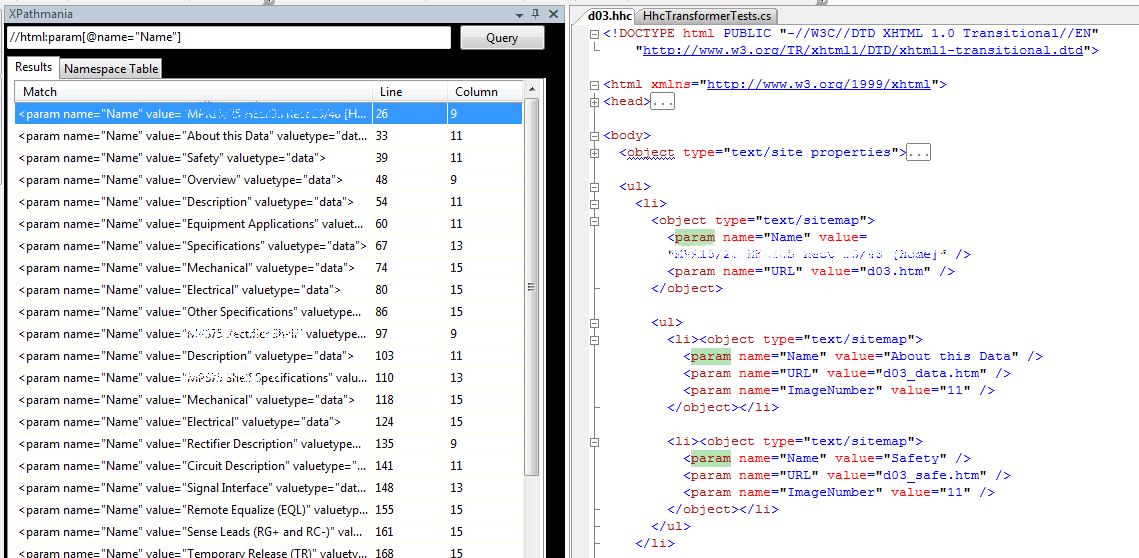
XPathmania is a terrific Visual Studio plugin which lets you run XPath queries against an XML document in a VS XML editor window.

Nice highlighted results, as seen below.

Don Demansk I mean Don XML talks about the plugin on his blog.  Obviously it’s not a brand new tool, but it’s highly useful for figuring out PITA XPath expressions.

XPathmania is part of the highly useful Mvp.Xml project out on CodePlex.  I’m using a couple of their libraries in my projects, one of which, EXSLT.NET, will hopefully solve a nasty problem I’m having trying to use XPath for querying poorly written HTML which I’ve converted to XHTML via Tidy.  More on that later after I actually figure it out…

WSS Sucks! WSS Rocks!

Brian wrote a great post on some very cool things he did for the CodeMash site.

Brian’s post highlights a couple of the many things that suck about WSS/MOSS: horrific error messages, and convoluted, brittle implementation of various features.

His post also highlights some of the many cool things about WSS/MOSS, like the ability to use a list to feed out content via web services.  We’re also using a list to catch topic submissions filed on the CodeMash website.  That’s simply wicked cool, and is a great value-add for our speaker committee.

Check his post out.

Tuesday, August 21, 2007

Perhaps the Greatest Design Tenet?

“…I've mostly come to the conclusion that any design effort that takes more than, say, 30 minutes is a waste of time.”  Sage advice snipped from a blog post by Eric Gunnerson.

I may be close to dowdification with my selective quote, but I think Eric’s blurb is spot on.  YAGNI, anyway.

Sunday, August 19, 2007

Wandering Speakers: Just Don't Do It!

Twice in the last three months I’ve sat through presentations where the speaker felt the need to wander throughout a large room (200+ folks at dinner tables) while giving a talk. 

That’s an awful, awful habit as far as I’m concerned.  It’s disconcerting to be reading something from the slides, then spend 30 seconds trying to find the speaker in the large room because they think it’s cool to either a) go walkabout or b) play some variation of “Where’s Waldo?”.  In both cases the speakers were otherwise giving a fairly good presentation (too many bullet slides, but that’s beside the point) and I started to tune out because I lost connection with them.

Don’t get me wrong.  Giving your presentation while stapled to your podium or table is also an awful habit, but you shouldn’t be meandering so far that your audience can’t quickly move from watching you to looking at your presentation.

There’s a nice balance involved in moving around while talking.  Casual wandering near your screen or stage is good.  Hanging out in the back corner of a large room?  Not so much.

Saturday, August 18, 2007

Shout Out: Day of .NET In Ann Arbor, 10/20/07

The folks up north are at it again: another episode of the Day of .NET in Ann Arbor, MI.  They’re moving to twice a year for these events which is fantastic.

Check out the site and submit a topic or three if you’re interested in speaking up there.

Friday, August 17, 2007

Nifty XML Editor

GVim rocks.  It’s lightweight, it’s got wicked great support for regex work, it’s loaded with numerous features that really speed editing work, and you have to type “:q” from within the editor to quit.  It doesn’t get better than that.

Wait, it does: There’s a handy XML editing plugin for Vim based off the xml.vim file which ships with Vim.  The extension provides a number of additional features like tag folding, joining tags, changing tags, and my current favorite: adding a tag to a block or tag.

I’m having to do some cleanup of badly balanced, badly written HTML which will be formatted to XML.  There are a number of instances where a particular tagset should be surrounded by a list item tag (<li>) but isn’t.  The tag surround feature comes in very handy for that since I can quickly get some cleanup with just a few keystrokes.

(I’ve looked at writing some XPath code to handle this, but that would actually take longer in this case…)

Tuesday, August 07, 2007

MOSS and Database Mirroring

SQL 2005’s mirroring gives an alternative to clustering for backup/availability scenarios, and of course there are a passle of considerations to grok.  This white paper talks about mirroring for MOSS farms and covers a lot of important territory.  File under Must Read for your MOSS planning.

(Via Joel Oleson via Steve P.)

SharePoint Skillset

SharePoint 2007 is huge.  Clients don’t understand how huge it is, management and sales often don’t get it, and many candidates who express MOSS “experience” also don’t seem to get it.  Joel Oleson has a blog post listing some of the skills a MOSS IT Pro or Architect needs — and his list doesn’t even include the details on the development side of things!

Because of my involvement with the Dayton .NET User Group I’ve had a lot of contacts from staffing companies looking for SharePoint experts.  I have a hard time getting it through recruiters’ heads that finding a MOSS solution architect, developer, or even admin is going to be a tough, tough hunt.  (Recruiters not listening or understanding a position’s requirements?  Go figure…)

Use Oleson’s list as a training plan if you’re interested in moving into the MOSS arena.  Use it as an aid to convincing your management that picking up MOSS is not something you can casually do via a vew hours of homework.

(Via Steve P’s killer SharePoint Link List.)

Monday, August 06, 2007

Updating Template

Something in the various migrations around to the various flavors of Blogger over the last year finally made my customized templates barf.  Ick.

I just blew away the customized template I had stolen from Jason Follas some time back.  If you’re hitting my site via a browser then you’re now seeing one of Blogger’s templates with some light customization.  I may eventually get back to the very cool color and font scheme that Jason came up with; however, time being what it is I may not…

Leave me a comment if you notice anything absolutely awful.

Archtecting for SharePoint Governance and Content

The SharePoint Team posted a great blog article on architecting for SharePoint deployments.  There’s a lot of great content in that article, and it really lays out what I think is a critical tenet: Content Is King.  Figure out how long your content will need to be around, and make many of your architectural decisions around that.

The article has some great discussion on laying out SharePoint installations: How you should host on server farms for particular implementations, how quotas should be addressed for those implementations, what considerations to give for self-service site creation, how to deal with content expiration for that, etc.  It really is great reading.

(BTW, if you’re in the SharePoint space make sure you’re subscribed to Steve Pietrek’s SharePoint Link blog.  Steve gets a great amount of highly useful links out on a daily basis.)

Friday, August 03, 2007

Step Away From The Keyboard

All the great folks in our geeky career domain are passionate about what they do.  They’re passionate about technology, they’re passionate about getting quaility solutions built, they’re passionate about solving tough problems for customers.

That passion is a critical part of our job, yet it can also be a hinderance if taken too far.  Frustration over any number of factors build up, stress piles on, and that passion can turn from a highly motivating force into a massively destructive factor.

If your frustration factor is building up, take a moment to consider how quickly you need to respond to an e-mail or an IM conversation.  High frustration leads to responses that are ill-thought, and/or are in phrases or a tone that’s nothing like you’d use in face-to-face conversation. 

Do yourself and your correspondent(s) a favor and step away from the keyboard.  Put the “urgency” of the issue in the right context.

Consider that last sentance for a moment.  I used to work in a job where urgency meant get something done right away because people could die1.  I also worked in a different job where urgency meant get something done right away or the company would be losing tens of thousands of dollars per minute because of a system outage.

If the situation you’re involved in doesn’t run the risk of death or huge per-minute costs due to outages then you’re not in a situation where you absolutely must respond to that message immediately.  Step away from the keyboard and let your emotions calm down.  Leave off responding to that e-mail for four hours.  Let your IM partner know you’re taking a short break, and be honest about the reason why.  Use the break to re-think your approach and re-assess how you can work with your correspondent to solve whatever the issue is.

(If you are in one of those jobs then stop being an asshat and put your passion aside because what’s called for is calm, cold clarity and speedy precision.)

I’m writing this post after having done just that with a person who is a good, good friend.  We were both getting angry over how to best achieve a very cool goal, but had different views on a few things.  I had to step away from the IM session and go beat my kids.2 When I came back to the computer I was completely calmed down and was able to move past our mini-tantrum.  (Note that was “our” tantrum.)  My good friend and I left the newly-resumed conversation in a much better frame of mind than we otherwise would have.  Problem solved.

Don’t let your passion run rampant over whatever it is you’re trying to accomplish.  Passion’s a Good Thing.  Unbridled passion?  Rarely so.

[1].  My wife and I had served with 75% of the crew of YUKLA 27 when it crashed due to striking a flock of geese just after takeoff.  Good men, all, and I still miss ‘em.

[2].  Be real.  I’m kidding, for crying out loud.

Thursday, August 02, 2007

Need a Mission Statement?

How about

“Our mission is to professionally restore scalable leadership skills and synergistically customize cost effective paradigms because that is what the customer expects.”

Or

“We exist to assertively fashion cost effective technology and globally provide access to multimedia based methods of empowerment in order to solve business problems.”

Both from Dilbert’s Mission Statement Generator.

(Via Scott Berkun’s essay “How to detect bullshit.”  Mirrored here because his server got Dugg hard.)

Using the Immediate Window in VS to Explore APIs

The Immediate Window in Visual Studio can be a great help if you’re trying to grok a particular API, or do a quick spike/prototype to understand behavior of a class, method, or property. The Immediate Window lets you make API calls, check values of variables, and even do assignments.  It’s a handy way to explore how your program’s behaving and how things might work if you alter data or calls.

For example, the documentation for the bits and pieces of the highly useful Uri and VirtualPathUtility classes often don’t include examples of what’s returned from various calls.  This is a hinderance as I’m trying to get formatting of file-based resource URIs correct to play with the WebBrowser control I’m using.  I need to do two things: 1) ensure the format of the URI is correct when I assemble it in the actual <link> element in the content source, and 2) extract a complete absolute path to the resource without the protocol part when I am doing my navigation.

I can write a prototype app with a class full of a bunch of crappy Console.Writeln statements to see the before/after bits. This isn’t much fun, even if I use Snippet Compiler.  On the other hand, I can start my existing project in VS in debug mode with a breakpoint set appropriately, then play around in the Immediate Window to discover the exact format of the URI and which API call I need to make.

For example, say my input Uri is a variable called “resource” which will point to a file-based resource. My starting content for that might be “file://Temp/Test.pdf”.

I flip to the Immediate window and enter

resource.AbsolutePath

which results in

"/Test.pdf"

Not what I wanted since it’s missing the Temp directory.  Maybe I can look at Uri.LocalPath:

resource.LocalPath

"\\\\Temp\\Test.pdf"

Still not right, since the Temp folder is showing up as location component.  Let me alter the actual Uri variable “resource”:

resource = new Uri("file://c:/Temp/Test.pdf")

You’ll see a whole bunch of stuff fly by as all the new Uri’s properties are displayed.  Now let’s check the LocalPath property again:

resource.LocalPath

"c:\\Temp\\Test.pdf"

Voila!

All this is pretty simplistic use of the Immediate Window, but it shows a different aspect than it’s normally used for.

Wednesday, August 01, 2007

Nifty SharePoint Utility

I haven’t tried this but it looks very cool: A system tray widget to manage AppPools on your MOSS box.  Additionally, you can configure URLs to visit after an IIS Reset or AppPool refresh — that way your sites will automatically get visited after a bounce, reducing the load time when you finally get around to visiting those pages.

I’ve been slowing moving back into the MOSS arena.  This widget will definitely get added to my toolbelt.

UPDATE: Forgot to cite my references.  I found tell of this in a comment on Sahil Malik’s blog post on his VM setup.  (FWIW, I asked him what tools he was using for automation and testing.  Strangely that comment didn’t make it past his moderation.  Maybe he doesn’t do any testing?)

Tuesday, July 31, 2007

Career Goals For The Next Six Months

Jason tagged me on this latest meme, but I’ve not responded to it in a couple days simply because I wanted to mull things over before slapping down something on my blog.

My career has had a lot of odd twists and turns over the last 13 years since I gave up flying around the world on one of these.  Much of that time has been me scrambling around trying to keep some sort of IT-related job while my wife dragged me (dragged!) to places like Bavaria, Washington DC, and Ohio.  Throw that in with 6.5 years as a work from home Dad and you may see that I’ve not been able to focus 100% on steering my career around right where I wanted it to go.

That said, I’m happy to say that somehow I’ve landed what I think is really my dream job working with a bunch of amazing folks at an amazing place.  (Despite not having seen the required movie.  James is still amazed I got hired having missed it.)

So what do I do to top that? Uh, get my act together and polish up the many rough spots I’ve got in my repertoire.

Improve My Testing

I desperately want to get rolling with FIT/Fitnesse.  I think this is an amazing tool that can really help turn the light on for customers and get them more intimately involved with ensuring what we’re building them is what they really wanted.  Goal: Get a great session together for my upcoming Grok talk at QSI at the end of this month.  Follow that by discussing using Fitnesse with at least one customer on a project in the next two months.

I also want to keep improving my skills with Rhino.Mocks so that I’m able to better test individual components.  Goal: Download and dig into the new features of Rhino within the next month.  This plays in to my next goal:

Improve My Use of Solid Patterns

First in line: the Model View Presenter.  I’ve not made as good a use of MVP in my current project as I’d like to and my code’s suffered for it.  I need to fix that.  Goal: Read at least four MVP articles over the next two weeks.  Roll that knowledge into future work.

Improve My Processes

Brian Button had a great post on getting rid of the pain points in your development processes.  If it hurts, do it more often until it becomes easy.  Sound words.  Goal: Fix a couple annoying build issues I have within the next two weeks.

Improve My Speaking

I’m stuck in the doldrums for topics which I’m interested enough to put together another speaking topic on.  I had a beer with Justin the other night and we talked a bit about possibly teaming on a CardSpace/OpenId gig, but I’m not sure if there’s enough interest and value in that right now.  I’d love to put together a great spiel to pitch for CodeMash, but my muse has abandoned me.  Goal: Come up with a solid topic for a good session some time in the next eight weeks.

Productivity

My productivity and velocity at work has been for shit.  Much of that has been due to starting a new job and getting back in the coding seat full-time after a LOOOOONG break.  While I’ve contributed a lot in the domain space, I need to carry my own weight in the actual delivery space.  Part of my low productivity has been a lack of disciplined focus with keeping my head down for longer periods.  Goal: Improve self-discipline for coding time, and improve my scheduling of tasks so I block out long periods for heads down time.

Improve My SharePoint

MOSS is a huge beast with some stunning potential.  I think there are a significant number of areas where it’s a steaming pile of dung, but the value MOSS can bring to a business is amazing.  I need to get out of the narrow arena where I’ve been and focus on the larger picture of MOSS.  Goal: deliver three successful MOSS projects or proofs of concept in the next six months, plus participate in at least one Architectural Design Session (ADS).

Improve My Community

My DevGroup.  The next Code Camp.  CodeMash.  I want our Dayton .NET Group to grow by 20% by Christmas.  I want the next Code Camp to have 150 folks attend.  I want CodeMash to have 350 attendees and mention in at least two national trade magazines who are weeping inconsolably because they were incredible ass hats and didn’t show up to cover what is going to be an amazing event.

Clean Out My Mental Cruft

I need to clean out some mental cruft that’s blocking me from clearly focusing on tasks at work.  Goal: Lose another 20 pounds within six weeks and run three times a week during that same period.  Goal: Get the trailer out and take the family on at least two camping trips in the fall.  Goal: Spend one evening a week playing alone with my daughter who’s had a rough time transititioning from me as the caregiver to my wife.  She’s the joy of my life and I need to spend more time remembering that instead of fearing her as a teenager because she’s enough PITA as a seven year old.

—————

That’s it for my list.

Five folks to tag either for career goals or the meme’s original topic of becoming a better developer:

  1. Ben Carey (Because he’s wicked smart, passionate, and incredibly innovative — so I’ll steal his ideas.)
  2. James Avery (Because he’s off this month and should have to do some work.)
  3. Justin (Because he’s a young guy who’s very passionate, very smart, and will do great things.)
  4. Drew (Because he’s moving up to IIS evangelist and I’m interested to see what his goals are.)
  5. Scott Guthrie (Because his career is obviously in trouble and he needs to think hard about what he’s doing.)

What Not To Use For A Domain Name (x10)

Greg Hughes has a hysterical post listing some domain names that were very poorly chosen.  For example the Italian Power Generator company whose URL is www.powergenitalia.  The other nine are equally funny. 

Seriously, what looks good in your head may not look good in a URL.  Think twice and have someone else look at it.  Don’t tell ‘em what the URL is supposed to say, just show them the text in all lowercase and wait for their reaction.

SharePoint Installation/Configuration Guides

EverythingSharePoint.com has a couple good guides detailing MOSS installation and configuration steps.  One’s for initial installation, the second covers configuration.

The guides have lots of step-by-step details and lay out some “best practices” for various aspects.  My major gripe with the guides is that they don’t reference where the best practices were developed at.  (Actually, I’ve a long rant about “best practices” anyway, but that’s a different post…)  Many line up with what I’ve read in official MS documentation, but the author ought to at least specify where the practices were drawn from.

The content’s nothing staggering to anyone who’s done a modest amount of MOSS installs and setups, nor is it overly different than what you’d find in the Office Server 2007 Administrator’s Companion  (affectionately referred to as The Big-Assed Guide to All The SharePoint Crap You’ll Need To Know.)  Despite that, the guides are a good read.

Monday, July 30, 2007

More ReSharper Goodness: Show Inheritors

The other night over a beer Justin reminded me of another great thing about ReSharper: View a class’s derived types with Ctrl-Alt-B.  That’s an awful keystroke combo, but it brings up a great display of everything that derives from your current selection:

Slick for any number of reasons, including the infamous “Now what the h3ll was that type of Exception I was looking for?” case where you can’t remember what you were looking for.

(And don’t forget Joe White’s 31 Days of ReSharper series.  It’s on R# 2.5 but is still a great thing for pointing out the many great uses of R#.)

Sunday, July 29, 2007

Updates to WinDevPowerTools Site

James finally caught up with the work that I’ve not been taking care of and has gotten some nice updates to the companion site for Windows Developer Power Tools.

If you’re on the team of a tool that was selected for the book, or if you helped write for the book, then you’re welcome (and encouraged!) to add a badge to your blog or tool homepage.  We’ve got some slick badges on this page here — the folks at O’Reilly did a slick job of creating these for us.

Friday, July 27, 2007

Book Review: Regular Expression Pocket Reference

Regular Expression Pocket Reference, 2nd Ed. by Tony Stubblebine. Published by O'Reilly, ISBN 0-596-51427-1

This is a handy little guide for common regular expression odds and ends.  The intro chapter does a nice job of giving you the regex elevator speech and hits all the important fundamentals: different engines, metacharacters, and general pattern rules.  There’s also a regex “Cookbook” section; however, that bit is only two pages and the “recipes” there are so rudimentary that they’re nearly useless and would have been better left to a different book.

The remaining chapters hit regex support in major languages, Apache, shells, and Vi and Vim editors.  These sections are very well done and give you great guidance to regex implementations on that platform, plus give you guidance on the APIs you’ll need for working with regexes.  Languages covered include Perl 5.8, Java 1.5/1.6, .NET framework with examples in C#, PHP, Python, Ruby, Python and JavaScript.  The Perl Compatible Regular Expression library (PCRE) is also covered.

Each chapter is concise, well-written and hits the major things you’ll need to refresh your memory on from time to time.

Overall it’s a very well done book.

Open Source At Microsoft

Yes indeed, it does happen.  Sara Ford posts about her team’s experiences moving their Power Toys over to CodePlex.  It makes for good reading, and it enforces the fact that there are some smart folks at MS who are passionate about getting good software out for all to use, adapt, and contribute to.

John D’Addamio, the tester on Sara’s team, has a couple good blog posts on the topic as well here and here.

Check out these pictures of her office window if for some reason you think she’s not passionate about MS embracing open source.

(And yes, I’m starting to pester her already about speaking at CodeMash!)

Subscribe (RSS)

The Leadership Journey