Wednesday, December 07, 2011

31 Days of Testing—Day 7: Automated Test Basics

Updated: Index to all posts in this series is here!

I thought today’s post would be a good opportunity to lay out some fundamentals of automated tests work. The mechanics of test automation varies extraordinarily based on what platform you’re working on, and even within platforms you’ll see vastly differing approaches based on whatever testing framework/toolset you’re using.

Testing frameworks have a number of commonalities, regardless of platform and implementation. You’ll have a test runner which executes the tests. Test runners may live in the IDE you’re using to write your tests, they may be a separate GUI, or they may be a command line runner. Command line test runners make it possible to run your tests in a number of different environments such as a build or continuous integration server. The tests themselves will likely be organized, depending on the framework/tool, into classes, fixtures, scenarios, or something else. You generally point your test runner at these fixtures and the runner noodles out what tests are contained within those groups. The runner will execute all those tests and give you back a report on the pass/fail status.

Today’s column shows unit tests, but the general concepts apply to integration and functional tests too.

I’m going to be showing examples in C# with NUnit and RhinoMock, simply because that’s what I’m very comfy with. Yes, yes, we should all get out of our comfort zone and do things on other platforms, but the point of this series isn’t for you to watch me flail around while trying to learn new stuff… Smile

Some things to keep in mind as you read posts of mine which contain code:

  • I’m old school, although I try hard to keep up with new trends
  • I haven’t written system code in a long time, just test code. There’s a bit of a difference.
  • I am a starting point for your learning, not a destination. Look at my stuff, figure out what works and doesn’t, then go find other places to learn more.

The examples I’ll be using today are taken from the Unit Testing 101 talks I give. The examples aren’t *DD-ish because I want to focus on very fundamental pieces with out adding any methodology to the mix. Like I said, old school—but the foundational principles are critical and similar regardless.

Without further ado, part one, unit test basics. The system we’ll be testing is a simple payroll wage calculator method. It’s purposely not optimized or concisely written because I use it as a starting point for some refactoring, etc. (If you’ve interviewed with me for a job you’ve likely seen a variant of this…)

Here’s the method:

public float ComputeWages(float hours, 
                            float rate, 
                            bool isHourlyWorker)
{
    if (hours < 0)
    {
        throw new ArgumentException("Hours must be greater or equal to zero " 
            + hours);
    }
    float wages = 0;
 
    if (hours > 40)
    {
        var overTimeHours = hours - 40;
        if (isHourlyWorker)
        {
            wages += (overTimeHours*1.5f)*rate;
        }
        else
        {
            wages += overTimeHours*rate;
        }
        hours -= overTimeHours;
    }
    wages += hours*rate;
 
    return wages;
}

This method figures wages for hourly and salaried workers based on their status (hourly/salaried), number of hours worked, and their hourly rate. Salaried workers don’t get overtime; hourly get time-and-a-half for anything over 40 hours.  We also check for negative inputs around hours. There’ input guards we should handle, but again, this method purposely leaves off a number of things.

Let’s cover basic tests for an hourly worker first. Looking at the code we want to make sure we hit all the boundaries in this method. There’s a boundary for over/under 40 hours, so we’ll need values over and under that. I always like to specifically test zero as well, so we’ll want a value there. Finally, we’ve got a check for negative hours, so we’ll need that. Let’s just use five bucks per hour as a our rate to simplify things. Here are our input values and expected outputs.

Hours Rate Expected
0 5 0
40 5 200
41 5 207.50
-1 5 ArgumentException

Let’s start with the simple happy path test first.

I mentioned fixtures above as a container for individual tests. In NUnit you create a class and decorate it with the TestFixture attribute. Other frameworks work in a similar fashion. Mostly.

[TestFixture]
public class When_working_with_an_hourly_worker
{...

A test fixture should contain a logical group of individual tests. Styles of grouping and naming conventions vary dramatically between advocates of particular methodologies. I’m avoiding all that discussion here and just focusing on the fact a fixture holds tests. You need to figure out what works with your team in your environment on your project.

In NUnit a test is simply a method with public scope that’s decorated with a Test attribute:

[Test]
public void Computing_with_40_hours_at_rate_5_returns_200()
{...

Now it’s time to write the actual test. Patterns for writing tests vary with methodologies, but I think there’s a common pattern regardless: Arrange, Act, and Assert. You Arrange the things you need to run the test, you Act on the system you’re testing, and you Assert to see if your actual results are what you expected.

Asserts, regardless of how they’re named in your framework/tool, are simply equality checkers of one form or another. You’re checking two strings are the same, two integers have the same value, or two collections have the same values in the same order. You’re generally asserting these conditions are equal, although you’ve likely many options such as Assert.IsFalse(someBoolean), Assert.IsNotNull(somethingElse), etc.

Here’s what our actual test will look like:

[Test]
public void Computing_with_40_hours_at_rate_5_returns_200()
{
    //Arrange
    WageComputer computer = new WageComputer();
    bool isHourlyWorker = true;
 
    //Act
    var computeWages = computer.ComputeWages(40, 5, isHourlyWorker);
 
    //Assert
    Assert.AreEqual(200, computedWages);
}

The final statement in this test is the Assert: it’s comparing the expected value (200) to the actual value returned from the call to ComputeWages. You’ll continually hear the terms “expected” and “actual” in testing parlance.

I’ll use the JustCode test runner that lives within Visual Studio to run this test. Here’s what it looks like as a passing test:
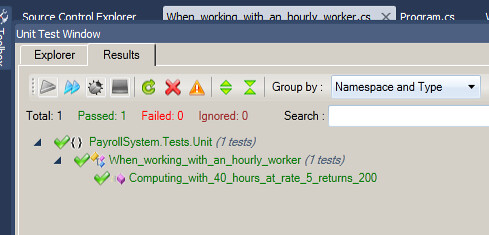
TestRunner-Green

If I change the expected value in the test to an incorrect value, we’ll see what the failure looks like. Note the red colors and the detailed message on the right frame. Your test runner’s output likely varies, but the point is you get a clear failure and an exact reason why the test failed. In this case, the expected value was 201 (my manual hack) and the actual was 200.
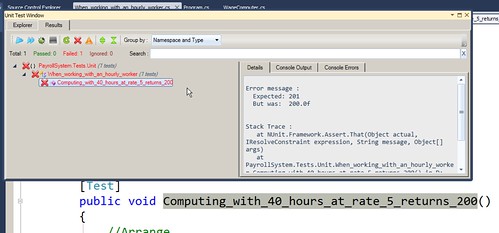
TestRunner-Red

Really, the first three test cases are variants of this: input values and an expected output value. Let’s jump to the last of the test cases, where our expected result is an ArgumentException. Every testing framework should give you the ability to assert exceptions are happening as you expect. In NUnit that’s handled simply via an attribute. Here’s how that actual test looks:

[Test]
[ExpectedException(typeof(ArgumentException))]
public void Invoking_with_negative_hours_throws_ArgException ()
{
    WageComputer computer = new WageComputer();
    var wages = computer.ComputeWages(-5, 5, true);
}

You’ll note we’ve got some duplication in our two tests: we’re repeating the setup of our WageComputer class. This isn’t a huge code smell for two tests, but I’d rather not see us continue this needless duplication as we grow our tests out.

Tomorrow we’ll discuss how to deal with this situation by using setup methods, and we’ll cover their corresponding teardown equivalents. We’ll also dive in to data driven tests.

Tuesday, December 06, 2011

31 Days of Testing—Day 6: Types of Automated Testing

Updated: Index to all posts in this series is here!

Automated tests come in several flavors, and I sometimes hear folks mixing up terms for the type of test they’re discussing. I thought I’d take one short column to lay out a few definitions.

Unit Tests

Unit tests focus on one small piece of the system’s functionality, most often a method or procedure. Unit tests never cross any service boundaries, and shouldn’t even rely on other dependencies outside of the specific area being tested. Unit tests work in isolation—any external dependencies need to be faked/mocked/stubbed out. If your test is hitting the file system, database, or a web service, then it’s not a unit test.

Imagine a payroll computation method which takes hours worked, a worker’s hourly rate, and whether or not that worker is salaried or hourly. The method is a simple algorithm and doesn’t have any outside dependencies. A unit test would be one that calls that method with a set of input parameters (42 hours, $20 per hour, salaried worker) and checks the output of that against expected results.

Keeping true to the above-described isolation requires a well-designed system that enables you to mock out these dependencies. There are a number of design approaches that help this, but those things are well beyond the scope of this series. (Go look up dependency injection, inversion of control. Also check out tight coupling and use of static classes.) The act of mocking out these dependencies means you’ll be looking to tooling to help you out. Many frameworks exist to help you get through this on whatever platform you’re working on.

Because of this isolation, unit tests are blisteringly fast. It’s common for thousands of unit tests to run in a few tens of seconds. Unit tests are your first line of defense against regressions. Developers should be running them constantly through their work cycle, and most definitely before committing any work back to the source control repository.

Integration Tests

Integration tests specifically target interaction between different components or services. Integration tests are most often below the user interface level, checking things like business logic, persistence, or web services.

An integration test might call a web service to create a user, then call the database directly to insure the user was indeed created.

Integration tests are generally quite slower than unit tests because of the overhead involved with standing up web services, hitting databases, etc. Because of this slower execution speed integration tests aren’t generally run as often as unit tests. If your integration test suite is small enough you may be able to have your developers running them right before they commit their final work on the current work item. It’s more common to run only the set of integration tests directly relating to the work item, then run the entire suite of integration tests during regular smoke checks throughout the day. (Or once per night if your suite is really large and you’ve not set up your infrastructure for parallel execution.)

Functional Tests

Functional tests are the slowest of all the tests because functional tests are generally standing up the real application, either on the desktop or in a browser, and driving that user interface around to perform the same actions a user would.

An example of this would be using something like Selenium or Test Studio to start up a browser, open your web application, and take some actions to place an order in an electronic purchasing system.

A great many tools and frameworks can be used to help you write functional tests depending on what platform you’re working on. There are many flavors of functional tests, but at their core they’re responsible for helping you verify one specific test case around your system’s functionality behaves as expected.

Performance Tests

Performance testing is a broad umbrella encompassing a number of different types of tests. Performance, load, stress, failover, soak, endurance, and other terms all come in to play. I wrote a somewhat longish post on my blog at Telerik around these different types. You can go read that for more detail, but here’s the Cliffs Notes version:

  • Performance: Measures the performance of one specific functionality slice, such as saving a user to the database. May be from the user interface down, or may be some slice of internal functionality.
  • Load: Checks the system’s performance while ramping up the load on the system by hitting it with simultaneous connections from some source. Measures performance of a scenario under real-world loading.
  • Stress: Can also be called failover testing. Can also be called “Throw an insane amount of traffic at the system, then throw more traffic at it until something breaks.” Less flippantly, the idea is to ramp up traffic and load on your system until it degrades or outright fails. The idea is to understand what the maximum useable load is, and what happens when that’s exceeded.
  • Endurance: Systems behave differently under load over a long period. Things like subtle memory leaks show up which you might not otherwise find.

Security Tests

Automated security tests are looking for regressions in protections around cross site scripting, SQL injection, and any of the other numerous (and really scary) security-related threats.

Tools for automating these sorts of checks are quite specialized, and I don’t pretend to have a great grasp on them. Instead of possibly leading you astray, I’ll just recommend you look elsewhere for this information.

Each Type of Test Has Its Place

You could make the case there are other types of automated testing, but I think these categories above cover the most important types. What’s critical is that you understand the basic fundamentals of each type and its role.

(Note that I didn’t discuss testing methodology such as test-driven development, behavior-driven development, acceptance test driven development, etc. Those are methodologies which use the types of tests I described above.)

I’m a firm believer that you absolutely need all of these types of tests working together. I’ve seen far too many instances where a developer or team focused on getting unit tests rolling, only to find bugs that would have been caught at the integration or functional level. Performance testing may not be required on every project, but I’d make the case it’s valuable to have at least a bit of metrics around performance simply to ensure you’re not losing ground on user experience as you continue to evolve the system.

Know your test types. Use them in the right places.

Monday, December 05, 2011

31 Days of Testing – Day 5: Choosing What To Test

Updated: Index to all posts in this series is here!

You can’t test everything. Get over it.

Even if you’re doing some form of test-first development, you are not going to go as far down the testing rabbit hole as you might like. In my post Focus on the Why, Not the How  I passed on a true story of a pal who, while paired with an industry “expert,” spent five hours ripping apart a view to get 100% test coverage. The exercise turned out to be useless, and they delivered no value whatsoever that day because the remaining three hours of the day were spent rolling back the work they’d done to that point. #FAIL.

What you can do is carefully chose what to test in order to get the most effective testing possible. There are a great many ways to start narrowing down what you should look to hammer away with on testing. Most of this article is directed at exploratory or functional testing, but the points apply generally to all forms of testing--I hope!

In his chapter from Beautiful Testing Adam Goucher speaks of evolving to a focus of “uncover[ing] quality-related information as efficiently as possible.” (Emphasis Adam’s.) This is really a great line, because it’s exactly how I view testing. I want to get the best information about the state of the system, and do it as quickly as possible.

Adam has a great acronym he uses to guide his testing: SLIME, which stands for Security, Languages, RequIrements, Measurement, Existing. (He also freely admits he had to stretch the heck out of “requirements” to make it fit his wonderful acronym.) This is one great way to approach what and how to test existing systems, or to do exploratory or additional testing on a system being developed.

I look at a number of similar things in determining what I want to have a look at, or where I want to focus my automation efforts. (Again, this is in addition to tests that are hopefully being written by devs and testers pairing together as the system is being built!)

Choosing by Value

Hopefully your team is focusing very tightly on delivering only valuable features to your customer. Look at those features, or the existing functionality, and prioritize the most critical things first. You’ve likely got a mix of features and work items driven by the market and customer. Prioritize that list, and figure out which are the most critical to spend your time on. Within that list, figure out how far down the rabbit hole it makes sense to dive.

Dealing With Regulatory Compliance

Perhaps you’re under constraints mandated by some form of legal or regulatory compliance. In that case, you’ve got to do some disciplined focus to ensure you’re meeting those legal constraints. HIPAA, Sorbanes-Oxley, privacy-related information—all these domains will absolutely require your focus if you’re working in those environments.

You may be forced to drop all other work and focus on the features under that constraint to ensure you don’t put your entire organization at risk. Tom and Mary Poppendieck speak to just this situation in their book Lean Software Development—they had a state-mandated set of regulations on a project they were brought in to rescue. Everything else had to be put on the back burner in order to ensure they met the legal requirements.

Choosing by Risk

Another approach is to look to your riskiest features/work items/components and focus on those first. Are you working with a complex security model in your system? Do you have an extremely large, complex feature your team’s been under pressure to roll out? What about overall complexity of the component or feature?

Focusing on your highest risk areas first will help you mitigate last-minute panic when that complex system doesn’t work as expected – and you’re only a couple days away from release. Focusing on those risky areas gets those problems identified as early as possible.

Choosing by Measurements

Looking to concrete measurements is a great way to figure out where to focus additional testing effort. You don’t want to spend time on areas that are already covered by tests, or which have been stable in the past, so look to code coverage tools and bug reports to help you find areas to possibly cover.

Code and architectural/design complexity are great places to look at for determining where to add more testing. Most every platform has a set of tools which will give you stats on things like cyclomatic complexity, lines of code, coupling, etc. These stats are not only geeky cool, they can point you right at spots rife for bugs.

Finally, have a look at code churn, the amount of changes made to classes, files, or components in your system. Lots of churn means a lot of work has gone in to that item, and the chances are something may be amiss. Churn coupled with code metrics and bug histories makes for an awesome indicator!

Choosing by Spidey Sense

Finally, there’s your intuition. You know what your team is like. You likely have a feeling for areas of the system that have scary corners. You know which areas of the system have given you grief in the past.

Trust your spidey sense and hit those areas for some rough and tumble exploratory testing. Use those bugs to create new integration/functional/unit tests around what you discover and fix.

You can’t test everything. You’ve got to apply some discipline and planning so that you can do your testing as effectively and efficiently as possible.

NOTE: I encourage you to go read up on works by folks like Lanette Creamer, Elisabeth Hendrickson, and others who are doing amazing things in the exploratory/rapid testing domain. There are a lot of tremendously smart folks out there doing great work!

Sunday, December 04, 2011

31 Days of Testing - Day 4: Sustainable Pace, Sensible Flow

Updated: Index to all posts in this series is here!

Updated: Fixed some busted paragraph formatting. Sorry for the massive run-on post!

If you want to continually deliver great software in a rapid fashion at as low a cost as possible, then you need to step back and understand how critical sustainable pace and sensible flow are—especially as it relates to testing.

Sustainable pace is a critical rule that needs to be part of a team’s foundation. You work a sane amount of hours every day, then go home and come back the next day refreshed and ready to do great work. Yes, you may need to work occasional spurts of extended hours, but that needs to be the very, very rare exception. Environments without a fundamental belief in sustainable pace keep silly amounts of pressure on their teams to complete work in unreasonable periods. “No, we’re not cutting scope. We’re in this mess because you created too many bugs previously, and our marketing department has made too many promises. Work harder. Failure to meet the release date with the promised scope is not an option.” Such attitudes and environments will kill your team over time, and will end up driving the quality of the products/systems into the ground over time. Your developers speed through their work and throw everything over the fence to the separate QA group. The separate QA group is overwhelmed and ends up feeling like scapegoats for the release’s poor quality.

Sensible flow is a term I’ve been using, off and on, to describe how work items need to move through your development process and environment. I’m sure other smart folks in the industry have other terms, but it’s what I’m using to describe things like ensuring you have great collaboration, proper work item sizing, and honest measurements or standards for what “done” really means.

The notion that testing is a separate activity leads to testing being the last bit of work done in iterations/sprints/release cycles. This is madness, quite frankly. You’re putting an immense amount of unreasonable pressure on your testers, and it also creates additional stress when they inevitably reject work items with only a day or two to do the rework and revalidation.

I’ve worked in these environments in the past, and I continue to talk with a lot of folks in the community and clients who are in these environments now. My biggest, bestest suggestion to them: Take the mental step of throwing away the notion that testing is separate from development.

That may seem like a trivial thing to do, but it really helps you, your team, and your organization to start being honest about when a work item is really done. That item isn’t done until it’s been tested. (I could go a few steps farther and say it’s not really done until it’s released to production, but as with all these columns I’m trying to save you from too many of my wandering rants.)
Agreeing that an item has to be tested before it’s considered done means you have to be honest about including schedule time for testing. This discussion is a great positive factor when you’re deciding what you can accomplish during your iterations because your team will be more consistent about identifying possible bandwidth problems near the end of the iteration.

Once you get honest about having to include testing as a measure of an item being done, then you have to get honest about how you’re going to meet done for your work items in your iteration. Now we can start to look at how you’re sizing your work items.

If your work items are too big, then they get hung up in the development stage for too long. Testers don’t get their hands on the work items until late in the cycle, and there’s little time left for finishing up automation and doing exploratory testing. (Note I said “finishing up automation” because I believe your devs and testers should be pairing up on building automation as part of the development cycle!) These delays lead to pressure to get everything done in the few days at the end of the iteration. Folks work longer hours and/or work doesn’t get finished up within the iteration. Both are bad.

You need to figure out what size work items works well in your environment, but I’d encourage you to try to reach work items that can be completed in a day or two. Yes, by “completed” I mean done. That’s designed, discussed, developed, and tested.

Small-sized work items mean you’re able to start getting a great flow through your team’s process. There’s much more sense of progress, and there’s less impact when a work item fails the testing stage and has to be put back in for further rework. The team sees a lot more accomplishments, even if those items are at a smaller scale.

Now you’re open and clear about what done means, and now you’re working hard to properly size your work items. Ensuring sustainable pace and sensible flow means watching your processes stages to avoid pileups and bottlenecks. Maybe your development team is crushing their work and getting through the development portion of work items at a tremendous pace. The downside of this is you’re stacking up a huge amount of Ready-To-Test work items in the testers’ area. What do you do?

Look at this backlog pileup as a team problem. Solve it as a team problem. Have your developers roll up their sleeves and help work through those items. No, developers aren’t testers, but they’re quite smart and can do a great job helping work through this backlog. A couple ground rules do have to be in place for this to succeed, though. First, no dev can test a work item they did. Secondly, each dev has to meet with a tester for a few moments before they test to quickly discuss testing strategy for that work item. Lastly, the dev has to quickly review their actions and discoveries with the testers after they’ve done their work.
Once you get back to a good spot with your pipeline’s backlog then developers can go back to their primary tasks.

Focusing on keeping a sustainable pace, and a sensible flow ensures the software you’re building gets solid testing throughout the process. Be honest about what done means, size your work properly, and work as a team to avoid backlog pileups.

Saturday, December 03, 2011

31 Days of Testing - Day 3: More Collaboration, Not Less

Updated: Index to all posts in this series is here! Also fixed some formatting problems.

So many problems in our software industry have poor communication at their root. The technology’s not the hardest part of our job, it’s getting clarity of expectations, dealing with roadblocks around effective understanding, and all the other human factors.

This isn’t news. We’ve known this for years. With that in mind, why would anyone think less collaboration between testers and other members of the team could ever be a recipe for a successful project?

In an earlier post the awesome Lisa Crispin said in a comment “I’d go further and say, testing is part of development, not a separate thing.”

I agree. Completely.

I firmly believe that we deliver the best possible product when testing is an integral part of the process, not a separate team, or some black hole of activity that comes after everything else is done. We want to deliver great software, and we want to deliver it rapidly to our customers with as little wasted time during that process.

Separate development and testing teams mean a lot of wasted effort around handoffs, and a tremendous amount of friction around the mechanics of that handoff. The old school mindset of “Build it and pitch it over the wall to QA” has to be avoided at all costs. Can you deliver great software that way? Possibly, but it’s at the cost of huge amounts of wasted time creating ponderous specs detailing every testing action in minutia. It’s at the cost of unnecessary, repeated cycles building software that’s handed off to QA only to be kicked back because there were misunderstandings about what was to be built, or what was to be tested.

I’ve seen this waste personally in environments I used to work in. I see this waste when I talk with folks in the community who still work in or around such environments. I see this waste when I talk with customers during demos, site visits, and training.

You can NOT convince me you can do a better job delivering the best possible software as quickly as possible at the lowest cost possible if you’re working with separate testing and development teams. Go ahead and try. I’ll plug my ears and yell “LA LA LA LA LA I CAN’T HEAR YOU!”

Without exception, the smoothest, fastest, best releases I’ve seen have been where testing is an integral part of the development process. There are no separate QA and dev teams. It’s one team—or at least as close to one team as possible.

Goals of Collaboration

Why do we care about good collaboration on our teams? It’s not a specious question, honest! Ask what the goals of your collaboration are. It’s a good exercise.

Here are some of the things I’ve learned over a few years in the workforce.

Build better stuff!

I care about building great software. I care about helping others build great software. Great software helps our clients solve real world problems and in some cases even save lives! In my previous job at Telligent I was part of a team that built software used by aid agencies rolling in to Haiti and other natural disaster sites. Our platform was helping those agencies coordinate emergency aid to help folks wiped out by earthquakes, tsunamis, etc. Wow.

Other testers help teams deliver software running medical devices. I’m a diabetic and my life is in the hands several times a day of the folks who built and tested the equipment I use to test my blood sugar and dispense the insulin I need. If either of those are off then I can drop in to a diabetic coma and die.

On a less dramatic scale, software we build and test helps move millions of people around the world through travel systems. Software we build and test enables my son to play Angry Birds during really boring long car rides.

The chance of creating wonderful systems is dramatically improved if we can boost our collaboration and increase effective communication among our team members. That may sound like marketing hyperbole, but it’s not.

Waste, in the Lean sense, happens when we spend too much time repeating work because goals weren’t clear. More collaboration, especially early in the game, lets our teams have a better understanding of what it is we’re trying to build, and how the testers are going to bash it around.

Less waste is a Good Thing.

Reduce handoffs

Along the same line, more collaboration can reduce waste incurred during handoffs. Every handoff incurs some waste since there’s context switching and ramping up involved. There’s increase in miscommunication. Contrast that with effective flow of work items through your chain with good discussion at all points.

Handoffs equal waste and opportunities for miscommunication. Reduce those handoffs as much as possible.

Reduce stress

Great collaboration and communication reduce stress, pure and simple. Less miscommunication, greater clarity of purpose. Smooth running teams have less stress, and if that’s not a great goal then I don’t know what is.

Developers and testers learn more about their domains

Improving your teams’ skills ought to be one of your prime goals. More collaboration means your developers start to pick up on more on handling things testers will be bashing up. Your testers learn more about how the system’s actually working. All this knowledge transfer is a beautiful thing.

What to Collaborate On?

If you weren’t already a believer, hopefully I’m swaying you to my view that more collaboration is better. So now what do we start to collaborate on as we move to a more integrated team? This list could be really huge, but I’m focusing on two items.

Acceptance criteria!

Target number one: Get your PMs/stakeholders, developers, and testers sitting down at the same table (virtual or otherwise) and get them discussing what great acceptance criteria are for each work item. Do this as early in the cycle as possible. The acceptance criteria shouldn’t be a huge dramatic spec, but your team does need to figure out what works for them. I always try to keep to the metaphor of bullets on a 3”x5” card, regardless of whether we’re using TFS, Unfuddle, or some other system.

Testabilty

Target number two for close collaboration: Testability of the system. Lots of conversations can help ensure the UI is being appropriately built to help support automation through functional tests. Lots of element IDs at appropriate spots, less convoluted DOM structures, less “clever” but messy Javascript that can potentially cause problems.

Close collaboration at this area can also help with developers starting to build up supporting frameworks for automation – service layers to help do basic CRUD operations to help set up prerequisites for tests, for examples.

Evolve a process and environment that promotes collaboration

Work hard to get your team collaborating, and build an environment that empowers them to do so.

Get your team as close together as possible, physically in the same room as possible. Look to creative ways to bring virtual members as close together. (Lisa Crispin’s team has one remote worker. They use a rolling desk with a monitor, speakers, microphone, and webcam to get that worker involved in nearly every aspect of their team’s work.) If you aren’t already, get your team using daily standups to help boost communication between your entire team. Get retrospectives going so everyone can help tweak things to create a better process and environments.

By all means, get your developers and testers pairing on a regular basis. The pairing doesn’t need (necessarily) to be all day every day, but it needs to be frequent and regular. That’s where you’ll find the best gains in how your developers are looking at the system they’re building, and how your testers see the overall system.

At the end of the day, the best single action you can do to boost collaboration is to stop referring to testing as a separate action. You don’t have a development team and a testing team. You have one team  that’s building great software to help your customers do great things.

Friday, December 02, 2011

31 Days of Testing: Day 2: Setting Expectations

Updated: Index to all posts in this series is here!

Updated again: Fixed some really ugly formatting. Sorry, folks!

We folks in the software industry talk a lot about the importance around setting expectations as we move through a software project. Too often those expectations are only discussed in the context of the system we’re delivering; setting expectations in the context of testing that system too often gets left at the sidelines. (I’d make a vehement argument that you shouldn’t be separating those contexts, but then this post would take me a year to write. Go with me on this, ok?)

Projects with unclear expectations are at an extremely high risk of failure. Take the same care of setting expectations around your testing efforts as you do with expectations of the system itself. (Better yet, have those as one combined discussion—because that’s really how it should be!)

What’s the goal of testing?

No, this isn’t a silly question. Putting the question of “What’s our goal with testing?” out on the table really helps get the team, including management, gelled around who/why/how much.

Here are a few different goals I came up with. It’s not a comprehensive list, but it’s a conversation starter:

Heal customer relationships/Improve perception of company
It happens. Your team/organization/company has done a poor job and you’re now paying the price with irate customers, bad press, and dropping revenues. Yes, poor quality does pay off in the negative sense over time. Now you’ve got to pay the piper. If you’re at this spot it’s not necessarily a bad thing. Someone high up in your food chain has likely figured out the damage that’s been done and is giving some support for changing things. Look at it in a positive light, although you’ve certainly got lots of work ahead of you!
Cut cost of maintenance?
Bugs kill. They’re costly to fix after they escape into production. Preventing bugs from ever being written is the best option. Catching them early in your project is nearly as good, and loads better than fixing after you release.
Identify risk
Zero bugs is an admirable goal, but it’s simply not possible for many teams. (Yes, there’s a sad note of surrender there.) Perhaps your team’s goal of testing is to at least identify for your product owners/stakeholders the level of risk for the software’s current state. At the end of the day the business side of the house needs to be able to make a business decision of “Can we ship this product as is, or do we need more work?” Testing helps identify and clarify the risk.
Fakery: Appearance of quality
Ouch. Yes, this happens. I’ve been in these environments and have left them. Poor companies/organizations use their testing team as a scapegoat or pointless mascot for their awful environments and development practices. “Yep, we’re solid with quality! We’ve got two testers for our 30 developers, and we’re committed to quality!” There’s just no nice way of putting it. Sorry.
Building great software
The best goal is that organizations want testing as an integrated part of their development processes because they simply want to ship great software that works and helps customers solve their problems.

Do an inception deck so everyone’s clear on the goals!

The awesome book Agile Samurai has a tremendous section in it on creating an Inception Deck. I highly encourage you to buy a copy of the book and have a look through that section.

The Inception Deck is a byproduct of a one or two day long workshop where the team lays out clear goals for the project, among other things. You end up with a great concise set of slides which clearly state goals for your project.

These sorts of goals need to be up in your team’s work areas, because these can greatly help keep everyone reminded of where testing fits in the picture, and what the overall goals of the project are. That’s a great head nod to the level of commitment you’ll need for a successful integrated testing effort.

One of the best points in Agile Samurai: Post the deck on a wall in the team area so everyone can see it!

Once you’ve done that, make sure you, your team, and your stakeholders/customers are clear on the many things you’ll need for a successful project. This list is of course focused on the testing-related things!

You’ll need time

Yes, testing requires time. Surprise! You’ll need time for a great many things relating to testing. Time to learn new skills and get through proficiency to mastery. Time to fit your testing into your existing processes, or to create new processes. Time to evaluate and update those processes. Time to learn new tooling you may be making use of. (Yes, even Test Studio, which I’m immensely proud to be a part of, requires time to master.) Time to set up that tooling and infrastructure.

Most of all you’ll need time for doing the work! Testing does add up front time, be it some form of developer-level testing (unit, integration, etc.), or the tester’s final checks. More time up front, dramatically less time after you’ve released. Sometimes that is a tough sell to folks who are too focused on the immediate timeframe.

You’ll need money

You have to set expectations around the cost of testing. Yes, there’s a cost, and it’s not trivial if all you’re focused on is what you’re paying today instead of focusing on the overall cost of the project. You’ll have increased headcount as you hire on new testers to your team. You’ll have increased costs for more infrastructure—that overloaded build server isn’t the right place to be hosting those long-running, intensive integration and functional tests—and you’ll need additional systems for those new team members.

There are costs for new tools, too, either explicitly if you’re buying something like Test Studio, or implicitly if you’re using one of the many great open source tools. (By “implicit cost” I mean the cost of getting up to speed and mastery of those tools.) There’s also an additional cost in the sense of the time it takes you to get those tests built, running, and maintained over time.

You have to be open and frank about the monetary costs of testing. It’s absolutely worth it, but get everything out in the open at the start so folks aren’t surprised later on.

You’ll need long-term, honest commitment

Testing requires commitment by everyone on the team at all levels. Every role from PM through dev and tester through stakeholder has to accept the many things I’ve laid out above—and they’ve got to commit to supporting the team. There will be times when management pushes back on time and resource commitments around testing. You and your team have to figure out when to fight that and when to realize that business has its own set of needs and that middle ground is an acceptable place to be.

Just remember the most important goal: Building great software that helps your customers do great things.

Development is part of that goal. Testing is too!

Thursday, December 01, 2011

31 Days of Testing: Day 1: The Kickoff

I’ve seen a number of blog series over the last year or so along the theme of “31 days of <xxx>” where <xxx> is the technology/framework/whatever of the day. I thought I’d pile on with my own series of “31 Days of Testing” because you may, by now, have an idea about how important I think testing is…
Over the next 31 days I’ll be hitting a broad range of topics. Many of the follow on posts will be general or high level, although I’ll be diving in to some more technical aspects when it comes time to cover things like mocking, data setup, etc. I’m kicking this off somewhat spur of the moment, so the flow of the overall series may be a little disconnected and clunky. Sue me.
Some of the broad themes I’ll be covering include
  • Building a culture and team that cherishes testing
  • Building testing skills and team collaboration
  • Different kinds of automated and manual testing
  • Avoiding brittle, unmaintainable tests
  • Infrastructure for testing
  • Keeping your tests running quickly
  • Keeping your tests focused on value
  • Deciding what to test and what to automate
  • Why *DD isn’t about testing, it’s about development
I’ve had a couple pals offer to write articles for the series, so I’ll be cross-posting or linking to content elsewhere when those posts come up—I’m lucky to have a network of smart folks to leech off of!
I’ll keep updating this specific post with links to follow on articles as I post them.
Do feel free to add in suggestions for topics. I’ll refactor as I go based on customer (reader!) input.
I hope you enjoy the series. I’m looking forward to it!


UPDATED: Here’s the index of posts in the series!

  1. Day 1: The Kickoff (like, this post)
  2. Day 2: Setting Expectations
  3. Day 3: More Collaboration, Not Less
  4. Day 4: Sustainable Pace, Sensible Flow
  5. Day 5: Choosing What To Test
  6. Day 6: Types of Automated Testing
  7. Day 7: Automated Test Basics
  8. Day 8: Pay Attention to Your Tests’ Setup!
  9. Day 9: Readable Tests
  10. Day 10: Mocking Out Dependencies
  11. Day 11: Maintainable Functional Automation
  12. Day 12: Functional Test 101
  13. Day 13: Functional Test 201 (Common Problems)
  14. Day 14: Tests as Specifications
  15. Day 15: Cucumber is Not A QA Tool
  16. Day 16: Testing Web Services
  17. Day 17: Rules for Effective Data-Driven Tests
  18. Day 18: Baseline Datasets
  19. Day 19: Refactoring a “Monster” Functional Test, Part 1
  20. Day 20: Refactoring a “Monster” Functional Test, Part 2
  21. Day 21: Data Driving Your Functional Tests
  22. Day 22: Why Collaboration Matters (A Real World Example)
  23. Day 23: Acceptance Tests & Criteria in the Real World
  24. Day 24: Getting Serious About Performance
  25. Day 25: Performance Testing, Part 2

Wednesday, November 23, 2011

Combinatorial / Pairwise Tools

I’ve recommended combinatorial or pairwise tools frequently in my Automation Isn’t Shiny Toys talk. I think it’s a great way to cut down large matrices of input data or configurations. These tools can save you incredible amounts of time – as James Bach mentions on his Allpairs blurb, you can potentially cut 10,000,000,000 test cases down to 177.

Them’s big apples, folks.

Here are a few of the resources I’ve mentioned in that segment of the talk:

  • Pairwise.org. A great starting place to learn about combinatorial or pairwise testing.
  • Allpairs. Nifty Perl script from James Bach.
  • ACTS. Another nice tool from the National Institute of Standards and Technology. It’s freely available, but you have to ask.
  • MbUnit. Lovely test framework for the .NET platform which has combinatorial features built in!

I encourage you to do a bit of reading on the subject and see if it might be helpful for you!

Update: I totally forgot to mention Hexawise, an interesting tool/service. I haven’t personally used it, but I’ve read up on it and follow founder Justin Hunter on Twitter. Interesting pricing model, too.

Monday, October 24, 2011

Umm, Why No, There Aren’t Any More CodeMash 2012 Tickets

If you blinked this morning then unfortunately you’re likely out of luck.

CodeMash 2012 sold through 1200 tickets in 20 minutes.

We on the CodeMash staff are stunned at the excitement and passion our attendees show. Thanks for helping us make this an awesome conference!

CodeMash 2012 Registration Opens Today!

What’s special about October 24th? One should look no further than http://www.InfoPlease.com/dayinhistory/October-24. There you’ll find that in 1901 Anna Edson Taylor was the first person to survive going over Niagara Falls in a barrel. Her Wikipedia page leaves out a little-known, but extraordinarily important fact: she went over the falls, driven mad by having to program in COBOL.

Please, PLEASE, do not let the same thing happen to you. Keep your skills sharp and on the cutting edge. Keep yourself aware of the important things happening in the IT industry, and keep yourself tied in with great networks where you can find wonderful opportunities to keep you engaged, empowered, and motivated – and out of a barrel going over Niagara Falls.

CodeMash 2012 registration opens today at 10:24.

Do NOT delay or fool around. A barrel and ignominy awaits those who miss out.

Thursday, October 13, 2011

Know a Diabetic? Help Them (Us!) by Supporting the Artificial Pancreas Campaign

Type 1 diabetes sucks, plain and simple. I won’t bother you with more details than that. Just take my word for it, T1D sucks—and my situation is relatively stable and very controllable compared to many other diabetics I know. Plus, I got my T1 when I was well in to middle age rather than at a very young age. If you’re interested in learning more, then hit any one of the many solid websites on the topic.

What I will bother you with is a request that you help try to sway the Food and Drug Administration’s opinion on speeding up progress around development of an artificial pancreas. (The pancreas produces the body’s insulin – it’s the organ that goes haywire for us diabetics.)

The Low Glucose Suspend (LGS) insulin pump, a precursor to an artificial pancreas, is currently in use in over 40 countries, including Canada, England, France, and Germany. Unfortunately, the FDA blocks diabetics in the US from using the LGS.

The Juvenile Diabetes Research Foundation is sponsoring a petition to send to the FDA encouraging them to move forward with adopting recommendations from industry experts. Adopting these recommendations would result in the FDA approving clinical trials around this sort of device.

The FDA is set to issue its guidance on 1 December, so there’s not much time to sway their opinion. Please take a few minutes, think this over, perhaps do some research on your own, and then go sign the petition if you believe it’s worthwhile.

If the same device is approved in 40 other nations, why in the world shouldn’t diabetics and medical researchers  here in the US have access to it? (Please note that depending on what sources you read from, the FDA isn’t actively blocking use of these devices; it just appears they’re not moving forward with approval in a timely fashion.)

Monday, October 10, 2011

Video of my Selenium Talk from Rocky Mountain Ruby Posted

Back in late August/early September I spoke at the Rocky Mountain Ruby conference in Boulder, Colorado. My talk was about lessons learned dealing with large functional test suites over my career. For example, at a previous job I ran a team that got up to 9,000 Selenium tests scattered across roughly 850 test fixtures. I’ve had similar experiences working on other projects too.

The talk was videotaped and is now up on the Confreaks video hosting site: Surviving Growing from Zero to 15,000 Selenium Tests. Yes, the talk’s title is wrong. I goofed when submitting it.

The fundamentals I lay out in this talk span all test tools and frameworks, so it doesn’t matter if you're writing your tests in Selenium or Watir, or using QTP or Visual Studio. Early in your automation effort you’ve got to address basic problems such as long-running suites, brittle tests, and focusing on automating only the most valuable, critical aspects of your system.

(I like to think that Telerik’s Test Studio helps you navigate these issues a little more easily but 0) I’m biased and B) you absolutely still need to use your grey matter and think about this stuff as you’re doing it!)

This talk was the genesis for my “Automation Isn’t Shiny Toys” talk I’m giving a number of times over the next few months. I’ll be writing up a number of blog posts around this both here at FrazzledDad and at my Telerik blog.

I’d also recommend you watch the Testing Panel discussion from the same conference. I sat on that panel with three other really smart folks and there’s a lot of tremendously useful information on it.

Monday, October 03, 2011

Upcoming Speaking Engagements

Updated AGAIN: I’m also giving my Intro to Unit Testing talk at the Cincinnati Financial User Group on 10/12.

Updated: I had the wrong date for speaking at Dayton! I’m doing that talk on 10/26!

I’m on the road a fair amount over the next couple months talking about maintainable automation and how to keep your sanity while moving forward with it. Here’s where I’ll be at between now and Thanksgiving. I’d love to see you if you’re in the neighborhood!

Name

Date

Location

StarWEST

10/6/11

Anaheim, CA

Cincinnati Financial User Group

10/12/11

Cincinnati, OH

DFW QA Association

10/18/11

Dallas, TX

Dayton .NET Developers Group

10/26/11

Dayton, OH

DevConnections

2-4 Nov

Las Vegas, NV

Agile Testing Days

11/15/11

Berlin, Germany

Tuesday, September 20, 2011

Three Book Reviews

Updated: Fixed the title which referenced two books when I’m actually reviewing three. Would have caught that off by one error had I written a test first…

Three long-overdue book reviews!

Debug It!

Debug It!: Find, Repair, and Prevent Bugs in Your Code by Paul Butcher, published by Pragmatic Press. ISBN 193435628X. This, coupled with David Agans’ Debugging, is a must-have on a programmer’s bookshelf.

Code goes wrong, systems get tetchy, and you need a logical approach to dealing with problems. Butcher’s book lays out lots of great tips and practices for finding, fixing, and preventing bugs in your software. I love his emphasis on empirical, measured approaches to troubleshooting, and I also like that he draws a clear border between finding and fixing bugs. You really do need to step back and take a breath after you’ve found a pesky bug, because you’ll want a different approach for fixing it and preventing other similar bugs.

“Debug It!” puts a great emphasis on controlling the environment and isolating one thing at a time as you work through finding bugs. Butcher’s sections making nondeterministic bugs deterministic and his logical steps for approaching bugs are wonderful. I also LOVE that he emphasizes, strongly, that the debugger is a tool of last resort. An important tool, but one to use only after you’ve exhausted other avenues. (I’m a firm believer the debugger is a time sink. Manually stepping through code is a horrible use of your time.)

Butcher covers a great many topics from the team’s culture to methodologies. Along the way he offers insight on tracking your bugs, practical tooling advice around assertions, and finishes up with a great section on Anti-Patterns. Here you’ll find some great reading around culture (had to work with a Prima Donna, anyone?), methodologies, and team culture (Code Ownership, FTW!).

This really was a tremendous book, and I highly recommend it!

The Manga Guide to the Universe

The Manga Guide to the Universe by Kenji Ishikawa, et. al. Published by No Starch Press. ISBN 1593272677.

I’ve gotten several Manga Guide to… books and they’ve all been wonderful. The Universe guide is no exception! The book’s comic-style is entertaining, although I could do without the weird females-as-sex-objects undertone, and the authors have done a great job bringing some really arcane, difficult topics to an understandable level.

The book weaves its education of the reader around a central plot where three girls are trying to write and create a school play. Their attempts to flesh out their storyline bring them in to contact with a number of other characters, each giving different insights into astrophysics, astronomy, and the historical evolution of science and theory in these domains.

I greatly enjoyed the historical aspect of the book – learning how scientists like Kepler, Galileo, and Copernicus made their discoveries is really fascinating. The book’s main storyline is interspersed with a lot of great sidebars on these practical matters in both historical and current contexts. You’ll read about how ancients attempted to measure distances of solar bodies, what dark matter is, how the universe was formed, and what scientists are working on currently.

This is another great addition to the Manga series, and I’m very happy to have gotten it!

The Agile Samurai

The Agile Samurai: How Agile Masters Deliver Great Software by Jonathan Rasmusson, Pragmatic Press. ISBN 1934356581.

I get many free books for review – this is one I paid for out of my own pocket and it was worth every penny. Clear, well-written, and extremely useful. This book stays very focused on what matters in building a successful agile practice without being preachy or vague.

Rasmusson doesn’t pull punches on silliness around “agile” being some silver bullet. He’s pragmatic and practical – and blunt when discussing schizophrenias like management by miracle (an unrealistic plan has a miracle event which results in working software. Yeah, that happens often!).

He’s also hard-nosed (in a gentle way) about the fundamental problem in any software project: poor communication. Consider this beauty from Chapter 3:

Q: What kills most projects?

A: The assumption of consensus where none exists.

Much of his book (well, so much of “agile,” really) is about ensuring clarity of communication.

Rasmusson walks you through a Project Inception workshop to “Get Everyone On the Bus” then moves on to the other standard agile topics. He does a wonderful job explaining user stories and estimation—one of the better jobs around points I’ve ever read—and he lays out a nice clear picture of why and how you should set up a visual workspace.

The book finishes up with a nicely done section on building the software. Rasmusson walks through the standard fare of test driven development, refactoring, technical debt, and continuous integration. If you’ve read much about agile you’ll likely not learn anything in this section, but its tone and content is every bit well done as the other sections.

I’ve read plenty of books on Agile. This one’s definitely in the top three.

Thursday, September 15, 2011

Join NW Ohio .NET User Group for Their 10th Anniversary!

The great Northwest Ohio .NET User Group in Toledo is celebrating their 10th anniversary on Tuesday, 9/20. Richard Campbell will be presenting at their meeting, and rumor has it they’re having BBQ to top things off!

If you’re in the area I encourage you to head over and join them in celebrating their great milestone. Register at Eventbrite to help them keep an accurate headcount.

Tuesday, September 13, 2011

Maintainable Tests: Keeping Your Test Cases Focused

Maintainable and performant test suites are somewhat my addiction right now – simply because I’m finding more and more and more folks in every domain running in to the same sorts of problems: brittle, long-running test suites that end up sucking the life and morale out of teams.

Before you dive into a new project, or as you’re rethinking an approach to an existing one, take some time to consider what your test suite will evolve to look like. I’m not talking just unit tests, I’m talking your full stack of tests: unit, integration, functional, and perhaps even performance.

I’ve got a number of topics I’ll be writing on over a few posts, but this particular post centers on an easy win: keeping your test cases focused on what you really need to test. This means you need to cut out any unnecessary steps or UI goo that don’t pertain exactly to the functionality you’re testing.

In my Surviving Growing from Zero to 9,000 Selenium Tests talk at Rocky Mountain Ruby, I used an example of testing that User B can reply to a forum post from User A.

“As a user, I want to reply to another user’s forum post, so that I can create a conversation”

There are any number of things which don’t pertain to that test, including things like:

  • Can User B log on to the system?
  • Does User B’s name show up when she’s logged in?
  • Can User B browse to User A’s forum post?
  • Can User B properly format bold, italic, and hyperlink text in the reply?

Logging in to the system and browsing to User A’s original forum post might take you ten seconds, plus you need validation checks that User B actually did log on. If you have 800 test fixtures, and logging on and navigating to a point in your system takes 10 seconds for each test fixture, then you’re looking at 8,000 seconds just for that effort. 8,000 seconds / 60 seconds per minute gives 133-ish minutes.

That’s two hours of time spent just getting to the place where you need to actually do your test. Worse yet, if you have any problems with your logon or navigation functionality then you’re going to have false failures for those areas which masks potential failures in your post-a-reply functionality.

Look carefully at your system and see how you might be able to bypass those particular authentication and navigation issues. Maybe you can store a generated cookie for User B, enabling you to completely skip the logon process. Perhaps you can figure out how to navigate directly to User A’s forum post instead of using your system’s browse/search/whatever navigation.

Taking these steps can greatly reduce the brittle and slow nature of your tests.

Next let’s consider how you actually enter the text for that reply. Are you using a rich text or some other fancy editor? How does that editor render on your page? Is it locked in some iframe or other odd element that’s difficult to point your automation framework at?

Perhaps your system has an alternative editor that’s simpler to deal with.  If that’s the case, look to use that simpler editor instead–you’ll find your tests for interacting with content become much cleaner and easier to maintain.

I’ve talked with developers who’ve created completely different configurations for their automated testing runs where entire slices of functionality get cut out in order to simplify testing of other discrete, controlled areas.

These sorts of concepts—cutting out unnecessary steps and eliminating irrelevant functionality—pay off in spades as you continue evolving your test suites. Look very hard at each test case as you’re fleshing it out and ensure you’re not biting off automation of steps you don’t need to.

Please note I’m not telling you to skip testing your logon and browsing functionality. (Or whatever it is you decide to cut out.) You’ll definitely need to test those bits and pieces, but you can do them in isolation instead of throughout the rest of your test suite.

Keep your test suites running as smoothly as possible by staying focused on exactly what you’re trying to test. Figure out ways to cut out all the remaining cruft. You’ll be much happier.

Saturday, September 10, 2011

Slides From Effective Distributed Teams Talk (Philly Day of Agile)

I’ve posted the slides from my Effective Distributed Teams talk at the Philadelphia Day of Agile up to SpeakerDeck.

Feedback on this session was extremely polarized. A few attendees felt I spent too much time covering forming the teams and what tools to look in to versus walking through specific problems around processes with distributed teams. That’s highly useful feedback and I’m considering how to possibly refactor part of the talk.

The other side of the feedback coin was extremely satisfying – there was a group of ten or so folks in the session who were highly interactive. I love these kinds of sessions where the audience dives in to the discussion with some questions and things they’ve been through. I got some wonderful input from a couple different attendees on how to get past cultural and language barriers, plus folks were great about sharing their own experiences with distributed teams.

I greatly enjoyed the chance to speak with the group, and I hope most folks got something out of it!

Tuesday, September 06, 2011

Rocky Mountain Ruby Conference Wrapup

Where to start? My great bosses at Telerik fully embrace some of my quirky ideas about diving in to different, new communities for us. As a result, I found myself right in the midst of a crowd of passionate Rubyists at the Rocky Mountain Ruby conference in Boulder, Colorado.

I was fortunate enough to get picked up for a session – I spoke in front of the crowd about my experiences being part of a team growing a Selenium test suite from zero to 9,000 tests. I also participated in a follow-on panel discussing testing as well as a panel discussing diversity in the software engineering industry.

I loved the format of the conference: a mix of Unconference, lightning talks, and sessions of either 20 or 30 minutes in duration. The overall conference is also single-track, so you’re able to avoid stressing about running around and deciding what sessions you’re going to miss.

My goal going to RMR was to chat up folks around long-running test suites and brittle tests. I had good fortune to get great discussions with folks I already knew and folks I’d just met. Here’s a surprise: long-running tests are an issue in the Ruby domain, too.  (Say it quietly, but they’re a problem in every domain…) I didn’t get any magic answers about solving the problem, but then I didn’t really expect to. What I did come away with were contacts to continue more detailed discussions later on.

The rest of the conference was also very rewarding. Every session I sat through was great, but there were several standouts for me.
•    Michael Feathers’ keynote. I’m sure he hears it all the time, but his Legacy Code book was extraordinarily influential for how I think about software. It was great to finally hear him speak.
•    Anthony Eden’s talk on building great APIs was tremendous. Work hard on making your APIs clear, concise, and simple. I’m hoping Anthony will submit this to CodeMash because it’s absolutely applicable to you regardless whether you’re writing Ruby, C#, Java, or Perl. Might not apply to assembly folks.
•    Jeff Casmir’s session on rescue projects hit home for a lot of reasons. The things he brought up rang very true with my own experiences, and I loved how he put out that there are many hidden costs for failed projects beyond just the financial bottom line. Rescuing a project is hard, hard work, but it can bring a set of tremendous personal rewards.
•    Justin Searls and Cory Flanigan’s talk on testing Javascript was really well presented. Paired presentations often fall flat. Justin and Cory had a unique, entertaining style that I enjoyed. (Because as a presenter myself I know how much work they put in to it.)
•    Avdi Grimm’s Exceptions talk re-re-reminded me that your team needs to sit down and hash out an exception handling strategy early on in your project. His talk was more on the mechanics of dealing with Exceptions and it was really need to see some intriguing ways you can deal with Exceptions in Ruby. I also had a great hallway chat with Avdi about development and testing in the embedded world. He corrected some of my misperceptions (based on previous work experience) about automated testing in the embedded world.
•    Mike Gerhard’s meditation talk/exercise was a wonderful way to start off the conference. He encouraged folks to do short meditations during the week and Tweet about them with the hashtag #devmed (which is developer meditation, not developer medication). I’ve used short meditation off and on to help me regain some balance during extremely stressful times in previous jobs. Mike’s session reminded me of other great benefits of meditation – you’ll be seeing #devmed Tweets from me starting next week.

The culture and atmosphere of the conference were extraordinary. I was really upset about being gimped up – I missed a lot of hiking and trail running – but I hope to be back next year and make up for that!

Thanks to the organizers for picking up my talk, and thanks to all with whom I had great discussions!

Subscribe (RSS)

The Leadership Journey