Sunday, November 30, 2008

Can't Download Purchased Content From Xbox Live?

Problem: On my Xbox I canceled a content download (like the Gears of War Flashback Map Pack). Now the download doesn't show in my history and my redemption code shows as invalid when I try to resubmit it.

Solution: Log on to your Xbox Live account's Purchase History page: http://marketplace.xbox.com/en-US/myAccount/PurchaseHistory.aspx. Find the purchased content (in my case the "Flashback Multiplayer Map Pack") in your history and click "Add to Queue." You'll be able to download it now.

Tuesday, November 25, 2008

Book Review: More Effective C#

More Effective C#: 50 Specific Ways to Improve Your C# by Bill Wagner. ISBN 0321485890

This is a follow on to Bill’s other book, Effective C#, an amazing work that I reviewed on Slashdot when it came out.

More Effective C# continues in the same style as Bill’s first book: short, concise articles around a specific topic you’ll need to pay attention to when figuring out how to write the best C# code you possibly can.

Bill starts off with a deep dive into Generics and some of the many subtleties you need to consider. He points out things like considering how you write generic code in base classes, genericized algorithms, and working with generic interfaces. Bill moves through other broad categories including LINQ, C# Design, and enhancements in the 3.0 release of C#. There’s also a great section on multithreading in C# which hits some great points in this very arcane but critical aspect of development.

This book definitely isn’t a tutorial on C#, but I’d say that it’s critical for all devs regardless of experience, to read through.  I’d also say, although Bill will likely disagree with me, that many of the tenets he puts forth can apply to folks working in other languages on the .NET platform. Even VB devs can learn some high-level concepts from reading through this book.

I can’t recommend this book enough. It’s right alongside Jon Skeet’s C# in Depth and Bill’s Effective C#.

<Disclaimer>Bill Wagner, the author of this great work, is a friend of mine. I got the book for free as a review copy, but not from him. Neither those facts, nor the $0.25 Bill slipped me, have any impact on my review.</Disclaimer>

Monday, November 24, 2008

XBox Problem: Games Not Saving After XBox Upgrade

Problem: XBox games aren't saving after XBox upgrade. I ran through the new XBox experience upgrade a couple days ago, then found that my Halo 3 games weren't saving. I'd have to completely restart the campaign after shutting down the console. Restores to the last checkpoint were working fine when I'd die in the session, but starting a new session reset me back to square one. Sucky.

Solution: Clear the XBox disk cache. Go to the system blade, then memory, then drill down to your hard drive.  Press X, X, Left Bumper, Right Bumper, X, X. You'll be asked if you want to perform maintenance on the drive. Answer yes. The system will clear cache from the disk which solves the problem. NOTE: All game updates will be deleted, which means you'll have to reload them, but that's only a tiny hit for fixing the problem!

Saturday, November 22, 2008

My First Week At My New Job: Telligent

As promised in my farewell to Quick Solutions post, here's a separate post about my new job: Working as a Program Manager at Telligent Systems.

When it came time for me to leave QSI there was really only one place I looked. I opened a conversation with Telligent because I knew a number of the folks who worked there (Leon, Dave, and Dan), and I knew of a lot of other folks there. I knew the folks at Telligent were incredibly sharp and extremely engaged in the community. Furthermore, conversations with Dave and Leon cemented my impression that Telligent approaches development in a vein similar to my own philosophy. Finally, during interviews everyone was open about where the warts in their environment were, and they were looking to get those warts solved.

My kind of place.

I started Monday, 11/17, in a role as a Program Manager. I'm having a bit of a career shift since I'm getting out of the direct line of hands on keyboard for delivery, but I'll be keeping some involvement on the technical side. We're still working out exactly what my areas of responsibilities will be, but it looks like taking over the web services for Community Server will be one step.  I'm also helping with something near and dear to my heart: testing. I'll be helping refine Telligent's pre-delivery testing criteria and toolset which means I'll be playing lots with things like Selenium. I get to work closely with Dave on this which is a huge benefit for me because I've wanted to work with him for about 50 years or so.

As with any first week at a new job, it's been quite a firehose. I'm learning whom to ask what questions of, where to find various pieces of information, and starting to understand what the roadmap looks like. (And it looks wicked cool! Bwaaahaaahaaa!)

So far I really like the culture. Lots of openness, lots of great coordination with remote teams, lots of communication. I've already seen practical examples of how upper level leadership has their head screwed on straight which only cements my initial impressions.

Overall it's been a pretty good week!

(Plus Telligent uses Exchange, not Lotus Notes. That's the real reason I left QSI.)

Sunday, November 16, 2008

Book Review: Essential WCF For .NET 3.5

I am waaaay behind in posting this one, but here you finally go:

Essential Windows Communication Foundation (WCF): For .NET Framework 3.5by Steve Resnick, et. al. ISBN 0321440064

This book’s very well written and does a great job of explaining a lot of the features around WCF. I like their approach to topics, starting out with basics and evolving from there. For example, right off the bat they do a solid job of showing a service hosted entirely in code, then do a comparable service hosted in IIS. All differences are clearly laid out with some good rationale for either implementation.

This same approach continues through the book, which is something I’m always appreciative about: give me options with clear explanations of why they’d apply, then let me choose which one fits for my environment. The authors even lay out a number of tables throughout the book showing options and alternatives – like the supported features of bindings table in chapter 4.

It’s a solid book for newcomers to WCF or experienced folks looking to brush up on the deltas as WCF moves to .NET 3.5.

Thursday, November 13, 2008

Last Day at Quick Solutions

Tomorrow is my last day at Quick Solutions, Inc. Over the last nearly two years I've had an amazing time working in QSI's Solutions group with some of the brightest, bestest folks in the Heartland region.

Why am I leaving? One reason, and one reason only: I live in Beavercreek, a 'burb of Dayton. QSI is in Westerville, a 'burb of Columbus. This map explains it visually:
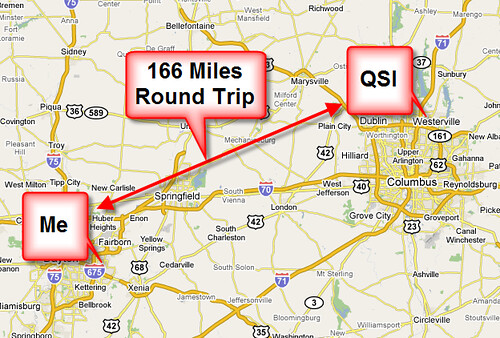
That's 166 miles round trip, which is three hours of wearing my car every day if weather and traffic cooperate. At the height of the gas price crunch my monthly gas bill was over $500. That hurt, but the worse hurt was the loss of three hours a day from family time.

My family and I spent a significant amount of time looking for a place to relocate to in Columbus to cut the commute, but the end result was five months of frustration.  We just had too many moving parts in our lives to make a relocation feasible, and there was no way I could continue spending three hours a day driving back and forth to QSI.

QSI's been an amazing place to dock my laptop over the last year and a half. As an aspiring crusty old fart (I've been in the workforce for a loooong time), I can easily and confidently say that QSI is the second best job I've ever had. (First place goes to my 11 years fixing radar and computers while flying on AWACS radar planes.)

My peers at QSI's Solutions group are unparalleled for their involvement in the developer community, which was the main reason I went to work with them. Members of the QSI Solutions group have spoken at EVERY .NET code camp or conference in the Ohio and Michigan area for three years straight, and they've been involved in a large number of events outside that area. QSI Solutions folks presented at six of the 24 sessions at the last Central Ohio Day of .NET; that's 25% of the sessions with a QSI dude or dudette up front showing their great technical chops.  QSI's Solutions folks have presented at nearly every .NET user group in the Heartland district at least once, and in many cases multiple times, over the last several years.

Simply put, if you're at a .NET event of any sort in the region, you're very likely to see a QSI Solutions member attending or presenting. There's no other company, consulting or otherwise, that comes even close to this amount of passionate community involvement and the technical chops to be recognized as thought leaders.

I am awed by the skills and accomplishments of my peers at QSI.  Simply awed. I was fortunate enough to work on several ground-breaking projects with a few of the Solutions folks, and there are a bunch of other folks I wish I'd had the opportunity to work with. I learned many things from many people in Solutions, and I'll greatly miss that interaction.

My managers at QSI earned my respect time and time again on issues I count as fundamental deal-breakers. Empower your people to learn. Give them the confidence to say "I don't know" because that builds credibility with your clients. Encourage them to say "That's wrong" as long as you're helping them to follow that up with "Here's a realistic alternative." I left a company previously because management didn't live up to these kinds of values; QSI exceeded those expectations in every way.

Sure, there are some rough spots at QSI. Every company or group has warts and you're deluded if you think otherwise. None of those rough spots at QSI was a reason for me leaving. Not one. Every issue that I had at QSI was a challenge I felt could be overcome because I worked for, and with, amazing folks. As I said at the top of this blog, the sole reason for me leaving is the commute.

I'm moving on to a position with another great company, and I'll be starting on Monday, 11/17. I'll leave news of that for another post because I really want this post to focus on Quick Solutions.

Be clear on one thing: If I lived in Columbus I'd be staying at Quick for a long, long time. Many companies profess to value their employees. Many companies profess to be smart about business. Very few actually live up to those promises -- and Quick is certainly one that does.

If you're looking for a great place to work, I can't recommend Quick enough, either on the Staffing side or in Solutions.  The bar to get in to the Solutions group is high, but they're an amazing, elite group of folks I'm awfully proud to have worked with. I'll miss 'em all. 

Thankfully they're all community groupies so I'll see them all over the place anyway.

(PS: Actually, this whole blog post is a complete lie. I'm leaving Quick Solutions because they use Lotus Notes and Notes sucks.)

Wednesday, November 12, 2008

CodeMash Session List Posted

The CodeMash session list has been posted at our Google Group!

The sucky side of this is that we had to drop submissions by a lot of friends of ours. We had over 300 submissions for 60 slots. That's a tough, tough job to pare that monstrous list down. Good friends, good smart friends of mine didn't get selected, and that hurts.

The good side of this is that we've got an amazing list of sessions and presenters. Uncle Bob Martin. Mary Poppendieck. Richard Campbell and Carl Franklin. Jesse Liberty. Jim Weirich.

And keep in mind that our Precompiler on Day 0 (Wednesday) has a crapload of great tutorials from folks of the same expertise. Whoof!

Go register!

Monday, November 03, 2008

.NET University Schedule Posted

Jeff put up a great site for the various regional events: Start A Fire.

Check out the schedule for the 8 November .NET University event!

Usability 101: Lessons From Odd Places

I spent last week on a Disney cruise vacation and found a usability lesson in a odd place: a coffee machine on board the ship.

I drink a lot of coffee. I have ever since my first winter while stationed in Anchorage, Alaska. Go figure. Coffee urns for large coffee service are well-known, common equipment to a lot of folks. They're simple and have had the same basic features since dinosaurs roamed: a large pot to hold the coffee, an optional heat source to keep the coffee warm, and a simple spigot to dispense the coffee.

The spigot's operation is simple: pull a lever, a valve opens, and a stream of coffee starts to flow. Release the lever, the valve closes, and the stream of coffee stops. It's a simple mechanical gadget that's worked well and is familiar to all regardless of which continent you're on, or what the local language is. You don't need a manual, you don't need a waiter to help.

The Disney Magic, the ship we were on, had some nice-looking coffee machines which appeared to be completely automatic: they looked like they were plumbed in to a water source and were complete with grinders and a brewing system. I never saw an attendant pour in any coffee from another source. The benefit to the Disney crew of this for an operation serving thousands of cups of coffee is pretty obvious: fire and forget. Load up your coffee beans or grounds, ensure the water and electricity is on, then simply monitor to make sure everything's fine.

The usability issue? The spigot. Some engineer thought it would be a great idea to make the valve system electronic instead of mechanical. Then they could set an amount to automatically dispense when someone triggered the spigot.  8 oz. cups are pretty standard, so the engineers could set the dispensed amount to 7.5 ounces and everyone would be happy.

Except 99% of the coffee-drinking populace is used to holding that spigot open with their hand instead of simply whacking it a bit to get the stream flowing.

The results I saw were really amusing, even when it happened to me: Want to simply warm up some coffee in your mug? Not such a good idea, because the dispenser pours out 8 oz., regardless. 4 oz of lukewarm coffee + 8 oz of hot equals 12 oz. total, which is 50% more than an 8 oz. mug will hold.

Stack overflow.

Worse yet, someone's initial instinct in such a situation is that the valve's stuck, so why not work the spigot handle a couple times? Whoops, another 8 oz. of coffee flowing out. Good thing the coffee machines had a plumbed drain, too, otherwise there'd been a tidal wave of coffee flowing over the floor.

Lesson Which Should Be Learned: Think carefully when you're trying to bend users' experience in a concept that's ingrained and accepted for a long time.  We cherish thinking outside the box, and we love seeing UIs or system flows which give us a better experience than we've suffered through previously -- but sometimes some things are better left untouched.

(I also had a rental car which had a fuel gauge that was backwards. Every fuel gauge I've seen since starting to drive a long, long time ago has its Empty side on the left and its Full on the right. The Pontiac G6 we had showed Empty on the right and Full on the left. That's a dangerous change since someone's quick visual glance might lead them to believe they're at 7/8 of a Full tank when they're really 1/8 away from walking...)

Thursday, October 23, 2008

Letting Go: Clearing Out Old Conference Badges

It was a Dr. Phil release day yesterday: I had to work through some issues and throw out a passle of old badges/badge holders from several years worth of conferences. It wasn't easy, because they were somewhat like a, uh, badge of honor, but they were pretty useless and adding a whole lot of clutter to my home office workspace.

What was the point in keeping them around, anyway?

SharePoint Connections? Moderately lame conference where I met some great folks, but why keep that badge around?

MVP Summit? Outstanding networking where I met some great folks, but when will I use that holder again?

Six or eight or more Day of .NET conferences from here in our kickass Heartland district? Outstanding conferences where I met a lot of great folks, but do I really need those holders in my desk?

DevLink? John Kellar's amazing baby down in Nashville where I met a lot of great folks and had my opinion of one particular person turned around 180 degrees to positive from negative, but I'm not going to use that notepad in that holder anyway.

CodeMash? Oi. My own baby via group parenthood together with Brian Prince, Jason Gilmore, Dianne Marsh, Jason Follas, Jeff and Josh, and a whole lot of other great folks. Toughest to let go of, but then your own kids always are.

See something common between all those? Great folks I met or worked with at them. The badge holders don't have anything to do with those ongoing relationships. All they were was workspace clutter adding to my mental fugue.

I'm feeling better now.

Maybe I should start a group. "Hi, my name's Jim and I'm a badgeaholic. It's been one week since my last badge collecting incident."

Monday, October 20, 2008

Microsoft Dogfood Developers Conference

I'm speaking at a neat conference put on by Microsoft on 20 November at their Columbus office: The Dogfood Developers Conference.

This conference has a lot of great content put forth by a bunch of Really Smart Folks. I'm giving an opening session on roadmaps, technologies, and announcements coming out of the PDC. Smart folks like Leon, Monish, Rick, Carey, Steve Smith, Jeff, and others will be presenting or hanging out at open spaces after the main conference.

There are plenty of seats left open, so go register and show up!

Update: The sponsor at Microsoft fixed up the agenda a bit so it's easier to read. New fix posted below.

** Track 0: MS Multipurpose Room **
8:00 to 9:00 AM Register
9:00 to 9:45
- Software + Services, MS Roadmaps, PDC Announcements
Speaker: Brian Prince, MS
9:55 to 11:35
- MOSS: ECM, KnowledgeLake, Imaging Capture
Speakers: Mike Miller and Mark Oman, KnowledgeLake
Noon to 1:00 PM: Lunch
1:00 to 2:20 PM
- MOSS Development
Speaker: Leon Gersing, Telligent
2:30 to 3:30
- Virtual Earth
Speaker: Steve Millroy, MS
3:30 to 5:00 PM
-Ask the Experts
-------------------------------------------------------------------------
** Track 1: DeVry 501 **
8:00 to 9:00 AM Register
9:00 to 9:45
- Software + Services, MS Roadmaps, PDC Announcements
Speaker: Jeff Blankenburg, MS
9:55 to 11:35
-IE Application Compatibility, Web 2.0, Web Slices and extension
Speaker: Mike Lutton, Sogeti
Noon to 1:00 PM: Lunch
1:00 to 2:20
-SilverLight/WPF Overview
Speaker: Jeff Blankenburg, MS
2:30 to 3:30
-MVC Overview
Speaker: Steve  Smith, MS MVP and Nimble Software Professionals
3:30 to 5:00
-Ask the Experts
--------------------------------------------------------------------------
** Track 2, DeVry 502**
8:00 to 9:00 AM Register
9:00 to 9:45
- Software + Services, MS Roadmaps, PDC Announcements
Speaker: Jim Holmes, MS MVP
9:55 to 11:35
- BizTalk: SOA and ESB
Speaker: Monish Nagisetty, Quick Solutions
Noon to 1:00 PM: Lunch
1:00 to 2:20
-Legacy Modernization: Tools for COBOL, AS/400 and Mainframe migrations to .NET
Speakers: Hewitt Wright, MS and Walter Sweat, Fujitsu
2:30 to 3:30
- Writing Secure Code
Speaker: Steve  Webb, Information Control Corporation
3:30 to 5:00
-Ask the Experts:
------------------------------------------------------------------------------------------
** Subject Matter Experts Panel **
-Carey Payette, President of the Central Ohio .NET Developer’s Group:
C#, .NET
-Alexei Govorine, Co-founder of Central OH Application Lifecycle Management Group:
Team Foundation Server, ALM
-Rick Kierner, HMB Consultant:
MOSS Development
-Jim Holmes, MS MVP:
.NET, MOSS Development
-Monish Nagisetty, Founder of Mid-Ohio Connected Systems Developers User Group:
SOA, BizTalk
-Leon Gersing, Telligent
MOSS development
-Jeff Hunsaker, Co-founder of Central OH Application Lifecycle Management Group:
Team Foundation Server, ALM
-Mario Fulan, Microsoft Consulting Services:
MOSS Governance and development
-Tom Sears, Microsoft Consulting Services:
.NET Architecture, Architectural Guidance
-Steve Smith, MS MVP:
ASP.NET, MVC, Agile Practices
-David Baliles, MS SLG Dev Tools, Solution Specialist:
MSDN and TFS
-Mike Gresley, MS SLG Developer Technology Specialist:
.NET and TFS

Friday, October 17, 2008

Can't Browse Non-Local Locations in Add Users/Groups

Problem: You're working on a system that's joined to a domain, but when you try to add domain resources to security, local groups, etc., the only Location showing in the dialog box is your local system -- no domain. You may even be able to log on to the system with a domain account, but you're still limited to local resources when dealing with the Add thingie.

Possible Solution: Double-check where your DNS server settings are pointing to. In my case, I was working on adding a MOSS VM to the Exchange VPC I downloaded from Microsoft. The Exchange is set up as the domain controller and has AD and DNS running on it.  However, I'd had it grab an IP address from my local DHCP server -- and as a result both the Exchange VPC and MOSS VM were using DNS servers other than the Exchange VPC.  Some domain-related calls worked fine, like joining the domain and logging on with a domain account, however, others didn't.

I put manual DNS server entries in the network connection dialog for each system and put the Exchange VPC's address as primary DNS and my network's DNS server as the secondary.  Now everything's hunky dory. Domain resources are now available when I'm altering group membership.

Yay.

Tuesday, October 14, 2008

Did I Actually Write That?

As young to mid-level programmers/developers/whatever, we often find it hard to fess up to mistakes or admit ignorance.  We're young, we're lacking a stream of successes on which we can build our confidence, and if we're in a weak work environment we're lacking a mentor who gives us a positive culture which acknowledges weaknesses and failure -- but helps us learn to grow past those.

As more seasoned whatevers we often let egos get in our way of fessing up to those mistakes or weak spots in our knowledge. That might be even worse than the factors earlier in our careers, but regardless it's still a large problem because it's giving us and our colleagues a false sense of security. I also think it gets in the way of, or tamps down, the desire for continual improvement in our craft.

I always find it refreshing to hear industry leaders like Jeff Atwood bring this up in very public venues like Dot Net Rocks. On one of the DNR shows Atwood had a great quote along the lines of "A young developer's code sucks, and they don't know enough to admit it, much less fix it. A professional developer knows his code sucks and works to fix it."  Jeremy Miller said something very similar on the Alt .NET Podcast, and I've seen any number of amazing brain children on Twitter fess up to the same thing.

Hearing and reading folks like that step up and admitting their failures certainly makes it a lot easier for us folks down on the food chain admit ours. It ought to at least. If you can't, then you ought to re-evaluate where you're checking your ego when you sit down to code...

Several months ago I was working on a project that had been idle for four or five months. I was looking over a bunch of tests to try and refresh myself about how a part of the system functioned -- the class and method names I chose at the time ended up being not as expressive as I'd thought when I initially wrote them, and I was using the tests to drive back through the behavior.

I came across a test that was checking a custom sort routine's correctness. Stand up a list of items in unsorted order, call the sort routine, then check the order's sorted. Simple, no?

I started reading through the test's implementation and broke out in loud laughter. My colleagues at Quick Solutions, who already think I'm nuts, must have had that impression cemented in. Why?

I found the assertion I was doing to check the validity of the test was simply counting the number of elements in the list. What the hell was I thinking when I wrote that? Did I actually write a sort validation that simply counted the number of elements after sorting? Obviously, because TFS's history showed me as the guilty culprit.

I have no idea what I was doing when I wrote that code, and I've no idea why I didn't write more tests around that functionality.  Thankfully my implementation was correct, so the sucky, stupid test didn't impact the rest of the system.

That was the only bad code in that entire project of 45K lines of code. Every other line of code was such a work of art that it brought tears of joy to my eyes. Right.

What's the point here? Several.  First, your code sucks and you know it. Fess up to it.

Second, figure out why that code sucked and don't make the same mistakes tomorrow.

Third, and this is the hard one, be open about the mistakes you've made. Check your ego at the door(which is a hard thing), because your openness will benefit your entire team and your project. Your credibility goes up with your colleagues and your client because you're showing you're concerned about quality: You know you need to pay off that technical debt. You know you're working on educating yourself and your team to improve their chops.

Hopefully you'll also find this trait spreading to your colleagues and hopefully they'll start the same process: admit their code sucks, move on, and improve what they're writing.

Your code sucks. It's OK to admit it if you're working on fixing it. Honest.

Tuesday, October 07, 2008

CodeMash Precompiler Event 7 January

(Posted on CodeMash's Google Group too)

We've been finalizing the content for the CodeMash Precompiler / Day0
event on 7 January.  I'm awfully excited about this because we've got
a pretty amazing event to tack on to CodeMash.

I've come to believe that the meme running around of "Learn a new
language each year" isn't good enough. You can sit down with a book or
some online material, but you'll only get the shallow facade of the
language. You'll learn how to code Ruby in C# style (if C# was your
language of skill) because you're missing all the lessons and idioms
learned by others who've worked in that language for some time.

What the meme ought to be is "Lean a new language, and learn it from
passionate geeks who've been working in it!"  To wit, an entire day
dedicated to getting folks up to speed in the basics of languages and
methodologies they're unfamiliar with.  The CodeMash Precompiler will
give you the building blocks you'll need to jump into other content on
CodeMash's regular days.

Here's what things are looking like now. Please keep in mind that the
abstracts I've put below are my off-the-cuff initial drafts. We'll get
more polished, descriptive abstracts posted up shortly.

All Day CodeJam
Come in and spend all or part of your day cranking out code in a room
full of Wicked Smart People. We'll have a server application built and
hosted on either a VPC or networked server. You can spend your time
cranking out a front end to the app, you can extend the app's
functionality, or you can just say "This sucks and I'm rebuilding it
from scratch and I'm gonna do it right!"

You can work in your own environment, or better yet, do the CodeMash
thing and jump off into a new environment. We'll have a number of VPCs
set up with all the major development environments.

Concerned that you want to jump into a new environment, but won't know
how to get started? We'll have experts wandering around the room just
waiting to help you out. Why not sit down with someone working in a
different environment and pair up with them?

FULL DAY Language Tutorials

.NET 101 with Josh Holmes and Jeff Blankenburg (and maybe others).
Figure out how to get your feet wet in the .NET framework, C#, Visual
Basic, WPF, Silverlight and more.

Java, Groovy, and Grails 101 with Chris Judd and Jim Shingler. Two
Java experts walk you through the basics of Java, it's newest dynamic
language (Groovy), and the shiniest web framework (Grails.)

Ruby 101 with Jim Weirich and Joe O'Brien.  Yeah, does it get any
better? Go learn Ruby from two masters of it.

HALF DAY Methodologies Tutorials

Turning The Ship with Dave Donaldson. (HALF DAY) Spend time in a
highly interactive session with Dave as he discusses practical lessons
learned on changing processes, mindsets, and culture to steer a
company onto a more agile, productive path.

Kanban 101 with Dave Laribee. (HALF DAY) What's Kanban? How's it
different from other Agile implementations? Learn about a not-so-new
approach to managing projects that will help you boost your team's
productivity and speed to delivery.

Fundamentals of Test Driven Development. (HALF DAY.  REPEATS MORNING
AND AFTERNOON.) Sit down and walk through the basics of TDD with Leon
Gersing and another presenter yet to be announced.  This hits the
basics of TDD and is hands on with two of the most passionate
advocates of TDD around.  Learn TDD, evolve your critical thinking.

IMPORTANT

The CodeMash Precompiler is an /OPTIONAL/ event for which you'll
register separately. Final costs are still being worked out, but it
should be well below $100.  More details on registration for the
Precompiler shortly.

I hope this excites y'all as much as it does me.  I'm more than a bit
twitterpated about it.

Saturday, October 04, 2008

.NET University: More Details

Jeff Blankenburg and I have done some work fleshing out the details of the topic list for the .NET University event in Columbus on 8 November. (Register here.)

Here's the session list:

  • Lap Around Visual Studio 2008 / Testing with Visual Studio
  • Introduction to Object Oriented Programming
  • Introduction to Web Services
  • Windows Presentation Foundation 101
  • Silverlight 101
  • AJAX Basics

The list of speakers is still being ironed out, but will include myself, Jeff, Leon Gersing, and a couple of other great speakers from the region's community.

Remember that .NET U is targeted to folks new to or considering .NET, or looking to find out more about the .NET 3.5 platform.

Thursday, October 02, 2008

Shout Out: Cleveland Software Freedom Day

Scott Sieghman of Sun Microsystems passed on some interesting info on a great event in Cleveland on 27 October: The Software Freedom Day.  It's a free day-long discussion on how businesses can take advantage of Free and Open Source Software (FOSS).

More info and registration links at the event's site.

Wednesday, October 01, 2008

.NET University Registration Open!

Registration is open for the .NET University being held in Columbus on 8 November. Sign up here!

Jeff and I are still ironing out the exact content agenda, but you can find the broad strokes content listed on this earlier post.

Remember: .NET University is intended for folks new to .NET, or new to the .NET 3.5 platform, or folks who are thinking of moving to .NET. It's a 100 level overview of things like LINQ, VS 2008, and a bunch of other goodies.

Monday, September 29, 2008

Network Printers Shared From Vista not Printing From XP Clients

Problem: You've got a printer you've shared off a system running Vista. You're trying to print from a non-Vista client, such as XP. Print jobs show up in the print queue when you open up that printer, but the print jobs don't run until you restart the print spooler.

Solution: Turn off bi-directional printer support on the shared printer's port.  Open up the printer's property dialog (Printer | right-click | Run as administrator | Properties) and select the Ports tab. Find the port your printer is shared off of, select it, then clear the checkbox for Enable bi-directional support.

(Note: I'd love to say that based on my years of network and system support, I figured this out on my own. Not so. Google saved me with several hits on MSDN and TechNet fora.)

Friday, September 26, 2008

Next Speaking Gig: Ann Arbor Day of .NET

On 18 October I'll be presenting "3 Tips to Improve Your Development Process" at the Ann Arbor Day of .NET. It's nice to have another session lined up -- I'm slowly working my way back in to regular speaking after a months-long funk where I couldn't get fired up about creating new presentations or rehashing old ones.

I'm excited about this presentation because it's all about making small changes to how you develop software: Figure out how to estimate better. Start having a daily standup.  Every once in awhile stop and look back over what you've done via a retrospective.

This gig's been poking around my head for awhile, and I'm looking forward to fleshing it out and putting it out in front of a crowd.

The folks running AADODN always do a terrific job hosting the conference. I hope to see you at there, and maybe even in my session!

Thursday, September 25, 2008

ArcReady Events: Architecting Modern Distributed Applications

ArcReady is a neat series of events hosted by Microsoft and targeted to architects or folks who are interested in software architecture.

This quarter's event is on architecting distributed apps.  There are events in Columbus on 2 October and Cincinnati on 7 October. Other events are scattered throughout the Central region, so the odds are you can find something close to you.

Check out the ArcReady site for more information on the session and for info on registering.

Subscribe (RSS)

The Leadership Journey