Wednesday, February 04, 2009

Getting Selenium HTML Test Suites Running Automatically

We’ve been working on using Selenium to write tests around our major functional slices in Community Server. Selenium enables you to write a test script that opens up an instance of Firefox, Chrome, or Internet Explorer and drives it around your website. You can navigate, check functionality, and test for text on the screen. It’s an amazing tool, and it is leaps and bounds ahead of the web testing functionality in Visual Studio, IMO.

Selenium has a number of different parts to it: a server component to run the tests on a server, a remote control piece which lets you push tests through different browsers, and a grid piece to scale out execution for load testing/faster execution.

The Selenium server test runners support a number of different languages, so you can write tests in C#, Java, Ruby, or a number of others. Tests are written those languages, then compiled into an assembly, and executed in one fell swoop by the server which consolidates all the output from the tests into one individual results file.

We’re using program managers like myself to handle writing these tests, so we’re all over using Selenium IDE to record and maintain the tests. Selenium IDE records tests and stores them in an HTML file, so it’s easy for PMs to crack open and understand what’s going on.

Support for running HTML test “suites” in Selenium is pretty spotty, unfortunately. The Selenium team’s focus has really been on supporting real languages instead of HTML. (No, HTML is not a programming language! You aren’t writing code if you’re writing HTML!)  As a result, gaps in tools and a bug in the server code leave users with no way to automate a series of HTML test suites. You have to individually execute your test suites through Selenium IDE. While this is still tremendously useful, it’s painful if you want to run a large number of tests, or if you want to automate execution for dropping into a CI process like CruiseControl.NET.

Moving to the pure language environment isn’t what we want to do at Telligent for our feature testing. We want to keep the HTML test suites because our PMs all understand HTML and it’s easy for us to write and maintain tests – we don’t have to divert devs from focusing on their work. There’s an option in Selenium IDE to convert the HTML to C#/Rub/Java/etc., but that’s a one-way tool and can’t be automated. Too brittle, too labor intensive. Again, everything points our environment to HTML. Your environment may and likely does differ.

Dave Donaldson and I have been spending some time over the last couple weeks plinking away at getting this HTML suite issue solved, and we’ve finally gotten things up and working!  There are three steps involved:

0) Patch the Selenium server code to support HTML suites.

1) Build a script to execute your HTML test suites.

2) Build a script to read the suites’ output reports and consolidate the information for inclusion into your CC.NET report.

First off, you’ll need Selenium up and running on your server. I’m not going in to that in this post. The Selenium site’s instructions on setup can get you going.

You’ll also need a full version of the Java SDK on the server you’re running Selenium from, not just the JRE.

Next, you’ll need HTML Tidy. We use that to clean up some HTML goo from the Selenium test reports so that we can treat those reports as XML in PowerShell.

Lastly, you’ll need PowerShell.

Step 0: Patch Selenium

There’s a bug in Selenium RC that prevents the Selenium HTML test runner from correctly loading HTML test suite files. We need to fix that, so grab the Selenium RC source from the Subversion repository at http://svn.openqa.org/svn/selenium-rc.  You’ll need to apply the patch discussed here and then use Maven to rebuild the jar file. Maven will drop the updated file into the folder selenium-rc\trunk\selenium-server\target. The jar you’ll use is ‘selenium-server-1.0-SNAPSHOT-standalone.jar’.  You absolutely should rename that jarfile so it’s clear you’re running a patched version, not the stock one. Being a highly creative chap, I chose ‘selenium-server-1.0-SNAPSHOT-standalone-TelligentPatched.jar.’ Brings a tear to your eye, I’m sure.

 Step 1: Execute Your HTML Test Suites

(Note: Step 2: Deal With Reports is mixed in here…)

Launching an HTML test suite in Selenium is done by invoking Java to fire off the Selenium server (Dox on SeleniumHQ site). The snippet below shows some PowerShell parameters, i.e. “$browser”.

java -jar selenium-server-1.0-SNAPSHOT-standalone-TelligentPatched.jar 
        -htmlSuite 
	$browser 
	http://localhost/csfunctionaltests/ 
	$testSuitePath 
	$testReportPath

The “-htmlSuite” param says you’re running the test in an HTML suite as opposed to a C# assembly, Java jar, etc.  “$browser” lets you specify what browser to use. Chrome, Firefox, Opera, and Internet Explorer are among those currently supported. “http://localhost/csfunctionaltests/” is the root of the site your Selenium scripts will execute against. “$testSuitePath” is the test suite’s file location. “$testReportPath” is where the report for the specified test suite will get stored.

To start off with, we use a number of parameters when invoking this PowerShell script. This lets us keep the script the same but tweak its execution in different environments for our build server or local dev boxes. The parameter statement looks akin to

# Get params, most likely passed from a .bat file.
param($browser, $testScriptsRootDir, $reportDir, $tidyDir)

There are a number of ways to figure out what test suite files you need to run. We append “TestSuite” to all our suite filenames, i.e. “ForumCRUDP0TestSuite.html.” Using this convention, you could search a directory structure for all those test suites and iterate over them, launching the server jar as needed. Note that the test suite’s output report won’t get merged with other suite reports. You’ll need to have a separate name for each report and merge those after the run’s complete. Fear not, more details on that later.

For now, we’ve hardwired in our test suite locations in a predefined array:

# Setup pairs of test suites with their report names. 
#  Ex: ("myTestSuite.html", "myTestReport.html").
$suites = 
	("CommunityServer\Forums\P0\ForumCRUD\ForumCRUDP0TestSuite.html", 
	  "ForumCRUDP0.html"),
	("CommunityServer\Forums\P0\PostCRUD\PostCRUDP0TestSuite.html", 
	  "PostCRUDP0.html"),
	("CommunityServer\Wikis\P0\WikiCRUD\WikiCRUDP0TestSuite.html", 
	  "WikiCRUDP0.html")

Note that these aren’t full paths, they’re partial paths under a common root. We’ll use an input parameter to control where that common root is, enabling us to easily support different environments on our build box and local dev machines.

Next we set up some global variables for accumulating stats on each test suite:

$accumulatedTestCount = 0
$accumulatedTestPasses = 0
$accumulatedTestFails = 0

Now we can iterate through our list of test suites with a simple foreach. The loop sets up paths for the suite and reports, runs the suite, then does some processing on the output file to gather up statistics. We use HTML Tidy to clean up the report so we’re able to use PowerShell’s XML data type to easily pull important bits from the report.

This loop can use some serious refactoring, but hey, we’re just at the “Green” stage of things right now. Note that I’ve done some line breaking for readability here.

foreach ($testSuiteAndReport in $suites)
{
	$testSuite = $testSuiteAndReport[0]
	$testReport = $testSuiteAndReport[1]

        $testSuitePath = join-path $testScriptsRootDir $testSuite
	$testReportPath = join-path $reportDir $testReport
	
        "Running $testSuitePath..."
	$buildScriptDir = join-path $testScriptsRootDir "BuildScripts"
      
        set-location $buildScriptDir
	java -jar selenium-server-1.0-SNAPSHOT-standalone-TelligentPatched.jar 
		-htmlSuite 
		$browser 
		http://localhost/csfunctionaltests/ 
		$testSuitePath 
		$testReportPath
	
	"Cleaning up HTML..."
	set-location $tidyDir
	./tidy.exe -m -i 
		   --doctype omit 
		   --output-xml true 
		   --numeric-entities true 
		   $testReportPath
	
	$report = [xml] (get-content $testReportPath)

	#
	#Hardwired positions based on current Selenium HTML report
	#
	$currentSuite = 
		$report.SelectSingleNode("//table[@id='suiteTable']/tbody/tr[1]/td/b")
	
	$currentTestCount = $report.html.body.table[0].tr[2].td[1]
	$accumulatedTestCount += $currentTestCount

	$currentPasses = $report.html.body.table[0].tr[3].td[1]
	$accumulatedTestPasses += $currentPasses

	$currentFails = $report.html.body.table[0].tr[4].td[1]
	$accumulatedTestFails += $currentFails
	
	if ($currentFails -gt 0) 
	{
		"`nFailures present: " + $currentSuite.get_InnerText()
		$suitesWithFailures += $currentSuite.get_InnerText()
	}	
}

OK, so we’ve looped through our array of test suites to run each individual suite and save its report, we’ve cleaned up those reports, and extracted out various statistics from them.

Now we can directly work with PowerShell’s XML type to create the summary results we’ll hand off to CruiseControl for its reporting. (You do remember that’s what we started off with as our goal at the top of this post, right?)

First we’ll create our XML structure, then we’ll list our accumulated totals, following on with looping through test suites with failures, then finally closing out the XML structure and writing it to our output file.

"Building Selenium report..."

$xmlOut = "`n"
$xmlOut += "" + $accumulatedTestCount + "`n"
$xmlOut += "" + $accumulatedTestPasses+ "`n"
$xmlOut += "" + $accumulatedTestFails+ "`n"
$xmlOut += "`n"

"Suites with failures:"
foreach ($failure in $suitesWithFailures)
{
	$xmlOut += "" + $failure + "`n"
	"* " + $failure
}

$xmlOut += "`n"
$xmlOut += "`n"

$finalReport = join-path $reportDir "selenium-results.xml"

$xmlOut | out-file $finalReport

We’re finally through the entire script!

We run this script by invoking it from a batch file shown below. I’ve broken lines for readability, although the path to the PowerShell script will likely look like complete poo on my blog. Deal with it.


powershell.exe
	D:\Builds\CommunityServerFunctionalTests\Working\Trunk\Tests\FunctionalTests\BuildScripts\RunSeleniumTestSuites.ps1'" 
	-browser 
	"*firefox" 
	-testScriptsRootDir 
		"D:\Builds\CommunityServerFunctionalTests\Working\Trunk\Tests\FunctionalTests" 
	-reportDir 
		"D:\Builds\CommunityServerFunctionalTests\Artifacts" 
	-tidyDir 
		"D:\Downloads\HtmlTidy"

The entire PowerShell script can be found on my site here.

We use a simple XSL to merge the “selenium-results.xml” file into CruiseControl as well as a mail notice that goes out.  That XSL’s fairly simple:

<?xml version="1.0"?>
<xsl:stylesheet xmlns:xsl="
http://www.w3.org/1999/XSL/Transform" version="1.0">

    <xsl:output method="html"/>

    <xsl:template match="/">
        <xsl:if test="//seleniumReport">
            <br />

            <table border="0" width="100%">
                <tr>
                    <td>
                        <!-- Header table -->
                        <table width="100%">
                            <tr>
                                <td style="background-color: #000066; padding: 5px;">
                                    <span style="color: #ffffff; font-weight: bold; font-size: 12pt;">Selenium Summary</span>
                                </td>
                            </tr>
                        </table>

                        <!-- Stats table -->
                        <table>
                            <tr>
                                <td style="padding-left: 5px;">
                                    <span style="font-weight: bold;">Total Tests:</span>
                                </td>
                                <td style="padding-left: 5px;">
                                    <xsl:value-of select="//seleniumReport/totalTests" />
                                </td>
                            </tr>
                            <tr>
                                <td style="padding-left: 5px;">
                                    <span style="font-weight: bold;">Total Passed:</span>
                                </td>
                                <td style="padding-left: 5px;">
                                    <xsl:value-of select="//seleniumReport/totalPass" />
                                </td>
                            </tr>
                            <tr>
                                <td style="padding-left: 5px;">
                                    <span style="font-weight: bold;">Total Failed:</span>
                                </td>
                                <td style="padding-left: 5px;">
                                    <xsl:value-of select="//seleniumReport/totalFail" />
                                </td>
                            </tr>
                        </table>

                        <!-- Table to display failed test suites -->
                        <xsl:if test="//seleniumReport/failedSuites/failedSuite">
                            <xsl:variable name="failedSuite" select="//seleniumReport/failedSuites/failedSuite" />
                            <br/>
                            <table cellpadding="4" cellspacing="0">
                                <tr>
                                    <td style="border: 1px solid #649cc0; background-color: #a9d9f7;">
                                        <span style="font-weight: bold;">Failed Test Suite</span>
                                    </td>
                                </tr>

                                <xsl:for-each select="$failedSuite">
                                    <tr>
                                        <td style="border-left: 1px solid #649cc0; border-right: 1px solid #649cc0; border-bottom: 1px solid #649cc0;">
                                            <xsl:value-of select="." />
                                        </td>
                                    </tr>
                                </xsl:for-each>
                            </table>
                            <br />
                        </xsl:if>
                    </td>
                </tr>
            </table>
        </xsl:if>
    </xsl:template>
</xsl:stylesheet>

OK, that’s plenty to digest, and there’s lots of room for improvement in the process. As I said, we got past the Red stage and are at Green. Refactor comes as we figure out any hitches in this.

Feedback is welcome, and I’d especially love to hear from any Selenium folks who’ve also solved this problem!

Leadership 101: Odds and Ends Grab Bag

My second-to-last post in this series is really a grab bag of several topics which I thought important but was too lazy to come up with enough material on to write longer individual posts on. Frankly, I was also getting concerned I’d started spending too much time telling Jim-as-an-old-fart war stories or was drifting into Dilbert land complaining about bad bosses…

With that in mind, here are a few smaller items about leadership fundamentals which you need to keep in mind as well.

You’re Part of the Team, but You’re Not IN the Team

A leader needs to be close to and part of his team, but he needs to remember that he’s not IN the team. That sounds strange, so let me try to clear it up a bit. While you lead the team, you need to keep in mind that your teammates aren’t your peers. You’re responsible for leading them, you’re responsible for their success as individuals, but you’re also responsible for the team’s success and contribution to the larger organization. At some point you’ll have to make some difficult decisions, and sometimes an overly intimate relationship with your team can get in the way.

Don’t get me wrong: build camaraderie with your team. Build strong bonds with your team. Build incredibly strong trust and communication with your team. But you’ve got to maintain a bit of distance between you and your team to ensure you’re able to have a clear head when it’s time to make tough calls.

Part of this is also taking care to avoid blowing off steam around your team. Don’t vent your frustrations to your team, instead find a peer at your same level and form a Mutual Rant League. When you start venting to your team you’re injecting them with the same level of frustration you’ve got. Worse, actually, since it’s a one-to-many relationship and whatever you feel frustrated about will get vastly magnified and distorted when you vent to your team. Finally, they’re seeing that you’re not living up to the Calm in a Storm tenet I wrote about earlier.

As Capt. John Miller said in Saving Private Ryan, “Gripes go up, not down. Always up. You gripe to me, I gripe to my superior officer, so on, so on, and so on. I don't gripe to you. I don't gripe in front of you.”

Unfair? Maybe. Deal with it. You’re a leader. Act like one.

Value Your Elites, but Keep Membership to That Group Open

Hopefully you’ve got a team built up of top-notch performers. They’re elites who work hard, work well, and work to continually improve themselves. The 10X productivity factor of your elites isn’t a myth, it’s a reality, and it’s a reality that brings your organization incredible success.

Recognize those folks as elites, because they are. They’ve invested a tremendous amount of time, passion, and sweat equity in improving themselves. There’s a vast ocean of individuals in the world who care not a whit for self-improvement, and your elites are small islands in that sea of dross. Recognize your elites for what they’ve done to reach their level, and heed their input. If you’re lucky you’ve got a team working for you that’s a whole lot smarter than you, so listen to them! (And it’s a Good Thing to have folks smarter than you on your team.)

At the same time, keep the entrance door open to that group and encourage people from other teams to aspire to get into your team. Don’t you dare drop the bar for entrance to your elite team, but make it clear to others that they can join the Kool Kidz if they have the right mindset and put in the level of work required to lift themselves over that bar.

Furthermore, open up that door even wider: actively encourage members from other teams to join your brown bag lunch presentations. Set up developer exchanges where outsiders can join your group and get fired up about how neat it is to learn new things and succeed at them.

Your elites are the drivers of success in your organization. Recognize them as such.

Praise in Public, Criticize in Private

Do I really have to write about this one? Yes, unfortunately, I do.

Criticism to one of your team members should never be given in front of others. Do it in private where there’s no sense of confrontation and egos can stay a bit less inflated. Furthermore, you’re bettering your odds of success for ensuring the criticism is taken as guidance for the receiver to improve on something. Criticism in public is nothing more than a slapdown, and it’s always going to leave hard feelings.

Even worse, your team’s going to take a significant morale hit as they see you grinding someone down in front of them. They’ll lose the confidence you’ve worked to build up in them for fear of being castigated in public for errors, right or wrong.

Conversely, offer up your praises in public. Recognize the person in front of their peers. You’re lifting up the recipient, and you’re building good morale with the peers, too.

Successful Team? It's the Team's Success, Not Yours.

Just because you’re a leader doesn’t mean you get to take credit for your team’s accomplishments. Sure, you’ve worked hard to build up that team, but the victories and accomplishments the team achieves are the team’s! Yes, you certainly had a part in it, but guess what? Who did the real work? You guided, you had some vision, hopefully you inspired and supported – but you didn’t figure out that Excel Services issue, you didn’t handle all the blocking at the net, and you alone didn’t pull off making 550 folks outrageously happy over a three day conference. (SharePoint development, volleyball, and CodeMash, respectively. J )

Sports teams are great for this: the coaches generally make sure the players get the limelight. Apple’s nearly the complete opposite: Steve Jobs seems to take credit for every accomplishment and gets his name on many of the patents awarded to Apple when I doubt he’s the driving force behind many of them.

Ensure the spotlight’s on those who actually do the work. You lead, but your team wins the victories.

-------------

A complete listing of all articles in this series can be found here.

Monday, February 02, 2009

PowerShell Snippet for Combining Directory Paths

System.IO.Path.Combine rocks for safely combining directory paths, but it’s got a silly inflexibility built in which means you’ve got to clean up paths you first pass in to it.

For example:

Path.Combine(“C:\Foo\”,  “\bar”) results in “\bar” because you’ve given Combine “\bar” which is a root-level folder. Unfortunately, there’s no flexible way in the API to deal with this, so you’ve got to do some pre-processing first.

My particular use case right now is that I don’t want any trailing slashes dealt with on the root (left) param, and I don’t care about starting slashes on the subdir (right), so I’m just going to get rid of both those. Ergo:

[char[]]$trimChars = '\\'
function FixTerminatingSlash ($root) {
    return $root.TrimEnd($trimChars)   
}

function FixStartingSlash($suffix) {
    return $suffix.TrimStart($trimChars)
}

function CombinePaths ([string]$root, [string]$subdir) {
    $left = FixTerminatingSlash($root)
    $right = FixStartingSlash($subdir)
    $fullPath = [System.IO.Path]::Combine($left, $right)
    return $fullPath
}


Invoke this via “CombinePaths <rootDir> <subDir>” with a space, not a comma, between the two. It’s not rocket science, and I’m sure some PowerShell guru will tell me all this can be done some other way in three characters – which is fine, so show me!

Leadership 101: Stop Talking and Listen

This one might be subtitled “Miscommunication? It's Your Fault, Not Theirs.” That or “Make Your Default Answer ‘Yes’, not ‘No’.”

Let’s take as a given that your team is comprised of average or better folks. If not, then you’ve got other issues you need to address that are outside the scope of this series. With that ground rule in mind, if you’ve hired good people, then pay attention to what they’re saying. If someone on your team brings up a point, they’re raising it for a reason, and furthermore, since you’ve invested in getting solid folks, they’re likely bringing up for a reason that will benefit the team.

If one of your team members is talking to you, take the time to listen to what they’re trying to tell you. If you’re not understanding what they’re saying, then you need to work harder – as a leader, it’s your fault if your team can’t get something across to you.

Read that again, because it’s important. Communication problems between you and your team are your fault. There are two aspects of this, both on your shoulders: First, you haven’t invested enough time with your team to learn their communication style, or to educate them on how to better communicate. Secondly, you’re not working hard enough to hear what they’re trying to tell you.

As an example, a friend of mine repeatedly ran into roadblocks when trying to pitch crucial upgrades and changes to his company’s infrastructure. The changes were utterly necessary to remove roadblocks hindering a large group of really talented folks who were constantly delivering value to the organization. My friend didn’t have the best communication talents and sometimes delivered his requests in a blunt, unclear fashion, but what he was trying to say was critical to the success of the organization. The organization’s head, instead of making the effort to clear up the communication issues, repeatedly fell back to a default answer of “No.” The boss’s failures to expend the effort to work through the communication blockages resulted in all the requests getting turned down. This ended up causing more blockages and slowdowns with his group – something you really don’t want when you’ve spent time and money to hire top-notch talent. Furthermore, my friend got extremely frustrated and took a pretty good morale hit since he couldn’t get any traction in trying to solve problems.

Your team needs to believe that you’re an advocate of theirs. Your team needs to believe that if they raise issues to you, you’ll invest the time to understand their problems, and that includes spending time to break through communication barriers with them.

Your team shouldn’t expect that they’ll get their every wish, but this falls back on your shoulders too. If you’ve worked to clearly understand the team’s requests, then you’ll be able to clearly communicate back to them the reasons why you may not be able to move forward with their request. Your team will have seen that you’ve take the time to hear them out and have put some conscious thought into your decision.

You have good people. Invest the time to make sure you understand what they’re trying to tell you.

Updated: Complete listing of articles in this series here.

Sunday, February 01, 2009

Excellent CodeMash Video Posted

John Kellar posted up a great video he made at CodeMash on his Edge of Dev series for Telerik TV.

There’s a bunch of video of an interview John did with me, but most of the video’s great stuff John took around the conference itself. John did a tremendous job capturing all the cool stuff that goes on at CodeMash.

Go check it out!

Friday, January 30, 2009

Leadership 101: Integrity is a Coin You Can’t Afford to Spend

Two of the worst leadership failures I’ve seen both involved me as the recipient of dishonest, duplicitous actions by leaders while I was in the Air Force. (Bear with me: there are some military positions, ranks, and terms in this post…)

Six months into my first stint in the Air Force I got in some trouble because I didn’t take responsibility in the first leadership role I’d been entrusted with. Buy me a beer sometime and I’ll tell you the whole story.

My First Sergeant [1] repeatedly ensured me he was supporting a verbal reprimand for me, not something more serious. After the dust had settled I looked over the paperwork for the mess and found, in extremely light, tiny handwriting, the First Sergeant’s recommendations to my Commanding Officer (CO): a much more severe punishment which would have resulted in a loss of rank and fines.

18 years old, six months into my first stint in the service, and this two-faced, lying SOB is what I’m being shown as an example of a leader? I still have a copy of that paperwork around somewhere. It’s been 26 years, and I still get pissed every time I run across that.

Years later I had an extremely tense situation involving one of my subordinates. Our Chief Enlisted Advisor (CEA [2]) gave me verbal orders which I vehemently disagreed with because they put me in a completely untenable position. I repeated the CEA’s orders to ensure I understood things correctly, then respectfully let him know my objections. “Carry on” or something similar was the response. I left that man’s office, went and got my superior officer, explained the situation, then returned to the CEA’s office with my Major in tow.

“I never said anything like that” was the CEA’s response when confronted with the situation. An outright lie to my face, and he knew it because I remember him being unable to look me in the eye. I served with that CEA in that unit for several more years, then again in another unit later on in my career. I also ran in to him several times after I left the service. Not once after that initial incident did I ever give him anything more than the bare minimum of courtesy required by regulation. He didn’t deserve it, and he never even remotely attempted to earn back my trust. Fail Whale, to use the vernacular.

Integrity is absolutely critical to who you are as a person. Not a developer, not a professional, not a leader, but as a person. Small transgressions with your friends, peers, customers, or team members will dig you into a big hole. Moderate transgressions leave you at the bottom of a huge crater. Large transgressions are the equivalent of the Grand Canyon, and you’ll likely never, ever recover.

In the past I’ve dug some holes through sheer stupidity or lack of courage, and it took me a lot of hard work to recover. That time and pain of that recovery effort is something I can look back on now and say “Jackass! You could have avoided all that if you’d had the stones to do the right thing.” Thankfully Darwinism gave me a pass and I’ve survived after learning some hard lessons.

I can’t emphasize this enough: Integrity is the foundation of nearly everything I’ve written about so far: communication, respect, responsibility. All my examples were negative ones because I wanted to show the impact of getting it wrong. Take the magnitude of those examples’ failures, flip them over, and hopefully you’ll understand the upside of being adamant about protecting your integrity.

You earn your integrity very slowly over a long period of time by demonstrating your honesty and trustworthiness. You spend it quickly with white lies, hypocrisy, and uneven handedness in how you treat those around you. Big lies drain your entire account in an instant.

Integrity’s a coin you need to hold near and dear to your heart. You can’t ever, EVER afford to spend it.

[1] First Sergeant: a senior enlisted person responsible for conduct and performance of all enlisted personnel in a unit.

[2] Chief Enlisted Advisor: somewhat like a First Sergeant, but generally responsible for a smaller group of enlisted personnel in a unit.

Update: Find links to this series of posts here.

Wednesday, January 28, 2009

Central Ohio Day of .NET Call For Speakers

The Central Ohio Day of .NET will be Saturday, 18 April, and will once again be held at the Roberts Centre in Wilmington, Ohio.

We’re now accepting submissions for sessions, so go submit your talks at the speaker submission page!

Updated: Fixed the bad URL for the speaker submission page. Thanks to commenter Kevin Upchurch for pointing it out, and massive boos to Live Writer for its less-than-helpful handling of pasting in URLs.

Leadership 101: Open That Door!

While at Quick Solutions, I had mentorship responsibilities for a number of folks. I was very fortunate that all my mentorees were in Quick’s Solutions group. QSI Solutions folks are, in my honest opinion, the region’s best and brightest conglomeration of bleeding edge devs. (Second, of course, to my homies at Telligent!) As a result, the scope and number of problems I had with them were miniscule in comparison to other situations I’ve been in at previous jobs.

(For example, while in the Air Force I had to manage a subordinate who “accidentally” shot his friend who was having an affair with said subordinate’s wife. Long story. Buy me a beer some time and I’ll tell you more. But I digress.)

Almost all of the personnel issues at QSI are handled through Larry Schleeter, the Vice President for Professional Services. Larry oversees nearly all consultants at QSI, and all the recruiters report up to him, so he’s an extremely busy guy. Twice I had situations where I needed to bounce my ideas off someone in a leadership position. Both times I walked into Larry’s office and was able to get a significant chunk of his time to discuss my approach to the problems. Larry was freely giving of his time and experience, helping me to refine a couple aspects of how I was going to fix the problem.

Larry was always adamant about making time for any conversation his folks needed to have with him. Sometimes I’d need to hold off while he finished up a meeting, but I knew I’d get his time at some point fairly quickly. What’s more impressive is that I wasn’t even a direct report to Larry.

As a leader you absolutely must keep your door open to your team. They need to have a clear belief that you’re going to make time to help them out with their problems. If you’re closing your door, either metaphorically or physically, then you’re crushing free and productive communication with your team. A closed door means you’re blocking the ability to quickly hear about problems that are hindering your team’s ability to function smoothly. More importantly, you’re giving the impression your team’s is somewhere far down your priority list. You’ll not be getting crucial feedback to situations, and you’ll be missing the chance to let your team bring up pressing issues – something that’s crucial for keeping a happy, productive team.

Of course you have situations where you can’t drop everything immediately for your team, and you do need to respect your own time and productivity. Set up a Do Not Disturb signal with your team and lay out some clear expectations for them, but ensure that you’re tipping the balance to “Open Door” rather than “Closed in Most Cases Door.”

Keeping your door open reaps you a wealth of goodness with your team. Ensure you’re giving your team priority for their communication needs.

Open up that door!

Update: Find links to this series of posts here.

Monday, January 26, 2009

Leadership 101: Don't Sweat The Small Stuff (And It's NOT All Small Stuff)

My first Air Force assignment after basic training was technical training school at Keesler AFB in Biloxi/Gulfport, Mississippi. There I joined the Blue Knights Drum and Bugle Corps where I played a bad second horn. (No, I don't mean bad as in wicked good, I mean they were hard up for horns and took me despite my tremendous suckage.) Because we performed for the public, we Blue Knights spent a lot of time keeping our uniforms top-notch. I, as did the other Blue Knights, took immense pride in having a set of boots and shoes that were incredibly well-polished. I kept up this habit through months of other training until I was posted to my first "real" job with the 963rd Airborne Warning and Control Squadron at Tinker AFB in Oklahoma.

Just a couple weeks after I arrived in Oklahoma, the Soviet Union's air force shot down a Korean Air 747 over the seas north of Japan. Things in the world were pretty tense at that point, and we deployed a number of extra aircraft to Okinawa to fly overwatch for the salvage operations. I was on one of those deploying flight crews and was scrambling around to get everything ready. For some reason, instead of focusing on getting my training material and deployment gear gathered up I was fixated more on getting my two pairs of flight boots polished up to my usual high standards.

Master Sergeant George Bishop, one of the most utterly smart, highly experienced, and very respected radar technicians we had, said in a very calm, quiet voice "Don't sweat the small stuff." Nothing more, nothing less. His calm voice snapped me out of my tizzy and reminded me that polishing my boots wasn't going to get me on the plane.

You as a leader need that same view: what's the really important stuff for getting your team's goal accomplished? What are the important things that will help not only your team, but your broader group succeed? Focus on those crucial things, and keep your team from getting lost in minutia which contributes only churn and hinders progress.

Is your team getting constantly interrupted for administrivia tasks? Jump in as the gatekeeper to block those disturbances. Do you find members of your team getting overly focused on small tasks tangential to delivery on your project? Take time during the day to help guide them back on track.

You've also got to have a good filter for deciding what's small stuff and what's not. Everything isn't small stuff. Sorry, but those time cards, while a complete pain in the keester, ensure your team members get paid. Furthermore, those same sucky timecards ensure your company is properly recording your billable hours so you're pulling in your appropriate revenue.

Don't sweat the small things, but keep in mind that it's not just small stuff because it irritates you.

Update: Find links to this series of posts here.

Friday, January 23, 2009

Leadership 101: Build Broad Shoulders

Note: This post really dovetails with the prior one “Foster Success with Small Victories”, and might even be the same concept but spun differently. Regardless, I wanted to call it out separately…

I never thought twice about it at the time, but at the age of 20 I was a single point of failure for a radar system responsible for protecting a lot of human lives and critical targets in the Persian Gulf. I ran and maintained the radar and transponder systems in flight on E-3 radar surveillance planes, and during the 1980s I was part of aircrews monitoring the Iran/Iraq war. Occasionally planes or boats from one side or the other would go try to blow up things like oil tankers, ships, or ground targets in countries other than Iran or Iraq. Our radar planes monitored those bad guys and vectored in good guys to keep people and things from getting blown up.

If I didn't do my job right, the radar wouldn't be available to find the bad guys, things might explode, and good guys could die.

On a less dramatic but more cheerful note, during my non-flying times I was also responsible planning annual budgets for a fairly large set of computers, radios, and other equipment. I was responsible for several thousand dollars worth of equipment, and had to plan an annual budget between $50K and $100K. I needed to understand budgetary cycles, equipment phase out schedules, future requirements, and a lot of other fairly complex concepts.

Both of these things were part of my regular work day all right around the time I was first able to legally drink alcohol.

I had a lot of responsibility heaped on my shoulders at an early time in my career, and I never thought twice of it. There wasn't a big deal made of it, and I got solid guidance and help along the way. That said, at the end of the day, it was my name on the dotted line for equipment, and my hands on the equipment keeping the radar alive to keep the bad guys at bay.

Dealing with responsibilities is just like exercise: you need to build up your muscle to handle it and do it well. Help your team grow by giving them ownership of and responsibility for tasks. Furthermore, don’t shy away from putting large amounts of responsibility on them. Do it in an escalating manner, and monitor things as you go to ensure you’re putting the right level of responsibility on the right shoulders.

Finally, do this as early as possible in your subordinates' careers, because it dovetails right in with the concept of fostering success with small victories.

Learning to take on responsibilities for significant things is an important part of your team members’ career growth. Help them build up the strength to shoulder those responsibilities.

Update: Find links to this series of posts here.

Wednesday, January 21, 2009

Foster Success with Small Victories

Confidence is a nebulous, sometimes fragile thing. (Confidence ain't arrogance or ego.) As a leader you need to build the confidence of your team with a regular parade of victories and successes, even if it's a parade of small victories. This is critically important in two different lines of leadership: team confidence and building the confidence of your future leaders.

Team confidence can often hinge on the perception of the team's progress. If your team isn't seeing progress on the project, then frustration builds and morale suffers. One of the reasons I'm such a fan of Big Visible Charts in project workplaces is that the entire team can easily see how you've been doing in delivering velocity. You might feel beat down by a problem you're working on today, but a quick glance at the velocity chart and you can see that you've made some progress on the project this week. Sure, you may be behind projected velocity, but you're still knocking things off and you've still got some success to lay claim to.

Building the confidence of your future leaders is something that too often gets completely ignored. While there are many, many aspects to building your organization's future leaders, one of the simplest, most critical things you can do is start building the confidence of those people at an early point in their careers. Give them small tasks at which they can succeed, then be sure to note their successes. Don't ignore failures, and don't make the tasks or recognition patronizing, but do get them creating a pattern of wins. Increase the complexity and responsibility of those tasks, and continue to give appropriate praise where earned.

Success is habit-forming, and you’re priming the pump for those future leaders by getting them a cadence of seeing success. Your future leaders will gain the confidence that they're able to make correct decisions and will be better positioned to accept more important tasks.

Small victories lead to big wins.

Update: Find links to this series of posts here.

Monday, January 19, 2009

Leadership 101: Communicate Bad News And Big Changes In Person

Twice I've worked for people who surprised me with personnel changes via PowerPoint slides shown on the wall at staff meetings. The first time I learned three people who worked for me now worked for our new practice manager. The second time I learned a former peer had been promoted to a position managing me and two other peers.

The first example was one of the final straws causing me to leave a badly led company that was sinking. The second example, while it happened to be a case of promoting the right guy to the right job, came as a slap in the face because the CEO of the company who decided on the change didn't have enough respect for me and my peers to let us know in private we'd be getting a new boss. The second example was even more galling because a peer and good friend had a demotion from "Manager" to "Lead" and found out about it on the same slide.

This year several friends of mine got notice a week before Christmas that their benefits were being substantially cut -- a week after a company meeting had the CEO announcing the company's outlook was rosy. Said notice came over e-mail.

The same company laid off another friend via a phone call instead of face-to-face. My friend had been recognized as "Consultant of the Year" two years before and had been highly regarded at clients.

Bad news in companies happens. Big changes happen. Every reasonable employee understands that there are economic cycles, and sometimes hard choices have to be made. Every reasonable employee understands that reorganizations are a necessary part of making sure you've got the right people in the right slots to ensure the company's success.

If you even pretend to want to be a leader, then you're going to have to make hard decisions at some point. You owe your team the respect of sharing those changes in person, not via e-mail or over the phone. Sometimes this can't scale: incredibly poor leadership at the auto companies and UAW is forcing nasty changes down the entire supply chain. CEOs from all the auto companies and the UAW union president can't hit up each and every worker in person.

Still, there are ways to ensure that big impact news is handed out in as respectful manner as possible. Such communications absolutely must be in person, regardless of the effort it costs you as a leader. Shy away from these tough conversations and you're in Fail Whale mode. Not only will you be losing respect (remember the thing about getting respect by giving respect?), you'll do immense damage to morale across the organization.

I can't stress that morale issue enough. Rumors fly rampant and quickly spiral out of control when bad news comes from a phone call or an e-mail. There's no face to the message, there's no context to it, there's no chance to ask questions. Get in front of the message, get in front of the audience, get in front of the recipient. Share the changes or bad news, and at least make an effort to answer a few questions.

Bitter pills are never easy to swallow, but giving that news in person is the only way to lead.

Update: Find links to this series of posts here.

Wednesday, January 14, 2009

Leadership 101: Calm in a Storm

Great leaders project calmness, even during crises. Your team doesn’t benefit from you losing your cool when times are tough. They need the feeling that things are being handled, even in tough situations.

One day while working at Quick Solutions we got news that a client had funding for our project yanked by their venture capital board. As a result, a large team of 28 needed to get down to 14 in a matter of three days. The entire team on the client site knew the bad news, and they were understandably flustered.

Tim James, our sales manager, calmly and quietly told me and the other studio leads “It’s 4:30 now. By 5:30 we’ll have a plan for each of the folks, and by 6:30 you’ll have called all of them to let them know what they’re doing tomorrow and where they’re going next week.”

Tim’s quiet, calm demeanor helped us quickly accomplish what we needed to: get coverage for all our folks, and get them quickly informed of the action plan. We met the deadlines, and we got our folks reassured that they’d still be valued members of our group.

Contrast that demeanor with your stereotypical Dilbert-style boss. Exploding in a fit, or getting wound up and emotional rarely solves problems. Furthermore, your team quickly picks up on the emotional explosion. Productivity plummets, rumors begin to fly, and your team’s morale falls through the basement.

Take a hard look at how you react to crises. If you’re an exploder, or someone who gets tightly wound, then you need to change that. If nothing else, force yourself to separate yourself away from your team for a few moments so you can settle down and get your head on straight. I’ve literally gone and sat in a stairwell for a couple minutes so I could collect my thoughts.

I can’t emphasize this enough: You need to have the presence of mind to get your act together. Even telling your team “Hey, this sucks. Give me a couple minutes to think. I’ll be with you shortly.” is a completely acceptable response. You’re showing your team that you’re actually in control of yourself instead of just exploding.

There’s another critical aspect of Calm in a Storm: The ability to figure out what a real crisis is. My military background comes in to play here, combined with my time as a system administrator for a global computer reseller. Some of my career experience is working on sensor systems used to keep bad guys from killing good guys, and from maintaining systems for a company where downtime meant, literally, tens of thousands of dollars in lost revenue every minute the system was down.

If people aren’t dying, if something’s not on fire, or if your company is still able to do its job, then the problem you’re experiencing is likely not a crisis. There may be a massive inconvenience, and the problem may be epic in scope, but you need to keep and force some perspective on the issue. Yes, you likely need to address the problem in a quick and focused fashion, but is it bad enough that you need to keep your team in overnight on a Friday evening?

Likely not.

Don’t get me wrong: There are times when you do need that level of escalation to fix a problem, but as a leader you need to protect your team by calmly triaging issues and allocating resources in a sane fashion to fix them.

Calm reactions on your part as a leader are crucial to keeping your team from spiraling into a panic attack. Keep your head on straight, stay cool, fix the problem.

Calm in a storm. It’s critical.

Update: Find links to this series of posts here.

Tuesday, January 13, 2009

Switching Website Root With PowerShell

Gasp! Jim is actually writing a technical blog post!

I'm using Selenium to write UI/feature tests for Community Server and Evolution. I use these tests both as feature acceptance and as regression tests to make sure we didn't bust something while working on other parts of the system. In order for me to regression test, I need to easily switch my website between the release and latest trunk.

For example, I’ve got two virtual directories in IIS, one for release, one for functional tests against trunk:

IIS

   Default Web   (http://localhost)

           Community Server Release  (http://localhost/CS)

                  Filesystem: C:\Program Files\Telligent\Community Server 2008.5\Web

           CS from Subversion’s trunk (http://localhost/csfunctionaltests)

                  Filesystem: D:\TelligentSvn\CommunityServer\Core\Trunk\CommunityServer.Web

I can change this manually in IIS Manager via the virtual directory's property sheet, but that's slow and a lot of mouse clicks. I hate the mouse. Keyboard, FTW!

PowerShell, to the rescue! I'm only just (finally!) getting back to PowerShell after a couple years' hiatus, so the following script likely isn't as cool as it could be. Still, it does the job and I'll refactor later if needed.

param ([switch]$showCurrent, [switch]$trunk, [switch]$release)

if ($trunk -and $release)

{

"Only one of -trunk or -release can be used."

exit

}

$iis=[ADSI]"IIS://localhost/W3SVC/1/Root"

$cstests = $iis.psbase.children | where {$_.AppRoot -eq '/LM/W3SVC/1/Root/csfunctionaltests'}

if ($showCurrent)

{

     "`nCurrent path: " + $cstests.Path + "`n"

     exit

}

if ($trunk)

{

     # Path for trunk

     $path = "D:\TelligentSvn\CommunityServer\Core\Trunk\CommunityServer.Web"

}

if ($release)

{

     # Path for release

     $path = "C:\Program Files\Telligent\Community Server 2008.5\Web"

}

$cstests.Put("Path",$path)

$cstests.SetInfo()

iisreset /noforce

$cstests = $iis.psbase.children | where {$_.AppRoot -eq '/LM/W3SVC/1/Root/csfunctionaltests'}

"`nNew path for csfunctionaltests: " + $cstests.Path + "`n"

Save this as ChangeRoot.ps1, edit the trunk and release paths for your environment and invoke it with "ChangeRoot.ps1 -trunk" or "ChangeRoot.ps1 -release" to change appropriately. Use the "-showCurrent" to tell you which path you're currently using.

Monday, January 12, 2009

CodeMash 2009 Is Wrapped!

It’s Monday following the conclusion of CodeMash 2009, and I have to say it was the best CodeMash to date. The PreCompiler went off really well and seemed to achieve its goal, namely giving folks some building blocks for the regular conference. The conference itself went off really well: there was an incredible amount of energy throughout the venue, everyone seemed to be getting the content they wanted to get, and no major emergencies of any sort.

There’s plenty of buzz around CodeMash on Twitter and the CodeMash Google Group, so I’d encourage you to keep your ears open around those spots. Also, keep an ear out for the .NET Rocks podcast which should post shortly – Leon Gersing, Jesse Liberty, Josh Holmes, and James Ward had an utterly amazing, passionate discussion that could have easily lasted two hours.

CodeMash Families and KidzMash continued their explosive growth, something which is really personally fulfilling to me. I count that aspect of CodeMash as important, perhaps even more important, than the conference itself. Come to CodeMash, learn lots, and have some amazing time to connect with your family. That’s particularly important to me because of my priorities for family/life mix.

Many thanks to all who helped CodeMash 2009 be such a great success: staff, sponsors, speakers, and most of all the attendees and their families!

Leadership 101: Want Respect? Give Respect.

Respect is a crucial thing in any relationship, whether it's personal or professional. Furthermore, it’s like a currency that you can’t afford to spend, ever. The respect your team has for you helps drive your team to do their utmost; lose that respect and it will take you an incredibly long time to earn it back. In some cases, you may not be able to recover lost respect.

By far the worst boss I ever worked for had utterly zero clue on how to treat his subordinates with respect. He'd curse at them, berate them, patronize them, and just be outright insulting to them – all the while micromanaging every aspect of work that was accomplished around him. I got large doses of his patronizing, insulting behavior, but somehow he understood to never cross the line of cursing at me. I can be foul mouthed myself, but that's never directed at another person, and I won't stand for people cursing at me.

As a result, this boss was feared by some and in my case outright hated, but never respected. His workers did their jobs for him, but he never got the maximum out of his people because they were too browbeaten to show initiative (others, not me), or too pissed off to focus on broader goals (me!).

Ted Gracey, a British expatriate I met while living and working in Germany, spent a long number of years serving in the British armed forces. Ted was a wise fellow who once told me a great jem: "You get respect by giving respect."

How utterly true.

You can't force people to respect you; you've got to earn it. You earn respect through your integrity at what you do, and you earn respect fastest when you freely give respect away to others around you.

Respect your team by being honest with them, even when the news is bad. Respect your team by looking to them for answers to your business problems and goals. Respect your team by listening to their opinions, let them know you've heard the opinions, and share when you're not able to go with those opinions. Respect your team by giving them the freedom to accomplish a goal by their own means, even if that means is a different way than what you'd choose. It's what you get done, not how. (Unless we're talking single classes with 3,000 lines of hand-written code and a cyclomatic complexity of 500. In that case, the how does matter.)

Fear isn't respect. Respect isn't mandated. Fail to treat others with respect and you’ll never get it yourself. Give respect out freely and it will come back to you in spades.

Update: Find links to this series of posts here.

Sunday, January 04, 2009

Leadership 101: Don’t Screw With My Crew

First and foremost, as a leader your #1 job is to protect your people. In the Army a platoon leader's job is to keep his people from getting killed while still accomplishing their mission. Your job as a leader is to protect your team from interference, petty BS, and personal politics so your team can focus on succeeding at their mission.

There is nothing that will get me more fired up than having someone mess with my team while we're heads down on a project. Your job as a leader, in the micro or macro context, is to run interference on people who are more focused on their ancillary priorities than helping the team succeed with their mission. Yes, time cards are important, but don't come break into my dev team's quiet productive time to harp about a half hour of mis-billed time. I'll do my job as a leader, grab you by your ear, and have you route that conversation through me at a less intrusive time. (Funny, how "your ear" can be mistyped as "you rear" which fits the context, too.)

This doesn't mean you throw out all things which aren't directly related to your team's goals. Yes, you have to eat your vegetables and fill out your timecard. Yes, those monthly department meetings are mandatory and really can be important. However, as a leader you need to ensure your team has the space they need to get their jobs done. It's your job to prioritize those less-than-essential tasks and schedule them in at sensible times.

As a leader from time to time it's also your job to jump in front of a bus or take a bullet for your team. I once had a couple team members goof on getting something done for a VIP. Said VIP had a huge ego and lousy people skills. Said VIP blew up at my crew, going off into a profane, over-the-top rant on my guys. Unfortunately, I wasn't around when this happened, and it bothers me still to this day that I wasn't able to intercept that lunatic. I did have some words with him after the matter, but the crux was I'd missed my opportunity to have taken that flack, redirected it, and let my guys get on with their jobs.

Your running interference for your team's critical for several reasons. First off, your team can focus on accomplishing their primary goal. Secondly, your team's sense of self-worth grows because they're allowed to get the mission-critical tasks done and see Big Picture Progress. Finally, your stock with your team grows because they know you'll protect them when it's really needed.

Protect your team. That's your job.

(It should be noted that when discussing this topic with my colleagues I often use a phrase that's a little more in the vernacular, something like "Don't f**k with my homies.")

Update: Find links to this series of posts here.

Leadership 101: My Take On Fundamentals

Leadership is near and dear to my heart.  It's something that I've had a lot of exposure to in many contexts over my more-than-a-few years in the workforce. Leadership’s critical for any size group, be it a team of three devs working on a small website project or a multi-national auto company.

This blog post, and the series following, is the result of some thoughts which have been bouncing around my head for several years. The series is my attempt to point out some fundamental topics central to good leadership, regardless of the size of team or environment. My posts will be in smaller scale things one can easily control: respect in your dealings with your team, protecting your team, communicating, etc. You’ll need to look to folks like Jack Welch for the macro-scale leadership things like strategy and vision.

Be clear, please: I do not claim to be some leadership expert or guru. I've been in a leadership role in a range of environments from intensely competitive volleyball teams to software development groups, but I have never lead larger groups, organizations, or companies. Regardless, some things are fundamental across all leadership positions, or at least I think so.

I have strong opinions on how leaders should and should not act, and I have some strong opinions on how many companies are utterly failing in training future leaders. This would be in addition to the utter failure we see with companies failing to ensure their corner office types are leaders with a positive impact instead of a negative one.

I think I've got some unique insight into these matters thanks to my 11 years in the Air Force. What a lot of folks outside the military don't see, don't understand, or flat out ignore is the serious investment the military makes in training soldiers, sailors, Marines, and airmen in leadership concepts from the very beginning of their careers. I can't speak to details of branches other than the USAF, but by the time I left the Air Force in 1993 I'd had three separate week-long leadership courses. Each of those courses covered a lot of ground not directly relating to leadership, but each of those courses spent a significant amount of time focusing on how to get your teams working smoothly and successfully. I can confidently say I've had more "leadership" training than a number of executives I've worked for, and the lessons I learned in those years have served me well.

I'd like to say that examples of behavior in my series are fictional and not based on any person living or deceased, but we'd all see that as a pile of hooey. Of course the examples, both positive and negative, are based on people I've worked with, around, or for. I'll avoid naming names in some cases, simply out of the desire to focus on behavior, not specific people.

Look for these blog posts to land once a week or so. I’ve got a number written up already, but am continuing to evolve and polish them.

I'd also love to hear feedback from my few readers on this -- but please, I'm working hard to avoid turning my columns into Dilbert-themed rants, so please keep that in mind with your feedback.

Updated With Postings:

Tuesday, December 30, 2008

Special CodeMash Sessions And Labs Announced!

(Cross-posted on the CodeMash Google Group.)

I'm pleased to announce a great opportunity for learning about new technologies at CodeMash 2009:

Microsoft's Software + Services (S+S) and Development Platform Evangelism (DPE) teams have joined forces and will be using CodeMash 2009 to showcase some upcoming technology releases! CodeMash attendees will have a chance to learn about the just-announced Azure cloud computing platform, Visual Studio 2010, and the .NET 4.0 framework and languages.

Join the Microsoft team in the Banyan room, where you'll be able to work through a number of hands on labs hosted on 15 desktop workstations. MS team members will be manning the room throughout the entire conference and PreCompiler, waiting to help you learn about Azure, .NET 4.0, and the next release of Visual Studio (VS 2010).

Additionally, the Ironwood room will be set up as a lounge where you can relax and talk tech with other Microsofties. There will also be a few breakout sessions on Azure presented in Ironwood throughout the conference. Check your program guide and schedules posted outside the Ironwood room for more details.

This is a terrific addition to CodeMash 2009, and it was made possible  because of the passion, open-mindedness, and drive for learning that CodeMash attendees bring to the conference!

Monday, December 29, 2008

Book Review: Pragmatic Thinking & Learning

Pragmatic Thinking and Learning by Andy Hunt, ISBN 1934356050.

Yet another terrific book from Pragmatic Press, this one on the critical skill of learning how to learn.

It’s my opinion that problem solving and the ability to rapidly learn new things are the two most important skills in our industry. Andy’s book helps you boost your learning ability by walking you through some fundamental aspects of how one learns.  He uses a lot of practical examples drawn from various studies on the psychology and background of learning, and does a great job of linking findings in domains such as nursing to our own IT domain.

It would be easy to dive so deeply into complex, dry topics like the Dreyfus model of skill acquisition, brain modes, etc., but Andy does a great job of keeping an appropriate level of writing. He also fills the book with small, practical tips to help out – simple things like keeping a notepad or PDA around all the time to capture fleeting ideas in order to flesh them out later.

I also love how he highlights things that don’t work, like his example of “sheep dip” training where technologists are lined up and thrown through an intensive multi-day training course which has little or no direct applicability to their environment. The training, like the parasite-killing goop sheep are dipped in, quickly wears off and has to be re-applied.

The book’s tone is clear, enjoyable, and concise. The book’s content is invaluable and mind-changing. I highly recommend you grab a copy and read it!

Saturday, December 27, 2008

More Reasons to Love CodeMash: Cool Community Things

CodeMash is about community. It’s about passionate geeks from a bunch of different domains getting together and sharing a lot of ideas.

CodeMash is also about all the various cool things those fired up geeks do, like Steve Harman creating the @CodeMash twitter account to spread the news, or Maggie Longshore creating a GIF file of the CodeMash logo for folks to add to their Twitter images.

My favorite though (as of right now today, that is) is Joe Fiorini’s www.IsItCodeMashYet.com site.

I’d love to hear from you if CodeMash has inspired you to do something similar – and I don’t care how big or small it is!

Wednesday, December 10, 2008

Selenium XPath Fu: Clicking the Right Dynamically Generated Button

Problem: I'm writing a Selenium test that needs to click a button in a table row. Said table row has a title cell. Said row may not always be in the same position in the table, so I can't just hit it via absolute positioning with something like 'clickAndWait('//input[@value='Edit' and @type='button' and @onclick="window.location = '/CS/controlpanel/forums/SectionEdit.aspx?SectionID=35'"]);'

NOTE: All images below are links to full-sized ones.

I need to be able to find that title text, then hit the appropriate button and all this needs to happen dynamically.

Answer: First off, you need a couple extra tools to help you out. Grab the Firefox extensions XPath Checker and DOM Inspector. (Tools | Add-ons | Get Add-ons and search for those titles)

My goal is to use XPath to find find the table cell with the title text I'm interested in, then in that same row find the Edit button so I can click it. This way I'm not locked on to an absolute position in the table which will likely be wrong as I do my tests.

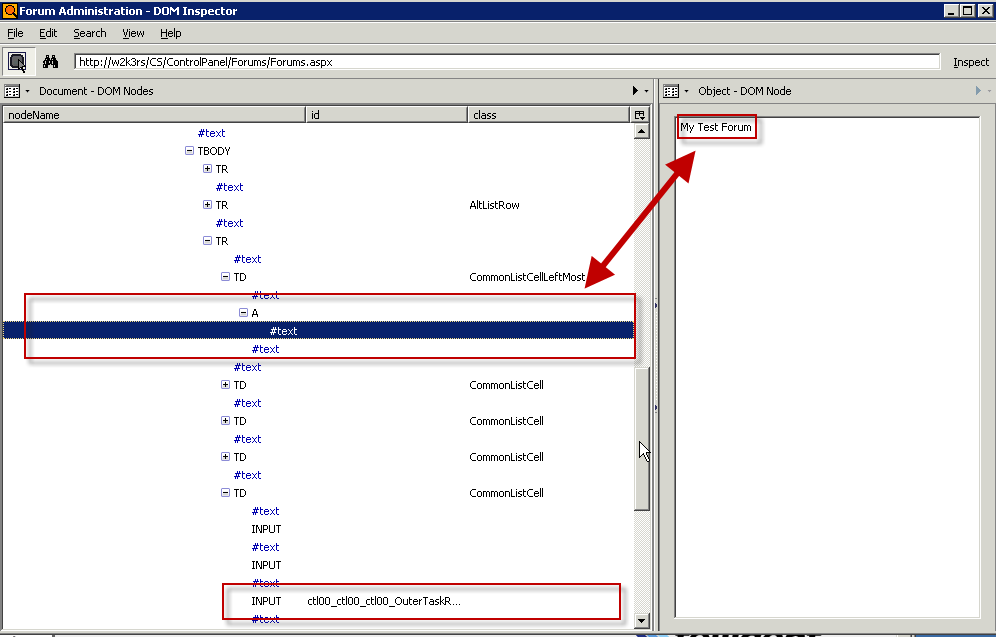
Navigate Firefox to the page you're working on testing. Open the DOM inspector (Tools | DOM Inspector or use Ctrl-Shift-I). In DOM Inspector select Search | Select Element By Click , switch back to your page and click the text you're interested in. In my case, DOM Inspector will now show something like this:

The cell's selected and the text of it shows in the right pane, but the button I want is actually an INPUT element further down the DOM -- that's the lower box. First we need to use XPath to grab the table row we want, then we'll work our way over to the button.

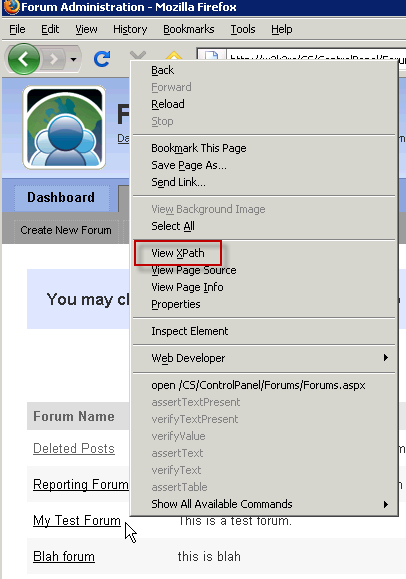
Flip back to Firefox and right-click by the cell you want and select View XPath from the context menu.

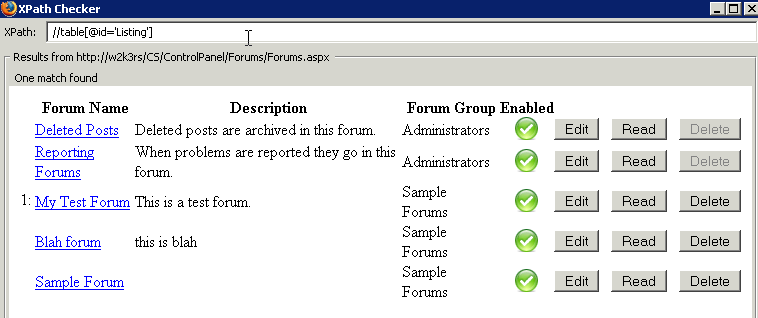
The XPath Checker window will open.

Note the XPath (id('Listing')/tbody/tr[3]/td[1]) is the absolute position format, which we don't want! However, we can see the element ID of the table is 'Listing' and we need that! Change the XPath in the field to "//table[@id='Listing']" and you'll see we've gotten the entire table. A good start.

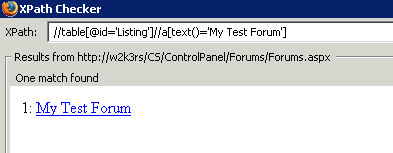
Now remember that our title was in the text field of an <A> element (see the DOM Inspector above).  Edit the existing XPath to search for any <A> element in the table which has "My Test Table" as its text content: "//table[@id='Listing']//a[text()='My Test Forum']". Note how the display changes.

Important note: This assumes (bad word!) that only one <A> element has the text "My Test Forum."

Now we need to navigate over to the <INPUT> element holding the Edit button. We are in an <A> element in a <TD> of a <TR>. We need to go up a couple levels, then look for the Edit button. The XPath "parent" will help us. Edit the XPath to go to the parent <TD> element ("//table[@id='Listing']//a[text()='My Test Forum']/parent::td") and you'll see the display change.

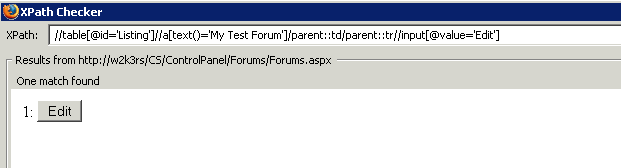
Finish by going up another parent to the row and then looking for the INPUT element with a "value" of "Edit" ("//table[@id='Listing']//a[text()='My Test Forum']/parent::td/parent::tr//input [@value='Edit']") which will result in the following:

Voila! We've got our XPath correct!

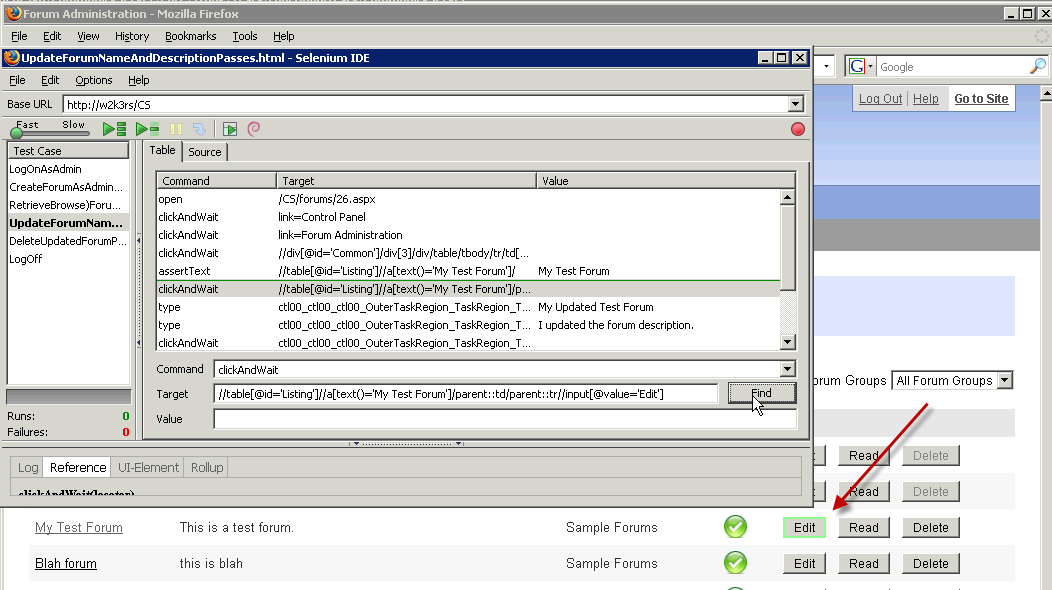
Now paste that entire XPath into your Selenium IDE's test case's Target field. The command type should be "clickAndWait." Click the Find button and you'll see the Edit button on your target page flash green, signifying you've gotten it right! (If it doesn't flash green, then go back and fool around with your XPath in XPath Checker.)

One last step. Execute that command of the test case with right-click | Execute this command. You should see the command line shaded green, and the Firefox window in the back nav to the proper page.


Phew!

Monday, December 08, 2008

CodeMash Schedule is Live!

We’ve finalized the schedule for CodeMash 2009!  Check out the schedule on the CodeMash site!

What? You’ve still not registered for CodeMash? Go do it now, or I will taunt you some more.

Sunday, November 30, 2008

Can't Download Purchased Content From Xbox Live?

Problem: On my Xbox I canceled a content download (like the Gears of War Flashback Map Pack). Now the download doesn't show in my history and my redemption code shows as invalid when I try to resubmit it.

Solution: Log on to your Xbox Live account's Purchase History page: http://marketplace.xbox.com/en-US/myAccount/PurchaseHistory.aspx. Find the purchased content (in my case the "Flashback Multiplayer Map Pack") in your history and click "Add to Queue." You'll be able to download it now.

Tuesday, November 25, 2008

Book Review: More Effective C#

More Effective C#: 50 Specific Ways to Improve Your C# by Bill Wagner. ISBN 0321485890

This is a follow on to Bill’s other book, Effective C#, an amazing work that I reviewed on Slashdot when it came out.

More Effective C# continues in the same style as Bill’s first book: short, concise articles around a specific topic you’ll need to pay attention to when figuring out how to write the best C# code you possibly can.

Bill starts off with a deep dive into Generics and some of the many subtleties you need to consider. He points out things like considering how you write generic code in base classes, genericized algorithms, and working with generic interfaces. Bill moves through other broad categories including LINQ, C# Design, and enhancements in the 3.0 release of C#. There’s also a great section on multithreading in C# which hits some great points in this very arcane but critical aspect of development.

This book definitely isn’t a tutorial on C#, but I’d say that it’s critical for all devs regardless of experience, to read through.  I’d also say, although Bill will likely disagree with me, that many of the tenets he puts forth can apply to folks working in other languages on the .NET platform. Even VB devs can learn some high-level concepts from reading through this book.

I can’t recommend this book enough. It’s right alongside Jon Skeet’s C# in Depth and Bill’s Effective C#.

<Disclaimer>Bill Wagner, the author of this great work, is a friend of mine. I got the book for free as a review copy, but not from him. Neither those facts, nor the $0.25 Bill slipped me, have any impact on my review.</Disclaimer>

Monday, November 24, 2008

XBox Problem: Games Not Saving After XBox Upgrade

Problem: XBox games aren't saving after XBox upgrade. I ran through the new XBox experience upgrade a couple days ago, then found that my Halo 3 games weren't saving. I'd have to completely restart the campaign after shutting down the console. Restores to the last checkpoint were working fine when I'd die in the session, but starting a new session reset me back to square one. Sucky.

Solution: Clear the XBox disk cache. Go to the system blade, then memory, then drill down to your hard drive.  Press X, X, Left Bumper, Right Bumper, X, X. You'll be asked if you want to perform maintenance on the drive. Answer yes. The system will clear cache from the disk which solves the problem. NOTE: All game updates will be deleted, which means you'll have to reload them, but that's only a tiny hit for fixing the problem!

Saturday, November 22, 2008

My First Week At My New Job: Telligent

As promised in my farewell to Quick Solutions post, here's a separate post about my new job: Working as a Program Manager at Telligent Systems.

When it came time for me to leave QSI there was really only one place I looked. I opened a conversation with Telligent because I knew a number of the folks who worked there (Leon, Dave, and Dan), and I knew of a lot of other folks there. I knew the folks at Telligent were incredibly sharp and extremely engaged in the community. Furthermore, conversations with Dave and Leon cemented my impression that Telligent approaches development in a vein similar to my own philosophy. Finally, during interviews everyone was open about where the warts in their environment were, and they were looking to get those warts solved.

My kind of place.

I started Monday, 11/17, in a role as a Program Manager. I'm having a bit of a career shift since I'm getting out of the direct line of hands on keyboard for delivery, but I'll be keeping some involvement on the technical side. We're still working out exactly what my areas of responsibilities will be, but it looks like taking over the web services for Community Server will be one step.  I'm also helping with something near and dear to my heart: testing. I'll be helping refine Telligent's pre-delivery testing criteria and toolset which means I'll be playing lots with things like Selenium. I get to work closely with Dave on this which is a huge benefit for me because I've wanted to work with him for about 50 years or so.

As with any first week at a new job, it's been quite a firehose. I'm learning whom to ask what questions of, where to find various pieces of information, and starting to understand what the roadmap looks like. (And it looks wicked cool! Bwaaahaaahaaa!)

So far I really like the culture. Lots of openness, lots of great coordination with remote teams, lots of communication. I've already seen practical examples of how upper level leadership has their head screwed on straight which only cements my initial impressions.

Overall it's been a pretty good week!

(Plus Telligent uses Exchange, not Lotus Notes. That's the real reason I left QSI.)

Sunday, November 16, 2008

Book Review: Essential WCF For .NET 3.5

I am waaaay behind in posting this one, but here you finally go:

Essential Windows Communication Foundation (WCF): For .NET Framework 3.5by Steve Resnick, et. al. ISBN 0321440064
This book’s very well written and does a great job of explaining a lot of the features around WCF. I like their approach to topics, starting out with basics and evolving from there. For example, right off the bat they do a solid job of showing a service hosted entirely in code, then do a comparable service hosted in IIS. All differences are clearly laid out with some good rationale for either implementation.

This same approach continues through the book, which is something I’m always appreciative about: give me options with clear explanations of why they’d apply, then let me choose which one fits for my environment. The authors even lay out a number of tables throughout the book showing options and alternatives – like the supported features of bindings table in chapter 4.

It’s a solid book for newcomers to WCF or experienced folks looking to brush up on the deltas as WCF moves to .NET 3.5.

Thursday, November 13, 2008

Last Day at Quick Solutions

Tomorrow is my last day at Quick Solutions, Inc. Over the last nearly two years I've had an amazing time working in QSI's Solutions group with some of the brightest, bestest folks in the Heartland region.

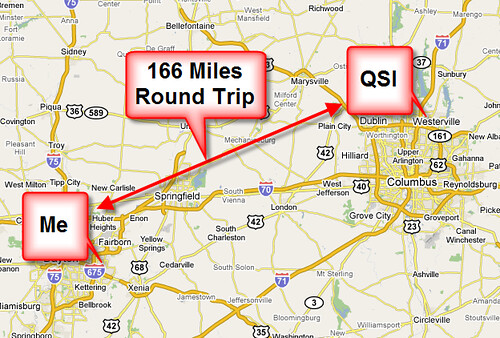
Why am I leaving? One reason, and one reason only: I live in Beavercreek, a 'burb of Dayton. QSI is in Westerville, a 'burb of Columbus. This map explains it visually:

That's 166 miles round trip, which is three hours of wearing my car every day if weather and traffic cooperate. At the height of the gas price crunch my monthly gas bill was over $500. That hurt, but the worse hurt was the loss of three hours a day from family time.

My family and I spent a significant amount of time looking for a place to relocate to in Columbus to cut the commute, but the end result was five months of frustration.  We just had too many moving parts in our lives to make a relocation feasible, and there was no way I could continue spending three hours a day driving back and forth to QSI.

QSI's been an amazing place to dock my laptop over the last year and a half. As an aspiring crusty old fart (I've been in the workforce for a loooong time), I can easily and confidently say that QSI is the second best job I've ever had. (First place goes to my 11 years fixing radar and computers while flying on AWACS radar planes.)

My peers at QSI's Solutions group are unparalleled for their involvement in the developer community, which was the main reason I went to work with them. Members of the QSI Solutions group have spoken at EVERY .NET code camp or conference in the Ohio and Michigan area for three years straight, and they've been involved in a large number of events outside that area. QSI Solutions folks presented at six of the 24 sessions at the last Central Ohio Day of .NET; that's 25% of the sessions with a QSI dude or dudette up front showing their great technical chops.  QSI's Solutions folks have presented at nearly every .NET user group in the Heartland district at least once, and in many cases multiple times, over the last several years.

Simply put, if you're at a .NET event of any sort in the region, you're very likely to see a QSI Solutions member attending or presenting. There's no other company, consulting or otherwise, that comes even close to this amount of passionate community involvement and the technical chops to be recognized as thought leaders.

I am awed by the skills and accomplishments of my peers at QSI.  Simply awed. I was fortunate enough to work on several ground-breaking projects with a few of the Solutions folks, and there are a bunch of other folks I wish I'd had the opportunity to work with. I learned many things from many people in Solutions, and I'll greatly miss that interaction.

My managers at QSI earned my respect time and time again on issues I count as fundamental deal-breakers. Empower your people to learn. Give them the confidence to say "I don't know" because that builds credibility with your clients. Encourage them to say "That's wrong" as long as you're helping them to follow that up with "Here's a realistic alternative." I left a company previously because management didn't live up to these kinds of values; QSI exceeded those expectations in every way.

Sure, there are some rough spots at QSI. Every company or group has warts and you're deluded if you think otherwise. None of those rough spots at QSI was a reason for me leaving. Not one. Every issue that I had at QSI was a challenge I felt could be overcome because I worked for, and with, amazing folks. As I said at the top of this blog, the sole reason for me leaving is the commute.

I'm moving on to a position with another great company, and I'll be starting on Monday, 11/17. I'll leave news of that for another post because I really want this post to focus on Quick Solutions.

Be clear on one thing: If I lived in Columbus I'd be staying at Quick for a long, long time. Many companies profess to value their employees. Many companies profess to be smart about business. Very few actually live up to those promises -- and Quick is certainly one that does.

If you're looking for a great place to work, I can't recommend Quick enough, either on the Staffing side or in Solutions.  The bar to get in to the Solutions group is high, but they're an amazing, elite group of folks I'm awfully proud to have worked with. I'll miss 'em all. 

Thankfully they're all community groupies so I'll see them all over the place anyway.

(PS: Actually, this whole blog post is a complete lie. I'm leaving Quick Solutions because they use Lotus Notes and Notes sucks.)

Wednesday, November 12, 2008

CodeMash Session List Posted

The CodeMash session list has been posted at our Google Group!

The sucky side of this is that we had to drop submissions by a lot of friends of ours. We had over 300 submissions for 60 slots. That's a tough, tough job to pare that monstrous list down. Good friends, good smart friends of mine didn't get selected, and that hurts.

The good side of this is that we've got an amazing list of sessions and presenters. Uncle Bob Martin. Mary Poppendieck. Richard Campbell and Carl Franklin. Jesse Liberty. Jim Weirich.

And keep in mind that our Precompiler on Day 0 (Wednesday) has a crapload of great tutorials from folks of the same expertise. Whoof!

Go register!

Monday, November 03, 2008

.NET University Schedule Posted

Jeff put up a great site for the various regional events: Start A Fire.

Check out the schedule for the 8 November .NET University event!

Usability 101: Lessons From Odd Places

I spent last week on a Disney cruise vacation and found a usability lesson in a odd place: a coffee machine on board the ship.

I drink a lot of coffee. I have ever since my first winter while stationed in Anchorage, Alaska. Go figure. Coffee urns for large coffee service are well-known, common equipment to a lot of folks. They're simple and have had the same basic features since dinosaurs roamed: a large pot to hold the coffee, an optional heat source to keep the coffee warm, and a simple spigot to dispense the coffee.

The spigot's operation is simple: pull a lever, a valve opens, and a stream of coffee starts to flow. Release the lever, the valve closes, and the stream of coffee stops. It's a simple mechanical gadget that's worked well and is familiar to all regardless of which continent you're on, or what the local language is. You don't need a manual, you don't need a waiter to help.

The Disney Magic, the ship we were on, had some nice-looking coffee machines which appeared to be completely automatic: they looked like they were plumbed in to a water source and were complete with grinders and a brewing system. I never saw an attendant pour in any coffee from another source. The benefit to the Disney crew of this for an operation serving thousands of cups of coffee is pretty obvious: fire and forget. Load up your coffee beans or grounds, ensure the water and electricity is on, then simply monitor to make sure everything's fine.

The usability issue? The spigot. Some engineer thought it would be a great idea to make the valve system electronic instead of mechanical. Then they could set an amount to automatically dispense when someone triggered the spigot.  8 oz. cups are pretty standard, so the engineers could set the dispensed amount to 7.5 ounces and everyone would be happy.

Except 99% of the coffee-drinking populace is used to holding that spigot open with their hand instead of simply whacking it a bit to get the stream flowing.

The results I saw were really amusing, even when it happened to me: Want to simply warm up some coffee in your mug? Not such a good idea, because the dispenser pours out 8 oz., regardless. 4 oz of lukewarm coffee + 8 oz of hot equals 12 oz. total, which is 50% more than an 8 oz. mug will hold.

Stack overflow.

Worse yet, someone's initial instinct in such a situation is that the valve's stuck, so why not work the spigot handle a couple times? Whoops, another 8 oz. of coffee flowing out. Good thing the coffee machines had a plumbed drain, too, otherwise there'd been a tidal wave of coffee flowing over the floor.

Lesson Which Should Be Learned: Think carefully when you're trying to bend users' experience in a concept that's ingrained and accepted for a long time.  We cherish thinking outside the box, and we love seeing UIs or system flows which give us a better experience than we've suffered through previously -- but sometimes some things are better left untouched.

(I also had a rental car which had a fuel gauge that was backwards. Every fuel gauge I've seen since starting to drive a long, long time ago has its Empty side on the left and its Full on the right. The Pontiac G6 we had showed Empty on the right and Full on the left. That's a dangerous change since someone's quick visual glance might lead them to believe they're at 7/8 of a Full tank when they're really 1/8 away from walking...)

Subscribe (RSS)

The Leadership Journey