Wednesday, July 27, 2011

Want to Improve/Change Your Career? Get Hooked up in the Community!

Are you hesitant about getting involved with professional communities in your area? Get over that hesitation and dive in. Or at least get your foot in the water.

Community involvement rewards me in many ways: I’m around smart people who love to share their knowledge, I find new ways to solve problems, I get energized by those same people, etc., etc. (I also get lots of great bacon at CodeMash.)

If that’s not enough for you, consider the simple fact of how involvement you’re your professional community can impact your career opportunities. All four of my last jobs have come directly because of my involvement with the Heartland community. Let me run those short stories by you so you can get a picture of just how my participation in the community helped.

I left the workforce in 2005 to be a stay at home dad. During this time I wanted to stay current with things in the .NET world and I got sick of driving to Columbus to their .NET group, so I started the Dayton .NET Developers Group. I worked with James Avery and kicked off the Dayton-Cincinnati Code Camp, one of the region’s first software conferences for any community. Because of this work (and my blogging and co-authoring Windows Developer Power Tools) I was awarded my MVP status from Microsoft. In the space of just a short year I’d grown a tremendous network of really smart folks who were passionate about the same things I was.

Community contact job 1: When it came time to re-enter the workforce in 2006 I spread the word I was looking for work via a blog post. Within two hours I had three contacts, one of which was my community pal Chris Woodruff who referred me in to NuSoft where I landed a position as a principal consultant.

Community contact job 2: When it became time to move on from NuSoft I reached out to my community pal Brian Prince who was running the Solutions Practice at Quick Solutions in Columbus. Brian had a great group of folks working from him who were all heavily involved in the Heartland’s developer community, and I knew it would be a wonderful opportunity. We met for lunch on Wednesday and on Friday I had a job offer in hand. Brian was the only person I reached out to for my search.

Community contact job 3: Life at Quick Solutions was terrific; however, it was a minimum of a three hour commute each day and that was just too much impact on my family life. I reached out to a couple community contacts, but my main lead was through two more Heartland community homies Dave Donaldson and Leon Gersing. They hooked me up with Telligent where I had a great run of various accomplishments. I can’t recall how many different people I spoke with about opportunities, but I am fairly sure it was no more than three or four. All were folks/companies I knew through my community network.

Community contact job 4: My new position at Telerik also came about through community contacts. I learned about the test tools division at Telerik by chatting with a few folks at a couple conferences, and I started looking in to the tools and frameworks. I reached out to one pal at Telerik and inquired about opportunities. One thing led to another and soon I was sleeping on the floor at Chicago’s O’Hare airport after having flown down to Austin for a face-to-face interview with the testing tools folks. (No, Telerik didn’t make me stay overnight in an airport; serious weather issues diverted me to an epic journey to get home in time for work the next day.)

---

There you go. My last four jobs, all through community contacts. Not once did I use Monster.com, Craigslist, or a recruiter.

Here are some specifics about why you as a job hunter should look to community contacts:

  • Better chance of finding open opportunities. You’ll hear about neat opportunities before they’re posted on job boards, etc. Moreover, you may find companies willing to make openings for you if you’re a good fit for them.
  • Better chance of getting past screens. Personal referrals count for a lot with companies, and your chances of getting past initial screens and actually landing an interview are much higher.
  • Better chance of a good fit. Since you will know those community contacts, you’ll have a better understanding of the potential employer’s culture, mindset, and staff. That exposure over time is a much better picture than you can get during a short interview process.

Community involvement is a wonderful thing for oh so many reasons; however, if for no other reason, get involved so you have a better channel to protect and advance your career. The bright, passionate, engaged folks you really want to work around are all deep in to the community. Hook up with them. It will help you and your career.

Friday, July 22, 2011

Follow Up to Maintainable Automation

During my first-ever webinar with Telerik this week I spoke briefly about learning how to keep your tests maintainable. This is something near and dear to my heart – I’ve been on a number of projects where we’ve had to suffer through test suites which became ever more brittle as time went on.

Brittle tests break frequently due to unrelated changes in the system’s workflow, UI, or business rules. Of course, tests should fail when something directly relating to the test is broken—that’s why we have the tests!—but one change to a web page unrelated to the specific area you’re testing shouldn’t completely derail that test. Brittle tests duplicate workflows and UI locators across many tests, forcing you to change hundreds or even thousands of tests when one webpage changes its layout. Brittle tests are overly complicated and have too many complex setup steps.

Brittle tests are the testing world’s equivalent of technical debt, shortcuts taken during development which end up causing you grief further down the road. Eventually the project team ends up spending a large amount of time simply cleaning up broken tests—and getting less and less work done around delivering value to the team’s customers or stakeholders. This can even lead to the team abandoning test automation completely, or worse.

Roy Osherove opens up his tremendous book “The Art of Unit Testing” with a very frank discussion of a project of his which failed because the team’s tests turned into a convoluted mess. Note they didn’t just abandon testing, the entire project failed. The team was spending more time trying to fix broken tests then they were delivering value to the customer, and the project tanked because of it.

Avoid this sort of drama by starting out your testing work with maintainability in mind from the beginning. Keep in mind the three major causes of brittleness in larger test suites:

  • Large suites taking too long to run
  • Changes to common workflow (such as logons) breaking multiple tests
  • Changes to UI elements breaking multiple tests

Tests Taking too Long to Run

UI-driven tests will always be orders of magnitude slower than unit tests. As you reach hundreds or thousands of UI tests you may find your tests taking many hours to complete. You’ll find yourself unable to have regular, frequent execution passes of your functional tests, instead relying on everything to get run once a week over the weekend. Long-running test suites can lead to a mindset of ignoring the tests because feedback doesn’t happen until days later.

Solve this with two different approaches. First, look to scale out your test infrastructure. Get your tests running in parallel on multiple systems using some form of test runner agent. Selenium, in both its v1 and v2 incarnations, supports this through Selenium Grid, or you can look to splitting up tests via your own customized test runner. If you’re using Telerik’s Test Studio you’ll benefit from our combination of Scheduling and Execution Servers to do this for you.

Secondly, look to split out your large suites and pull out a minimal set of Basic Validation Tests (BVTs) to check only the most important set of features. These BVTs should check only fundamental operations like:

  • Does the home page load
  • Can a user log on
  • Can a user create/retrieve/update/delete content

Using BVTs lets your team quickly execute a safety net of functional tests before making major commits, and you can also have these BVTs running on a much more frequent basis if you’re using some form of automated build or continuous integration. (And you should be!)

Use both of these approaches together to help deal with your long-running test suites.

Workflow Changes Breaking Multiple Tests

Your tests should focus on one discrete piece of your system’s functionality, i.e. does entering an invalid customer number display an error? However, your test will likely need to take other actions as a prerequisite—logging on to the system and navigating to the customer record area, for example. These prerequisites are likely common across many of your tests, and this can make them a significant risk for increasing complexity and brittleness.

These sorts of common actions need to be pulled out in to separate areas of your test suite so they’re defined once and only once. That way if your logon workflow changes (say you’ve added an additional requirement to input a value from a keyfob) you only need to update the workflow in one spot.

If you’re using Telerik’s Test Studio you can make use of our test-as-step feature to separate these common pieces out in to modules. If you’re working in Selenium, Watir, or some other testing framework then you can separate this commonality in to separate helper methods.

The main point of this is exactly the same as the software engineering concept of the Don’t Repeat Yourself (DRY) principle: Define functionality in one spot and one spot only.

UI Changes Breaking Multiple Tests

Changing UI can also wreak havoc with your tests. Element locator values (element IDs, XPath, CSS locators, etc.) will likely change if the UI is reorganized – and all your tests depend on being able to find those elements based on those locators. If you have your locators scattered through hundreds or even thousands of tests then you’re in for a sad time updating them after the UX team moved a widget from the right side of the page to the footer.

Mitigate this problem with the same concept I wrote about for workflow: Keep critical information in one and only one location in your codebase.  Use the same DRY principle for your locators.

If you’re using Selenium, Watir, or some other coding-based framework, then spend some time getting familiar with the Page Objects pattern. This idea has you create a separate class for each page you’re interacting with in your system. The locators are defined in each class, and the rest of your tests refer to or consume those page object classes. If something changes on the UI, you simply go back and modify that single page object class and all your other tests remain unaffected.

Telerik’s Test Studio helps with this as well by using our element repository. Elements you interact with are stored in one spot within Studio’s infrastructure. If an element’s locator changes it’s a simple thing to update that element to the new value – and you do it in one place only.

Wrapping Up

Automated tests are wonderful and I’ve been pitching (and practicing!) what I preach for years. That said, you have to approach your automation efforts with an eye to maintaining your suite over time. A long-term automation strategy isn’t just about writing great tests that help you deliver awesome software, it’s also about keeping your sanity as your software and tests evolve.

Monday, July 18, 2011

My New Job at Telerik!

I'm tremendously excited to announce my new career change: as of today I'm Telerik's newest evangelist!

I'll be spreading the word about Telerik's great Test Studio set of tools and their backing framework. Even more importantly, I'll be spending a great amount of time interacting with testers and developers across a number of communities! I'm really looking forward to being able to spend time talking with testers who are doing both manual and automated testing, and figuring out where we can help.

This new position really ties in to a number of things I'm passionate about: testing (of course), getting out in communities, interacting with folks to find out what works and what doesn't in their environments, speaking, writing, the list goes on. Test Studio speaks very dearly to me, having been through the wringer with leading a team writing a large suite of Selenium tests. The toolset offers up some really wonderful approaches to helping teams work through web and WPF automated testing -- and there's a LOT more coming down the pipe!

I'm very, VERY excited to be on board with Telerik. I'd interviewed with them five or so years ago, but chose a different path at that time. Thankfully they were still interested in me after all these years! Telerik's well-known for their community involvement; something that drew me to them years ago -- they were also the first sponsor of the Dayton .NET Developers Group, thanks to an introduction from Joe Kunk.

There will be a lot of exciting things going on, including me getting to spend a significant amount of time back doing technical work instead of leading a team and herding cats outside of that. I was extraordinarily fortunate to run a tremendous team of seven folks in my previous position; it's going to be equally as wonderful focusing my energies on creating content, helping educate folks, and best of all, LEARNING for myself.

Telerik has a great group of people working for them, and I'm honored to be among them!

Friday, July 15, 2011

Goodbye Telligent

Today’s my last day at Telligent.

I’m moving on to a very exciting position that hits a lot of my core passions, but I’ll leave that for a separate post come Monday. (And it will, shockingly, be made from a Mac… )

Telligent’s been a great place to hang my hat for the last 2.5 years, and management there was tremendously supportive in giving me free rein to build a QA team from scratch and run that team as I saw fit. While there were a number of things I wasn’t able to accomplish during my tenure at Telligent, I take great pride in having worked with a great group of testers who really transformed how Telligent ships software. We, as a great team, built something wonderful from scratch and that’s a tremendous accomplishment!

I’m also glad I’ve been able to gain experience working for a product company. I’d had years of experience working for consulting and contracting companies, but the environment of a product company is completely different. My experience here did nothing but cement up my firm beliefs in Lean: you simply can’t afford to build things only a few customers will ever care about. The pain and politics around trying to remove features you’ve released to the public isn’t something folks outside the product world will ever understand. Dodge all that pain and politics in the first place – avoid complexity, avoid building things the vast majority of your users won’t use frequently.

Many thanks to the folks at Telligent who put up with my oddball views coupled with a loud, often curmudgeonly personality. Most importantly, a load of emphatic thanks to the seven folks, onshore and off, who were on my QA team – you folks are some of the best people I’ve ever worked with and we did amazing things together!

Thursday, July 14, 2011

A Mentor’s Worth: Breaking Things Down

Good mentors are worth their weight in gold for oh so many reasons: their experience gives them views into problems you’d never considered, their technical skills or domain knowledge lets them identify things you’d missed, and their longer careers may give them some calm perspective you’re too fired up to miss. They’re also exceptional at helping you step back from problems you’re too deep in to.

As I wrote recently, I’ve picked up guitar playing again and am loving how it’s stretching my thinking and learning in so many ways. I’m also finding great parallels between my experience as a mentor and how my guitar instructor guides me.

For instance, a couple weeks ago I was having serious difficulty on a piece around fingerpicking. It’s basic stuff, but well, I’m a beginner. I’d hit a total mental block and wasn’t able to get past some of the initial pieces.

John, my instructor, took out his pencil and quietly made a few marks on the page. “Do just these combinations first, forget the melody. Just focus on the chords.”

Wow. Well, wow and “duh!”

Stepping back and focusing on small pieces of the trouble is such a crucial problem solving skill. The problem was I couldn’t get myself to step back. I needed a guide to pull me back and show me the way. Break it down, simplify it.

This is the same sort of thing I really enjoy working with my mentorees/subordinates on. Got a problem? Let’s chat it up and see what it looks like. Then let’s step back and break it down. Dealing with a complex test matrix? Maybe we can figure out some common points, or look to some combinatorial pairwise magic. Got an overly complex, muddled test case? Let’s step back and think about what we’re really trying to test, then go after that test case with a scalpel to pare away everything that’s not essential.

It’s what mentors are great at: helping you step back and break large problems into manageable pieces.

Updated:Fixed busted image link.

Friday, June 24, 2011

Get the Reps In

I’ve played the guitar for 37 years now; however, I took a 35 year break and just picked it back up two months ago. For years I’d been feeling an urge to get back in to music in some form, and the final kick in the pants was watching Carl Franklin, Chris Castle, and the Womack Family Band put on an awesome show at CodeMash 2011. Their love of music and the sheer joy they had playing together really inspired me to get off my assets and do something musical again. (I’d also played trumpet for some years when I was younger.)

Music Night at CodeMash 2011

Because I realized how total my suckage would be, I signed up for some lessons at the awesome Piano Preparatory School in Beavercreek where my kids have been taking piano lessons for years. John Trent, my instructor is an amazing classical guitarist and a great teacher as well.

This journey over the last couple months has been an awesome practical re-re-re-reminder of why it’s so important how you approach any learning situation. I’ve spent significant amounts of time over the last couple decades teaching in various forms; however, it’s been a long time since I’ve been the student. What an awesome change of pace!

Work has been in a bad spot over the last month as we move into the final phase of a huge release we’ve been building to for nine or ten months. Couple that with kids, pets, a large yard, and a spouse who would like to see me occasionally, and it’s meant little spare time. As a result, it’s been really hard for me to dedicate 30 minutes each day to sit down and do the practice I need to.

This last week it showed. I hadn’t gotten in anywhere near enough practice on my pieces in my workbook and I was badly stumbling through a couple parts that were really challenging. John calmly and simply said, “Get the reps in.”

Four words.

Four simple words tying directly back to all the things I’ve believed so fervently during my decades of instructing. Four simple words tying directly back to all the wonderful things in Chad Fowler’s tremendous The Passionate Programmer or Andy Hunt's Pragmatic Thinking and Learning.

I wasn’t doing what I’ve preached to students, subordinates, and mentorees for years: work hard at learning. If you care about something, if you’re serious about wanting to improve, you’ve got to work at deliberate practice. Mastering anything, be it guitar, running, or software development, means that you’ve got to dedicate yourself to carving out time each day to work on it.

Get the reps in.

Monday, May 16, 2011

Focus on the Why, not the How

I’ve been mulling this post over for a year or more now, perhaps as long as two. I’ve started a number of drafts and thrown them out, dissatisfied with what had ended up on the screen. I’m tired of struggling to get it perfect, so I’m just tossing it out now. I’m not completely satisfied with what I’ve gotten done in this version, but here it is.

The crux of the debate with myself is an internal railing against the dogma I see in development methodologies and selection of toolsets/platforms/whatever. Too often I see good friends and industry leaders getting angry, condescending, outright insulting, (or a combination of all three) based on their preferred approach to software development.

Yes, I know. You may find this a surprising event in our chosen work domain. The software industry has never had these arguments before. Mere contradiction perhaps, but please, bear with me.

I’m tired of all the hot air around how we build software because too many people have, in my mind’s eye, lost sight of the why. Why do we develop software? To solve problems for the people who are paying us. Most of the time they don’t care how we do it.

Take the platform people develop on. A number of folks on Twitter throw out lines like “Why do great developers settle for platforms which aren’t Ruby?” or “Why are they choosing a bad technology instead of <x>?”

Focusing on the tooling or platform is focusing on the how, not the why of  building software.

The winner of a challenge at the first CodeMash conference won by solving the problem using a table in Microsoft Word, much to the chagrin of the other contestants who wrote a lot of code.

Ruby, Erlang, Clojure, etc. are all technologies we use to build systems on. They have nothing to do with why we build those systems. The software for the space shuttle is written in HAL/S, not Ruby, not Clojure, not some other cool platform of the day. Is that an inferior technology? Likely. So what?

How about the iPhone or iPad? The few iOS developers I talk with scream about the friction and pain they suffer on a daily basis because of the lousy tooling and awful platform issues. But look at why they’re working on that platform. My buddy and ex-colleague Joe Morel works at a company that’s won awards for their Rock and Roll Hall of Fame app. My good friend, muse, and also ex-colleague Leon builds amazing stuff that helps people collaborate on the iPhone and iPad.

They’re focused on why they’re building software and aren’t wrapped up in the arguments of how.

A similar line is dogma around TDD/BDD/whatever test-first methodology is being talked about today – and here is where my post will likely be misunderstood, misread, or flat taken out of context.

TDD/BDD/100% coverage is a how, not a why.

Software testing, at the unit, integration, or functional area, is critically important aspect of development. Software testing is something I’ve been passionate about for years, and have talked emphatically about for years.  Test-first development helps us design good architecture.  It gives us surety around behavior. It is an incredibly important line in the sand against regressions. Test-first development helps us evolve our skills to use the right patterns in the right places, and the right amount of abstraction.

Test-first development teaches us how to think critically because we’re forced to make decisions at a very minute, granular scope while paying attention to the larger impacts of those decisions. We’re learning critical thought as we move along that journey.

Unfortunately, some people carry the dogma to extremes and forego critical thought. (“Extreme dogma” is rather redundant. Sue me.)

An example: A pal of mine got to pair up with a well-known expert. The expert writes books, does training, speaks at conferences, and is extraordinarily influential and impactful on a great many people in our world, me included, and rightfully so.

They spent five hours ripping apart one specific view class to be able to get more tests around it. All the behaviors dependent on the view were tested in other areas of the test suite, but the expert felt compelled to get this particular aspect of the codebase completely covered in unit tests. I don’t know all the gory details of the view, but if you’re focusing on finding reasons how they could have succeeded, you’re missing the question of why they should have done it in the first place.

Five hours to try and get one class 100% covered with tests. They didn’t finish. Zero value was delivered to the customer. As a matter of fact, it was an opportunity cost that ended up causing my pal to miss finishing up his feature because he had to roll back a number of significant changes that were left unfinished.

That pair got wrapped up in the how of building software and lost sight of the why: delivering working software to the customer.

Another example of why hits very close to home for me: my diabetic gear. I turned in to a type 1 diabetic two years ago. At some point soon I’ll be dependent on an insulin pump to help keep me alive. Right now I use a blood test meter six to ten times a day, and I adjust my insulin doses based on that meter’s readout. If there’s a glitch with the meter I can overdose on my insulin and go in to a coma. Or die.

Scott Hansleman has a great post on his blog about the insulin pump and glucose meter he uses. He says his phone crashed twice the day he was writing that post. His meter and pump haven’t crashed in ten years.

Having worked in the embedded computing industry for a few years, I doubt the firmware in that gear was developed with any form of test-first methodology. It certainly wasn’t developed in any cool platform you’ve heard buzz about these last two years (unless you’re in the embedded industry).

Go read Agile Testing and pay close attention to the intro chapter where one of the authors talks about walking in to an ICU room where a loved one is hooked up to life-saving gear – and the author realizes she tested that equipment.

You want to tell me the folks in that industry aren’t great developers because they’re not doing *DD or working on some platform you’re enamored with? Two words: Fuck. You. Those people write amazing software that saves people’s lives. How’s that for an impactful why?

Now here’s where I finally get to the point I’ve wanted to make earlier but felt it necessary to first walk you through some over-the-top examples to help make my case. At least I didn’t go all Goodwin’s Law on you. Or make any Mom jokes.

The point is this: testing is critical for oh so many reasons, but it’s like scaffolding around a building under construction.[1] Apprentices and journeymen stoneworkers need that scaffolding and rely on it as they’re learning their craft. A master craftsman knows when he can do something without first standing up a bunch of scaffolding – but he’s making that decision based on years of getting it wrong and learning when he can do it right without the scaffolding. Darwinism may come in to play, too, since he’s obviously lived to know when he needs that scaffolding.

Another example would be the writings of Hemingway or e.e. cummings. Hemingway did insane things with his dialog, and cummings just decided he could throw out punctuation, grammar, and structure whenever he wanted to make a point. Both of them were masters at their craft, and both knew when they could move past the scaffolding they’d grown up with. You as an individual try getting away with that in your lit or comp classes and your instructor will most likely laugh you out of the room.

Testing is that scaffolding. Testing drives you to learn great design. Testing drives you to cut complexity. Testing drives you to learn how to build great software. But what do you do once you’ve learned how to do all that? Are you unable to write appropriate abstractions without tests? Are you unable to create loosely coupled designs that are simple and readable? And above all, are you unable to write software that is correct without tests?

Maybe, just maybe, you have gotten to the point where your experience has driven you to form great habits. Maybe, just maybe you can use your brain and look at your experience and skills – but with an honest, harsh eye – and figure out if you’re ready to move on past that point.  Maybe you can focus on why you’re building software, not how.

Am I saying stop testing tomorrow?

HELL NO. And I’ll call you a liar to your face if you say I did.

What I’m saying is use your brain. Figure out what’s right. Maybe testing is still the answer for you. Maybe some testing is the right answer. If there’s any question or self-doubt at all, then by all means continue your journey with tests to guide you.[2]

Whatever you do, think about the why of what you’re doing more than the how.


[1] A pal and I arrived at the example of scaffolding instead of training wheels after a number of very tasty beers at Spinozas. Scaffolding works much better for me because it’s much less diminutive than training wheels.

[2] Public Service Announcement: I will not give up writing tests any time soon. I have no doubt where I am on my personal development journey, and I’m nowhere near close to the level of mastery where I’d even consider going with out training wheels, much less scaffolding. Remember that if you ever pair with me.

Monday, May 02, 2011

Building Great Teams

UPDATE: I totally forgot one critical part of what I spoke on being a team leader – thankfully Dave Fancher’s summary of KalX reminded me.

Saturday at the Kalamazoo X Conference I gave a talk on building great teams. I did it sans slides, but wanted to follow that up with a blog post covering the points I hit during the talk – so here it is!

My 1991 Intramural Volleyball Championship Trophy

The trophy in this picture sits on the top shelf of my closet. I have a look at it frequently as a reminder of what a group of regular folks can do when they put their minds to it.

The trophy is from the 1991 Elmendorf Air Force Base Intramural Volleyball championships. At the time I was the player/coach of the 962 AWACS’s volleyball team. Our team wasn’t filled with the greatest athletes, but we played out of our brains and knocked off other teams that were filled with tremendous individual athletes.

That is the peak of any team experience I’ve been a part of because it continues to remind me that regular folks can do amazing things if they work to a common goal.

To me, all great teams are founded on three pillars: Respect, Great Communication, Passion. No team will work to its potential (or beyond!) if any of those three pillars is weak.

Everyone on a team has to keep those in mind, both individual members and leaders alike.

You as a Member of a Great Team

As a team member it’s your job to figure out how to make your team, not yourself, shine. Fall back to the three pillars and think about how you’re dealing with them.

Respect: Everyone’s got opinions. You’ve likely got a passle and you should feel free to raise ideas and suggestions, particularly in areas which may impact the success of the team. That said, think about how you’re throwing your ideas out to the rest of the team. Just because someone’s baby is ugly doesn’t mean you need to phrase it quite that way. Change “Your code sucks” to something helpful and easier to swallow, like “I bet if we pair up we can figure out a way to cut this method’s cyclomatic complexity from 352 down to something a bit more manageable as well as make it a bit more readable and testable.”

You also need to be able and let go of your own ego, particularly around your own ideas and opinions. Somewhere I heard the phrase “strong opinions, weakly held.”  I’ve always kept that to heart, because it’s particularly apt in our industry. I have extremely strong opinions on how to build great software: frameworks I favor, tools I use, methods on how to actually create software. I have those strong opinions because experience has proven these particular things help deliver great value.

I hold those opinions weakly: show me a better way and I’ll change in a snap. At the end of the day I’m in favor of anything that lets me spend more time on the couch playing XBox with my son or riding bikes with my daughter.

Communication: What are the team’s goals? Having difficulties with someone on your team? Stuck on a task, but aren’t stepping up to ask for help? Those all fall under Great Communication. You’re a part of your team’s communications ecosystem. [1] You need to step up to the plate and ensure you’re doing your part to keep that ecosystem healthy. It’s rarely easy to try and work out interpersonal issues with someone on your team. On occasion it blows up. You know what? Just because it’s hard doesn’t let you off the hook. Work hard at Great Communication because its benefits tremendously outweigh the effort it takes.

Passion: Get fired up about what you do. Yes, sometimes you have to suck it up and get that lipstick on a pig; that’s just a fact of business life. Offset those dreary periods with excitement about other things. Throw a lunch and learn on something interesting. Reach out to pair with someone you haven’t before. Look to learn something new. Share that excitement with others on your team.

You as the Leader of a Great Team

Do everything I just wrote about, but turn it up to 11 – and start with the respectful attitude with which you treat your team.

As a leader you can’t have the same sense of humor you do with peers. You’ve got to be very, very careful of how far you go when cutting up with your subordinates. You can’t in any fashion afford to point edgy, biting humorous insults at your team. That kind of humor (which I actually enjoy with friends and peers) isn’t at all appropriate when directed at those reporting to you.

There’s a completely different context and undercurrent when a boss fires off Mom jokes or insults at their subordinates – and a leader should never, ever even playfully joke about firings, i.e. “Whoever wrote this code should be fired.” These sorts of jokes always cut subordinates more deeply than you realize, and cutting up about firing someone over bad code/design/architecture/tests will crush down your team without you ever having a clue about it.

I can’t emphasize this enough: take care with the humor you present to your team. Make humor a big part of who you are as a lead, but stay far, far away from anything which can have a negative connotation.

Above and beyond that, build a great team. You need to take care forming your team – or improving the team you’re given. As the leader it’s your job to line up the best possible members for your team or work hard to deal with the ones you’re given – and “deal with” may mean moving unproductive members off the team. Makeup of your team has to be something you are willing to go to the mattresses on. Fight to get only great members, fight to turn existing members great, fight to get rid of members who aren’t willing to come along for the ride.

Once you’ve gotten your team built, empower them to do great work. I’m a firm, vehement believer that nobody does well under micromanagement. Set broad goals for your team and individual members, give them some borders on how to get that work done, then step back and watch them do amazing things. You’ve set your team up with great folks, or the potential to be great. They don’t need you to guide them every step of the way.

Empowering your team doesn’t mean you ignore them and abdicate your role of leader: you do need to monitor progress, and in no way, shape, or form does this get you off the mentoring hook. Checking progress from time to time ensures your directions weren’t completely misconstrued or that things haven’t gone off the rails. Checking progress does not mean you’re expecting hourly updates on everything though.

Closely tied to empowering your team is your role as Remover of All Things Roadblocky. I am absolutely not the sharpest tool in the shed. I look to get those folks on my team. What I am great at is helping those folks by getting every friction point out of their way I possibly can. I fight for hardware and get creative about sharing it with others when I can’t get what we really need. I push through for process changes to get asinine hindrances removed. Rinse, repeat. That’s one of my personal favorite, most rewarding things to do as the boss: solve problems so folks can shine.

Don’t forget to recognize the progress your folks are making. Teams get bogged down in minutia, so it’s important to give regular shout outs when they’re deserved. The ever-important BVC is critical so the team sees progress over time: “God, we sucked this week, but look at how much value we delivered this month!” I also make use of Amazon.com gift cards and foodie packages from Zingerman’s when the entire team’s done something really cool – like hit major milestones.

Be Part of a Great Team

Building, running, and being part of great teams isn’t easy. It’s a lot of hard work and care and feeding of your people – and it’s worth every penny. I’ve been on dysfunctional teams, I’ve been on teams that were just OK, I’ve been part of amazing teams that continually astounded me. Amazing teams can happen.

Make one. Be part of one. It’s life changing.


[1] I just totally invented the phrase Communications Ecosystem. Feel free to use it. Or not.

Wednesday, April 13, 2011

Kalamazoo X Conference is Just Around the Corner!

My second favorite conference[1], the Kalamazoo X Conference, is rapidly approaching! Please come join a passionate, interactive, engaged group of folks in Kalamazoo, MI, on 30 April for a very unique, wonderful conference.

KalX is a single-track event focusing on the soft skills we technologists don’t often think about: interviewing, building your brand, leadership, education, and so forth. Sessions generally 20 – 30 minutes, and they’re always dynamic and engaging.

I’ll be giving two talks at this year’s event: Working With Great Teams, and a still-untitled talk on dealing with evaluations (giving and receiving). I’m also going to be part of a panel talking about interviewing – look at the list of speakers and you know that panel will be kicking out some tremendous discussion!

The Heartland has a passle of wonderful conferences to get you educated and engaged. KalX is a place I go to get inspired and motivated. It’s Just. Plain. Awesome.

Go register. Now!

(If you’re in the Dayton area and want to go but are hesitant because of the distance, drop me a line via the sidebar contact link. I’ve got room in my car and would be happy to have some carpool mates. I’ll keep my yodeling to a minimum.)

[1] Do you really have to ask what my first favorite conference is?

Tuesday, April 12, 2011

Your Resume: Go Visual

I (mostly) diligently update my resume twice a year. I do this regularly because I use the updating process as sort of a retrospective on where I’m at, what I’ve done, and what I want to do moving forward. I try to get one of the updates in a few months before my formal review comes up at work – not because I’m fearful of what’s going to happen, but because I want to make sure I’m on track with goals my manager and I had laid out.

This year I decided to do something different: create a visual resume. Pal Ben Carey once had a Tweet or link about visual resumes, and I started exploring around. I’ve seen a number of them around over the years and have really been impressed by the concept. Visual resumes definitely speak to organizations with a creative, curious mindset, and I think they’re a great way for younger workers to better highlight things in their short careers. For old farts like myself visual resumes enable a much better understanding of one’s career timeline and milestones.

After a couple attempts here’s what I finally came up with. It’s somewhat (ok, mostly) copped from the beautiful one Jef Newsom of Improving put together; however, I tweaked a few things to fit my style. (The image is a link, so you can see the full-sized version if you want.)

I tried this initially in PowerPoint, but that quickly fell apart, so I moved to Visio. My first go using a horizontal timeline got a polite thumbs down from Josh and his recruiter wife Gretchen who both suggested a vertical orientation to emphasize the most current work.

There are a number of other really neat styles which look like subway maps, octopuses, and various graphs; however, this format was one I could pull off with the tooling I had available. I’m happy with it as my first attempt. It plays around with technologies I’ve been around, it shows my positions and roles, and I use the middle lane of callouts to highlight specific events which have shaped my career.

I might not use this resume by itself for every position I was interested in. I’d definitely send it with a strong cover letter, and I would likely accompany it with a traditional resume if I was looking at a company with a more formal culture.

That said, as another pal Joe Morel remarked, “Do you really want to work for a company that wouldn’t find this really cool?”

Monday, April 11, 2011

Focus on 100% Value, not 100% Complete

Too often folks on a project focus on getting to 100% complete of a specific feature, feature set, or even project. Unfortunately, too often that means those same teams aren’t focusing on delivering 100% value.

Draw a comparison with the infamous 80/20 rule: the first 80% of something takes 20% of the effort, and the last 20% takes 80% of the effort.

It’s highly likely I’m not delivering the best value to my company or customers if I’m spending inordinate amounts of time finishing up the last 20% of every feature/feature set/project. Instead, teams should constantly be evaluating the progress through their features and asking the hard, hard question: “Does it make sense to finish out the last bit of this particular feature set, or should we stop and move on to something else of higher value?” [1]

This isn’t often an easy sell to folks. Some individuals or teams get very focused on those 100% metrics because that’s how they measure their own value: 100% complete of their work instead of 100% value delivered on the project. That’s a tough hurdle to overcome since this mindset hits not only teams, but also management and stakeholders.

You can sometimes overcome this mental FUD by laying out the cumulative effect of working five features to 100% complete, when only 80% of those features offer high value. Continuing with my completely arbitrary, highly contrived numbers, say each of those features takes 20 hours.

80% of the value of those features was created in 20% of the work time: 20 hours * .2 == 4 hours of value creation time. Conversely, you’ve spent 16 hours per feature working on lesser value portions of that feature.

Add that all up and you’ve spent 80 hours of your 100 on low-value work. That hurts. Badly.

The bright side of this – the really shiny, awesome part – is that you’ve created tremendous value in 20 hours of work out of the 100 you had planned for those five features. You have delivered tremendous value to the customer in just 20% of time/budget/whatever.

If you focused on only the most critical aspects of your work then you could apply those 80 remaining hours to building tremendous value elsewhere in your project. You could even have the conversation with your customer that “Hey, based on the close interaction we’ve had with you through this short project, it turns out we’ve gotten everything you really need on this project. How about we figure out some other awesome things to do with the money you’ve got left in those remaining 80 hours.”

[1] You also need to think hard about the added weight for maintenance, sustainability, and overall complexity you’re adding in by working that last 20% to completion. Those longer term costs, both direct and implied, can crush the life of a system.

Sunday, March 27, 2011

Slides from Effective Distributed Teams Talk (Cincy Day of Agile)

Thanks again to the folks who attended my talk on Effective Distributed Teams during the Cincinnati Day of Agile on Saturday.

You can find my slides up on my site.

I really appreciated the interaction from folks during the talk. It’s great to hear what tools and practices work for other folks running with team members scattered around the globe!

Tuesday, March 22, 2011

Manually Uninstalling Firefox Add Ons (or “DIE SKYPE!”)

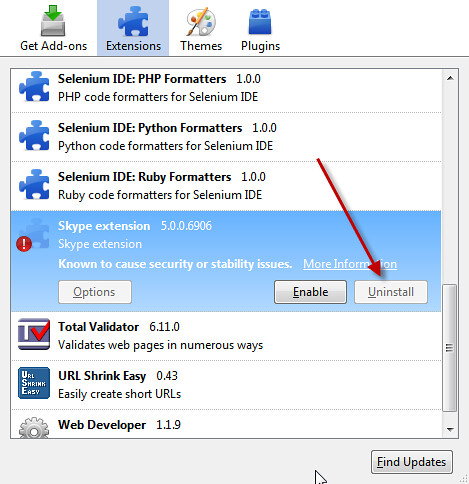
Skype’s Firefox extension gets installed whether you want it to or not. Uncool. This plugin is notoriously unstable and resource hogish. Moreover, Skype actually has the Big Brass Ones to disable the Uninstall button in the Add-ons UI:

There’s a way around this. Directions below for FF3.6 or higher.

  1. In Firefox, Help | Troubleshooting Information
  2. Under the Profile Directory box, click Open Containing Folder. Explorer handily opens in the profile folder. Navigate down to the Extensions folder.
  3. Flip back to Firefox.
  4. In the Troubleshooting Information screen’s Extensions section find the Skype plug in
  5. Look up the GUID value in the ID column
  6. Delete that particular directory
  7. Restart Firefox

I love Skype and use it for hours each week, but pushing stuff on me without my consent isn’t cool.

Finding Code Smell Comments with PowerShell

Adam Goucher has a great blog post on looking for comment-based code smells in software you’re testing.

Every occurrence of //TODO, //HACK, or God forbid, //FIX, is a pointer to a spot in the codebase where someone took a shortcut. More often than not those shortcuts highlight unfinished or outright sloppy work – spots rife for bugs, complexity, and all the other messes associated with pain.

Adam’s post has a Python script you can use to report on these problems. PowerShell lets you do the same thing as well in a bit terser fashion. Here’s how I skinned this cat in PowerShell:

Get-ChildItem . -include *.cs -recurse 
		| Select-String -pattern "//todo","//hack","//fix"
The output you’ll get will show the full path to the file, the line number, and the comment, like so[1]:
Tests\FunctionalTests\Telligent.Evolution.Tests.Selenium\Telligent.Evolution.Tests.Selenium\Common\Utilities.cs:158: //HACK: TolLower is a workaround for Unfuddle 3458. Remove when fixed.
You can redirect this to a text file, or you can capture it to a variable like $stinkyFiles so you can get counts, etc.

[1] The offending author of that line is rumored to look suspiciously like this blog’s author who declined to comment on the matter.

Updated: Fixed snippet formatting

Thursday, March 10, 2011

Recognition: It’s Cheap and Effective

Calling out folks in your organization for things they’ve done and milestones they’ve achieved is not only cheap, it’s a highly effective way of keeping your team motivated and fired up.  There are a number of neat ways to handle this; I thought I’d pass on a few I’ve been involved with over the last few years which I think work particularly well.

First off, look to call out folks in your regular meetings: your team’s dailies (you are doing daily standups, aren’t you?), your regular iteration closeouts/demos, or even your organization’s (hopefully!) regular broader meetings.

In Telligent’s Product Development group where I work we have bi-weekly iteration demo meetings. The group gets together and shows off features we’ve closed out and discusses status of the products we’re working on. My former boss Josh Ledgard started a “Shout Out” section of the meeting where folks can call out others in Telligent who’ve been particularly helpful. We generally take five or ten minutes to call out folks for things like great mentoring or pairing sessions, support from our IT staff, etc. Seeing an individual’s hard work recognized in front of their peers is a sweet thing.

Secondly, look to call out folks for specific actions which have a larger impact your organization.

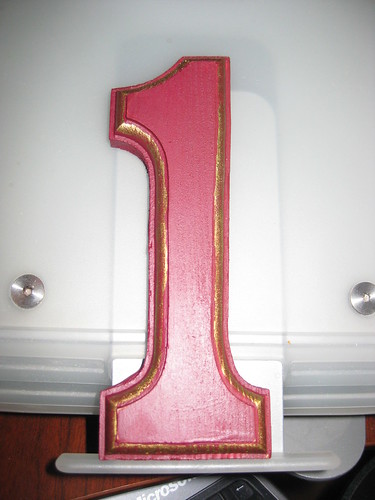
Not long after he came on board at Telligent, our CEO, Patrick Brandt, made everyone in the company read Raving Fans, a very interesting book on how to focus on amazing customer service. Shortly after that Telligent started handing out Raving Fans awards at the company-wide quarterly meetings. Winners get a neat wooden letter/number corresponding to the Raving Fan category they won in. (Find ‘Em, Get ‘Em, Launch ‘Em, Wow ‘Em, Support ‘Em, Plus 1%. Read the book, is all I can say.) Winners also get a very nice, sizable gift card at Amazon.

These Raving Fans awards tie back to our company’s core values and vision around how we’ll be successful by ensuring our customers love our products, services, and support. Regularly recognizing your staff for those contributions ensures those values and goals are fresh in everyone’s minds – and moreover, that those values and goals aren’t just the empty-hot-air-phrase-of-the-day they are at far too many organizations.

Finally, look to recognize folks for hitting significant milestones. Shipping software is hard work, regardless of whether you’re in a product group, services company, or internal development division. You’re running the gamut of communication issues, technical problems, politics, and all the other myriad of difficulties that contribute to our industry’s far-too-high failure rate.

Focus on delivering great value to your customers, then CELEBRATE that accomplishment with your team. Maybe you can’t afford $200,000 release parties, but you certainly should set aside some budget for at least a few small things.

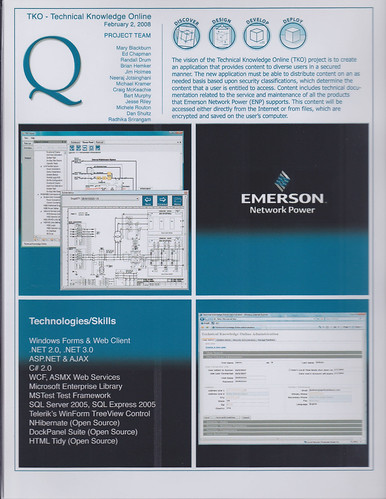
One of my most-cherished pieces of memorabilia from my entire working career is this project card from my days at Quick Solutions, Inc. I joined Quick and got placed on a project which ran in to a number of difficulties both on our side and the customer’s. It didn’t quite turn in to a death march. Quite. We finally got things settled down and delivered a lot of really neat functionality – and the team that had pushed through a lot of pain had by that time formed some very strong bonds.

This project card lists folks who worked on the project (we missed Jeff Blankenburg who left Quick for Microsoft before the project ended), a bit about the project, and some screenshots of the apps.

Every project at Quick’s Solutions group got one of these cards. Every project. Folks who’d been at Quick for a long time had a wall full of these things, and it was an awesome reflection of the value they’d shipped to our customers and the accomplishments they’d made happen for the company.

The three things I’ve talked about in this post don’t have to be over the top expensive or extravagant. Small things matter. Just figure out some way to call out your folks for the hard work they do.

It’s cheap, it’s effective, it’s an easy thing to do.

Update: Fixed a grammar nit (sorry, misplaced apostrophe’s kill me) and corrected the busted Twitter handle for Jeff.

Saturday, March 05, 2011

Book Review: Driving Technical Change

Driving Technical Change by Terrence Ryan. Pub by Pragmatic Press. ISBN 1934356603

Having problems convincing your team, organization, company, customer, etc. to adopt a new methodology or technology? Like that’s never happened to anyone else before…

Terrence Ryan’s Driving Technical Change is a nice collection of insightful tips and strategies for dealing with people skeptical of the change you’re trying to push through. Ryan’s writing style is very clear and approachable, and the book’s perfectly sized at 130 pages – there’s just the right amount of content without belaboring various concepts.

Ryan starts off with a couple short chapters helping you focus whatever it is you’re trying to pitch (Defining the Problem, and Solve the Right Problem), then lays out his list of types of skeptics, along with insights on what drives them and advice on how to deal with them:

  • The Uninformed
  • The Herd
  • The Cynic
  • The Time Crunched
  • The Boss
  • The Irrational

The next two sections of the book, Techniques and Strategy, lay out guidance for dealing with the skeptics. The Techniques section is very tactical in nature, offering up pattern-like approaches such as Gain Expertise, Create Trust, and Build Something Compelling. Each of the chapters follows the same template, and Ryan tells you which approach works best for what sort of skeptic.

The Strategy section of the book helps you with broader issues in dealing with groups, and Ryan starts off with what I think is a terrific piece of advice: “Ignore The Irrational.” The Irrational skeptics have no logic behind their objections and won’t ever be swayed – so don’t spend your energy trying to deal with them. Engage them in dialog when they approach you, but focus on other groups who you’ve got a chance at impacting.

Ryan finishes up with a final chapter on some hard knocks he’s learned through various successes and failures. It’s a nice closer to a solid, useful book for figuring out how to best deal with people skeptical of change you’re trying to implement in your organizations.

Thursday, March 03, 2011

Speaking at Cincinnati Day of Agile on 3/26

The great Cincinnati Day of Agile conference is coming up SOON!

I’m honored to have been picked up to give a talk on making distributed teams work effectively. I’m really excited about this talk because it’s been something close to home – I’ve been part of and have overseen a number of distributed teams over the last several years. As a result I’ve got plenty of scars but also plenty of successes to share.

As a note: many of the items I’ll be discussing work for making teams run great regardless of whether you’re in the same room or on different continents.

I hope to see you there!

Wednesday, March 02, 2011

API Overloads: Don’t overload different behaviors!

Clarity of an API’s intent and behavior is critical when you’re developing an API, be it internal or external. Overloads seem like a sexy way to pile up a lot of options for your API’s consumers; however, you’re doing no one any favors by overloading behavioral changes based on differing parameter combinations.

Much of the .NET framework is awful about this; SharePoint’s APIs take that a horrific step further. It’s Emeril’s “BAM!” on crack, but not as cute and charming.

Today I spent far too long trying to decipher why I wasn’t able to upload a file to a SharePoint document library. Two different usages of a call to SPList.RootFolder.Files.Add(), two completely different results.

This call caused an Access Denied exception to get thrown:

DateTime created = DateTime.Now;
DateTime modified = DateTime.Now;
bool overwrite = targetList.EnableVersioning;
SPFile newFile = targetList.RootFolder.Files.Add(name, file, ht, author, author, 
                                                created, modified, overwrite);

This call successfully uploaded the file:

bool overwrite = targetList.EnableVersioning;
SPFile newFile = targetList.RootFolder.Files.Add(name, file, ht, overwrite);
So on top of some awful breaking of the Law of Demeter (code pulled straight from too many crappy MSDN examples by some other dev), these two calls look and behave completely differently.

Have a look at the documentation for SPFilesCollection.Add. It has 24 overloads. Twenty-frickin-four, ladies and gentlemen. The signatures vary from two parameters to eight – some with two DateTime and Boolean parameters. Worse yet, there’s no indication in any of the overloaded descriptions that they’ve differing requirements or prerequisites. (Thankfully the SharePoint crew named the parameters somewhat clearly so it’s somewhat helpful deciphering intent while in the IDE.)

After a couple hours of troubleshooting, I found the first invocation was successful when the invoking user had Full Control rights to the doclib but would fail when the user only had Contribute.

The documentation didn’t provide any help, so I spent a bit of time trying to understand why the two different results. I can only assume (and I’m using the word advisedly) the first method requires the additional privileges to set properties about the file as it’s being uploaded. This is my complete assumption because, as you may have noticed, the documentation wasn’t any help.

So stepping back from my regular rants about SharePoint’s awful developer experience, let’s have a look at the root problem: two different invocations of the same method with completely different behaviors behind them. #FAIL.

The right way to do this would be to NOT overload those particular calls and instead refactor them out to completely different calls. That first method call should instead look something like

SPFile newFile = targetList.RootFolder.Files.AddAndModifyFileProperties(name, file, ht,
    author, author, created, modified, overwrite);
(Not to mention the documentation should clearly state permission requirements for calls…)

Overloads are absolutely appropriate when you’re offering up the same behavior (see your favorite unit test framework’s overloads for AreEqual, etc.) – but overloads are flat evil when you’re offering them up and backing them with completely different behaviors.

Please don’t overload methods with behavioral changes. If you’re feeling that evil go kick a kitten or promote Richard Simmons for President. Just don’t do the overloads. Please.

UPDATED: Whoops. I was so fired up I confused the Liskov principle with the Law of Demeter. Thankfully Jim Weirich pointed out my error! Corrected.

Tuesday, March 01, 2011

Getting Past SharePoint Exceptions with “Unable to evaluate expression because the code is optimized or a native frame is on top of the call stack.”

Problem: You’re seeing odd SharePoint exception behavior throwing vague “Unable to evaluate expression because the code is optimized or a native frame is on top of the call stack” messages as a general exception.

Issue: You may likely be seeing an Access Denied issue; however, SharePoint “helpfully” adds custom handling for that and bypasses general exception handling for you.

Solution: Turn off the CatchAccessDeniedException property, then reset it after you’re done with your code. See the example in MSDN documentation for specifics.

(Hat tip: Paul-Jan on StackOverflow)

Thursday, February 24, 2011

More Book Reviews

Continuing with more reviews I’m horribly overdue on…

Agile Coaching by Rachel Davies and Liz Sedley. Published by Pragmatic Press, ISBN 1934356433.

I’m amazed that this book covers so may critical topics so well and in such a short length! It’s a terrific book that can help guide you to building highly effective teams regardless of whether you’re a professional coach or team lead.

The book is formatted in four major sections (Coaching Basics, Planning as a Team, Caring About Quality, and Listening to Feedback), each with a few chapters around areas fundamental to good teams. The chapters are comprised of short sections working through details on things like good user stories, hijacked standup meetings, or defining what “Done” means.

I love the concise, easy-to-read style of the authors, and the content in the book is extremely helpful. They hit all the obvious topics, but they also lay out common tough issues like driving change in your organization, keeping meetings effective, and helping resolve team issues of culture and respect. Coaching’s easy when everything’s easy – but the real world requires great coaches to deal with tough problems and this book’s a tremendous help in that aspect.

I also love the authors focusing on issues that are so core to my own notions of great software teams: effective team environments, concise and simple user stories, listening to your teams, and fostering scads of communication. It was also great seeing an entire section of three chapters devoted to software quality, but then I may be a bit biased in that direction…

This book gave me a number of highly useful insights and made me re-think some approaches to common problems I see. It’s a great addition to my bookshelf.

Agile Retrospectives by Esther Derby and Diana Larsen. Published by Pragmatic Press, ISBN 0977616649.

I’ve been a firm believer in retrospectives for a number of years. I’ve used them on many projects in my last two jobs and the benefits have been tremendous. This book is a great help for me in tuning up and improving how retrospectives work.

The writing is extremely concise, well-done, and in a great tone. The authors cover the basics of retrospectives (Set the Stage, Gather Data, Generate Insights, Decide What to Do, and Close the Retrospective), but then head off into a number of other critical topics.

I really enjoyed the authors not shying away from dealing with potentially tough emotional parts of retrospectives. You’ll find short, extremely helpful tips on dealing with the occasional shouters, criers, stompers-off, etc. Retrospectives can be intense, and too many books skip over the unfortunate reality that on occasion you may have some drama to work through. Derby and Larsen don’t shy away; they’re practical in their advice.

Agile Retrospectives also emphasizes teams need to find a retrospective formula that works for them. They offer up a number of different approaches (fishbones, brainstorming, etc.) and lay out situations where those are helpful. (The section on fishbones was particularly helpful to me.) They also have a section on how to run longer post-release or post-project retrospectives – a horse of a completely different color.

Overall this has been a tremendously useful book, and I’ll continue to pull it off my shelf to brush up.

Subscribe (RSS)

The Leadership Journey