Wednesday, April 13, 2011

Kalamazoo X Conference is Just Around the Corner!

My second favorite conference[1], the Kalamazoo X Conference, is rapidly approaching! Please come join a passionate, interactive, engaged group of folks in Kalamazoo, MI, on 30 April for a very unique, wonderful conference.

KalX is a single-track event focusing on the soft skills we technologists don’t often think about: interviewing, building your brand, leadership, education, and so forth. Sessions generally 20 – 30 minutes, and they’re always dynamic and engaging.

I’ll be giving two talks at this year’s event: Working With Great Teams, and a still-untitled talk on dealing with evaluations (giving and receiving). I’m also going to be part of a panel talking about interviewing – look at the list of speakers and you know that panel will be kicking out some tremendous discussion!

The Heartland has a passle of wonderful conferences to get you educated and engaged. KalX is a place I go to get inspired and motivated. It’s Just. Plain. Awesome.

Go register. Now!

(If you’re in the Dayton area and want to go but are hesitant because of the distance, drop me a line via the sidebar contact link. I’ve got room in my car and would be happy to have some carpool mates. I’ll keep my yodeling to a minimum.)

[1] Do you really have to ask what my first favorite conference is?

Tuesday, April 12, 2011

Your Resume: Go Visual

I (mostly) diligently update my resume twice a year. I do this regularly because I use the updating process as sort of a retrospective on where I’m at, what I’ve done, and what I want to do moving forward. I try to get one of the updates in a few months before my formal review comes up at work – not because I’m fearful of what’s going to happen, but because I want to make sure I’m on track with goals my manager and I had laid out.

This year I decided to do something different: create a visual resume. Pal Ben Carey once had a Tweet or link about visual resumes, and I started exploring around. I’ve seen a number of them around over the years and have really been impressed by the concept. Visual resumes definitely speak to organizations with a creative, curious mindset, and I think they’re a great way for younger workers to better highlight things in their short careers. For old farts like myself visual resumes enable a much better understanding of one’s career timeline and milestones.

After a couple attempts here’s what I finally came up with. It’s somewhat (ok, mostly) copped from the beautiful one Jef Newsom of Improving put together; however, I tweaked a few things to fit my style. (The image is a link, so you can see the full-sized version if you want.)

I tried this initially in PowerPoint, but that quickly fell apart, so I moved to Visio. My first go using a horizontal timeline got a polite thumbs down from Josh and his recruiter wife Gretchen who both suggested a vertical orientation to emphasize the most current work.

There are a number of other really neat styles which look like subway maps, octopuses, and various graphs; however, this format was one I could pull off with the tooling I had available. I’m happy with it as my first attempt. It plays around with technologies I’ve been around, it shows my positions and roles, and I use the middle lane of callouts to highlight specific events which have shaped my career.

I might not use this resume by itself for every position I was interested in. I’d definitely send it with a strong cover letter, and I would likely accompany it with a traditional resume if I was looking at a company with a more formal culture.

That said, as another pal Joe Morel remarked, “Do you really want to work for a company that wouldn’t find this really cool?”

Monday, April 11, 2011

Focus on 100% Value, not 100% Complete

Too often folks on a project focus on getting to 100% complete of a specific feature, feature set, or even project. Unfortunately, too often that means those same teams aren’t focusing on delivering 100% value.

Draw a comparison with the infamous 80/20 rule: the first 80% of something takes 20% of the effort, and the last 20% takes 80% of the effort.

It’s highly likely I’m not delivering the best value to my company or customers if I’m spending inordinate amounts of time finishing up the last 20% of every feature/feature set/project. Instead, teams should constantly be evaluating the progress through their features and asking the hard, hard question: “Does it make sense to finish out the last bit of this particular feature set, or should we stop and move on to something else of higher value?” [1]

This isn’t often an easy sell to folks. Some individuals or teams get very focused on those 100% metrics because that’s how they measure their own value: 100% complete of their work instead of 100% value delivered on the project. That’s a tough hurdle to overcome since this mindset hits not only teams, but also management and stakeholders.

You can sometimes overcome this mental FUD by laying out the cumulative effect of working five features to 100% complete, when only 80% of those features offer high value. Continuing with my completely arbitrary, highly contrived numbers, say each of those features takes 20 hours.

80% of the value of those features was created in 20% of the work time: 20 hours * .2 == 4 hours of value creation time. Conversely, you’ve spent 16 hours per feature working on lesser value portions of that feature.

Add that all up and you’ve spent 80 hours of your 100 on low-value work. That hurts. Badly.

The bright side of this – the really shiny, awesome part – is that you’ve created tremendous value in 20 hours of work out of the 100 you had planned for those five features. You have delivered tremendous value to the customer in just 20% of time/budget/whatever.

If you focused on only the most critical aspects of your work then you could apply those 80 remaining hours to building tremendous value elsewhere in your project. You could even have the conversation with your customer that “Hey, based on the close interaction we’ve had with you through this short project, it turns out we’ve gotten everything you really need on this project. How about we figure out some other awesome things to do with the money you’ve got left in those remaining 80 hours.”

[1] You also need to think hard about the added weight for maintenance, sustainability, and overall complexity you’re adding in by working that last 20% to completion. Those longer term costs, both direct and implied, can crush the life of a system.

Sunday, March 27, 2011

Slides from Effective Distributed Teams Talk (Cincy Day of Agile)

Thanks again to the folks who attended my talk on Effective Distributed Teams during the Cincinnati Day of Agile on Saturday.

You can find my slides up on my site.

I really appreciated the interaction from folks during the talk. It’s great to hear what tools and practices work for other folks running with team members scattered around the globe!

Tuesday, March 22, 2011

Manually Uninstalling Firefox Add Ons (or “DIE SKYPE!”)

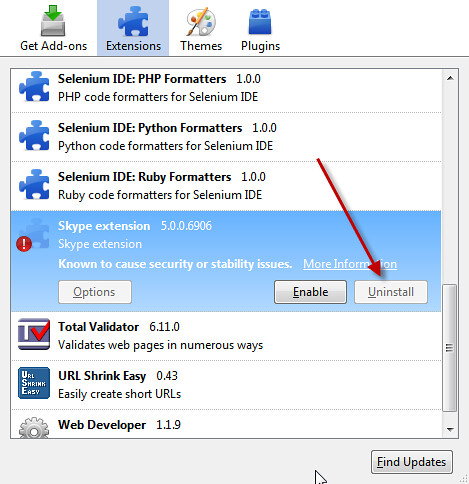
Skype’s Firefox extension gets installed whether you want it to or not. Uncool. This plugin is notoriously unstable and resource hogish. Moreover, Skype actually has the Big Brass Ones to disable the Uninstall button in the Add-ons UI:

There’s a way around this. Directions below for FF3.6 or higher.

  1. In Firefox, Help | Troubleshooting Information
  2. Under the Profile Directory box, click Open Containing Folder. Explorer handily opens in the profile folder. Navigate down to the Extensions folder.
  3. Flip back to Firefox.
  4. In the Troubleshooting Information screen’s Extensions section find the Skype plug in
  5. Look up the GUID value in the ID column
  6. Delete that particular directory
  7. Restart Firefox

I love Skype and use it for hours each week, but pushing stuff on me without my consent isn’t cool.

Finding Code Smell Comments with PowerShell

Adam Goucher has a great blog post on looking for comment-based code smells in software you’re testing.

Every occurrence of //TODO, //HACK, or God forbid, //FIX, is a pointer to a spot in the codebase where someone took a shortcut. More often than not those shortcuts highlight unfinished or outright sloppy work – spots rife for bugs, complexity, and all the other messes associated with pain.

Adam’s post has a Python script you can use to report on these problems. PowerShell lets you do the same thing as well in a bit terser fashion. Here’s how I skinned this cat in PowerShell:

Get-ChildItem . -include *.cs -recurse 
		| Select-String -pattern "//todo","//hack","//fix"
The output you’ll get will show the full path to the file, the line number, and the comment, like so[1]:
Tests\FunctionalTests\Telligent.Evolution.Tests.Selenium\Telligent.Evolution.Tests.Selenium\Common\Utilities.cs:158: //HACK: TolLower is a workaround for Unfuddle 3458. Remove when fixed.
You can redirect this to a text file, or you can capture it to a variable like $stinkyFiles so you can get counts, etc.

[1] The offending author of that line is rumored to look suspiciously like this blog’s author who declined to comment on the matter.

Updated: Fixed snippet formatting

Thursday, March 10, 2011

Recognition: It’s Cheap and Effective

Calling out folks in your organization for things they’ve done and milestones they’ve achieved is not only cheap, it’s a highly effective way of keeping your team motivated and fired up.  There are a number of neat ways to handle this; I thought I’d pass on a few I’ve been involved with over the last few years which I think work particularly well.

First off, look to call out folks in your regular meetings: your team’s dailies (you are doing daily standups, aren’t you?), your regular iteration closeouts/demos, or even your organization’s (hopefully!) regular broader meetings.

In Telligent’s Product Development group where I work we have bi-weekly iteration demo meetings. The group gets together and shows off features we’ve closed out and discusses status of the products we’re working on. My former boss Josh Ledgard started a “Shout Out” section of the meeting where folks can call out others in Telligent who’ve been particularly helpful. We generally take five or ten minutes to call out folks for things like great mentoring or pairing sessions, support from our IT staff, etc. Seeing an individual’s hard work recognized in front of their peers is a sweet thing.

Secondly, look to call out folks for specific actions which have a larger impact your organization.

Not long after he came on board at Telligent, our CEO, Patrick Brandt, made everyone in the company read Raving Fans, a very interesting book on how to focus on amazing customer service. Shortly after that Telligent started handing out Raving Fans awards at the company-wide quarterly meetings. Winners get a neat wooden letter/number corresponding to the Raving Fan category they won in. (Find ‘Em, Get ‘Em, Launch ‘Em, Wow ‘Em, Support ‘Em, Plus 1%. Read the book, is all I can say.) Winners also get a very nice, sizable gift card at Amazon.

These Raving Fans awards tie back to our company’s core values and vision around how we’ll be successful by ensuring our customers love our products, services, and support. Regularly recognizing your staff for those contributions ensures those values and goals are fresh in everyone’s minds – and moreover, that those values and goals aren’t just the empty-hot-air-phrase-of-the-day they are at far too many organizations.

Finally, look to recognize folks for hitting significant milestones. Shipping software is hard work, regardless of whether you’re in a product group, services company, or internal development division. You’re running the gamut of communication issues, technical problems, politics, and all the other myriad of difficulties that contribute to our industry’s far-too-high failure rate.

Focus on delivering great value to your customers, then CELEBRATE that accomplishment with your team. Maybe you can’t afford $200,000 release parties, but you certainly should set aside some budget for at least a few small things.

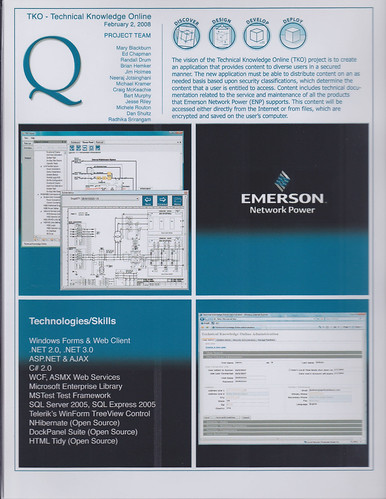
One of my most-cherished pieces of memorabilia from my entire working career is this project card from my days at Quick Solutions, Inc. I joined Quick and got placed on a project which ran in to a number of difficulties both on our side and the customer’s. It didn’t quite turn in to a death march. Quite. We finally got things settled down and delivered a lot of really neat functionality – and the team that had pushed through a lot of pain had by that time formed some very strong bonds.

This project card lists folks who worked on the project (we missed Jeff Blankenburg who left Quick for Microsoft before the project ended), a bit about the project, and some screenshots of the apps.

Every project at Quick’s Solutions group got one of these cards. Every project. Folks who’d been at Quick for a long time had a wall full of these things, and it was an awesome reflection of the value they’d shipped to our customers and the accomplishments they’d made happen for the company.

The three things I’ve talked about in this post don’t have to be over the top expensive or extravagant. Small things matter. Just figure out some way to call out your folks for the hard work they do.

It’s cheap, it’s effective, it’s an easy thing to do.

Update: Fixed a grammar nit (sorry, misplaced apostrophe’s kill me) and corrected the busted Twitter handle for Jeff.

Saturday, March 05, 2011

Book Review: Driving Technical Change

Driving Technical Change by Terrence Ryan. Pub by Pragmatic Press. ISBN 1934356603

Having problems convincing your team, organization, company, customer, etc. to adopt a new methodology or technology? Like that’s never happened to anyone else before…

Terrence Ryan’s Driving Technical Change is a nice collection of insightful tips and strategies for dealing with people skeptical of the change you’re trying to push through. Ryan’s writing style is very clear and approachable, and the book’s perfectly sized at 130 pages – there’s just the right amount of content without belaboring various concepts.

Ryan starts off with a couple short chapters helping you focus whatever it is you’re trying to pitch (Defining the Problem, and Solve the Right Problem), then lays out his list of types of skeptics, along with insights on what drives them and advice on how to deal with them:

  • The Uninformed
  • The Herd
  • The Cynic
  • The Time Crunched
  • The Boss
  • The Irrational

The next two sections of the book, Techniques and Strategy, lay out guidance for dealing with the skeptics. The Techniques section is very tactical in nature, offering up pattern-like approaches such as Gain Expertise, Create Trust, and Build Something Compelling. Each of the chapters follows the same template, and Ryan tells you which approach works best for what sort of skeptic.

The Strategy section of the book helps you with broader issues in dealing with groups, and Ryan starts off with what I think is a terrific piece of advice: “Ignore The Irrational.” The Irrational skeptics have no logic behind their objections and won’t ever be swayed – so don’t spend your energy trying to deal with them. Engage them in dialog when they approach you, but focus on other groups who you’ve got a chance at impacting.

Ryan finishes up with a final chapter on some hard knocks he’s learned through various successes and failures. It’s a nice closer to a solid, useful book for figuring out how to best deal with people skeptical of change you’re trying to implement in your organizations.

Thursday, March 03, 2011

Speaking at Cincinnati Day of Agile on 3/26

The great Cincinnati Day of Agile conference is coming up SOON!

I’m honored to have been picked up to give a talk on making distributed teams work effectively. I’m really excited about this talk because it’s been something close to home – I’ve been part of and have overseen a number of distributed teams over the last several years. As a result I’ve got plenty of scars but also plenty of successes to share.

As a note: many of the items I’ll be discussing work for making teams run great regardless of whether you’re in the same room or on different continents.

I hope to see you there!

Wednesday, March 02, 2011

API Overloads: Don’t overload different behaviors!

Clarity of an API’s intent and behavior is critical when you’re developing an API, be it internal or external. Overloads seem like a sexy way to pile up a lot of options for your API’s consumers; however, you’re doing no one any favors by overloading behavioral changes based on differing parameter combinations.

Much of the .NET framework is awful about this; SharePoint’s APIs take that a horrific step further. It’s Emeril’s “BAM!” on crack, but not as cute and charming.

Today I spent far too long trying to decipher why I wasn’t able to upload a file to a SharePoint document library. Two different usages of a call to SPList.RootFolder.Files.Add(), two completely different results.

This call caused an Access Denied exception to get thrown:

DateTime created = DateTime.Now;
DateTime modified = DateTime.Now;
bool overwrite = targetList.EnableVersioning;
SPFile newFile = targetList.RootFolder.Files.Add(name, file, ht, author, author, 
                                                created, modified, overwrite);

This call successfully uploaded the file:

bool overwrite = targetList.EnableVersioning;
SPFile newFile = targetList.RootFolder.Files.Add(name, file, ht, overwrite);
So on top of some awful breaking of the Law of Demeter (code pulled straight from too many crappy MSDN examples by some other dev), these two calls look and behave completely differently.

Have a look at the documentation for SPFilesCollection.Add. It has 24 overloads. Twenty-frickin-four, ladies and gentlemen. The signatures vary from two parameters to eight – some with two DateTime and Boolean parameters. Worse yet, there’s no indication in any of the overloaded descriptions that they’ve differing requirements or prerequisites. (Thankfully the SharePoint crew named the parameters somewhat clearly so it’s somewhat helpful deciphering intent while in the IDE.)

After a couple hours of troubleshooting, I found the first invocation was successful when the invoking user had Full Control rights to the doclib but would fail when the user only had Contribute.

The documentation didn’t provide any help, so I spent a bit of time trying to understand why the two different results. I can only assume (and I’m using the word advisedly) the first method requires the additional privileges to set properties about the file as it’s being uploaded. This is my complete assumption because, as you may have noticed, the documentation wasn’t any help.

So stepping back from my regular rants about SharePoint’s awful developer experience, let’s have a look at the root problem: two different invocations of the same method with completely different behaviors behind them. #FAIL.

The right way to do this would be to NOT overload those particular calls and instead refactor them out to completely different calls. That first method call should instead look something like

SPFile newFile = targetList.RootFolder.Files.AddAndModifyFileProperties(name, file, ht,
    author, author, created, modified, overwrite);
(Not to mention the documentation should clearly state permission requirements for calls…)

Overloads are absolutely appropriate when you’re offering up the same behavior (see your favorite unit test framework’s overloads for AreEqual, etc.) – but overloads are flat evil when you’re offering them up and backing them with completely different behaviors.

Please don’t overload methods with behavioral changes. If you’re feeling that evil go kick a kitten or promote Richard Simmons for President. Just don’t do the overloads. Please.

UPDATED: Whoops. I was so fired up I confused the Liskov principle with the Law of Demeter. Thankfully Jim Weirich pointed out my error! Corrected.

Tuesday, March 01, 2011

Getting Past SharePoint Exceptions with “Unable to evaluate expression because the code is optimized or a native frame is on top of the call stack.”

Problem: You’re seeing odd SharePoint exception behavior throwing vague “Unable to evaluate expression because the code is optimized or a native frame is on top of the call stack” messages as a general exception.

Issue: You may likely be seeing an Access Denied issue; however, SharePoint “helpfully” adds custom handling for that and bypasses general exception handling for you.

Solution: Turn off the CatchAccessDeniedException property, then reset it after you’re done with your code. See the example in MSDN documentation for specifics.

(Hat tip: Paul-Jan on StackOverflow)

Thursday, February 24, 2011

More Book Reviews

Continuing with more reviews I’m horribly overdue on…

Agile Coaching by Rachel Davies and Liz Sedley. Published by Pragmatic Press, ISBN 1934356433.

I’m amazed that this book covers so may critical topics so well and in such a short length! It’s a terrific book that can help guide you to building highly effective teams regardless of whether you’re a professional coach or team lead.

The book is formatted in four major sections (Coaching Basics, Planning as a Team, Caring About Quality, and Listening to Feedback), each with a few chapters around areas fundamental to good teams. The chapters are comprised of short sections working through details on things like good user stories, hijacked standup meetings, or defining what “Done” means.

I love the concise, easy-to-read style of the authors, and the content in the book is extremely helpful. They hit all the obvious topics, but they also lay out common tough issues like driving change in your organization, keeping meetings effective, and helping resolve team issues of culture and respect. Coaching’s easy when everything’s easy – but the real world requires great coaches to deal with tough problems and this book’s a tremendous help in that aspect.

I also love the authors focusing on issues that are so core to my own notions of great software teams: effective team environments, concise and simple user stories, listening to your teams, and fostering scads of communication. It was also great seeing an entire section of three chapters devoted to software quality, but then I may be a bit biased in that direction…

This book gave me a number of highly useful insights and made me re-think some approaches to common problems I see. It’s a great addition to my bookshelf.

Agile Retrospectives by Esther Derby and Diana Larsen. Published by Pragmatic Press, ISBN 0977616649.

I’ve been a firm believer in retrospectives for a number of years. I’ve used them on many projects in my last two jobs and the benefits have been tremendous. This book is a great help for me in tuning up and improving how retrospectives work.

The writing is extremely concise, well-done, and in a great tone. The authors cover the basics of retrospectives (Set the Stage, Gather Data, Generate Insights, Decide What to Do, and Close the Retrospective), but then head off into a number of other critical topics.

I really enjoyed the authors not shying away from dealing with potentially tough emotional parts of retrospectives. You’ll find short, extremely helpful tips on dealing with the occasional shouters, criers, stompers-off, etc. Retrospectives can be intense, and too many books skip over the unfortunate reality that on occasion you may have some drama to work through. Derby and Larsen don’t shy away; they’re practical in their advice.

Agile Retrospectives also emphasizes teams need to find a retrospective formula that works for them. They offer up a number of different approaches (fishbones, brainstorming, etc.) and lay out situations where those are helpful. (The section on fishbones was particularly helpful to me.) They also have a section on how to run longer post-release or post-project retrospectives – a horse of a completely different color.

Overall this has been a tremendously useful book, and I’ll continue to pull it off my shelf to brush up.

Friday, February 18, 2011

Increase A Disk’s Size in a VMWare VM

I occasionally need a larger disk in one of my VMWare VMs, and I always forget how to do it. I’m writing this post to save myself time the next time I need to do it!

Problem: You need a larger disk in one of your VMWare VMs.

Solution: Expand the disk first in VMWare, then inside the guest OS use Disk Management to extend the disk. (Of course this is somewhat centric to Windows 200*, Vista, or Windows 7 guest OSes. Steps 1-4 apply are the same regardless of your guest OS.)

Note: You can’t extend volumes in VMWare if the VM has any snapshots.

  1. Shut down the guest OS.
  2. Delete any snapshots of the system (VMWare | VM | Snapshots | Snapshot Manager | Delete)
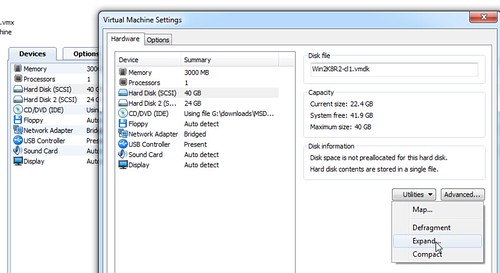
  3. From the VM’s settings screen, select the disk you need to resize, then use Utilities | Expand

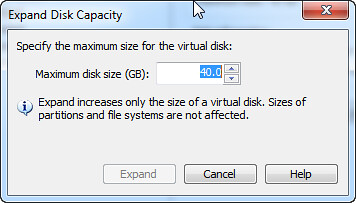
  4. Select the new disk size, click OK and go get lunch. It’s not a fast operation. (Impatient? Grips, dude. Think of what’s going on and listen to some Kenny while you do some yoga breathing exercises.)

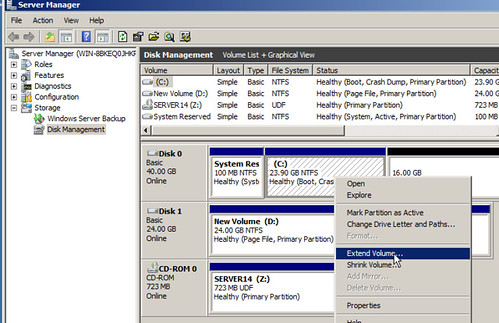
  5. Start up the guest OS, log on, and start server manager, then select Storage | Disk Management.
  6. Notice the partition you just expanded now shows extra available space. Right click the drive and select Extend.

  7. Walk through the wizard and confirm everything looks as it should

  8. Bask in the joy that you don’t have to fool around with building a new VM with a larger hard disk.

Tuesday, February 15, 2011

Deleting Browser Cookies with Fiddler

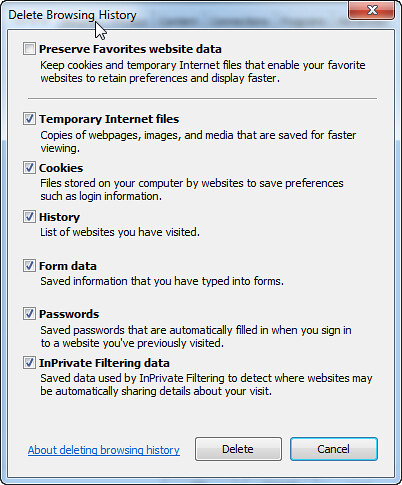
Problem: Internet Explorer 8 won’t clear out authentication credentials and keeps signing you on to a site with a set of undesired creds. In this instance, you’ve likely told Internet Explorer to remember a user’s logon creds for a site with Windows authentication turned on. You want to log on to that same site with different user credentials, but you can’t get IE to bring back up the user logon dialog. Clearing out all browser data (Tools | Internet Options | Browsing History | Delete | check all boxes, clear Preserve favorite website data) doesn’t solve the issue.

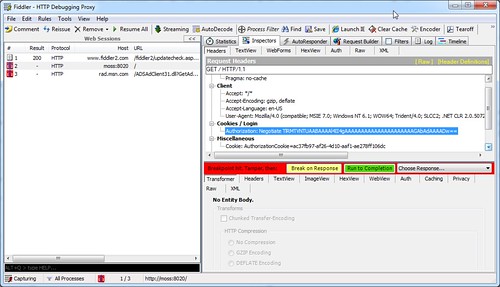
Solution: Use Fiddler to delete the browser’s cookie header. Start Fiddler and use Tools | Automatic Breakpoints | Before Request. Open IE and navigate to the bothersome site. Click on the last entry in the sessions pane, then right click on the Authorization cookie in the right Headers pane and select Remove Header.

Flip back to IE and clear out all browser data again (Tools | Internet Options | Browsing History | Delete | check all boxes, clear Preserve favorite website data) .

Now switch back to Fiddler and click Run to Completion in the lower left pane.

At this point you should be presented with the familiar login dialog.

Tuesday, February 08, 2011

Fixing Blogger’s Bad Formatting of Code Snippets

Problem: Your code snippet fomatting in Blogger looks like poo – extra line breaks “helpfully” injected by Blogger leave your snippets with more whitespace than a third grader’s resume.

Solution: From a forum post by Daniel Carrarini on MSDN: Go to your Blogger’s control panel and select Settings | Formatting. Then change Convert Line Breaks from Yes to No.

Voila!

Monday, February 07, 2011

Quick Script for Building .sln Files With Configurations

Repeatedly typing out msbuild command lines with configuration switches (release, debug) and clean/regular, FTL.

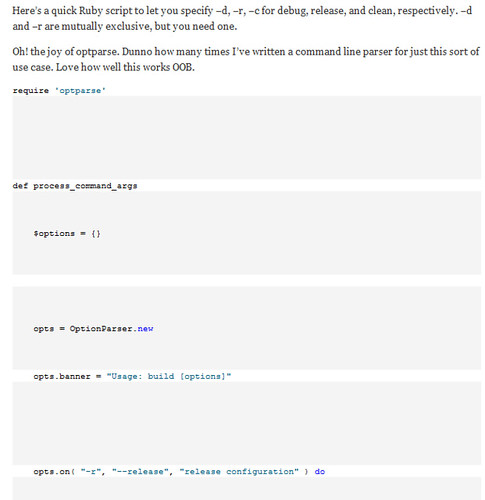
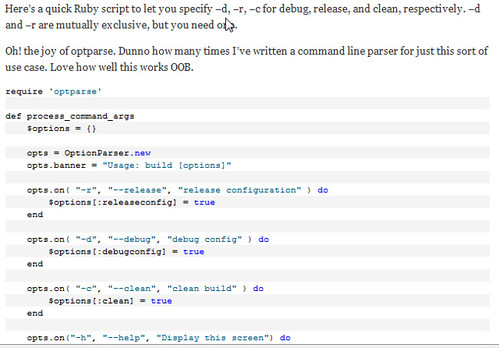
Here’s a quick Ruby script to let you specify –d, –r, –c for debug, release, and clean, respectively. –d and –r are mutually exclusive, but you need one.

Oh! the joy of optparse. Dunno how many times I’ve written a command line parser for just this sort of use case. Love how well this works OOB.

require 'optparse'
 
def process_command_args
    $options = {}
 
    opts = OptionParser.new 
    opts.banner = "Usage: build [options]"
 
    opts.on( "-r", "--release", "release configuration" ) do
        $options[:releaseconfig] = true
    end
 
    opts.on( "-d", "--debug", "debug config" ) do
        $options[:debugconfig] = true
    end
 
    opts.on( "-c", "--clean", "clean build" ) do
        $options[:clean] = true
    end
    
    opts.on("-h", "--help", "Display this screen") do
        puts opts
        exit
    end
 
    opts.parse(ARGV)    
    
    if ($options[:releaseconfig].nil? && $options[:debugconfig].nil?)
        puts "Red pill or blue, your choice. Try -d or -r.ac"
        puts opts
        exit
    end
    
    if ($options[:releaseconfig] && $options[:debugconfig])
        puts "Make up your mind: release OR debug, not both"
        puts opts
        exit
    end
 
end
 
 
def do_the_work
    if $options[:releaseconfig]
        $config= "release"         
    end
 
    if $options[:debugconfig]
        $config = "debug"         
    end
    
        
    $sln = Dir.glob("*.sln")
    if ($sln.length > 1)
        puts "More than one .sln file here. Can't figure it out, bailing."
        exit
    end
    
    $command = "msbuild " + $sln[0] + " /p:configuration=" + $config 
    
    if $options[:clean]
        $command += " /t:clean"
    end
    
    system($command)
    
end
process_command_args()
do_the_work()

Tuesday, February 01, 2011

Beware “the Meeting Guy”

If you want an effective project team, then you need to ensure everyone on the team is able to make the right things happen. This is especially important on projects which are in critical phases or are suffering through a painful spot with your clients/stakeholders. You can’t get through tough spots in a project if members of that team have to constantly run back to their supervisory chain to get approval for every decision, or if they can’t help you get roadblocks out of the way.

Sometimes it’s apparent that a member of the team was put there for no other reason than to have a token presence at the table. That member has no authority to make decisions and is unable to commit to anything because they’re constantly having to go elsewhere to get approval for fundamental actions. There’s a great term used to describe these people: “The Meeting Guy.” (Or “The Meeting Gal” if you prefer.)

I’ve run in to this a couple times in my career, and it’s never pleasant. You need someone to bust through impediments, and instead you’re saddled with someone who never delivers on anything because they can’t make anything happen. The Meeting Guy may be a wonderful, happy person, but at the end of the day they’re an impediment to the success of your project.

Having The Meeting Guy on your team is frustrating because your project’s progress suffers. Worse yet, this may be a dangerous sign of a lack of commitment from your client or stakeholder: they may not care enough about the project to fully support it. The worst of all situations might have someone seeking to actively sabotage the effort by saddling the project with a Meeting Guy – thankfully a situation I’ve never run in to.

Identifying the Meeting Guy

Sometimes it’s obvious right away if The Meeting Guy is on your team; other times it may take a few iterations/releases/weeks or an outright crisis to unmask the person. Daily standups are the biggest help in determining if you’re saddled with a Meeting Guy. Is someone on the team regularly missing commitments with reasons like “I’m waiting on <x> to give me approval for <y>,” or “We’re blocked on that while I coordinate with <z>?” Potential Meeting Guy.

Note that I said “regularly.” Stuff happens, and not everyone can get every roadblock instantly out of the way. Meeting Guys/Gals are repeat offenders.

Dealing with the Meeting Guy

There are no easy answers when you’re stuck with The Meeting Guy. You have to get communication flowing to find out what the real issue is – because The Meeting Guy is a symptom, not a root cause.

You need to have a frank, open  discussion with your project’s stakeholders and potentially with the project’s executive sponsors. Take a breath and leave your frustrations behind. Approach the conversation from the business value aspect: “We’re not able to deliver the amount of value we should be because we’re not able to get through roadblocks in a timely fashion. Having the right people committed to the team will help us deliver more quickly.”

What’s the Root Cause?

You also need to step back and re-evaluate the need for the project. If stakeholders and sponsors won’t get the right people at the table, is there actually a real need for the project? Perhaps the business environment has changed and the project isn’t as high a priority any more. That’s not an easy topic to bring up with the people responsible for the project, but it’s a hard question that you need to get answered. Again, approach it from the business value aspect: “If the business situation’s changed so much, maybe we should stop this project and figure out a better place to spend our time and effort. What other cool things can we do for the business?”

Never, ever approach these conversations with a demanding mindset or tone. Yes, you need to clearly identify impediments and risks, but you can’t slip over in to metaphorical hostage taking or blackmail!

These are tough conversations to have with the people and organizations responsible for the project, but you must have them. Something is preventing you from delivering the best business value to the client/organization/stakeholders. Find the root cause, solve it, and focus on helping your organization/clients get the best value for their money!

Friday, January 28, 2011

Catching Up on Book Reviews

It’s been a long time since I’ve written up reviews on anything from my book pile. Here’s an overdue catch up post with short reviews of several books I’ve read over the last six months or so.

Growing Object-Oriented Software, Guided By Tests by Steve Freeman and Nat Price. Pub Addison-Wesley, ISBN 0321503627.

The first part of this book seemed scattered, jumping all over the place and making a lot of reference to things which weren’t defined until later in the book. However, once you get used to the style, this book jumps off a cliff and hits a lot of great topics, and hits them in depth.

Tooling, design, culture, methodologies – it’s all covered, and it’s covered fairly well. I particularly enjoyed the authors carrying the same detailed, practical example through the book. Too many software books use trivial examples specific to one topic. Freeman and Price evolve an “Auction Sniper” as they go through the book; the consistency is a great asset.

I also enjoyed the authors speaking emphatically about using acceptance tests as the starting point for features, not just unit tests. There’s an important differentiation between acceptance and unit tests, and the authors specifically call out acceptance tests “using only terminology from the application’s domain” – speaking to the feature’s business driver, not the underlying technology.

Also as critical to me is the authors’ emphasis on keeping the test side of the codebase clean. Your tests ARE production code. Treat them with the same approach about solid design and refactoring as you treat the code you’re deploying to your customers.

This isn’t a simple 100-level book. The authors dive deep in to design, practices, and lifecycle. They do it well enough that they’ll hook newcomers to testing as well as teach accomplished folks new things too.

Great read.

Cooking for Geeks by Jeff Potter. Pub by O’Reilly, ISBN 0596805888.

OK, this book is just plain fun. The recipes are straight-forward and tasty, and it’s terrific to dive deep in to how and why food transforms itself during the cooking process.

Potter covers everything from Calibrating Your Instruments to creating your own sous vide immersion cooker. Along the way you’ll learn about how leaveners work, discover a new taste factor you may not have known of (Umami), figure out some key time/temperature figures critical to food safety, and get exposed to some interesting molecular gastronomy.

The writing style is exceedingly well-done. Potter does a great job walking readers through the recipes and the science behind them – and it’s extremely apparent that he’s writing about something he loves.

I’m a very serious, very accomplished home cook and I got a tremendous amount out of this book. More importantly, I had scads of fun reading it.

Apprenticeship Patterns by Dave H. Hoover and Adewale Oshineye. Pub by O’Reilly, ISBN 0596518382.

Short, concise, well-written, highly useful. Other books such as Chad Fowler’s The Passionate Programmer cover similar things, but this book sits absolutely well in that company.

This book is a series of very short articles (“patterns”) around specific things you can do to guide and improve your career as a software craftsman. The articles all follow the same template: discuss the context of an environment/situation you’re in, lay out a problem you need to solve, then offer up a solution for you to apply to that problem. Many of the articles are interwoven, linking common ideas or useful concepts.

This book echoes a number of things in Passionate Programmer like the concepts of being the worst in your group (work with folks that are a LOT better than you so you’ll learn more), but it’s a very worthwhile read on its own.

Apprenticeship Patterns is particularly nicely done in that the authors don’t push a specific path they expect you to follow. They lay out a number of options and encourage you to find the path that works best for you.

I also GREATLY appreciated the authors being pragmatic over dogmatic in their approach to software craftsmanship. Certain zealots in the craftsmanship movement have completely lost site of the primary purpose of our trade: delivering value to customers. In their section “Craft over Art” he authors specifically and emphatically point out that we need to deliver “value to customers over advancing your own self-interests.” They don’t promote getting sloppy with one’s work, but emphasize doing your work well while keeping the folks in mind who are writing the checks.

All in all, this is a solid read.

Tuesday, January 25, 2011

Convert a HyperV Image to VMWare

Problem: You have the physical files for a Hyper-V virtual machine and you need to convert it to VMWare. (Maybe you’ve downloaded one of Microsoft’s demo systems such as their SharePoint 2010 Information Worker Evaluation VM.)

Solution: If you have access to HyperV, load the image in HyperV and use VMWare’s stand alone converter. It’s awesome. Point it at your HyperV server, select the server, and the converter does the rest.

If you don’t have access to HyperV, all is not lost.

Option 1: Install Virtual PC, create a new virtual system, use the VHD from the image you have. Start that system up in VPC, ensure it’s running, shut it down, then use VMWare’s Import feature to read the .vmc file Virtual PC created. (VMWare’s Import will deal with .vmc files from VPC, but not the .xml or .exp files from HyperV.)

Unfortunately, the image I was trying to import wouldn’t come up in VPC, so I was left with the less elegant, funky sledgehammer approach of

Option 2: Grab WinImage, a nifty piece of shareware that lets you convert a VHD directly to a VMDK – the format VMWare uses. Download it, install it, launch it, use Disk | Convert Virtual Hard Disk image. Select the source VHD, choose to use a fixed or dynamic target disk type, then give it the name and location of the target VMDK. (See the very nice HOWTO.)

Now you can create a new VMWare image and use the existing VMDK. The VMDK’s format is from an older version of VMWare, but VMWare will nicely upgrade it for you.

Power on your VM and bask in your geeky awesomeness.

Then go pay for WinImage because they’ve saved your bacon and you should throw some money their way. That’s how shareware works, folks.

Friday, January 21, 2011

VMWare Full-Screen Display Oddities

Problem: In VMWare 6.x and 7.x I constantly run in to the problem where I set the VM to full screen mode and then have the cursor in the VM go completely bonkers – clicking anywhere in the VM causes the cursor to shoot to the upper left corner. Occasionally a number of items on the screen will get selected.

Solution (sort of): Toggle the VM to multiple-monitor mode, minimize VMWare, maximize it again, and finally switch back to single-monitor mode. It’s ugly, but it works.

Subscribe (RSS)

The Leadership Journey