Eric Gunnerson is running a series on deadly sins of programming. He’s only got the first two installments up, but they’re great already.
Wednesday, May 31, 2006
Great Series on Sinful Programming


Classic American Novels
The guys over at Power Line blog (warning: site by often-raving conservative lawyers) have a cool list of what they think are the top 21 American novels ever written. (Funny, there aren’t any novels there by Canadian, Mexican, or Brazilian authors…)
It’s a great-looking list, and I’m happy to say I’ve actually read a number of them. And yes, that number is > 0, although I have to fess up that Moby Dick is still unfinished.
There are some works on the list that I’ll look to get into after mid-July when James and I finish up work on the book.
Tuesday, May 30, 2006
Managing a Writing Project
James and I are getting a significant number of contributors writing for our book, which means I’ve got a significant amount of workflow to handle all the overhead involved in that. I’ve got a pretty good workflow down, based partially on GTD and partially on McGhee’s book (the two are pretty dang similar).
First off, we’re tracking contents of each chapter via To-Do lists on our Basecamp site—and Basecamp been friggin invaluable as a tracking/collaboration tool. Each chapter’s To-Do list has deadlines for contributor submissions, and chapter delivery deadlines are tracked via Milestones. We’ve got a short time between contributor deadlines and chapter delivery, basically just enough time to finish our own writing and get everything edited up.
I use a template for initially contacting contributors. I’ll note on the chapter’s to-do when I’ve sent out the solicitation e-mail so I know when it’s time to get myself or James writing the article if the contributor doesn’t reply. I could put a deadline for receiving a reply on the to-do list as well as creating an Outlook appointment, but have found that a visual check of the To-Do list has worked fine so far.
If I get a positive reply back from contributors I’ll forward them another templated e-mail with the writing templates, style guides, example articles, and some contractual gunk in it. I let contributors know I’ll check in with them a few days before their deadline (noted in the first template and the second mail too) for a status update. I create an Outlook appointment for that status check and move the contributor’s accepting e-mail into that appointment — cleaning up my Inbox and getting the right info into the appointment all in one swell foop. We also created a general Basecamp user for contributors which lets us quickly see who’s writing specific articles, a general contributor, me, James, or Ben Carey, who has been doing killer work both as a focus-group-of-one as well as writing some seriously golden content.
When first draft articles are complete (from contributors, James, or myself) they get checked into a Subversion repository. I’ll update the Basecamp To-Do list, noting the article’s arrived and is ready for review—and assign myself as the person responsible since I’m first in line for reviews. (Except for stuff I write, natch.)
If at all possible, I try to give the article a once-over right upon reception. This lets me make sure the general content and style of the article is on track. I learned that lesson the hard way, having left a couple early-arrivers until much later, only to find some serious errors. Upon reception of the article I also make an appointment for the “real” review. This keeps me focused on what’s in the pipeline and helps me keep my nose to the grindstone instead of heading out to the garden to chase my kids around the yard.
At this point we’re moving along pretty well. James and I have a good flow for reviewing and editing articles, after which we consolidate the articles into one chapter and hand that off to the folks at O’Reilly.
Sure, there have been plenty of hitches, but it’s going relatively smoothly, and the workflow lets me get writing and management done while still doing the Mr. Mom thing of ferrying kids around to preschool/school/piano lessons. (Not to mention finally finishing the new flooring in the office.)
Now Playing: Molly Hatchet—Molly Hatchet
Monday, May 29, 2006
Happy Memorial Day!
I’ve tried scratching out a few different blog posts on what today means to me, but nothing was sounding quite right. The best thing I can do is just point back to what I wrote last year because that really rings quite true to me.
Here in the US, Memorial Day is about honoring vetrans who’ve given their lives in service to this nation so that the rest of us can have safer lives in a country where freedom rings. Regan said it so poignaintly when he spoke of our great land being a shining city calling to others. This shining city (warts and all) is what it is in no small part due to folks in our military who’ve made sacrifices most of us can’t fathom.
Memorial Day isn’t just about grilling burgers on the grill, although I did that. It’s about reflecting on what others have done so that your life is better than what they might have had. You don’t have to limit that to folks in the military members, and you certainly don’t have to limit that to the borders of the USA.
I spent some quiet time today looking at a picture of an airplane on my wall, painted as a tribute to 24 of my friends and comrades who lost their lives in a crash some years ago while flying on a mission in Alaska. I spent some significant time today thinking about the hard work my parents and their forebears have laid in to help me get where I am today.
Regardless of where you come from, regardless of what nation you call home, take some time and think of those who’ve sacrificed to help you have the life you’ve got.
Book Review: Software Engineering with Microsoft Visual Studio Team Systems
Software Engineering with Microsoft Visual Studio Team Systems, Sam Guchkenheimer, Addison-Wesley
This book isn't about implementing Visual Studio Team Systems, so don't expect details on setting up, configuring, or making use of VSTS in a daily work environment. What this book really covers is the high-level use of project data, reports and features in VSTS. The author himself says this is intended as a general book on software engineering practices, touching on how to use VSTS to get engineering done well. You'll have to look elsewhere for the nitty-gritty details on actually rolling VSTS into your organization's development environment
What you will find in this book are some well-written, well-thought guidelines on how to approach various aspects of the software development process. Frequently those guidelines will involve using products or features from VSTS, and the book does some nice analysis using those products.
Microsoft Solutions Framework, a platform to create software engineering lifecycle processes, gets moderate coverage through the book. You'll see frequent references to the MSF implementations for Agile and CMMI, but again, only from a high-level aspect.
All this so far might sound like I didn't care for the book. That's not true, it's just that it's written from a very different angle than I expected. I was expecting more of a HOW-TO or implementation guide. This book ain't that.
Specifics which I found very good in the book included the great sidebars, the section on using coverage reports for development feedback, and the troubleshooting section. For example, some sidebars show you the specific MSDN heirarchy for finding specific documentation on an aspect of VSTS, helpful for that actual implementation stuff. (That's assuming Microsoft doesn't completely re-arrange MSDN's content structure as they seem wont to do with alarming frequency.) The portion on coverage feedback is great for developers understanding why coverage might change in unexpected fashions as they're moving through their work.
The troubleshooting chapter is seriously good stuff. Guckenheimer does a great job of tossing up many graphs with different data and showing how to interpret them. He shows how graph states might reflect problems on the project with scope creep, architectural mistakes, or various issues with defects such as reactivations or poor unit testing.
Guckenheimer's closing chapter is quite useful too. He's very forthright about potential criticisms of his book, but makes a good case on why the book's structured as it is -- it was at this point that I finally clued into the book's purpose.
The book is definitely not for developers looking to learn more about VSTS, but rather for management and leads looking to understand how VSTS can help them effectively manage their projects will get a whole lot of use from the book.
Saturday, May 27, 2006
Congress And The Separation Of Powers
Warning: Political Stuff. Skip over this if you’re only interested in reading my blog posts on gardening, cooking, or whatever that dang .NET thing is.
I don't know whether you care or not about the flap surrounding the FBI's search of Congressman Jefferson's office, but Glenn Reynolds has some good stuff over at Instapundit.com on the issue. Jerry Pournell, on the other hand, shows that while he’s an absolutely brilliant science fiction and general-issue tech writer, he should probably stay away from attempting to pontificate on Constitutional law matters.
Reynolds hits it on the head in his opening graf: “What’s frustrating in these discussions is the failure to distinguish between what the law should be in somebody's opinion, and what it actually is, based on the Constitution and the caselaw.”
The behavior of the GOP Speaker of the House is continuing to drive the nail deeper in my resolve to vote Democrat in the next election, not because I approve of anything the Democrats are doing (which is nothing but hyperbolic, vitrolic criticism without offering any alternatives), but because the GOP Congress has shown they’re completely out to lunch with regards to any form of accountability, fiscal responsibility, or respect for we folks who elected them.
Setting up a Subversion Server under Windows
I'm working on setting up Trac, a neat-looking issues-tracking system with integration between a Wiki and Subversion. It's a huge PITA to install on Windows, but here are two good helpers I've found so far:
Trac’s as bad, if not worse, than Bugzilla for setup pain, but it looks like it will be something interesting to explore.
(Posted mostly for my own future reference)
Friday, May 26, 2006
Terrific Video on Assembly Hijacking
Watch this terrific video for a killer demonstration on exactly how bad guys can hijack assemblies in your apps. This is a step-by-step demonstration on how bad guys can use sql injection and inference attacks to discover scary details of your system, then make your life miserable by taking over a simple logging DLL.
There’s also anice video on realistic Small Office Home Office (SOHO) security.
Via Microsoft’s Threat Modelling Blog.
Shiny New Presenter
Rob Keefer gave a great presentation on architecture at this month’s DevGroup meeting here in Dayton. He had lots of great knowledge to pass on, and there was some very good Q&A, but what really caught my eye was the neat presenter he was using.
I have a neat IR pointer/presenter Drew was nice enough to give me, but it’s IR which means line of sight. I wander around a lot, guesturing like a madman, while doing my presentations, so the line of sight is a real pain in the butt.
I’ve been a good boy lately and really being careful about not spending money on toys, but this one I couldn’t pass up, so I gave in to impulsive temptation and bought one. (BTW, the company selling these from that Amazon link ROCKS! They had the device in my hands two days after ordering, all for a very small shipping fee.)
I’m happy with the gadget so far, but I’m trying to research out keymapping options to change the Internet and E-Mail buttons to something more useful. Who the heck would want a presenter widget to fire off e-mail and a browser? OK, browser maybe, but not e-mail.
I’m hoping to remap the E-Mail key to Alt-1 and the Internet Key to Esc. That would let me make great use of ZoomIt to scribble on the screen directly from the presenter without having to return to the laptop. I tried SharpKeys but unfortunately it doesn’t recognize the Mail or Browser keystrokes, nor can I map Alt-1 using SharpKeys. I may end up manually hacking the registry — but I’d rather have somebody else’s software to blame if I screw it up.
More and More MbUnit Goodness
I’ve been fooling around with MbUnit off and on for several months, and I continue to be knocked over by its goodness and killer features.
One cool thing I’m working on today is the TypeFixture attribute/test fixture which lets you use factories to bounce different instances through one set of tests. This works very nicely for testing different types implemeting a common interface.
For example, here’s a simple (ok, contrived) example using an interface defined for employee object functionality:
public interface IEmployee
{
string FName { get; set; }
string LName { get; set; }
double HourlyRate { get; set; }
string WageType { get; set; }
}
If I’ve SalariedEmployee and HourlyEmployee classes which both implement this, then I can do some quick testing by first building a couple factories:
public class EmployeeFactory
{
[Factory]
public SalariedEmployee BasicSalaried
{
get
{
return new SalariedEmployee("FirstName",
"LastName",
50,
Employee.WageTypes.SALARY);
}
}
[Factory]
public SalariedEmployee BasicHourly
{
get
{
return new SalariedEmployee("FirstName",
"LastName",
50,
Employee.WageTypes.HOURLY);
}
}
}
Now I create another class marked as a TypeFixture and let that class know where it will get its data from (the EmployeeFactory class above), and of what type that data will be (objects implemeting IEmployee). This TypeFixture will deal with IEmployee objects as defined in the attribute.
[TypeFixture(typeof(IEmployee))]
[ProviderFactory(typeof(EmployeeFactory), typeof(IEmployee))]
public class MBIEmployeeTests
{
[Test]
[ExpectedException(typeof(ArgumentOutOfRangeException), "Rate less than zero")]
public void CheckRateFailsUnderZero(IEmployee emp)
{
emp.HourlyRate = -20;
}
[Test]
[ExpectedException(typeof(ArgumentOutOfRangeException), "Invalid wage type!")]
public void CheckBadWageTypeFails(IEmployee emp)
{
emp.WageType = "Bogus!";
}
}
MbUnit will run both the types output by the Factory-marked methods through the test fixture, resulting in four different tests. Here’s the output from TestDriven’s test runner:
------ Test started: Assembly: JHSCR.Tests.dll ------
Test Execution
Exploring JHSCR.Tests, Version=1.0.0.0, Culture=neutral, PublicKeyToken=null
MbUnit 1.0.2232.25376 Addin
Found 4 tests
[success] MBIEmployeeTests.EmployeeFactory.BasicSalaried.CheckRateFailsUnderZero
[success] MBIEmployeeTests.EmployeeFactory.BasicSalaried.CheckBadWageTypeFails
[success] MBIEmployeeTests.EmployeeFactory.BasicHourly.CheckRateFailsUnderZero
[success] MBIEmployeeTests.EmployeeFactory.BasicHourly.CheckBadWageTypeFails
[reports] generating HTML report
TestResults: file:///D:/Data/Iterative%20Rose/Presentations/Test%20Tools/JHSCR/Build/JHSCR.Tests.Tests.html
4 passed, 0 failed, 0 skipped, took 2.41 seconds.
Nifty stuff. Elegant implementation and a big timesaver.
Tuesday, May 23, 2006
Software Security Isn't Just Code
From the "We're Really Friggin' Stupid" department: Veterans' data swiped in theft | CNET News.com.
Security isn’t just how well you build your code, it’s also about policies and procedures ensuring critical data is properly protected. You can lock down access privileges all you want on your database and file system, do all the code reviews you want to ensure no SQL injection attacks are allowed, but at the end of the day all it takes is some stupid SOB taking home critical data on a laptop which then gets stolen.
I’m a veteran and my wife’s active duty military. Privacy information for both of us is now at risk. Think I’m pissed off about this? You bet.
This definitely gets added to my Into to Secuity presentation as an example of What Not To Do.
Review Addition: Practices of an Agile Programmer
Adding on to my earlier post about Practices of an Agile Developer. Here are more specifics on why this is such a great book.
One of the things I found so attractive about this book was its large section “Delivering What Users Want.” I’m sure many of you have horror stories about management, leads, and developers who couldn’t have cared less about the customers/users. Maybe you yourself think that customers and users don’t matter. Here’s a secret for you: You as a developer most likely don’t pay yourself out of your own pocket. It’s customers who buy your software which ends up putting money in the company’s coffers of which some ends up in your pockets. It’s users who create a need for the stuff you’re working on, thereby enabling a flow of cash from said company coffers to said pockets. Sorry, rant over.
The section on user focus hits some great points not which only specifically deal with enabling customer decisions to drive your products, but also forces you to think about why you should make various choices about how you’re building your software. Desgin shouldn’t dictate, but guide. Technology is cool, but can you really justify moving to that shiny new <Fill In The Blank> system? Demos should happen often, and you should listen to what the audience tells you about the product. I found this section to be very unique as compared to other books on Agile I’ve read. There’s gold throughout the book, but this section in particular hit home for me.
The chapter on collaboration also brings up some nice points in a style different from other books I’ve read. I particularly liked the bit on mentoring (but then I’ve written about that before…), and there’s a nice balancing article on letting folks figure things out themselves. Feed a man a fish vs. teach a man to fish, and all that.
Again, as I mentioned in my other post, the Epilogue is just amazing. Step-by-step guides on which practices to roll out first, plus two great guides for folks interested in trying to sell Agile. One is written from a manager’s prospective on how to sell Agile to a team, the other from a developer’s viewpoint trying to sell Agile to management. These are top-notch resources if you’re the lone voice trying to get pieces of Agile rolled into your envrionment.
All this may sound like I’m blathering on about the book. I am. It’s a great, great work right along the lines of amazing things like Peopleware.
Thanks. No.
For all that stupid crap you get from folks who think passing on every stupid Urban Legend and “wonderful story!” is a great use of bandwidth and time.
(Via Hanselman)
Monday, May 22, 2006
ReSharper 2.0 Released!
The amazing folks at JetBrains have released ReSharper 2.0. I’ve been involved in the Early Access Program for a number of months and have been impressed with how much they accomplished.
Check out ReSharper if you’re at all interested in improving your VS experience. It’s available for both 2003 and 2005 versions, plus I believe there’s some support for Visual Basic. Download ReSharper 2.0 and ask ‘em for a 30 day license if you’re not familiar with it and are interested in checking it out.
Congrats to the great folks at JetBrains!
Short Review: Practices of an Agile Developer
UPDATE: Once again, I prove my abiltiy to goof up: The title of this book is Practices of an Agile Developer, not Programmer as I'd earlier noted. Fixed in the title and text. Sorry!
I got Practices of an Agile Developer not long ago and ended up reading it bit by bit over a week or two. It’s a very short, concise book (176 pages!) with a lot of great stuff in it. It’s absolutely worth picking up if you’re at all interested in learning about agile, moving to agile, or improving your existing agile approach.
Here’s the short review I posted up on Amazon.com:
This is an absolutely terrific book. It's well-written and lays out 45 essential practices for starting and keeping an agile project rolling.
Each chapter starts out with a very sensible overview, pointing out where the practices for that chapter might fit. Each specific practice is nicely done, with short, to-the-point discussions of what the practice is, how you roll in to it, and how you stay in the groove with that practice.
There's a lot of goodness in the bibliography for additional reading, plus the epilogue, "Moving To Agility" is worth pasting on the foreheads of stubborn mangement who are unwilling to listen to rationale for improving the development environment. The specific steps for rescuing a failing project are terrific, as are the other epilogue sections.
Lastly, there's a nice pull-out reference card with one or two sentance blurbs on each practice.
Sheer gold.
Well worth the asking price. (Disclaimer: I got this for free as a review book.) This one gets saved on my bookshelf, unlike many other fine reference-style books which arrive in the mail. Those get read, reviewed, and passed on to other folks simply because they’re not unique enough for me to keep around.
More on Software Development and Cooking
Dan good naturedly gave me a hard time last week about a post on software development compared to cooking. In the same line, here’s a great article on Coding Horror talking about how programmers and chefs have one critical thing in common: the need to keep your workplace clean.
In cooking, it’s keeping your mis en place straight and your cookware ready for the next round. In software it’s the need to keep your code refactored.
Another good post from Jeff Atwood, and worth the read.
Friday, May 19, 2006
The Downside of Non-Admin Privs
I’ve been having various pains getting my new-to-me tablet configured (James sold me his well-used one for $8,799. What a guy!). Some of the pains are due to my attempts to get everything set up via installs using the MakeMeAdmin.cmd file to temporarily give myself admin privs. Per Margosis’s suggestion in that same blog post, I also changed the default install behavior so that new objects belong to the Administrator, not the user doing the install.
All this is generally shiny, but it bit me with my Palm software’s synch stuff. Attempts to HotSync were haging during the Media phase, and I wasn’t sure what the problem was. Sysinternals to the rescue. A quick capture session using Regmon and Filemon pointed me to the culprit: file privilege problems.
The profiles for HotSync don’t get installed in a user’s home directory, rather they’re separate folders in the \Program Files\PalmOne tree. I can’t write there as a basic user who doesn’t own the installed objects. Bad implementation on Palm’s part. Quickly fixed by giving myself modify rights to the profile tree.
Life with non-admin privs takes a little getting used to, but it’s worth the curve.
My Current Mountainous Stack of Geek Books
OK, so I’m falling a bit behind on my pile of books to read. Ugh.
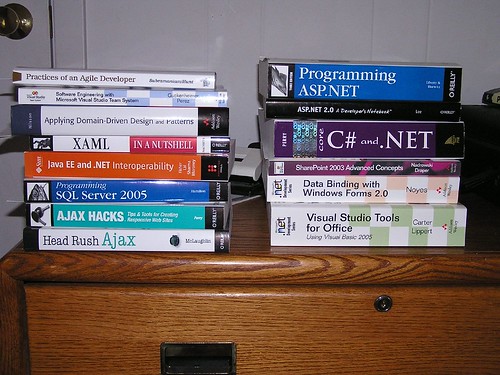
Actually, I’ve gotten through some of this pile already:
- I’m mostly through Practices of an Agile Developer and it’s sheer gold. Short, concise, filled with goodness on getting Agile done right.
- Liberty’s Programming ASP.NET, 3rd ed is really well-done but is more about implementation without much on general web development. Gotta find another book for that.
- I've found some great stuff in ASP.NET 2.0, A Programmer’s Notebook so far. Overviews of 2.0 goodness, but you'll need other material to get in the guts of things.
- I’ve only skimmed parts of Perry’s Core C# and .NET, but it looks well-written and helpful. Solved one or two things for me, so it’s got that going for it.
The next six weeks are sheer madness here as James and I crush to get the last half of the book knocked out. I’ll have little time for any reading, so this pile ain’t gonna get much smaller any time soon…
Thursday, May 18, 2006
SQL Connection String Help
Dave Donaldson blogged about ConnectionStrings.com some time ago, but I’d forgotten about it until today when I kept munging up an string in an attempt to get MyGeneration working.
Now I’ve got a working string and life is happy.
Book Review: iPod & iTunes -- The Missing Manual, 4th ed
I’ve got an “old fashioned” 4th generation iPod with no video. Poor me, I can only fit 10,000 or 15,000 songs on my rig and can’t watch movie clips. Still, I manage to suffer through.
J.D. Biersdorfer’s iPod & iTunes -- The Missing Manual, 4th ed is a great companion for my iPod, even though a fair chunk of the book is geared to folks with the newer gadgets. There is a good overview section on the different hardware models (the Shuffle gets its own chapter) to get you familiar with the players themselves, plus there’s a great discussion of the different audio formats. I found that particularly useful since I wasn’t clear on impacts of moving away from iTunes’ native AAC format.
Who It's For
Beginners and intermediate users will find plenty of good stuff in this book. The basics are clear and concise, so you’ll quickly learn how to set up and manage your iPod and your iTunes library. You’ll learn the ins and outs of connecting your iPod to everything from your home stereo to the AirPort Express home broadcasting system.
Who It's Not For
Folks who already know how to rip apart their iPods and replace the batteries. Folks who already use AppleScripting to customize their iPod’s update process or control home lighting.
Good Stuff
The chapter on iTunes is pretty extensive and covers all the functionality from importing CDs to working wth playlists and the Music Store. There’s a nice chapter on using the iPod as an external drive, a nice trick if you’re looking for an extra place to back up that presentation you’re travelling somewhere distant to make. I also liked the chapter on Hacks and Cool Tools with its good list of extra software you can find to help you do things like better manage your library and iPod, change the volume of your iPod due to idiotic government mandated volume controls for European devices (sorry, libertarian rant there), or creating your own podcasts.
I’m particularly happy to read all the various websites with resources for iPods. It’s handy to know where to look for information about battery issues, or find online communities of iPod users.
Bad Stuff
It would have been nice if the author covered the JHymn package which lets you back up your purchased music, but I can understand the hesitancy due to legality questions — but it’s my music that I bought and paid for, damnit!
The author might also have given a quick nod to covering running presentations from your iPod, but that’s a serious edge case.
Bottom Line
This really is a nice book if you’re at all interested in doing more with your iPod.
Subscribe to:
Posts (Atom)
Subscribe (RSS)

The Leadership Journey
